
gpt-image-2-style-library
Was er macht
Dieser Skill macht aus deiner Bildidee einen ausführlichen Prompt mit einer Bibliothek von GPT-Image2-Stilen. Er ist für alle gedacht, die gepflegte KI-Bilder wollen, ohne Prompts von Grund auf zu schreiben.
Wann du ihn nutzt
- ✓Wenn du ein KI-Bild für ein Poster, ein Produkt, eine Oberflächen-Vorlage, eine Infografik oder eine Illustration willst.
- ✓Wenn du eine grobe Bildidee hast und einen stärkeren, gut strukturierten Prompt willst.
- ✓Wenn du Bildstil-Vorlagen durchsehen und die passendste auswählen willst.
Link zum Skill
https://github.com/freestylefly/awesome-gpt-image-2/blob/main/agents/skills/gpt-image-2-style-library/SKILL.mdKopiere ihn und füge ihn in deine KI ein (Claude, ChatGPT oder Cursor) mit der Bitte, den Anweisungen zu folgen.
So nutzt du ihn
Am einfachsten: Kopiere die Nachricht und füge sie in deine KI ein. Sie liest den Skill und folgt den Anweisungen.
Fertige Nachricht zum Einfügen
Für Claude Code, Codex oder Cursor: Führe den Befehl in deinem Projektordner aus, dann wird der Skill installiert.
Lade die SKILL.md herunter und lege sie in den Skills-Ordner deines Agenten.
Beispielanfrage an deine KI
“Schreib mir einen GPT-Image2-Prompt für ein Poster mit Systemkarte des Stadtlebens im klaren Infografik-Stil.”
5 neue Skills pro Woche. 1 Minute Lesezeit.
So funktioniert es
Der Skill ordnet deine Anfrage einer Vorlagenkategorie, einem Stil-Tag oder einem Szenen-Tag zu und baut dann einen Prompt, der Motiv, Layout, Stil, Text und Format abdeckt. Passen mehrere Vorlagen, bietet er zwei oder drei Optionen zur Auswahl an.
Technischer Inhalt (originale SKILL.md)
Originaltext des Autors, auf Englisch, direkt von GitHub.
GPT-Image2 Style Library
Use this skill to turn a user's image-generation intent into a production-ready GPT-Image2 prompt using the awesome-gpt-image-2 style library.
Example Output
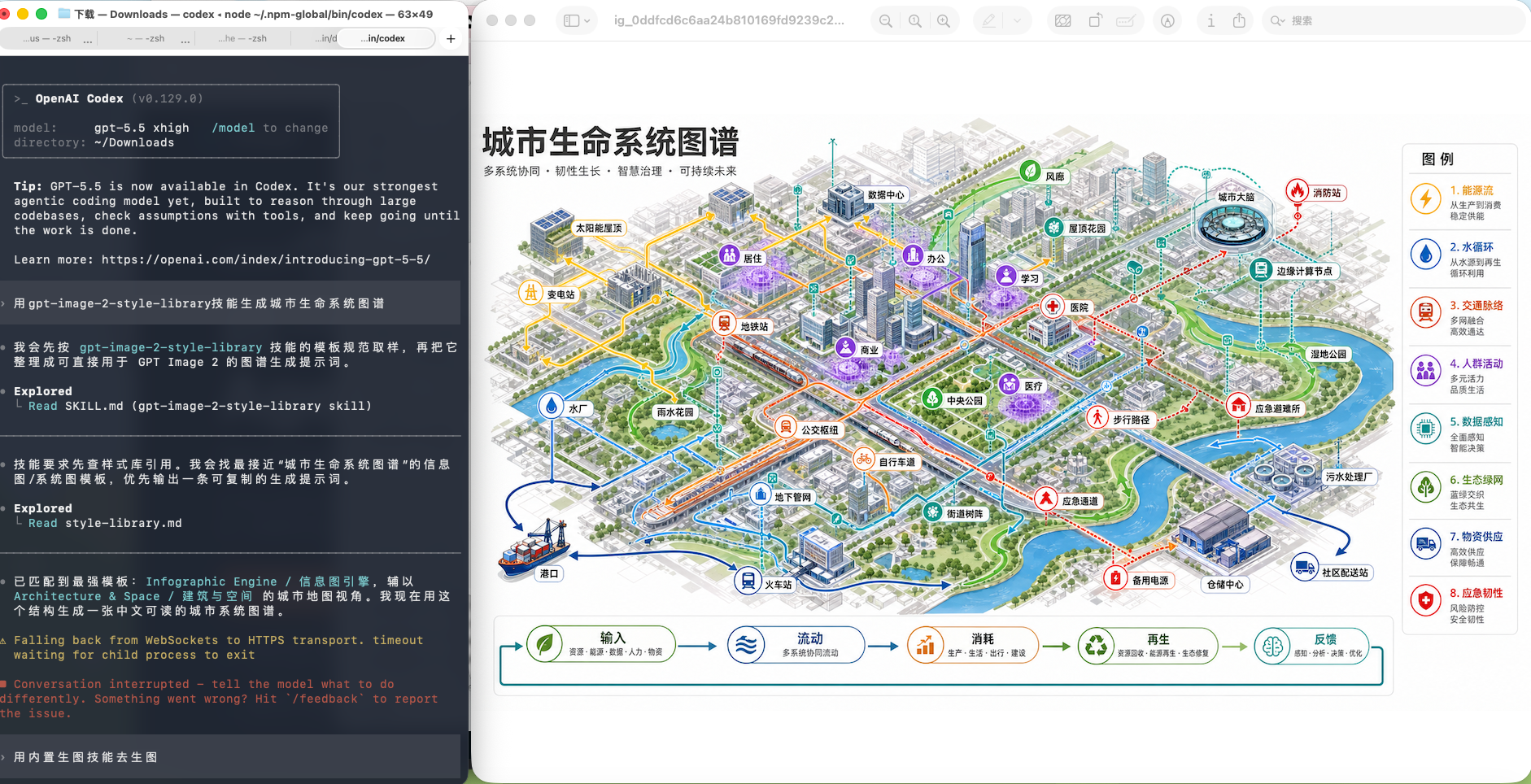
Example request: 用 gpt-image-2-style-library 技能生成城市生命系统图谱
Reference
- Read
references/style-library.mdbefore choosing a template or style. - The reference is generated from
data/style-library.jsonin the repository. - Prefer the reference over memory when template names, categories, covers, or style tags matter.
Workflow
- Detect the user's language and answer in that language.
- Identify the user's target output: product, poster, UI, infographic, brand, photo, illustration, character, scene, history, document, or special task.
- Match the request in this order: template category, visual style tag, scene tag, then nearest example cases.
- If one template is clearly strongest, use it directly. If several are plausible, present 2-3 options with short reasons and ask the user to choose.
- Build the final prompt with these blocks:
- subject and task
- composition and layout
- visual style and materials
- text and label requirements
- aspect ratio and output format
- constraints and negative details
- Include the selected template name and any useful example case IDs.
Output Defaults
- Provide a copyable prompt first.
- Keep constraints concrete: exact text, aspect ratio, readable labels, layout hierarchy, and avoided artifacts.
- For Chinese requests, write the final prompt in Chinese unless the user asks for English.
- For English requests, write the final prompt in English unless the user asks for Chinese.
- When the user asks for multiple concepts, reuse one template and vary subject, composition, palette, and scene.
Maintenance
When the source repository changes, run:
npm run generate:style-skill
To install the skill into the local Codex skill folder, run:
npm run install:skill
Häufige Fragen
Erzeugt er das Bild selbst?
Der Skill baut den Prompt. Das Erzeugen des Bildes ist ein eigener Schritt in deinem Bildwerkzeug.
Was, wenn mehrere Stile passen könnten?
Er stellt zwei oder drei Optionen mit kurzen Begründungen vor, und du wählst eine.
Woher stammen die Vorlagen?
Aus einer Referenzdatei, die aus der awesome-gpt-image-2-Stilbibliothek aufgebaut wurde.
Details
Originalbeschreibung des Autors
Choose GPT-Image2 / gpt-image-2 visual styles and industrial prompt templates from the awesome-gpt-image-2 style library. Use when an agent needs to create, rewrite, classify, or improve image-generation prompts with repository-backed templates, categories, style tags, scene tags, pitfalls, and example cases.
Beliebtheit
- GitHub-Sterne
- 35k
- Platz im Ranking
- #7588
- Lizenz
- MIT
- Aktualisiert
- 14.10.2026
Kommentare
- …
Ähnliche Skills
gifgrep
394kLässt deinen Agenten GIF-Bibliotheken durchsuchen, Ergebnisse vorab ansehen, ein GIF herunterladen und ein Einzelbild oder ein Kontaktblatt mit Bildern herausziehen.
meme-maker
394kLässt deinen Agenten eine Vorlage für ein Meme auswählen, eigene Beschriftungen hinzufügen und das Meme als SVG- oder PNG-Bild erstellen.
ios-icon-gen
280kHilft deinem Agenten, Icons für iOS-Apps zu erstellen. Er nutzt Apple-Symbole oder Icons aus anderen Quellen und erzeugt die richtigen Dateien.