
gpt-image-2-style-library
यह क्या करती है
यह स्किल GPT-Image2 शैलियों की लाइब्रेरी इस्तेमाल करके आपके इमेज विचार को विस्तृत प्रॉम्प्ट में बदलती है। यह उन लोगों के लिए है जिन्हें प्रॉम्प्ट शून्य से लिखे बिना अच्छी AI इमेज चाहिए।
कब इस्तेमाल करें
- ✓जब आपको पोस्टर, प्रोडक्ट, UI मॉकअप, इन्फ़ोग्राफ़िक या इलस्ट्रेशन के लिए AI इमेज चाहिए।
- ✓जब आपके पास मोटा इमेज विचार हो और आप बेहतर, संरचित प्रॉम्प्ट चाहते हों।
- ✓जब आप इमेज शैली टेम्पलेट देखकर सबसे उपयुक्त चुनना चाहें।
Skill का लिंक
https://github.com/freestylefly/awesome-gpt-image-2/blob/main/agents/skills/gpt-image-2-style-library/SKILL.mdइसे कॉपी करके अपने AI (Claude, ChatGPT या Cursor) में पेस्ट करें और निर्देशों का पालन करने को कहें।
कैसे इस्तेमाल करें
सबसे आसान तरीका: मैसेज कॉपी करके अपने AI में पेस्ट करें। वह skill पढ़कर निर्देशों का पालन करेगा।
पेस्ट करने के लिए तैयार मैसेज
Claude Code, Codex या Cursor के लिए: प्रोजेक्ट फ़ोल्डर में चलाएँ और skill इंस्टॉल हो जाएगी।
SKILL.md डाउनलोड करें और अपने एजेंट के skills फ़ोल्डर में रखें।
AI से क्या माँगें: उदाहरण
“साफ़ इन्फ़ोग्राफ़िक शैली में एक शहरी जीवन सिस्टम मैप पोस्टर के लिए GPT-Image2 प्रॉम्प्ट लिखिए।”
हर हफ़्ते 5 नई skills, 1 मिनट में पढ़ें।
यह कैसे काम करती है
यह आपके अनुरोध को टेम्पलेट श्रेणी, शैली टैग या दृश्य टैग से मिलाती है, फिर विषय, लेआउट, शैली, टेक्स्ट और फ़ॉर्मेट को कवर करने वाला प्रॉम्प्ट बनाती है। अगर कई टेम्पलेट फ़िट हों, तो यह दो या तीन विकल्प देती है चुनने के लिए।
तकनीकी सामग्री (मूल SKILL.md)
लेखक का मूल टेक्स्ट, अंग्रेज़ी में, सीधे GitHub से।
GPT-Image2 Style Library
Use this skill to turn a user's image-generation intent into a production-ready GPT-Image2 prompt using the awesome-gpt-image-2 style library.
Example Output
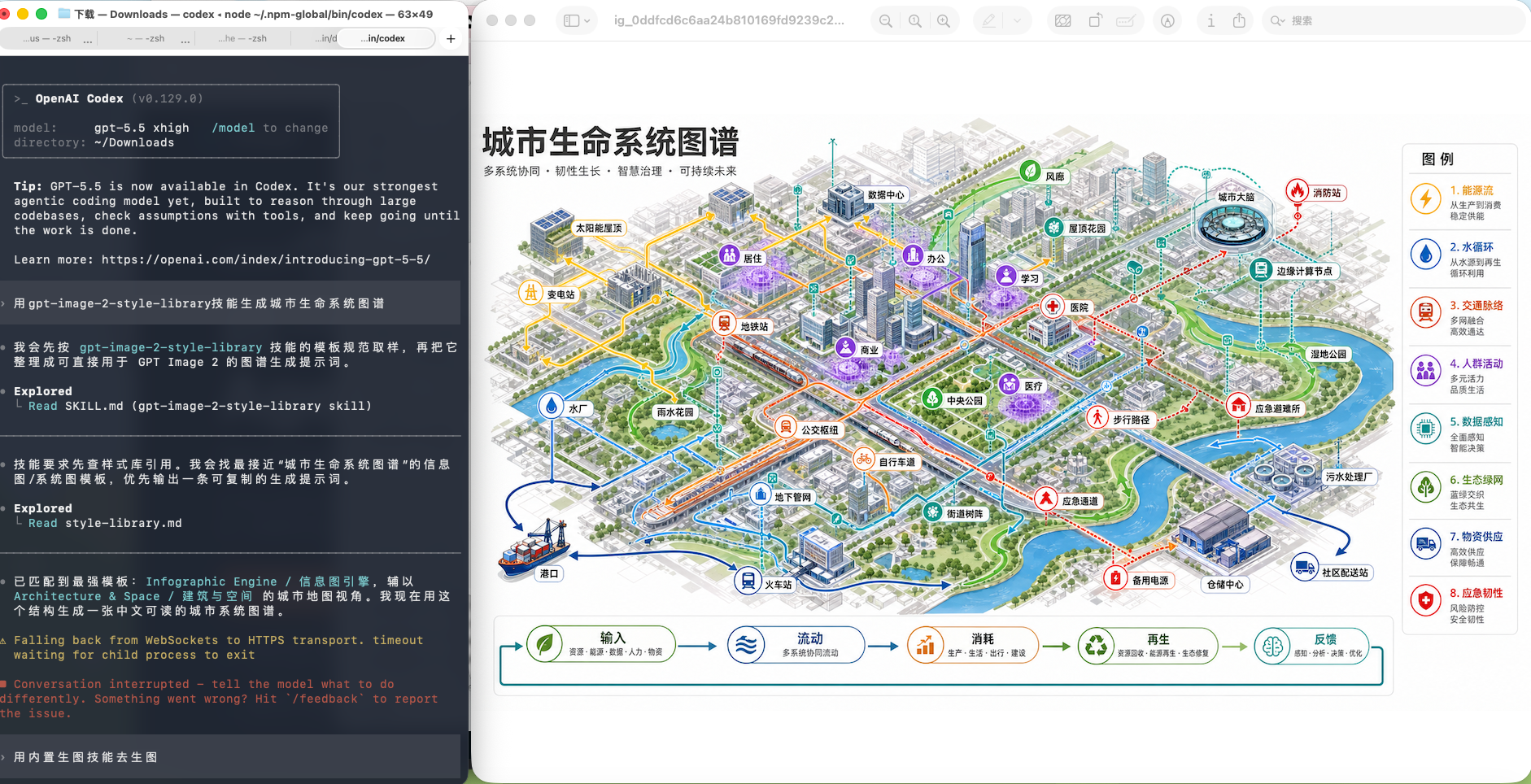
Example request: 用 gpt-image-2-style-library 技能生成城市生命系统图谱
Reference
- Read
references/style-library.mdbefore choosing a template or style. - The reference is generated from
data/style-library.jsonin the repository. - Prefer the reference over memory when template names, categories, covers, or style tags matter.
Workflow
- Detect the user's language and answer in that language.
- Identify the user's target output: product, poster, UI, infographic, brand, photo, illustration, character, scene, history, document, or special task.
- Match the request in this order: template category, visual style tag, scene tag, then nearest example cases.
- If one template is clearly strongest, use it directly. If several are plausible, present 2-3 options with short reasons and ask the user to choose.
- Build the final prompt with these blocks:
- subject and task
- composition and layout
- visual style and materials
- text and label requirements
- aspect ratio and output format
- constraints and negative details
- Include the selected template name and any useful example case IDs.
Output Defaults
- Provide a copyable prompt first.
- Keep constraints concrete: exact text, aspect ratio, readable labels, layout hierarchy, and avoided artifacts.
- For Chinese requests, write the final prompt in Chinese unless the user asks for English.
- For English requests, write the final prompt in English unless the user asks for Chinese.
- When the user asks for multiple concepts, reuse one template and vary subject, composition, palette, and scene.
Maintenance
When the source repository changes, run:
npm run generate:style-skill
To install the skill into the local Codex skill folder, run:
npm run install:skill
अक्सर पूछे जाने वाले सवाल
क्या यह इमेज खुद बनाती है?
स्किल प्रॉम्प्ट बनाती है। इमेज बनाना आपके इमेज टूल में एक अलग चरण है।
अगर कई शैलियाँ काम कर सकें तो?
यह छोटे कारणों के साथ दो या तीन विकल्प रखती है, और आप एक चुनते हैं।
टेम्पलेट कहाँ से आते हैं?
awesome-gpt-image-2 शैली लाइब्रेरी से बनी एक संदर्भ फ़ाइल से।
जानकारी
लेखक का मूल विवरण
Choose GPT-Image2 / gpt-image-2 visual styles and industrial prompt templates from the awesome-gpt-image-2 style library. Use when an agent needs to create, rewrite, classify, or improve image-generation prompts with repository-backed templates, categories, style tags, scene tags, pitfalls, and example cases.
लोकप्रियता
- GitHub स्टार
- 35k
- रैंकिंग में स्थान
- #7588
- लाइसेंस
- MIT
- अपडेट की गई
- 14/10/2026
कमेंट
- …
मिलती-जुलती skills
gifgrep
394kयह आपके एजेंट को GIF लाइब्रेरी में खोजने, नतीजों का पूर्वावलोकन करने, GIF डाउनलोड करने, और उससे एक फ़्रेम या फ़्रेम्स की शीट निकालने देती है।
meme-maker
394kयह आपके एजेंट को मीम टेम्पलेट चुनने, अपने कैप्शन जोड़ने और मीम को SVG या PNG इमेज के रूप में बनाने देती है।
ios-icon-gen
280kआपके एजेंट को iOS ऐप्स के लिए icons बनाने देता है। यह Apple symbols या दूसरे स्रोतों के आइकन इस्तेमाल करके सही files बनाता है।