
gpt-image-2-style-library
Fungsinya
Skill ini mengubah ide gambar Anda menjadi prompt rinci dengan memakai pustaka gaya GPT-Image2. Skill ini untuk siapa saja yang menginginkan gambar AI yang rapi tanpa menulis prompt dari nol.
Kapan dipakai
- ✓Saat Anda menginginkan gambar AI untuk poster, produk, mockup UI, infografis, atau ilustrasi.
- ✓Saat Anda punya ide gambar yang kasar dan ingin prompt yang lebih kuat dan tersusun baik.
- ✓Saat Anda ingin menjelajahi templat gaya gambar dan memilih yang paling sesuai.
Link skill
https://github.com/freestylefly/awesome-gpt-image-2/blob/main/agents/skills/gpt-image-2-style-library/SKILL.mdSalin lalu tempelkan ke AI Anda (Claude, ChatGPT, atau Cursor) dan minta AI mengikuti instruksinya.
Cara pakai
Cara paling mudah: salin pesan ini dan tempelkan ke AI Anda. AI akan membaca skill dan mengikuti instruksinya.
Pesan siap tempel
Untuk Claude Code, Codex, atau Cursor: jalankan di folder proyek, lalu skill langsung terpasang.
Unduh SKILL.md lalu taruh di folder skill agen Anda.
Contoh permintaan ke AI
“Tulis saya prompt GPT-Image2 untuk poster peta sistem kehidupan kota dengan gaya infografis yang bersih.”
5 skill baru setiap minggu. 1 menit baca.
Cara kerjanya
Skill ini mencocokkan permintaan Anda dengan kategori templat, tag gaya, atau tag adegan, lalu menyusun prompt yang mencakup subjek, tata letak, gaya, teks, dan format. Jika beberapa templat cocok, skill menawarkan dua atau tiga pilihan untuk dipilih.
Konten teknis (SKILL.md asli)
Teks asli dari pembuat, dalam bahasa Inggris, langsung dari GitHub.
GPT-Image2 Style Library
Use this skill to turn a user's image-generation intent into a production-ready GPT-Image2 prompt using the awesome-gpt-image-2 style library.
Example Output
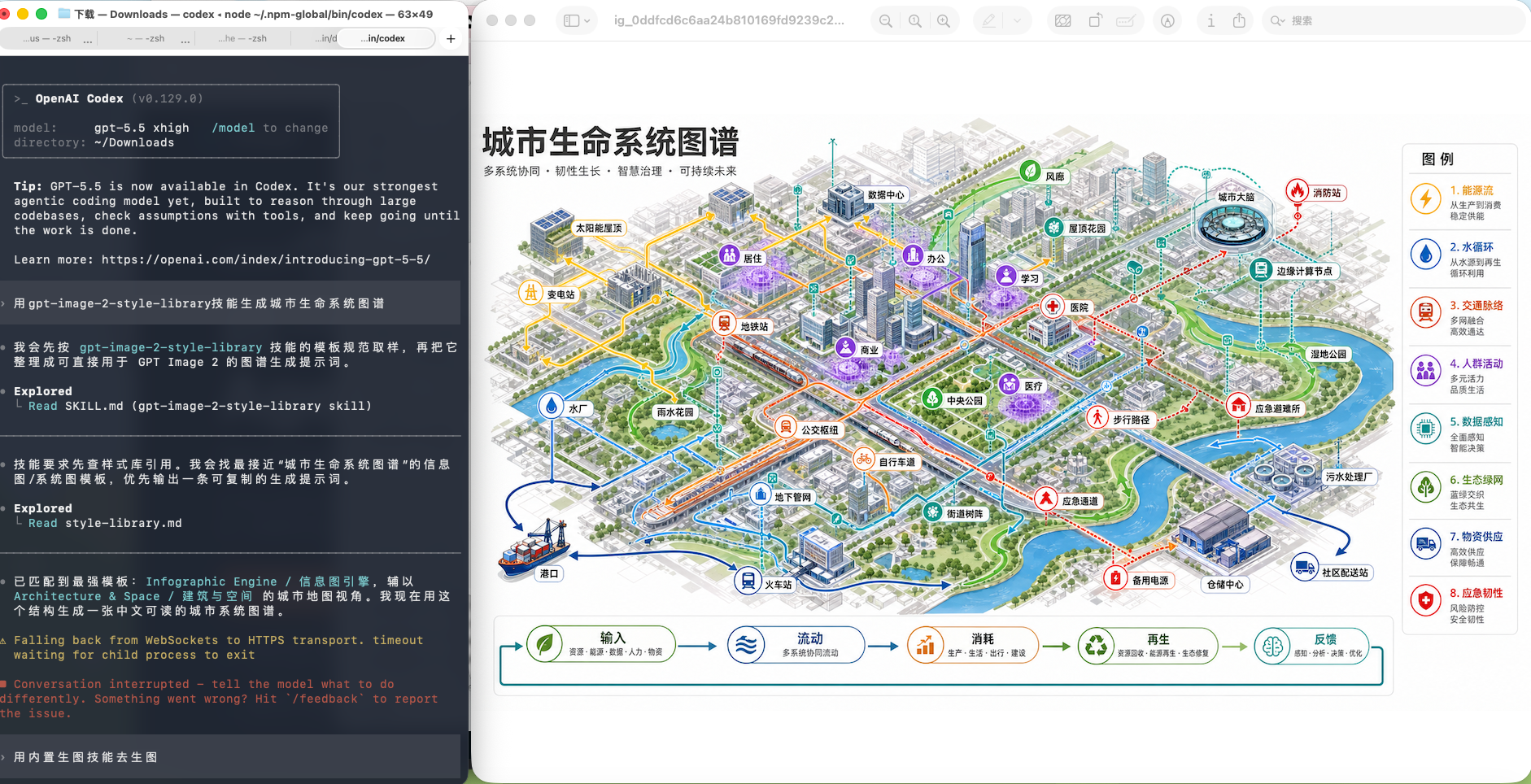
Example request: 用 gpt-image-2-style-library 技能生成城市生命系统图谱
Reference
- Read
references/style-library.mdbefore choosing a template or style. - The reference is generated from
data/style-library.jsonin the repository. - Prefer the reference over memory when template names, categories, covers, or style tags matter.
Workflow
- Detect the user's language and answer in that language.
- Identify the user's target output: product, poster, UI, infographic, brand, photo, illustration, character, scene, history, document, or special task.
- Match the request in this order: template category, visual style tag, scene tag, then nearest example cases.
- If one template is clearly strongest, use it directly. If several are plausible, present 2-3 options with short reasons and ask the user to choose.
- Build the final prompt with these blocks:
- subject and task
- composition and layout
- visual style and materials
- text and label requirements
- aspect ratio and output format
- constraints and negative details
- Include the selected template name and any useful example case IDs.
Output Defaults
- Provide a copyable prompt first.
- Keep constraints concrete: exact text, aspect ratio, readable labels, layout hierarchy, and avoided artifacts.
- For Chinese requests, write the final prompt in Chinese unless the user asks for English.
- For English requests, write the final prompt in English unless the user asks for Chinese.
- When the user asks for multiple concepts, reuse one template and vary subject, composition, palette, and scene.
Maintenance
When the source repository changes, run:
npm run generate:style-skill
To install the skill into the local Codex skill folder, run:
npm run install:skill
Pertanyaan umum
Apakah skill ini membuat gambarnya sendiri?
Skill ini menyusun prompt. Pembuatan gambarnya adalah langkah terpisah di alat gambar Anda.
Bagaimana jika beberapa gaya bisa cocok?
Skill ini menyajikan dua atau tiga opsi dengan alasan singkat, dan Anda yang memilih.
Dari mana templatnya berasal?
Templat berasal dari file referensi yang dibangun dari pustaka gaya awesome-gpt-image-2.
Detail
Deskripsi asli dari pembuat
Choose GPT-Image2 / gpt-image-2 visual styles and industrial prompt templates from the awesome-gpt-image-2 style library. Use when an agent needs to create, rewrite, classify, or improve image-generation prompts with repository-backed templates, categories, style tags, scene tags, pitfalls, and example cases.
Popularitas
- Bintang GitHub
- 35k
- Peringkat
- #7588
- Lisensi
- MIT
- Diperbarui
- 14/10/2026
Komentar
- …
Skill serupa
gifgrep
394kMemungkinkan agent Anda mencari GIF, melihat pratinjau hasil, mengunduh GIF, dan mengambil satu bingkai diam atau lembar kontak darinya.
meme-maker
394kMemungkinkan agent Anda memilih templat meme, menambahkan teks sendiri, dan membuat meme sebagai gambar SVG atau PNG.
ios-icon-gen
280kMemungkinkan agent Anda membuat ikon untuk aplikasi iOS. Menggunakan simbol Apple atau ikon dari sumber lain untuk membuat file yang tepat.