
gpt-image-2-style-library
できること
このスキルは、あなたの画像のアイデアを、GPT-Image2のスタイルのライブラリを使って、詳しいプロンプトに変えます。プロンプトを一から書かずに、洗練されたAI画像がほしい人向けです。
使う場面
- ✓ポスター、製品、UIのモックアップ、インフォグラフィック、イラスト用のAI画像がほしいとき。
- ✓大まかな画像のアイデアがあり、より強く構造化されたプロンプトがほしいとき。
- ✓画像のスタイルのテンプレートを閲覧して、最適なものを選びたいとき。
スキルのリンク
https://github.com/freestylefly/awesome-gpt-image-2/blob/main/agents/skills/gpt-image-2-style-library/SKILL.mdコピーしてAI(Claude、ChatGPT、Cursor)に貼り付け、指示に従うよう頼んでください。
使い方
いちばん簡単な方法:メッセージをコピーしてAIに貼り付けるだけ。AIがスキルを読んで指示に従います。
貼り付け用メッセージ
Claude Code、Codex、Cursorの場合:プロジェクトのフォルダで実行するとスキルがインストールされます。
SKILL.mdをダウンロードして、エージェントのスキル用フォルダに入れてください。
AIへの頼み方の例
“都市生活のシステムマップのポスターを、clean infographicのスタイルで、GPT-Image2用のプロンプトにしてください。”
毎週5つの新しいスキル。1分で読めます。
仕組み
このスキルは、あなたの依頼を、テンプレートのカテゴリ、スタイルのタグ、シーンのタグに当てはめ、被写体、レイアウト、スタイル、テキスト、形式を含むプロンプトを作ります。複数のテンプレートが合う場合は、選べるように2つか3つの案を示します。
技術的な内容(元のSKILL.md)
作者による元のテキスト(英語)をGitHubからそのまま表示しています。
GPT-Image2 Style Library
Use this skill to turn a user's image-generation intent into a production-ready GPT-Image2 prompt using the awesome-gpt-image-2 style library.
Example Output
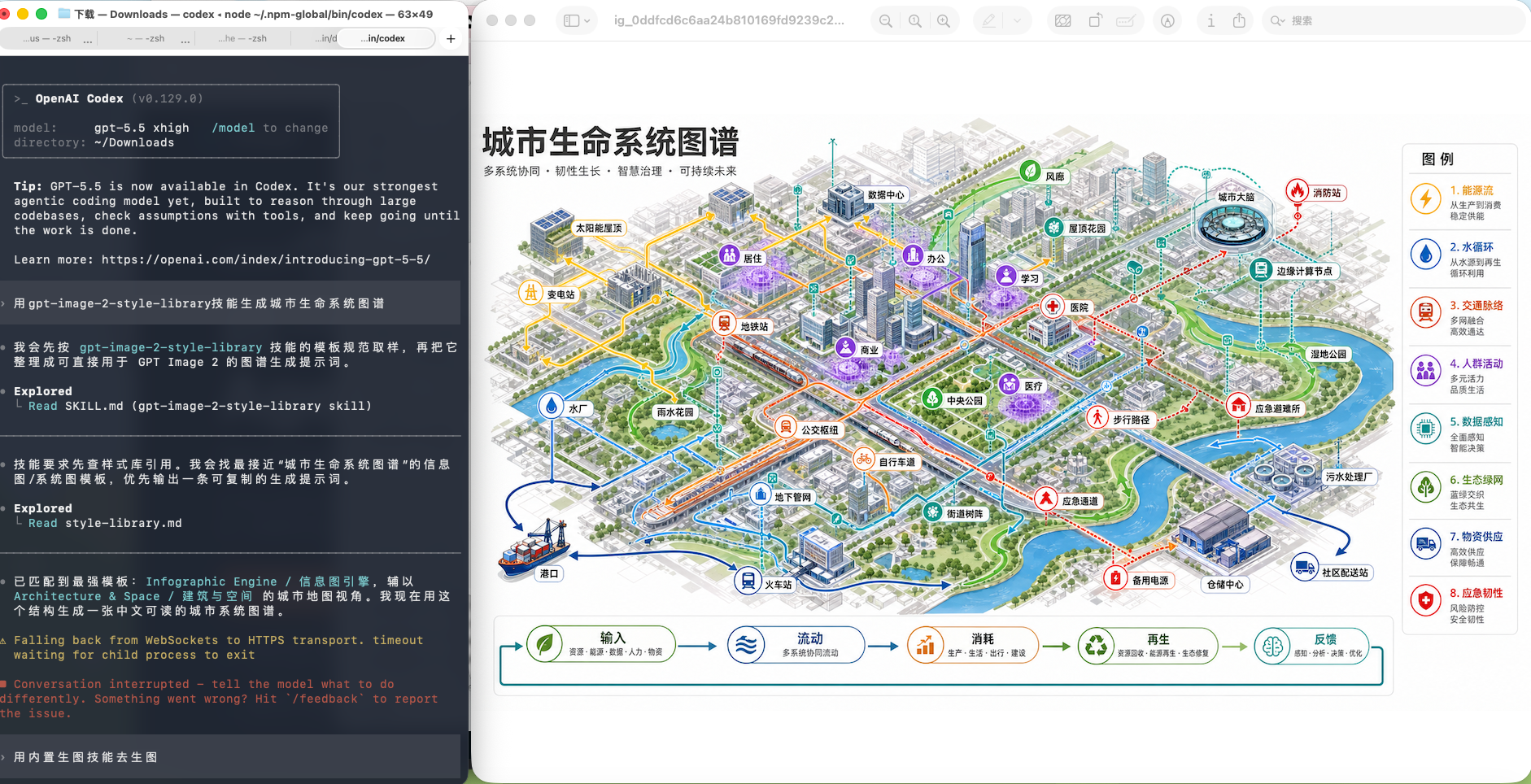
Example request: 用 gpt-image-2-style-library 技能生成城市生命系统图谱
Reference
- Read
references/style-library.mdbefore choosing a template or style. - The reference is generated from
data/style-library.jsonin the repository. - Prefer the reference over memory when template names, categories, covers, or style tags matter.
Workflow
- Detect the user's language and answer in that language.
- Identify the user's target output: product, poster, UI, infographic, brand, photo, illustration, character, scene, history, document, or special task.
- Match the request in this order: template category, visual style tag, scene tag, then nearest example cases.
- If one template is clearly strongest, use it directly. If several are plausible, present 2-3 options with short reasons and ask the user to choose.
- Build the final prompt with these blocks:
- subject and task
- composition and layout
- visual style and materials
- text and label requirements
- aspect ratio and output format
- constraints and negative details
- Include the selected template name and any useful example case IDs.
Output Defaults
- Provide a copyable prompt first.
- Keep constraints concrete: exact text, aspect ratio, readable labels, layout hierarchy, and avoided artifacts.
- For Chinese requests, write the final prompt in Chinese unless the user asks for English.
- For English requests, write the final prompt in English unless the user asks for Chinese.
- When the user asks for multiple concepts, reuse one template and vary subject, composition, palette, and scene.
Maintenance
When the source repository changes, run:
npm run generate:style-skill
To install the skill into the local Codex skill folder, run:
npm run install:skill
よくある質問
画像そのものを生成しますか?
いいえ。スキルはプロンプトを作るだけです。画像の生成は、あなたの画像ツールでの別のステップです。
複数のスタイルが合う場合はどうしますか?
短い理由とともに2つか3つの案を示し、あなたが1つを選びます。
テンプレートはどこから来ますか?
awesome-gpt-image-2のスタイルのライブラリから作られた参照ファイルから来ます。
詳細
作者による元の説明
Choose GPT-Image2 / gpt-image-2 visual styles and industrial prompt templates from the awesome-gpt-image-2 style library. Use when an agent needs to create, rewrite, classify, or improve image-generation prompts with repository-backed templates, categories, style tags, scene tags, pitfalls, and example cases.
人気
- GitHubのスター
- 35k
- ランキング
- #7588
- ライセンス
- MIT
- 更新日
- 2026/10/14
コメント
- …