
gpt-image-2-style-library
하는 일
이 스킬은 아이디어를 GPT-Image2 스타일 라이브러리를 사용해 자세한 이미지 프롬프트로 바꿉니다. 프롬프트를 처음부터 쓰지 않고 다듬어진 AI 이미지를 원하는 사람을 위한 스킬입니다.
사용하는 경우
- ✓포스터, 제품, UI 목업, 인포그래픽, 일러스트를 위한 AI 이미지를 원할 때.
- ✓대략적인 이미지 아이디어가 있고 더 강하고 체계적인 프롬프트를 원할 때.
- ✓이미지 스타일 템플릿을 둘러보고 가장 맞는 것을 고르고 싶은 경우.
스킬 링크
https://github.com/freestylefly/awesome-gpt-image-2/blob/main/agents/skills/gpt-image-2-style-library/SKILL.md복사해서 AI(Claude, ChatGPT, Cursor)에 붙여넣고 지침을 따르도록 요청하세요.
사용 방법
가장 쉬운 방법입니다. 메시지를 복사해 AI에 붙여넣으세요. AI가 스킬을 읽고 지침을 따릅니다.
바로 붙여넣을 수 있는 메시지
Claude Code, Codex, Cursor용입니다. 프로젝트 폴더에서 실행하면 스킬이 설치됩니다.
SKILL.md를 다운로드해 에이전트의 스킬 폴더에 넣으세요.
AI에게 요청하는 예시
“깔끔한 인포그래픽 스타일의 도시 생활 시스템 맵 포스터를 위한 GPT-Image2 프롬프트를 작성해 주세요.”
매주 새 스킬 5개. 읽는 데 1분.
작동 방식
스킬은 요청을 템플릿 범주, 스타일 태그, 장면 태그에 맞춘 뒤, 주제, 배치, 스타일, 텍스트, 형식을 담은 프롬프트를 만듭니다. 여러 템플릿이 맞으면 두세 가지 선택지를 제시합니다.
기술 내용 (원본 SKILL.md)
작성자의 영어 원문을 GitHub에서 그대로 가져왔습니다.
GPT-Image2 Style Library
Use this skill to turn a user's image-generation intent into a production-ready GPT-Image2 prompt using the awesome-gpt-image-2 style library.
Example Output
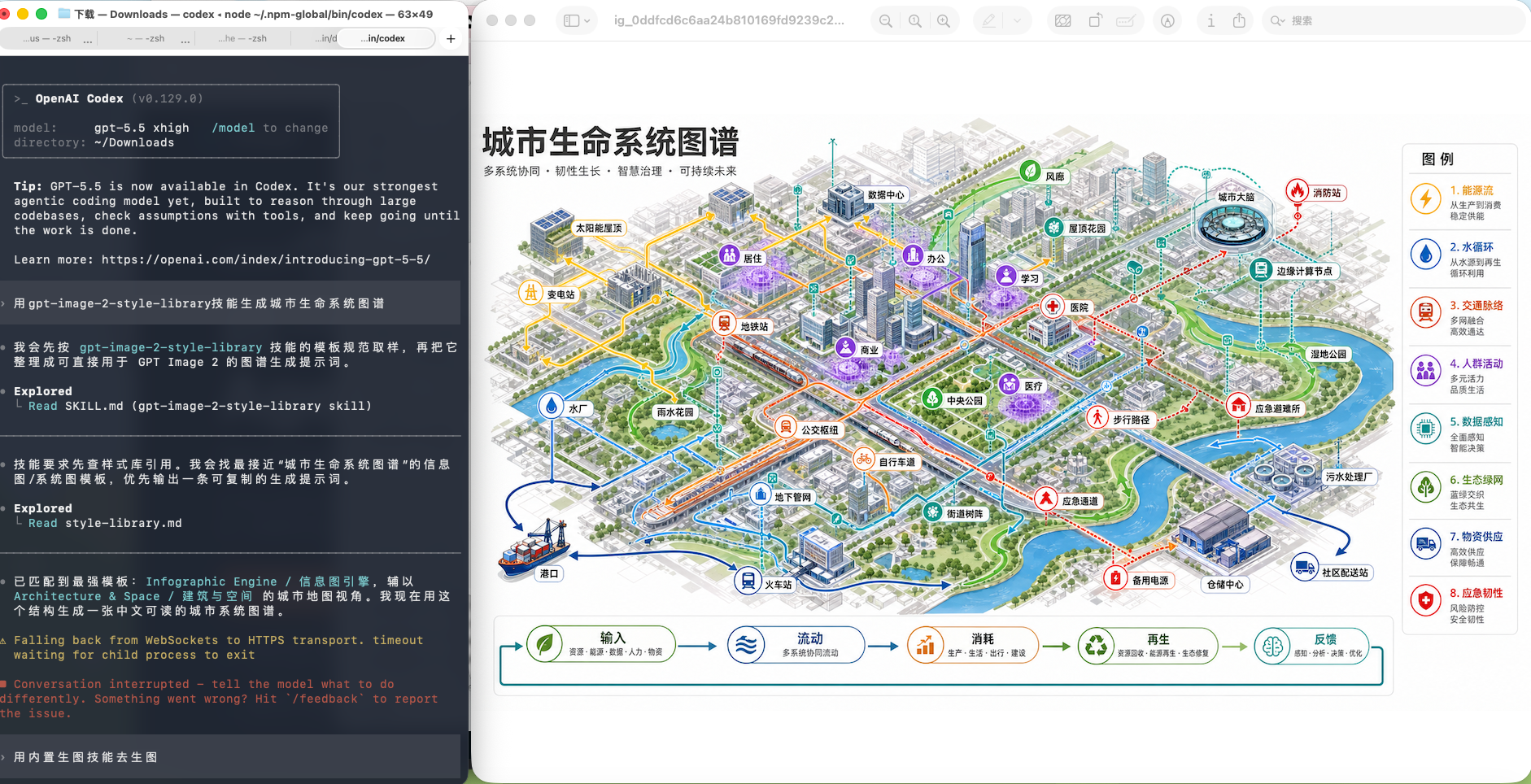
Example request: 用 gpt-image-2-style-library 技能生成城市生命系统图谱
Reference
- Read
references/style-library.mdbefore choosing a template or style. - The reference is generated from
data/style-library.jsonin the repository. - Prefer the reference over memory when template names, categories, covers, or style tags matter.
Workflow
- Detect the user's language and answer in that language.
- Identify the user's target output: product, poster, UI, infographic, brand, photo, illustration, character, scene, history, document, or special task.
- Match the request in this order: template category, visual style tag, scene tag, then nearest example cases.
- If one template is clearly strongest, use it directly. If several are plausible, present 2-3 options with short reasons and ask the user to choose.
- Build the final prompt with these blocks:
- subject and task
- composition and layout
- visual style and materials
- text and label requirements
- aspect ratio and output format
- constraints and negative details
- Include the selected template name and any useful example case IDs.
Output Defaults
- Provide a copyable prompt first.
- Keep constraints concrete: exact text, aspect ratio, readable labels, layout hierarchy, and avoided artifacts.
- For Chinese requests, write the final prompt in Chinese unless the user asks for English.
- For English requests, write the final prompt in English unless the user asks for Chinese.
- When the user asks for multiple concepts, reuse one template and vary subject, composition, palette, and scene.
Maintenance
When the source repository changes, run:
npm run generate:style-skill
To install the skill into the local Codex skill folder, run:
npm run install:skill
자주 묻는 질문
스킬이 이미지를 직접 만드나요?
아닙니다. 스킬은 프롬프트를 만들며, 이미지 생성은 이미지 도구에서 하는 별도 단계입니다.
여러 스타일이 가능하면 어떻게 하나요?
짧은 이유와 함께 두세 가지 선택지를 제시하고, 사용자가 그중 하나를 고릅니다.
템플릿은 어디에서 오나요?
awesome-gpt-image-2 스타일 라이브러리로 만든 참조 파일에서 옵니다.
상세 정보
작성자의 원본 설명
Choose GPT-Image2 / gpt-image-2 visual styles and industrial prompt templates from the awesome-gpt-image-2 style library. Use when an agent needs to create, rewrite, classify, or improve image-generation prompts with repository-backed templates, categories, style tags, scene tags, pitfalls, and example cases.
인기도
- GitHub 스타
- 35k
- 순위
- #7588
- 라이선스
- MIT
- 업데이트
- 2026. 10. 14.
댓글
- …