
gpt-image-2-style-library
O que ela faz
Esta skill transforma sua ideia de imagem em um prompt detalhado usando uma biblioteca de estilos do GPT-Image2. É para quem quer imagens de IA refinadas sem escrever prompts do zero.
Quando usar
- ✓Quando você quer uma imagem de IA para um pôster, produto, maquete de interface, infográfico ou ilustração.
- ✓Quando você tem uma ideia de imagem ainda rascunhada e quer um prompt mais forte e bem estruturado.
- ✓Quando você quer navegar pelos modelos de estilo de imagem e escolher o que melhor se encaixa.
Link da skill
https://github.com/freestylefly/awesome-gpt-image-2/blob/main/agents/skills/gpt-image-2-style-library/SKILL.mdCopie e cole na sua IA (Claude, ChatGPT ou Cursor) pedindo para seguir as instruções.
Como usar
O jeito mais fácil: copie a mensagem e cole na sua IA. Ela lê a skill e segue as instruções.
Mensagem pronta para colar
Para Claude Code, Codex ou Cursor: rode na pasta do projeto e a skill fica instalada.
Baixe o SKILL.md e coloque na pasta de skills do seu agente.
Exemplo do que pedir para a IA
“Escreva para mim um prompt do GPT-Image2 para um pôster de mapa de sistema da vida urbana, em estilo infográfico limpo.”
5 skills novas por semana. 1 minuto de leitura.
Como funciona
Ela associa o seu pedido a uma categoria de modelo, a uma tag de estilo ou a uma tag de cena, e então monta um prompt que cobre assunto, layout, estilo, texto e formato. Se vários modelos servirem, ela oferece duas ou três opções para escolher.
Conteúdo técnico (SKILL.md original)
Texto original do autor, em inglês, direto do GitHub.
GPT-Image2 Style Library
Use this skill to turn a user's image-generation intent into a production-ready GPT-Image2 prompt using the awesome-gpt-image-2 style library.
Example Output
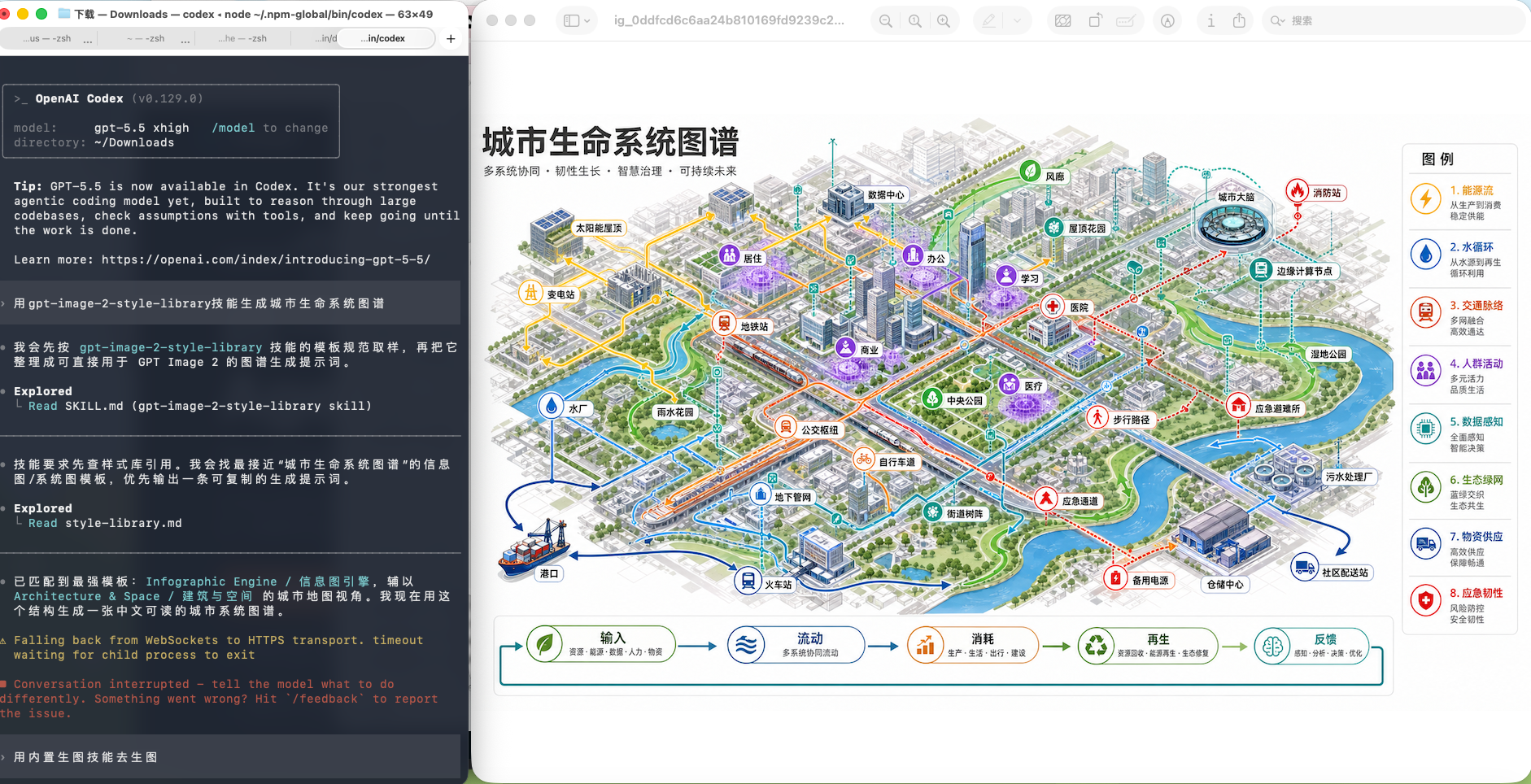
Example request: 用 gpt-image-2-style-library 技能生成城市生命系统图谱
Reference
- Read
references/style-library.mdbefore choosing a template or style. - The reference is generated from
data/style-library.jsonin the repository. - Prefer the reference over memory when template names, categories, covers, or style tags matter.
Workflow
- Detect the user's language and answer in that language.
- Identify the user's target output: product, poster, UI, infographic, brand, photo, illustration, character, scene, history, document, or special task.
- Match the request in this order: template category, visual style tag, scene tag, then nearest example cases.
- If one template is clearly strongest, use it directly. If several are plausible, present 2-3 options with short reasons and ask the user to choose.
- Build the final prompt with these blocks:
- subject and task
- composition and layout
- visual style and materials
- text and label requirements
- aspect ratio and output format
- constraints and negative details
- Include the selected template name and any useful example case IDs.
Output Defaults
- Provide a copyable prompt first.
- Keep constraints concrete: exact text, aspect ratio, readable labels, layout hierarchy, and avoided artifacts.
- For Chinese requests, write the final prompt in Chinese unless the user asks for English.
- For English requests, write the final prompt in English unless the user asks for Chinese.
- When the user asks for multiple concepts, reuse one template and vary subject, composition, palette, and scene.
Maintenance
When the source repository changes, run:
npm run generate:style-skill
To install the skill into the local Codex skill folder, run:
npm run install:skill
Perguntas frequentes
Ela gera a imagem em si?
A skill monta o prompt. A geração da imagem é uma etapa separada na sua ferramenta de imagem.
E se vários estilos puderem servir?
Ela apresenta duas ou três opções com motivos curtos, e você escolhe uma.
De onde vêm os modelos?
Eles vêm de um arquivo de referência criado a partir da biblioteca de estilos awesome-gpt-image-2.
Detalhes
Descrição original do autor
Choose GPT-Image2 / gpt-image-2 visual styles and industrial prompt templates from the awesome-gpt-image-2 style library. Use when an agent needs to create, rewrite, classify, or improve image-generation prompts with repository-backed templates, categories, style tags, scene tags, pitfalls, and example cases.
Popularidade
- Estrelas no GitHub
- 35 mil
- Posição no ranking
- #7588
- Licença
- MIT
- Atualizada em
- 14/10/2026
Comentários
- …
Skills parecidas
gifgrep
394 milPermite que seu agente pesquise bibliotecas de GIFs, visualize resultados, baixe um GIF e extraia um quadro fixo ou uma folha de quadros.
meme-maker
394 milPermite que seu agente escolha um modelo de meme, adicione suas próprias legendas e crie o meme como imagem SVG ou PNG.
ios-icon-gen
280 milFaz seu agente gerar ícones para aplicativos iOS. Ele usa símbolos da Apple ou ícones de outras fontes para criar os arquivos corretos.