
gpt-image-2-style-library
Skill này làm gì
Skill này biến ý tưởng hình ảnh của bạn thành một prompt chi tiết bằng thư viện phong cách GPT-Image2. Skill dành cho ai muốn có hình ảnh AI đẹp mà không phải tự viết prompt từ đầu.
Khi nào nên dùng
- ✓Khi bạn muốn một hình ảnh AI cho áp phích, sản phẩm, bản mẫu giao diện, infographic hoặc minh họa.
- ✓Khi bạn có một ý tưởng hình ảnh sơ bộ và muốn một prompt mạnh hơn, có cấu trúc tốt.
- ✓Khi bạn muốn xem các mẫu phong cách hình ảnh và chọn cái phù hợp nhất.
Liên kết skill
https://github.com/freestylefly/awesome-gpt-image-2/blob/main/agents/skills/gpt-image-2-style-library/SKILL.mdSao chép rồi dán vào AI của bạn (Claude, ChatGPT hoặc Cursor) và nhờ nó làm theo hướng dẫn.
Cách dùng
Cách dễ nhất: sao chép tin nhắn và dán vào AI của bạn. AI sẽ đọc skill và làm theo hướng dẫn.
Tin nhắn có sẵn để dán
Dành cho Claude Code, Codex hoặc Cursor: chạy lệnh trong thư mục dự án của bạn và skill sẽ được cài đặt.
Tải tệp SKILL.md về và thả vào thư mục skill của agent.
Ví dụ cách nhờ AI
“Viết cho tôi một prompt GPT-Image2 cho áp phích bản đồ hệ thống đời sống thành phố theo phong cách infographic gọn gàng.”
5 skill mới mỗi tuần. Đọc chỉ 1 phút.
Cách hoạt động
Skill ghép yêu cầu của bạn với một nhóm mẫu, thẻ phong cách hoặc thẻ cảnh, rồi xây dựng prompt gồm chủ thể, bố cục, phong cách, chữ và định dạng. Nếu nhiều mẫu phù hợp, nó đưa ra hai hoặc ba lựa chọn để bạn chọn.
Nội dung kỹ thuật (SKILL.md gốc)
Lấy nguyên văn từ GitHub, do tác giả viết bằng tiếng Anh.
GPT-Image2 Style Library
Use this skill to turn a user's image-generation intent into a production-ready GPT-Image2 prompt using the awesome-gpt-image-2 style library.
Example Output
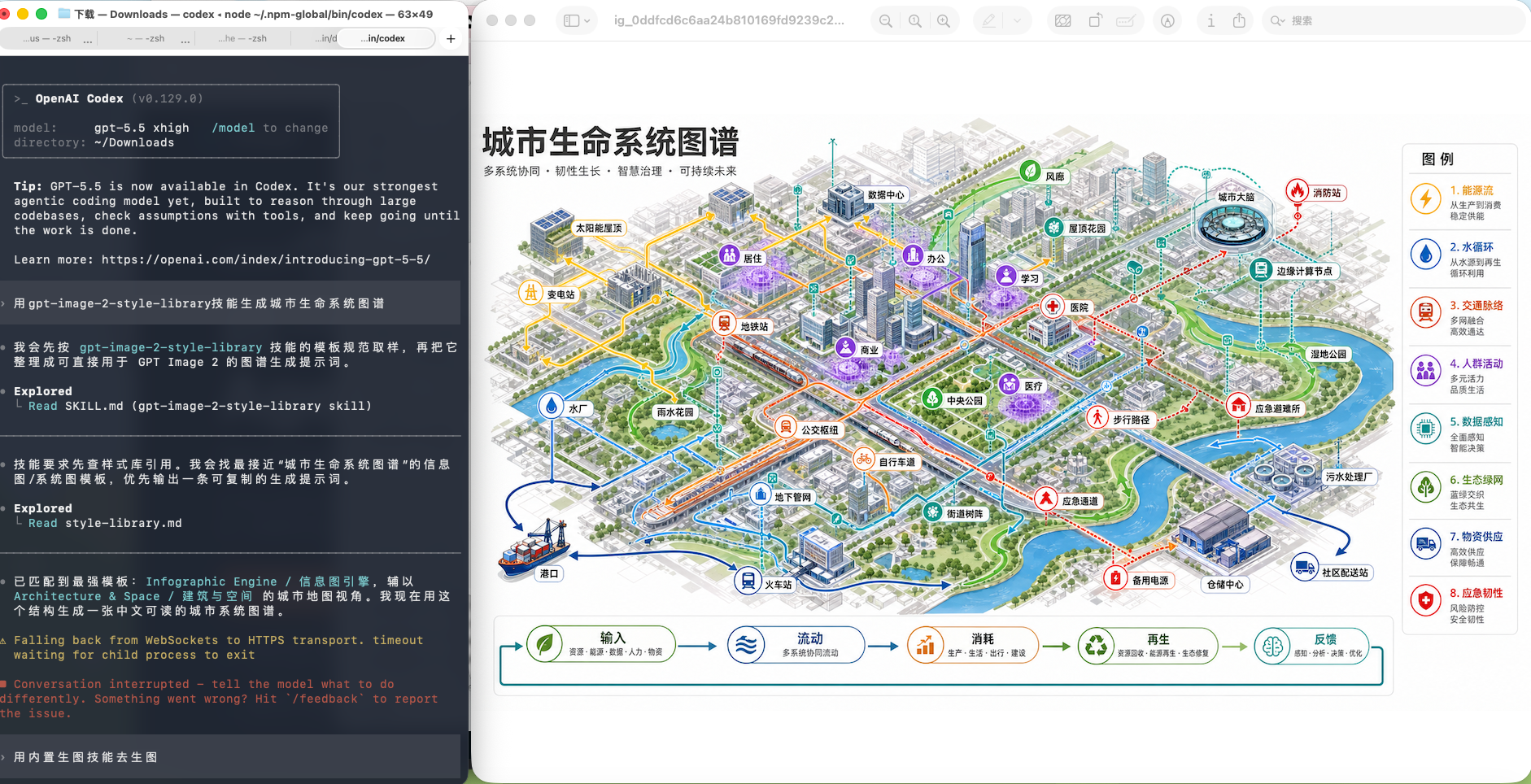
Example request: 用 gpt-image-2-style-library 技能生成城市生命系统图谱
Reference
- Read
references/style-library.mdbefore choosing a template or style. - The reference is generated from
data/style-library.jsonin the repository. - Prefer the reference over memory when template names, categories, covers, or style tags matter.
Workflow
- Detect the user's language and answer in that language.
- Identify the user's target output: product, poster, UI, infographic, brand, photo, illustration, character, scene, history, document, or special task.
- Match the request in this order: template category, visual style tag, scene tag, then nearest example cases.
- If one template is clearly strongest, use it directly. If several are plausible, present 2-3 options with short reasons and ask the user to choose.
- Build the final prompt with these blocks:
- subject and task
- composition and layout
- visual style and materials
- text and label requirements
- aspect ratio and output format
- constraints and negative details
- Include the selected template name and any useful example case IDs.
Output Defaults
- Provide a copyable prompt first.
- Keep constraints concrete: exact text, aspect ratio, readable labels, layout hierarchy, and avoided artifacts.
- For Chinese requests, write the final prompt in Chinese unless the user asks for English.
- For English requests, write the final prompt in English unless the user asks for Chinese.
- When the user asks for multiple concepts, reuse one template and vary subject, composition, palette, and scene.
Maintenance
When the source repository changes, run:
npm run generate:style-skill
To install the skill into the local Codex skill folder, run:
npm run install:skill
Câu hỏi thường gặp
Skill có tự tạo hình ảnh không?
Không. Skill xây dựng prompt. Việc tạo hình ảnh là một bước riêng trong công cụ hình ảnh của bạn.
Nếu nhiều phong cách có thể phù hợp thì sao?
Skill đưa ra hai hoặc ba lựa chọn kèm lý do ngắn, và bạn chọn một.
Các mẫu đến từ đâu?
Chúng đến từ một file tham chiếu được xây dựng từ thư viện phong cách awesome-gpt-image-2.
Chi tiết
Mô tả gốc của tác giả
Choose GPT-Image2 / gpt-image-2 visual styles and industrial prompt templates from the awesome-gpt-image-2 style library. Use when an agent needs to create, rewrite, classify, or improve image-generation prompts with repository-backed templates, categories, style tags, scene tags, pitfalls, and example cases.
Độ phổ biến
- Sao GitHub
- 35k
- Vị trí xếp hạng
- #7588
- Giấy phép
- MIT
- Cập nhật
- 14/10/2026
Bình luận
- …
Skill tương tự
gifgrep
394kCho phép agent của bạn tìm thư viện GIF, xem trước kết quả, tải một GIF, và lấy một khung hình tĩnh hoặc bảng ghép nhiều khung hình.
meme-maker
394kCho phép agent của bạn chọn một mẫu meme, thêm chú thích của riêng bạn và tạo meme dưới dạng ảnh SVG hoặc PNG.
ios-icon-gen
280kGiúp agent tạo biểu tượng cho ứng dụng iOS. Dùng biểu tượng của Apple hoặc từ các nguồn khác để tạo đúng định dạng tệp.