Find the Best Open Source AI Models for Your Own Computer
Skillpedia team · updated 2026-10-16 · 9 min read
Short answer: There isn't a single "best local AI model" for everyone. The ideal choice depends on your computer, the task you want to do, and your patience level. It's like choosing a car: a compact is great for the city, but not for a big family road trip.
Imagine being able to use powerful artificial intelligence on your own computer, without relying on the internet, without paying a monthly fee, and with total privacy. This is possible with local AI models. It sounds like science fiction, but it's real and more accessible than you think. This guide will explain this world to you from scratch.
Table of Contents
- Why Use AI on Your Own PC?
- What Do You Need to Run a Local AI?
- How to Choose the Best Model for You?
- The Step-by-Step to Install and Run
- Table of Popular Models for Beginners
- What Else Can You Do?
- Try These 3 Skills First
- Frequently Asked Questions
- Read More
Why Use AI on Your Own PC?
Think of famous AIs, like ChatGPT. They run on other companies' gigantic servers. A server is a very powerful computer, always connected to the internet, that "serves" information to you. It's like an industrial kitchen that prepares your food.
Using a local AI is different. It's like having your own kitchen at home. You buy the ingredients (the AI model), use your own appliances (your PC), and prepare the meal. The advantages are huge:
- Total Privacy: Your conversations, your documents, your ideas never leave your computer. No one else has access.
- Zero Cost After Installation: You don't pay per question, nor per month. You only spend your PC's electricity.
- Works Without Internet: Need to write a text or summarize a document during a trip? No problem.
- You Control Everything: You can customize the AI your way, without the service owner company changing the rules overnight.
The disadvantage? Your "home kitchen" won't be as powerful as the "industrial kitchen." Local models can be slower and sometimes less accurate than the best paid online models. But for everyday tasks, they are already amazing.
What Do You Need to Run a Local AI?
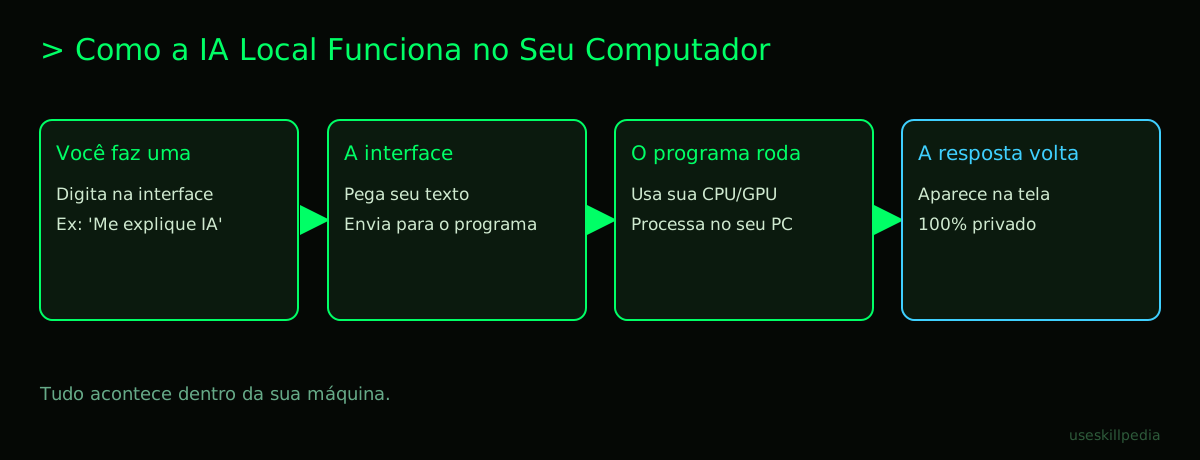
Before you start downloading things, it's good to see if your computer can handle it. Local AI needs three main things:
Hardware (Your PC's Parts):
- RAM (Memory): This is the computer's work desk. The bigger it is, the more things it can process at once. For basic models, 8GB is the minimum. For fancier models, 16GB or more is ideal.
- Processor (CPU) or Graphics Card (GPU): These are the "muscles" that do the calculations. A modern graphics card (like ones from NVIDIA) does this much faster than a common processor. Having a good GPU is the biggest trick for speed.
- Disk Space: The models are large files. Be prepared to use from 4GB to 20GB of space, depending on the model you choose.
Software (The Programs That Make the Magic Happen): You won't talk directly to an AI file. You need an intermediary program, an interface. It's a nice-looking program, with a text box for you to type and a window to see the responses. It's the one that reads the AI model on your disk and makes it work. Popular and easy examples for beginners are Ollama, LM Studio, and GPT4All. They hide the complicated part for you.
The AI Model Itself (The "Brain"): This is the file that contains all the knowledge and the ability to converse. It is downloaded from a repository. A repository is a site or service that stores and distributes these files, like an online library of AI brains. Hugging Face is the most famous repository.
How to Choose the Best Model for You?
Here's the secret: ignore complex rankings for now. As a beginner, your criterion should be: "Does it work well on MY computer for what I want to do?".
Ask yourself these three questions:
What is the main task?
- Chat / Write Texts: Prioritize models that are good in English and are fluent.
- Help with Programming: Choose models specialized in code.
- Understand Documents / Summarize: Prefer models with a large context. Context is the size of the AI's short-term memory. The larger it is, the more text it can read and remember at once.
How Powerful is Your PC?
- Weak PC (old laptop, 8GB RAM): Look for models with "3B", "4B", or "7B" in the name. The "B" stands for billions (of parameters, which is the model's complexity). The smaller the number, the lighter it is.
- Decent PC (16GB RAM, okay graphics card): You can try "7B" or "13B" models.
- Gaming PC (32GB+ RAM, strong graphics card): Then the sky's the limit. You can test "34B" or "70B" models (which are very heavy).
Does it understand English well? Many models are trained mainly in English. Look for models that mention "multilingual" or that have versions with "EN" in the name. Models from Meta (like Llama) often have good English versions.
A good start for an average PC is Llama 3.2 (3B or 8B version) or Mistral 7B. They are balanced models, relatively light, and with decent English support.
The Step-by-Step to Install and Run
Let's do it the easiest way possible, using Ollama as an example. It's free and very simple.
- Download and Install Ollama: Go to the official Ollama website and download the installer for your system (Windows, Mac, or Linux). Install it like any other program.
- Open the Terminal (or Command Prompt): A terminal is a black screen where you type text commands for the computer, instead of clicking icons. It's like giving direct orders to your PC.
- On Windows, search for "Command Prompt" or "PowerShell".
- On Mac, search for "Terminal" in Spotlight.
- Choose and Download Your Model: In the Terminal, type the command to pull the model. For example, to download the Llama 3.2 with 8 billion parameters, type:
ollama run llama3.2The program will download the file (it may take a few minutes, depending on your internet). - Start Chatting: When the download finishes, the AI will already be running! You will see a
>>>prompt. Just start typing your questions in English and press Enter. The answer will appear next. - To exit, type
/byeand press Enter.
That's it! You are now chatting with a 100% local AI. After that, you can use prettier interfaces that connect to Ollama, like Open WebUI or Jan, which look more like ChatGPT.
Table of Popular Models for Beginners
| Model Name (light version) | Approx. Size | Good For... | Notes for Beginners |
|---|---|---|---|
| Llama 3.2 (3B or 8B) | 2GB - 5GB | Texts, conversations, ideas. | Balanced. Decent English. Great starting point. |
| Mistral (7B) | ~4GB | General reasoning, instructions. | Very efficient. Needs multilingual version. |
| Gemma 2 (2B or 9B) | 1.5GB - 6GB | Safety, secure conversations. | Created by Google. Light and to the point. |
| Phi-3 (mini) | ~2GB | VERY weak devices, mobile. | Surprisingly good for its mini size. |
| DeepSeek-Coder (1.3B) | ~1GB | Programming only. | Focused only on helping write code. Specialist. |
What Else Can You Do?
Once you get the hang of it, the world opens up. You can:
- Use Skills: These are "modes" or extensions you add to your AI to give it specific abilities, like analyzing a chart or following a writing style. In the Claude universe, they are standardized.
- Integrate with Other Tools: Using protocols like MCP, your local AI can, for example, read your emails or automatically save notes in an app. MCP is a standard connector, like a universal USB cable that links your AI to other programs.
- Create a Personalized Assistant: You can fine-tune the AI with examples of your writing style or about a subject you know, creating a personal expert.
Try These 3 Skills First
When you're more comfortable, skills add superpowers to your AI. They are like installing a new app on your phone.
- council-multi-model-affaan-m: This skill makes your AI consult other "free" online AI models to check or improve its answer. It's like your local assistant asking for a second opinion from a specialist colleague on the internet, without your private data leaking.
- cost-aware-llm-pipeline-affaan-m: It automatically manages when to use your local AI (for free) and when it's worth paying for a more powerful online model for complex tasks. It thinks about the cost-benefit for you.
- prompt-optimizer-affaan-m: This skill helps you write better questions for the AI. It rephrases what you typed in a way the AI understands perfectly, so you always get the best possible answer.
Frequently Asked Questions
Do I need to be a programmer to use local AI? No! Tools like Ollama and LM Studio were made exactly for people who aren't programmers. It's all point-and-click or very simple commands copied and pasted.
Is it illegal or piracy to download these models? No, as long as you download from official sources (like Hugging Face or the creators' sites). Most are open source, which means "open code": the creators release the model on purpose for the community to use, study, and modify.
Can I use it on my phone? Yes, but the experience is limited. Some apps, like "LLM Bench" for iOS, allow running very small models. For something truly useful, a computer is still necessary.
Will the local AI crash my computer? If you try to run a model that's too big for your PC, it may become extremely slow or run out of memory. That's why it's crucial to start with light models (3B, 7B) and only later test larger models.
Can I make the local AI understand PDFs and images? Yes, but it's not automatic. You need an interface or skill that has that function. Normally, you "send" the PDF file and the interface extracts the text from it to send to the AI to read. For images, you need a model with computer vision (called "multimodal"), which are heavier.
Read More
Want to dive deeper? These guides will help with the next step:
- To understand how to choose models for specific tasks: Best AI Models in 2026: Which to Use for Each Task
- If your focus is programming: Best AI for Programming in 2026
- For text creation: Best AI for Writing Texts
- To explore more skills: search skills
- Understand an important concept: What is MCP (Model Context Protocol): Explained in an Easy Way
Sources
- Anthropic: model overview (accessed 10/16/2026)
- OpenAI Models (accessed 10/16/2026)
- Gemini API Pricing (accessed 10/16/2026)
- Claude Plans and Pricing (accessed 10/16/2026)
Full guide on this topic: Best AI Models in 2026: Which to Use for Every Task