Find the Best AI for Writing: A Simple Guide for Beginners
Skillpedia team · updated 2026-10-16 · 10 min read
Short answer: The best AI for writing depends on your budget and needs. For creative, long-form writing, Claude Opus is excellent. For daily use and a great balance, Claude Sonnet or GPT-6.1 Sol are fantastic choices.
Have you ever been stuck staring at a blank screen? Or spent hours trying to write an email that sounds just right? You're not alone. The good news is that today there are AI assistants that can help. They're like a very well-informed friend who's always willing to give an opinion, suggest ideas, or even write a draft for you.
But with so many names out there—ChatGPT, Claude, Gemini—how do you choose? This article is for you if you've never coded and just want a tool that works. We'll explain everything in simple words and everyday analogies.
Table of Contents
- How Do These AIs Help with Writing?
- The Main Players in the Market
- What Do I Need to Know Before Choosing?
- How Do I Start Using One? Is It Hard?
- Tips for Writing Better with AI
- The Future: Smarter, Connected AIs
How Do These AIs Help with Writing?
Think of AI as a very chatty search engine. Instead of giving you a list of links, it talks with you and builds the answer on the spot.
It can help in several ways:
- Break creative block: Tell it the topic, and it suggests titles, introductions, or key points.
- Rewrite and improve: Paste your text and ask to make it clearer, more formal, or funnier.
- Generate ideas: Ask for "30 Instagram post ideas about travel" and watch the list appear.
- Maintain a consistent tone: You can say: "Write as if you were a patient teacher explaining to high school students." It will try to follow that style.
Analogy: It's like having a ghostwriter always available. You give the main idea and the style, and they draft something for you to review and approve.
The Main Players in the Market
Let's meet the main "competitors." These are services you access via a website or app.
Claude (by Anthropic)
Known for being careful, detailed, and great for long texts. It's like the meticulous researcher of the group. It offers several "models" (which are versions of the AI's brain) with different prices and abilities:
- Claude Opus: The most powerful (and most expensive) version. Ideal for complex projects, books, scripts.
- Claude Sonnet: The perfect balance. Good for almost everything in daily life, at a reasonable price. It's the everyday car of AIs—it does everything well.
- Claude Haiku: The fastest and cheapest. Perfect for simple tasks, like summarizing text or replying to short emails.
ChatGPT (by OpenAI)
The most well-known name. It's versatile and converses very naturally. It can be considered the uninhibited conversationalist. Its latest version, GPT-6.1 Sol, offers near-top-tier quality at a very good price, making it an excellent option.
Gemini (by Google)
Integrated with Google products. It's strong at finding up-to-date information on the internet. Think of it as an assistant who's also great at Google. The Gemini 4 Argon version is the most advanced.
Other Options
There are others, like Grok (from X/Twitter, with a more humorous tone), Mistral, and DeepSeek, which are good alternatives, often with generous free plans.
| Name | Strong Points | Best For... |
|---|---|---|
| Claude Opus | Writing quality, details, long texts | Serious creative projects, books, deep analysis |
| Claude Sonnet | Balance between quality and cost | Daily use, emails, blog posts, ideas |
| GPT-6.1 Sol | Versatility, natural conversation, price | Varied conversations, brainstorming, multiple tasks |
| Gemini 4 Argon | Integration with Google, up-to-date information | Research, texts that need recent data |
What Do I Need to Know Before Choosing?
Choosing the best AI for writing isn't just about which is the "smartest." A few simple concepts make a difference:
1. Tokens: The "Little Words" the AI Understands
A token is a small piece of text. It can be a short word, a syllable, or even a period. The AI counts everything in tokens. Important number: 1 million tokens is roughly equivalent to 555 thousand words. That's a ton of text! Everything you send and the AI replies with consumes tokens. Cheaper models charge less per token.
2. Context Window: The "Short-Term Memory"
This is how much text (in tokens) the AI can remember at once during a conversation. If you write a book and put it in the chat, it will be able to read and talk about it. Today, the main ones have windows of about 1 million tokens, which is more than enough memory.
3. Free vs. Paid Models
Almost all have a free version, but with limits (few questions per hour, less powerful models). Paid plans (for Claude, the Pro plan costs $20/month; for others, check the official page) give access to the best "brains" (models), more usage, and extra features. For serious professional use, the paid plan is usually worth it.
4. Where Does It Run? In the Cloud or on Your Computer?
The vast majority run in the cloud (giant servers on the internet). You just need a browser. But some, like Claude Code, can be installed on your computer for specific tasks (more for programming, but also for writing). This is a more technical option.
Server: A powerful computer, always connected to the internet, that "hosts" a service (like email or AIs). The cloud is a bunch of servers together.
How Do I Start Using One? Is It Hard?
No, it's very easy! You don't need to be technical.
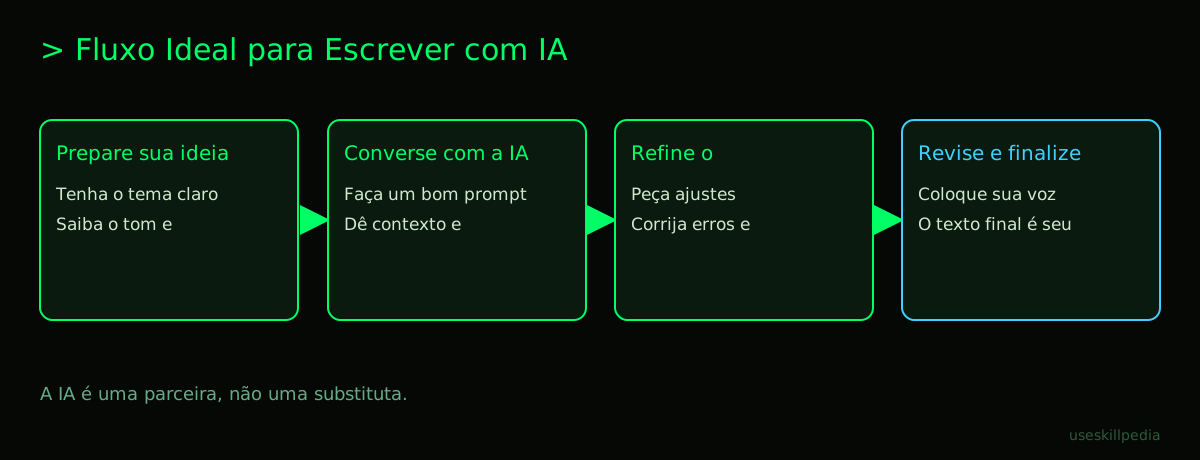
Step 1: Choose one to test. Go to the website for ChatGPT, Claude, or Gemini. Create an account (it's like creating an account on any social network).
Step 2: Start the conversation. In the text box, write exactly what you need. Be clear!
- Bad: "Help me with a text."
- Good: "Write a 3-paragraph introduction for a blog post about gardening tips for beginners. Use a motivating and friendly tone."
Step 3: Refine. Didn't like it? Say so! "Can you make it shorter?" or "Use simpler examples." The AI will adjust.
Analogy: Using an AI for the first time is like talking to a foreigner who speaks your language very well. At first, it feels strange, but you quickly get the hang of making yourself understood.
Tips for Writing Better with AI
The quality of the answer depends a lot on your question (the prompt). Some golden tips:
- Give context: "You are a digital marketing expert. Write an Instagram ad for my new smartphone photography course."
- Be specific: Include details like length ("one paragraph"), tone ("casual"), format ("bullet-point list"), and examples ("in the style of author X").
- Ask for revisions in stages: First, ask only for the structure or main ideas. Then, ask to develop each part.
- Always review: The AI makes mistakes, invents facts ("hallucinates"), and can have a very generic style. Read what it wrote, adjust it, put your voice into it. The final text should be yours.
Repository: In the AI world, it's a folder or location on the internet where files, code, or, in the case of Skills, instructions for the AI are stored. It's like an organized project drawer.
The Future: Smarter, Connected AIs
The next frontier isn't just the AI writing alone, but it acting based on what it writes, using other tools.
- Skills and Connectors: These are "abilities" you can add to the AI. For example, a Skill can teach Claude to always write with your brand's voice. A Connector allows the AI to read your data from Google Calendar or Notion to write a report based on it.
- MCP (Model Context Protocol): Imagine a universal plug standard, like USB-C, but for AIs. With it, your AI assistant (Claude or ChatGPT) can easily connect to other programs on your computer, like spreadsheets, design editors, or databases, to fetch information and act. This goes far beyond just writing text.
To understand which AI "brains" (models) are better for each type of writing task, check out our detailed guide on the Best AI Models in 2026: Which to Use for Each Task.
We Recommend Trying These 3 Skills First
Skills are like apps or plugins you install in your AI to give it new, specific abilities.
- brand-voice-affaan-m: Teaches the AI to always write in your brand's tone. It's like giving it your company's style guide, so every text sounds consistent, whether it's an email or a post.
- council-multi-model-affaan-m: Allows you to consult multiple AI models at once (like Claude, GPT, and Gemini) in a single conversation. It's like having an expert panel meeting to debate your idea before writing.
- cost-aware-llm-pipeline-affaan-m: Automatically manages the cost of using AI. It chooses the cheapest model that solves your task, optimizing your budget. It's a financial advisor for your AI spending.
Frequently Asked Questions
Do I need to pay to get a good AI for writing? Not necessarily. The free plans for ChatGPT, Claude, and Gemini are great for getting started and for personal use. For intensive professional use, paid plans offer more quality and fewer limits.
Can the AI plagiarize text from the internet? It generates new text, but it's trained on internet content. It can accidentally produce passages very similar to something that exists. Always use a plagiarism checker for important texts.
Are my texts sent to the AI private? Generally yes, but read the terms of service. Serious companies like Anthropic (Claude) and OpenAI (ChatGPT) do not use your conversations to train public models on their paid plans. When in doubt, don't send secret or sensitive information.
What's the difference between using the website and the app? Almost none. The app for your phone or computer is just a more convenient and integrated way to access the same service. For long writing tasks, the computer is more comfortable.
Can I trust 100% of what the AI writes? Never. The AI "hallucinates" (invents facts, cites non-existent sources) and can make mistakes. Use it as a brilliant assistant that needs supervision. You are the editor-in-chief.
Read Also
- Want to use AI for another purpose? See the Best AI for Programming in 2026.
- Prefer something open-source that runs on your PC? Learn about the Best Open-Source and Local AI Model.
- Confused about Claude's models? This guide explains: Which Claude Model to Use: Haiku, Sonnet, or Opus.
- Learn about the options that don't cost anything in Best Free AIs.
- Understand what Claude Code is: What It Is, How to Download, Install, and How Much It Costs (2026 Guide).
- To dive deeper into connecting AIs to other tools, read What is MCP (Model Context Protocol): Explained in an Easy Way.
- Discover how to create an autonomous assistant in AI Agent: What It Is, How It Works, and How to Create Yours (Without Coding).
- Want to explore more skills? search skills.
Sources
- Anthropic: Model Overview (accessed 10/16/2026)
- OpenAI Models (accessed 10/16/2026)
- Gemini API Pricing (accessed 10/16/2026)
- Claude Plans and Pricing (accessed 10/16/2026)
Full guide on this topic: Best AI Models in 2026: Which to Use for Every Task