What Are AI Agents? A Beginner's Guide to Creating Your Own
Skillpedia team · updated 2026-10-16 · 14 min read
Short answer: An AI agent is an intelligent assistant that, instead of just answering a question, receives a goal (like "organize my schedule for the week") and acts on its own to achieve it. It plans the steps, uses tools (like searching the web or accessing your email), and executes tasks with little to no supervision from you.
Imagine having a personal assistant that actually does things for you. It's not a chat robot that only converses, nor a rigid program that repeats the same action. It's a digital ally that understands a complex goal, thinks of the best way to achieve it, and takes action using the right tools. This is the world of AI agents. They are revolutionizing how we interact with technology, bringing truly intelligent automation to daily life. In this guide, you'll understand what an AI agent is, how it works, and best of all: how to create your own, even without knowing a single line of code.
Table of Contents
- What is an AI Agent?
- Chatbot, Automation, or Agent? The Key Difference
- The Core Components of an AI Agent
- Examples of Agents in Daily Life
- What Are the Types of Agents?
- How to Create Your Own Agent (No Coding!)
- Sub-Agents: When One Agent Coordinates Others
- Risks and Limits: What to Watch For
- We Recommend Trying These 3 Skills First
- Frequently Asked Questions
What is an AI Agent?
An AI agent is an artificial intelligence system designed to receive a high-level goal and work autonomously to achieve it. Instead of you giving detailed commands ("take this file, open it in this program, do this"), you give a mission ("generate a sales report for the last quarter").
The agent then:
- Interprets your request.
- Plans a sequence of logical steps.
- Chooses and uses the necessary tools (like fetching data from the internet, analyzing a file you sent, or connecting to an app).
- Executes the steps, making decisions along the way.
- Delivers the final result.
It's like giving a task to an exceptionally fast human who never sleeps. The essence of an AI agent lies in this ability to act on its own within a digital environment.
Chatbot, Automation, or Agent? The Key Difference
It might all seem the same, but there's a clear evolution. Let's compare:
| Characteristic | Chatbot (Ex.: Common Assistant) | Automation (Ex.: IFTTT/Zapier) | AI Agent (Ex.: Advanced Personal Assistant) |
|---|---|---|---|
| Main Function | Answer questions, converse. | Execute a fixed sequence of actions A -> B. | Fulfill a complex goal autonomously. |
| How It Works | Reacts to each message. | Follows pre-programmed rules ("if this, then that"). | Plans the steps and decides which tools to use. |
| Flexibility | Low. Only responds within its training. | Medium. Only does the flow you configured. | High. Handles new situations and adjusts the plan. |
| Decision Making | Almost none. | None. It's deterministic. | High. Decides the next step based on context. |
| Practical Example | "What's the weather forecast?" | "Save all email attachments to the cloud." | "Analyze my emails from this week, identify the most urgent tasks, and schedule time in my calendar to resolve them." |
In short: a chatbot talks, an automation repeats, and an AI agent acts and solves.
The Core Components of an AI Agent
To understand how to create one, you need to know its basic components. Think of an agent as a person:
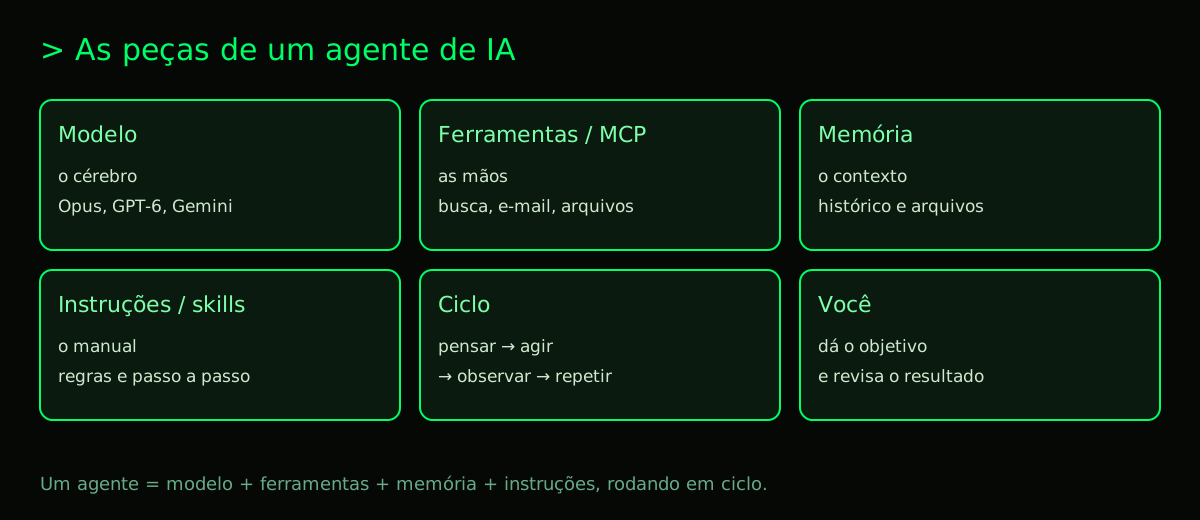
The Model (The Brain): This is the intelligence itself, like Claude Opus 5.5, GPT-6.1 Sol, or Gemini 4 Argon. It processes language, understands the goal, plans, and reasons. The choice of model directly affects the cost and capability of your AI agent. More advanced models, like Claude Fable 5.1, are specialized for long and complex tasks.
Tools / MCP (The Hands): These are the agent's "arms," allowing it to interact with the world. It's not stuck with just its internal knowledge. Tools can be: searching the web, performing calculations, reading and writing files, accessing APIs (like Gmail, Google Calendar, Notion). The MCP (Model Context Protocol) is a standard that works like a "universal connector" (a USB-C port) to plug these tools into the agent in a standardized way. To learn more about this fundamental technology, check out our guide: What is MCP? The Simple Guide to the Model Context Protocol.
Memory / Context (The Experience): This is the agent's ability to remember what has been said and done in that session. The "context window" (today with 1 million tokens or more in the best models) is the conversation's "RAM." Everything in it – the history, files, tool results – is available for the agent to make decisions. Be careful: everything counts towards tokens, and they "run out" quickly. Understand this concept better in: What Are Tokens in AI and Why Do They Run Out So Fast?.
Instructions / Skills (The Operating Manual): This is the set of rules, personality, and specific capabilities you define for the agent. They are system prompts that say "you are a marketing expert, be concise, always verify facts." Skills are ready-made packages of instructions and tools that teach new capabilities to the agent, like skill-creator-anthropics, which helps create other skills.
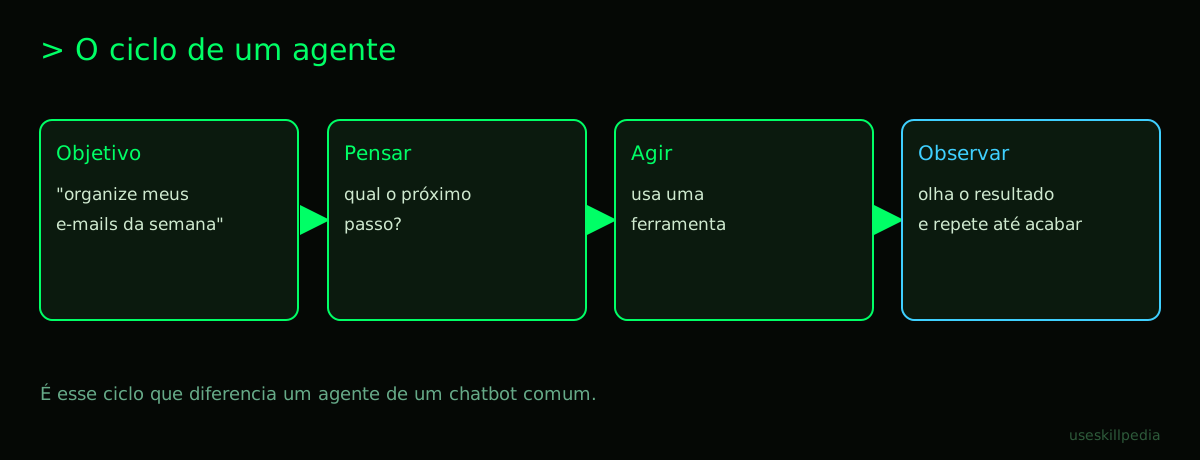
The Think-Act-Observe Cycle (The Process): This is the heart of autonomy. The agent operates in a loop:
- Think: Analyzes the current goal and context, and plans the next step.
- Act: Chooses and executes a tool (or generates a response for the user).
- Observe: Analyzes the tool's result (e.g., the data from a search) and updates the context.
- Repeats until the goal is completed or can no longer be advanced.
Examples of Agents in Daily Life
The theory is nice, but where does an AI agent appear in practice?
WhatsApp Customer Service: An agent can be configured to manage a business number on WhatsApp. Instead of just replying with saved messages, it can: understand the customer's question, consult a product database, check stock in a spreadsheet, calculate delivery time via a postal service API, and even generate a payment link. All in a single fluid conversation. See a full tutorial at: WhatsApp AI Agent: A Practical Guide for Beginners.
Smart Research: You ask: "Find the 10 most relevant academic articles on solar energy published in 2025 and make a summary of each, highlighting the innovations." The agent plans: 1) Access academic databases, 2) Filter by date and relevance, 3) Download or extract the text of the articles, 4) Read and summarize each one, 5) Synthesize common innovation points.
Programming with Claude Code: Claude Code is a terminal environment where Claude acts as an AI agent for programming. You say "create a simple website with a contact page that sends emails." The agent (Claude) plans: create the HTML/CSS file structure, write the form code, configure a backend API endpoint (if needed), and even test the functionality. It uses system tools (text editor, terminal, git) to execute this.
Email Organizer: The mission: "Scan my inbox, categorize emails between 'urgent', 'to read later', and 'promotional', and create a to-do list with any deadlines you find in the email bodies." The agent connects to your account (via MCP or a connector), reads, classifies, extracts information, and generates an organized report.
What Are the Types of Agents?
Agents can be classified by their main function. Knowing the types helps define which one you need to create. For a deeper analysis, we have a dedicated post: AI Agent Types Explained with Simple Examples for Beginners.
- Action Agents: Focused on executing tasks in the digital world. Ex.: scheduling meetings, shopping online, posting on social media.
- Research and Analysis Agents: Specialized in searching, filtering, cross-referencing, and summarizing information from multiple sources.
- Creativity Agents: Assist in generating textual, visual, or audio content, following complex briefs.
- Programming Agents (Code Agents): Like Claude Code, which writes, debugs, tests, and documents code.
- Support and Sales Agents: Serve customers, answer questions, qualify leads, and guide the user through a process.
- Workflow Automation Agents: Orchestrate tasks between different applications (ex.: when an order arrives in the system, notifies finance and updates inventory).
How to Create Your Own Agent (No Coding!)
Now, the most awaited part. You don't need to be a software engineer to have your own AI agent. There are accessible paths:
Option 1: Using Platforms with a Visual Interface (No-Code/Low-Code)
- n8n: A powerful automation tool that now integrates AI nodes. You can build flows (workflows) where an AI model like Claude makes decisions in the middle of the process. It's like creating automation, but with an intelligent brain that can analyze data and decide the next path. See how at: Build Your Own AI Agent with n8n: A Beginner's Guide.
- Connectors in Claude.ai: In the web version of Claude (Claude.ai), the "Connectors" tab allows you to add access to tools like Google Drive, Notion, and GitHub visually, configuring a basic agent that acts in those apps. It's available even on the Free plan.
Option 2: Using Instructions and Advanced Skills (In the terminal, but without writing code)
This is one of the most powerful ways for non-technical users who aren't afraid of a simple terminal. Use Claude Code with ready-made Skills.
- Install Claude Code: It's included in Claude's paid plans (Pro, Max, Team, and Enterprise). Open your terminal and run one of the installation commands, like via Homebrew (
brew install --cask claude-code) or Winget for Windows (winget install Anthropic.ClaudeCode). The complete guide is here: Claude Code: What It Is, How to Download, Install, and Cost (2026 Guide). - Navigate to a Folder: In the terminal, go to the folder where you want your agent to work (ex.:
cd ~/MyProjects). - Add a Skill: Skills are "superpowers" you install. Just copy the skill folder to
~/.claude/skills/(applies to all projects) or to.claude/skills/inside the project. You can find many in the official repository or in directories like buscar skills. - Activate the Agent: Just type
claudein the terminal and make your goal request. With the right skills, it will already have extra tools available.
For example, with the skill agent-harness-construction-affaan-m, you can get assistance structuring agent projects. The agent-eval-affaan-m skill helps evaluate your agent's performance.
Option 3: Using Projects and Instructions in Claude or ChatGPT
- In Claude.ai (with Projects) or ChatGPT (with custom instructions or GPTs), you can write detailed instructions, defining the agent's role, rules, and limitations. You can even instruct it to use certain thinking formats (ex.: "Always think step-by-step before acting"). We have a specific guide for Claude: How to Build AI Agents with Claude: A Simple Guide for Beginners.
- Look for "projects" or "GPTs" shared by the community that come pre-configured for a function (ex.: "Data Analyst", "Creative Text Reviewer"). You can duplicate and adapt them to your needs.
What if I want to program?
For those with technical knowledge, creating an AI agent opens a range of possibilities with libraries like LangChain, LlamaIndex, or the direct SDKs from OpenAI, Anthropic, and Google. You have total control over the architecture, flow, and integration. A good starting point is our guide: How to Build AI Agents from Scratch (No Coding Required).
Sub-Agents: When One Agent Coordinates Others
For very complex goals, a single agent can get overwhelmed. The solution is to use sub-agents. A "manager" agent receives the main goal, breaks it into specialized sub-tasks, and delegates them to other agents (the sub-agents).
Example: The goal "Create a marketing plan for a new fitness app." The main agent can create sub-agents for:
- Research competitors.
- Analyze the target audience on social media.
- Draft a content proposal.
- Make an estimated budget.
The main agent coordinates the results and synthesizes the final plan. This architecture allows handling huge tasks more efficiently and organized. To see this idea in action, check out: Subagentes no Claude Code.
Risks and Limits: What to Watch For
Agents are powerful, but they are not infallible or without risks. It's crucial to understand their limits:
- Hallucinations and Errors: The model can make factual or logical errors, especially in very complex tasks. Human review is essential for critical results.
- Cost: Running many steps with large models (like Opus or GPT-6 Astra) can generate significant token costs. Plan usage and monitor. For simple tasks, cheaper models like Claude Haiku 5.5 may be sufficient.
- Permissions and Security: By giving an agent access to your tools (email, calendar, databases), you are granting powerful permissions. Use with care, preferably in controlled environments or with dedicated service accounts.
- Edge Case Failures: The agent may crash or get stuck in a loop if it encounters a very unusual situation it wasn't prepared for.
- Connectivity Dependence: Tools that depend on third-party APIs may fail if the service is offline.
- Technical Limits: Context windows, although large, have an end. Very long sessions may need to be restarted. The maximum output is also limited (ex.: 128k tokens in Claude).
Always start with small, well-defined goals, increasing complexity gradually as you gain confidence in the agent.
We Recommend Trying These 3 Skills First
To start your practical journey with agents, install these skills in Claude Code. They are fundamental for creating and managing your own agents:
- agent-harness-construction-affaan-m: It's like a toolkit for building your agent's "structure" (harness). Helps organize components professionally.
- agent-eval-affaan-m: This skill teaches Claude to evaluate the performance of other agents. It's essential for testing and improving the agents you create.
- skill-creator-anthropics: The skill to create skills. With it, you can guide Claude to generate new custom skills for your specific needs, packaging instructions and tools.
Want to explore more? Browse the complete skill directory at: buscar skills.
Frequently Asked Questions
Do I need to pay to create an AI agent? Not necessarily. You can start with the Claude.ai Free plan and use Connectors, or use free models on other platforms. For more advanced features, like Claude Code, a paid plan is required (Claude Pro, starting at $20/month). We have tips for experimenting in: Free AI Agents: The Best Options to Get Started.
What is the best AI model for my agent? It depends on the task. For complex reasoning and planning, models like Claude Opus 5.5 or GPT-6.1 Sol are excellent. For fast and cheap tasks, Claude Haiku 5.5 or GPT-6 Luna. For a detailed analysis, see our comparison: Best AI Models in 2026: Which to Use for Every Task.
What is a Skill and how is it different from a Tool (MCP)? A Skill is a package that usually contains instructions (the "how" the agent should behave) and can reference tools. A Tool (usually via MCP) is a specific action capability (search the web, access an API). The Skill uses the tools to fulfill its role. Learn more about skills: Claude Skills: What They Are, How to Install, and Best Ones to Try.
Can my agent act on its own 24/7? Theoretically yes, if it's running on a server or computer that's always on and with an automated flow (like in n8n). However, agents in interactive chats (like Claude Code) only act while the session is active.
Is it hard to install Claude Code?
No. The process is well-guided and exists for all major operating systems (macOS, Windows, Linux). Just copy and paste the correct command into your terminal. The claude doctor command helps diagnose any installation issues.
Can an agent replace an employee? Not completely and immediately. An AI agent is an assistant and a task automator. It can replace tasks that are repetitive, analytical, or execution-based, freeing the human for activities that require creativity, strategy, and genuine empathy.
Can I create an agent that works on WhatsApp and email at the same time? Yes, it's possible. You would need to build a central agent (or use a platform like n8n) that connects to the WhatsApp Business and email APIs (like Gmail), processing messages from both channels and acting according to common rules. This type of integration is already a reality.
Read Also
- How to Build AI Agents from Scratch (No Coding Required)
- Claude Code: What It Is, How to Download, Install, and Cost (2026 Guide)
- What is MCP? The Simple Guide to the Model Context Protocol
- Claude Skills: What They Are, How to Install, and Best Ones to Try
- WhatsApp AI Agent: A Practical Guide for Beginners
- Build Your Own AI Agent with n8n: A Beginner's Guide
Sources
- O que é o Model Context Protocol (accessed on 10/16/2026)
- Claude Code: instalação (accessed on 10/16/2026)
- Modelos da OpenAI (accessed on 10/16/2026)
- Planos e preços do Claude (accessed on 10/16/2026)
- Preços da API da Anthropic (accessed on 10/16/2026)