Claude Skills: What They Are, How to Install, and Best Ones to Try
Skillpedia team · updated 2026-10-16 · 13 min read
Short answer: A Claude skill is a package of instructions that teaches Claude how to perform a specific task the way you need it done, like creating professional slides or reading PDFs. You install it once, and Claude automatically uses that knowledge when the task comes up. It's the secret to moving beyond generic results and getting well-done, personalized work.
Have you ever asked an AI assistant to do something and the result was that famous "just okay"? A boring slide, a basic chart, or a website that looks like a template? The solution is called Claude skills. In this complete guide, we'll explain what a skill is, how it works, where to install it, and most importantly, which are the best ones for you to try today to elevate your work with AI.
Table of Contents
- What is a Claude Skill?
- Why Use a Claude Skill?
- How Does a Claude Skill Work Under the Hood?
- Skills in Claude, Claude Code, Cursor, and Codex
- Real-World Examples by Profession
- Where to Find Claude Skills
- How to Install a Claude Skill (Step-by-Step)
- Common Mistakes When Using Skills
- We Recommend Trying These 3 Skills First
- Skill, MCP, Plugin, and Prompt: What's the Difference?
- How to Create Your Own Claude Skill
- Security: Precautions When Using Skills
- Frequently Asked Questions
- Read More
What is a Claude Skill?
Imagine Claude is a super-intelligent employee who has never worked in your field. You could explain your entire work process for every new project, or you could simply give them a company manual. A Claude skill is exactly that: a reusable manual that teaches Claude how to do a specific task, your way.
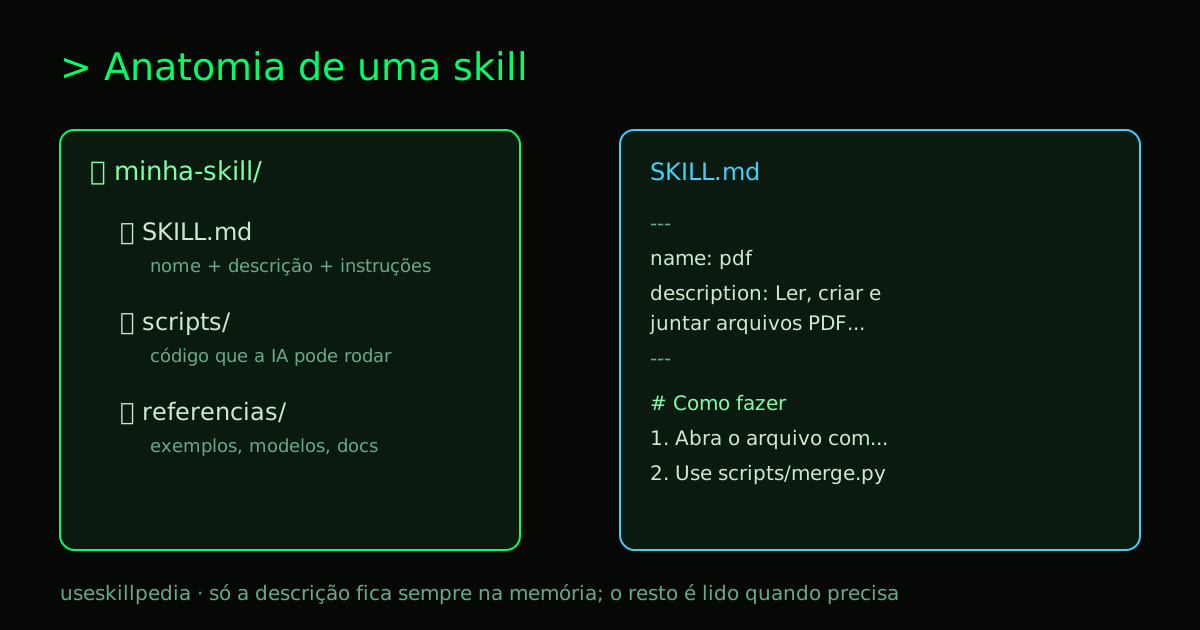
In practice, a skill is a folder that contains:
- A
SKILL.mdfile: The heart of the skill. It's a text file with the name, a short description, and the detailed instructions for the task. - Scripts (optional): Small programs Claude can run to perform more complex actions.
- Reference materials (optional): Templates, code examples, images, or any file that helps Claude do a better job.
The format was created by Anthropic and became an open standard called Agent Skills. This means a Claude skill made to this standard can work not only in Claude but also in other tools that have adopted the same format, like Cursor, Codex, and Gemini CLI.
Why Use a Claude Skill?
AI models are brilliant, but generic. They know a little about everything, but they don't know how you want things done. Without a skill, you face three problems:
- Repetition: You need to give the same instructions every time ("use our font, follow the company template, don't use that color").
- Generic results: The AI delivers something that works, but without the personalization or quality standard you're looking for.
- Failures on technical tasks: Asking it to edit a complex spreadsheet might result in broken formulas because the AI doesn't know the correct approach.
The Claude skill solves all of this. It encapsulates your knowledge, your preferences, and best practices into a package that Claude automatically accesses when needed.
How Does a Claude Skill Work Under the Hood?
The beauty of the skill system is its efficiency. Claude doesn't load all the instructions from all skills all the time, which would consume many tokens (the unit of text processing for AI) and make responses slower and more expensive.
The process, called progressive loading, works in layers:
- Always in memory: Only the name and short description (1-2 lines) of each installed Claude skill.
- When the task matches: You make a request. Claude analyzes the skill descriptions. If one seems suitable (e.g., you ask to "create slides"), it opens and reads the full
SKILL.mdfile for that specific skill. - Only if needed: For very complex tasks, Claude can then access the scripts or reference files inside the skill folder.
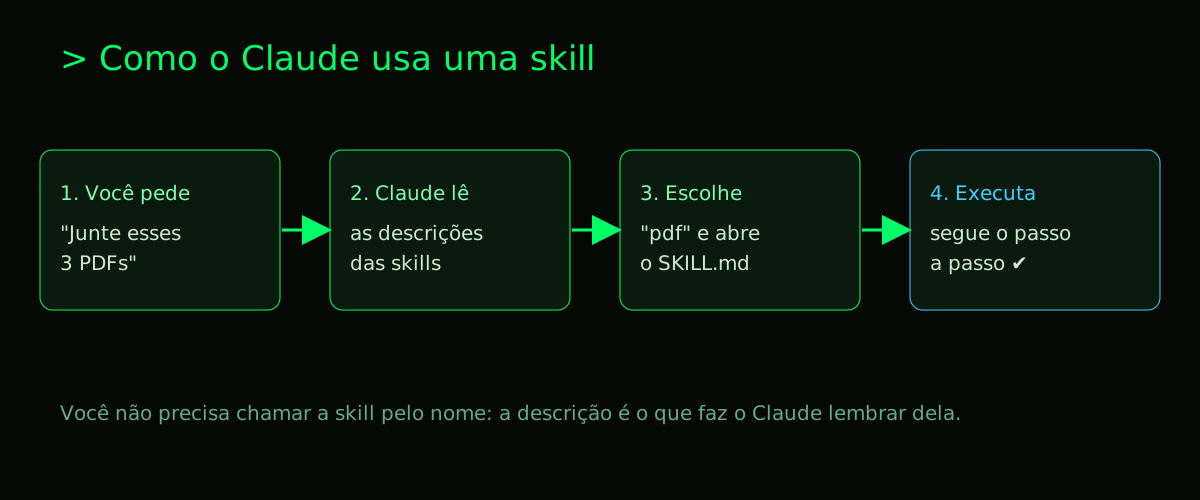
This means you can have dozens of skills installed without hurting performance. And the best part: you don't need to memorize or call the skill by name. Just ask for the task naturally.
Skills in Claude, Claude Code, Cursor, and Codex
Since the Agent Skills format is open, the same skill can be used in different tools. The only thing that changes is the folder location on your computer. The table below summarizes:
| Tool | Where the skills folder is (for all projects) | Where the skills folder is (for a specific project) |
|---|---|---|
| Claude Code | ~/.claude/skills/ |
./.claude/skills/ (inside your project folder) |
| Cursor, Codex, Gemini CLI | Each tool has its own folder; see its documentation or the installation tab on the skill's Skillpedia page | same |
| Claude.ai (website/app) | Doesn't use folders. Skills are loaded via the interface by uploading a .zip file. |
This offers great flexibility. You can have global skills (like the PDF one) available for all your projects, and specific skills (like a custom coding style) only in one project.
Real-World Examples by Profession
The true power of a Claude skill shows when it solves everyday problems. See how different professionals can use them:
- Designer: Instead of asking for a "nice website" and getting a generic template, a designer uses the frontend design skill. It instructs Claude to create site layouts and screens with real visual sense, avoiding generic templates and using real HTML/CSS, speeding up prototyping.
- Marketing/Communications: To quickly create pitch presentations or annual reports, the PPTX skill is essential. It teaches Claude to structure slides with title, content, and call-to-action, apply color palettes, and even format charts in a standardized way.
- Developer/Programmer: A dev needing to integrate an API can use a skill that provides specific examples of HTTP calls, error handling, and authentication patterns their company uses, avoiding "internet code" that might not be secure.
- Financial Analyst: Working with data becomes more reliable with the XLSX skill. It instructs Claude to manipulate spreadsheets without corrupting complex formulas, create standard charts for reports, and format numbers and dates in the style required by the department.
- Student/Researcher: To organize reading several articles, the PDF skill is a lifesaver. It allows extracting passages, summarizing chapters, and even creating study cards with citations and references in the correct academic format (like APA or MLA).
Where to Find Claude Skills
There are two main places to discover reliable and useful skills:
- Anthropic's Official Repository: The Anthropic GitHub (
github.com/anthropics/skills) is the primary source. There you'll find official skills maintained by the Claude team, like the PDF, XLSX, and design ones. It's the best place to start and for basic, robust skills. - Skillpedia: Our site, Skillpedia, functions as a catalog and search engine for skills. We gather and organize skills from various sources, including official ones and those created by the community. It's the ideal place to explore by category (design, productivity, code) and find the perfect skill for your need, like the video creation with Remotion skill or the brand guidelines skill.
How to Install a Claude Skill (Step-by-Step)
The installation process varies a bit depending on where you use Claude.
On Claude.ai (website or desktop app)
- Go to Settings (gear icon) and then the Capabilities tab.
- Make sure the "code execution" option is enabled. Many skills need this.
- Look for the Skills section. There you'll see official skills ready to activate (PDF, Excel, etc.).
- To install a custom skill (like one you downloaded), look for the "Upload skill" or "Add skill" option and upload the
.zipfile containing the skill folder.
Menu names change with Claude updates. If you can't find the option, search for "Skills" in the help center.
In Claude Code (via terminal)
This is the most powerful and flexible way, especially for developers.
- Find the skill: Choose a skill from the official repository or Skillpedia.
- Put it in the right folder: Decide if you want the skill for all projects (user folder) or just for one (project folder).
# Example: Install the official Frontend Design skill for ALL projects git clone https://github.com/anthropics/skills.git cp -r skills/skills/frontend-design ~/.claude/skills/ - Done! The next time you start Claude Code (
claudein the terminal inside your project), it will already be aware of the new skill.
For a more detailed guide on Claude Code, check out our pillar post: Claude Code: What It Is, How to Download, Install, and Pricing (2026 Guide). For details on installation via GitHub, see How to Install Skills from GitHub.
Common Mistakes When Using Skills
- Installing too many skills at once: This can cause similar descriptions to confuse Claude when choosing which skill to use. Start with the essentials.
- Bad skill descriptions: If the description in
SKILL.mdis vague ("helps with design"), Claude won't know when to use it. A good description is specific ("Creates wireframes and UI components in HTML/CSS following modern design principles"). - Forgetting to restart/reconnect: In Claude Code, sometimes you need to restart the session (
claude) for a newly installed skill to be recognized. - Trying to use skills without the right plan: Remember that Claude Code and its skills are only available on Claude's paid plans (Pro, Max, Team, Enterprise), not the Free plan. On the website, basic skills are available on all plans. Confirm your plan at
claude.com/pricing.
We Recommend Trying These 3 Skills First
To see the power of a Claude skill in action quickly, start with these three, which are official and solve very common needs:
- Frontend Design Skill: Teaches Claude to create website layouts and screens with good visual sense, avoiding generic templates and using real HTML/CSS.
- PPTX Skill: Turns Claude into a PowerPoint assistant, capable of creating complete presentations with well-structured and visually organized slides from a simple outline you provide.
- PDF Skill: Allows Claude to read, extract information, summarize, and even manipulate pages of PDF files, making analysis of long documents much faster.
Skill, MCP, Plugin, and Prompt: What's the Difference?
These terms can be confusing. The table below demystifies each one:
| Concept | What it is | Analogy | Practical Example |
|---|---|---|---|
| Prompt | The instruction you type for the AI. | Asking a question to an expert. | "Summarize this article in 3 paragraphs." |
| Claude Skill | A reusable manual that teaches how to do a task. | Giving a procedures guide to the new employee. | The Frontend Design skill teaches Claude to create UI. |
| MCP (Model Context Protocol) | An open standard that connects the AI to external data and tools. | A USB-C cable that connects your laptop to a monitor or external hard drive. | An MCP connector that gives Claude access to your files on Google Drive. |
| Plugin | A larger package that can contain Skills, MCPs, and other configurations. | A complete "toolkit" for a profession. | A "Designer" plugin with UI skills, color skills, and an MCP for Figma. |
In short: MCP provides access to data, and the Claude skill provides the knowledge of how to use it well. They are complementary. For a deeper explanation, read our support post: Skills vs MCP.
How to Create Your Own Claude Skill
Creating a skill is simpler than it seems. The essence is in the SKILL.md file. See a minimal example:
---
name: meeting-minutes
description: Generates professional meeting minutes from meeting transcripts, listing decisions, responsible parties, and deadlines in a table.
---

# Instructions for Generating Minutes
1.  Extract participant names from the provided transcript.
2.  Identify and list all decisions made.
3.  For each decision, create a row in a table with the columns: Task | Responsible | Deadline (MM/DD/YYYY).
4.  Add a final section with "Topics for Next Meeting".
Tips for a good skill:
- Focus on the description: Be clear about what the skill does and when to use it.
- Step-by-step instructions: Claude responds better to numbered, direct instructions.
- Start simple: A skill that does one thing well is better than a complex one that fails.
The easiest way is to use the Skill Creator skill itself. Just chat with Claude and say: "Create a skill that does [X]". It will generate the SKILL.md for you. For a complete tutorial, we have a dedicated post: How to Create a Skill for Claude.
Security: Precautions When Using Skills
Skills can contain scripts that run in your environment. Therefore, some precautions are important:
- Trusted Source: Prefer skills from Anthropic's official repository or reviewed marketplaces, like the categorization we do on Skillpedia.
- Read the SKILL.md: It's a simple text file. On each skill's page here on the site, you can view all its content before downloading. Understand what the skill will do.
- Be Careful with Credentials: Be wary of skills that ask you to insert passwords, API keys, or other sensitive data directly into the instructions. The secure method for this is to use Connectors (MCPs).
Frequently Asked Questions
Do I need to pay to use Claude skills? No, the vast majority of skills are free and open source. What you need is access to a tool that supports the format, like Claude Code (included in Claude's paid plans) or the Claude.ai website.
Does a Claude skill work on Claude's free plan? The basic skills (like PDF and Excel) are available on the Claude.ai website for all plans, including Free. However, to use Claude Code (where skill installation and management is more advanced), you need a paid plan (Pro, Max, etc.).
Do skills consume a lot of tokens and make responses more expensive? They consume very little. Only the name and short description (a few tokens) are always in memory. The full instructions are only loaded when the skill is activated for a specific task. The system is designed to be efficient.
Can I use the same skill in Claude Code and on the Claude.ai website?
Yes, but installation is done independently. The skill itself (the folder with SKILL.md) is the same. In Claude Code you put it in a folder, on the website you upload it as a .zip.
What is the Agent Skills standard?
It's the open standard (agentskills.io) that defines the structure of a skill (with SKILL.md). It was created by Anthropic so any AI tool (not just Claude) could use the same format. That's why a Claude skill can also work in Cursor, for example. Learn more at Agent Skills: The Open Standard.
How many skills can I have installed at the same time? There's no strict technical limit, but we recommend having only the skills you actually use. Many skills with very similar descriptions can make Claude's automatic choice more difficult.
Are Anthropic's official skills updated automatically?
In Claude Code, if you installed the skills by cloning the Git repository, you can update them with git pull. On the Claude.ai website, official skills are updated by the system itself. Manually installed skills (zip or folder) do not update on their own.
Read More
- Skills vs MCP: What's the Difference and When to Use Each
- How to Create a Skill for Claude
- Best Skills for Claude Code in 2026
- Frontend Design Skill: How to Use and Examples
- What is MCP (Model Context Protocol): Explained the Easy Way
- AI Agent: What It Is, How It Works, and How to Create Yours (Without Coding)
Sources
- Anthropic's official skills repository (accessed 10/16/2026)
- Agent Skills open standard (accessed 10/16/2026)
- Claude Code: installation (accessed 10/16/2026)
- Claude plans and pricing (accessed 10/16/2026)
- Anthropic API pricing (accessed 10/16/2026)