Skills vs MCP: What's the Difference and When to Use Each
Skillpedia team · updated 2026-10-16 · 11 min read
Short answer: Skills are like "shortcuts" for tasks you teach Claude. MCP (Model Context Protocol) are "connections" that let Claude access other programs, like your calendar or database. Use a skill to automate a process. Use MCP when you need the AI to interact with an external app.
If you're starting to use Claude Code or Claude in your browser, you've probably seen these two words. They might seem complicated, but the idea is simple. I'll explain it in a very easy way, like we're having a coffee.
Think of it this way: you have a smart assistant (Claude). This assistant can learn two things:
- New tricks (Skills).
- How to talk to your other apps (MCP).
In this article, you'll understand exactly what each one is, what they're for, and most importantly, when to use one or the other.
Table of Contents
- What is a Skill? (Your "Smart Shortcut")
- What is MCP? (The AI's "Universal Plug")
- Diagram: Skill vs MCP Side by Side
- Quick Table: Direct Comparison
- When to Use a Skill? When to Use MCP?
- How to Start Using Each?
- We Recommend Trying These 3 Skills First
- Frequently Asked Questions
- Read More
What is a Skill? (Your "Smart Shortcut")
A skill is a set of instructions you give Claude so it can perform a specific task the way you like.
Everyday Analogy: Imagine you want a friend to bake a cake. Instead of explaining the recipe every time, you write it down on a piece of paper: "My Favorite Cake Recipe." On that paper, you put the ingredients, the step-by-step instructions, and even a secret (use butter, not margarine!). Next time, just hand them the paper and say: "Make my favorite cake." The skill is that piece of paper.
In Claude's world, that "paper" is a file (called SKILL.md) inside a folder. In that file, you write:
- The skill's name (e.g., "Meeting Organizer").
- What it does (e.g., "Takes meeting notes and creates a summary with action items").
- How to do it (e.g., "Always ask who the participants are. Then, divide the text into 'Decisions,' 'Tasks,' and 'Questions'").
The big advantage? Claude only reads the skill's description to know it exists. It will only read the full instructions (SKILL.md) when you decide to use it. This is progressive loading. It's as if your friend only read the full cake recipe when you asked for the cake, and not before.
Skills are based on an open standard, which means anyone can create and share them. There's even an official Anthropic repository with many ready-to-use skills.
In short: Skill = Saved instructions for a task.
What is MCP? (The AI's "Universal Plug")
MCP stands for Model Context Protocol. Don't worry, I'll explain the difficult name! It's simply a standard way to connect artificial intelligence applications (like Claude or ChatGPT) to external sources of information or tools.
Everyday Analogy: MCP is like a universal USB-C adapter. Your laptop (Claude) has a USB-C port. With the right adapter (the MCP server), you can connect an external hard drive (your files), a charger (tools), or even a second monitor (other apps) to it. The protocol (the USB-C port) is always the same; what changes is what you plug into it.
In practice, MCP allows Claude to:
- Access data: Read files from your computer, fetch information from a database, or see your Google Calendar.
- Use tools: Search the internet, use a complex calculator, or generate a chart.
- Perform actions: Create a card in Trello, send an email, or make a note in Notion.
The architecture has two main parts:
- Client: This is the AI app (like Claude Code or the claude.ai website itself). It knows how to "speak" the MCP protocol.
- Server: This is a small program made specifically to expose a service (like Google Calendar) to MCP. It's the "adapter" in our analogy.
In Claude Code, you configure the MCP servers you want to use in a file called .mcp.json. On the Claude website (claude.ai), this feature is called "Connectors," but the technology behind it is the same.
In short: MCP = Connection for the AI to access other systems.
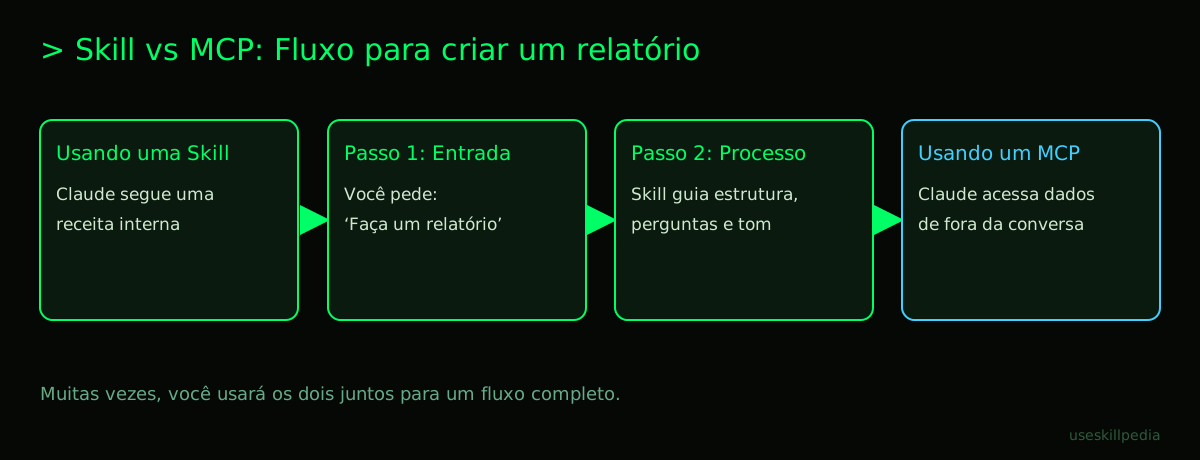
Diagram: Skill vs MCP Side by Side
Let's visualize the difference with a common situation: preparing a report.
Quick Table: Direct Comparison
| Characteristic | Skill | MCP (Connectors) |
|---|---|---|
| What is it? | Saved instructions for a task. | Connection to external apps and data. |
| Analogy | Cake recipe written on paper. | Universal USB-C adapter. |
| Main function | Tell Claude HOW to do something. | Give ACCESS to information and tools. |
| Where does it live? | .claude/skills/ folder in your project. |
Configuration in the .mcp.json file. |
| In Claude.ai | They are the Skills themselves. | They are called Connectors. |
| Need code? | To create an advanced one, yes. To use, no. | The MCP server needs to be programmed. |
| Practical example | "Write Blog Post" Skill: teaches structure, tone, and call-to-action. | Google Drive MCP: allows Claude to read and write files directly to your cloud. |
When to Use a Skill? When to Use MCP?
Now for the most important part: when it's time to choose, which one do you pick?
Use a Skill when:
- You want to standardize a process you always do with Claude (e.g., review texts, plan projects, generate ideas).
- You have a preferred way of doing things and want Claude to always follow that method.
- You want to teach a "trick" to Claude without having to rewrite the instructions every time.
- The task depends only on Claude's reasoning and writing, without needing data from outside the conversation.
Example: You always ask Claude to analyze the competition. Create a skill called "Competitor SWOT Analysis" that instructs Claude to always find 3 strengths, 3 weaknesses, 3 opportunities, and 3 threats, formatting them in a simple table.
Use MCP (Connector) when:
- You need Claude to access information outside this conversation (e.g., your local files, your calendar, a database).
- You need Claude to take an action in the real world (e.g., save a summary in Notion, create a task in Asana).
- You want Claude to use a specific tool it doesn't have natively (e.g., a tax calculator, a technical jargon translator).
- The work involves dynamic data that is located elsewhere.
Example: You want Claude to read the last 10 sales reports (which are in a folder on your computer), summarize the trends, and create a chart. You will need an MCP that gives access to your local files.
What if I need both?
Perfect! They are complementary. Many powerful workflows use both together.
Scenario: Automate weekly content planning.
- Google Calendar MCP: Claude sees your appointments and meetings.
- Google Drive MCP: Claude accesses the meeting agendas.
- "Post Generator" Skill: Based on the appointments and agendas, Claude uses your saved instructions to create draft posts for LinkedIn, following your preferred tone and structure.
- Notion MCP: Claude saves the generated drafts directly to your planning page.
How to Start Using Each?
To use Skills:
- Find ready-made skills: In Claude Code, you can search for skills. On the website, check the official repository or look for tutorials.
- Install: In Claude Code, it's usually about copying the skill folder to the
.claude/skills/folder of your project or workspace. - Activate: When starting a conversation in Claude Code, it will list the skills available in the project. Just select the ones you want to use in that session.
- Create your own: If you have a repetitive process, start documenting it in a
SKILL.mdfile. To learn more, see the guide How to create a skill for Claude (step by step).
To use MCPs/Connectors:
- In Claude Code (MCP):
- You need to find an MCP server for the service you want to use (e.g., file system, Google Search). Some come pre-installed.
- Add it to your project with a command in the terminal (a computer command window), like
claude mcp add server_name. - Configure permissions in the
.mcp.jsonfile.
- In Claude.ai (Connectors):
- It's simpler. In the web interface, look for the "Connectors" section.
- Activate the available connectors (like Web Search, for example) with one click.
- To connect apps like Google Drive or Notion, you will typically need to log in and authorize access, as you do with any app.
To know all the details about how to install and run Claude Code, our complete guide to Claude Code has the step-by-step. And to understand MCP in depth, read What is MCP (Model Context Protocol): explained in an easy way.
We Recommend Trying These 3 Skills First
To feel in practice what a skill does, start with these. They are like "apps" for your Claude.
-
- What it does: This skill helps you create MCP servers. It's a "meta-tool." If you need Claude to talk to a program that doesn't have a connector yet, this skill guides you through the process of building that connector.
-
- What it does: It's a skill that teaches Claude how to create other skills. You describe the task you want to automate, and it helps you write the
SKILL.mdfile correctly. Perfect for taking the first steps.
- What it does: It's a skill that teaches Claude how to create other skills. You describe the task you want to automate, and it helps you write the
-
- What it does: Guides Claude to generate web page codes (HTML, CSS) that are beautiful, modern, and don't look like generic templates. You describe the website you want, and it follows good design practices. See examples in the post Frontend design skill: sites that don't look like templates.
Frequently Asked Questions
Do I need to pay to use Skills or MCP? No. Both Skills and Connectors (MCP) are available on all Claude plans, including the free plan. The difference is that paid plans (like Pro) have higher usage limits for chat and Claude Code, where you normally use these resources.
Can I use my Skills and MCPs on the claude.ai website and in Claude Code? Generally, yes, but in different ways. The Skills you see on the website are made for the web interface. To use a Claude Code Skill on the website, you will likely need to adapt it. MCPs are configured directly in Claude Code. On the website, you use Connectors, which are Anthropic's implementation of the same concept, but in a simpler and more integrated way.
What's the difference between a Skill and an AI Agent? A Skill is a set of instructions you activate during a conversation with Claude. Claude remains "in command." An AI Agent is a more independent program that uses a model like Claude to make decisions and execute a series of steps (which can include skills and MCPs) on its own, without you needing to guide each step. It's a higher level of automation. Understand more in AI Agent: what it is, how it works, and how to create yours (without coding).
Is it difficult to create an MCP server from scratch? It can be a project for those who already have some programming knowledge. You need to write a small program (server) that follows the MCP protocol rules to communicate with the external tool or data. That's why you should start by using existing MCP servers or use the mcp-builder-anthropics skill to help you.
Where can I find more Skills to try? The best place to start is the official Anthropic Skills repository on GitHub. There you'll find many examples. You can also explore our page to search for skills and see recommendations.
Read More
To dive deeper, check out these other guides:
- Claude Skill: what it is, how to install, and the best ones to try (2026 guide) - The main pillar for understanding skills.
- Best skills for Claude Code in 2026 - Practical tips on the most useful ones.
- How to install skills from GitHub in Claude Code, Cursor, and Codex - Installation tutorial.
- What is MCP (Model Context Protocol): explained in an easy way - The main pillar for understanding MCP.
- Claude Code: what it is, how to download, install, and how much it costs (2026 guide) - Everything about the app where all this happens.
Sources
- Official Anthropic skills repository (accessed on 10/16/2026)
- Open Agent Skills standard (accessed on 10/16/2026)
- Claude Code: skills (accessed on 10/16/2026)
- Claude plans and pricing (accessed on 10/16/2026)
Full guide on this topic: Claude Skills: What They Are, How to Install, and Best Ones to Try