Best Claude Code Skills for Beginners in 2026
Skillpedia team · updated 2026-10-16 · 11 min read
Short answer: The best Claude Code skills for 2026 are like specific apps you install to help it handle complicated programming tasks more easily. They can generate the right code for beautiful designs, test websites automatically, or work with PDFs. To start, it's best to focus on skills that solve a problem you already have.
You've probably played around with Claude, that AI assistant that chats and answers questions. It's really smart. Now, imagine giving it special tools, like a screwdriver or a hammer, but for computer tasks. That's what skills are in Claude Code.
Claude Code is the program from Anthropic that you install on your computer to use Claude directly while you're programming. It's like a specialized assistant that sits by your side, right inside your code editor.
This article is for anyone who has never programmed and wants to understand how these "tools" (the skills) can help. I'll explain everything with simple analogies, no confusing jargon. If a technical word pops up, I'll explain it right away.
Table of Contents
- What are skills, in practice?
- Why use skills in 2026?
- How to install and manage skills?
- Skills vs. Plugins: what's the difference?
- 3 examples of powerful skills to see now
- How to choose the right skill for you?
- We recommend trying these 3 skills first
- Frequently asked questions
What are skills, in practice?
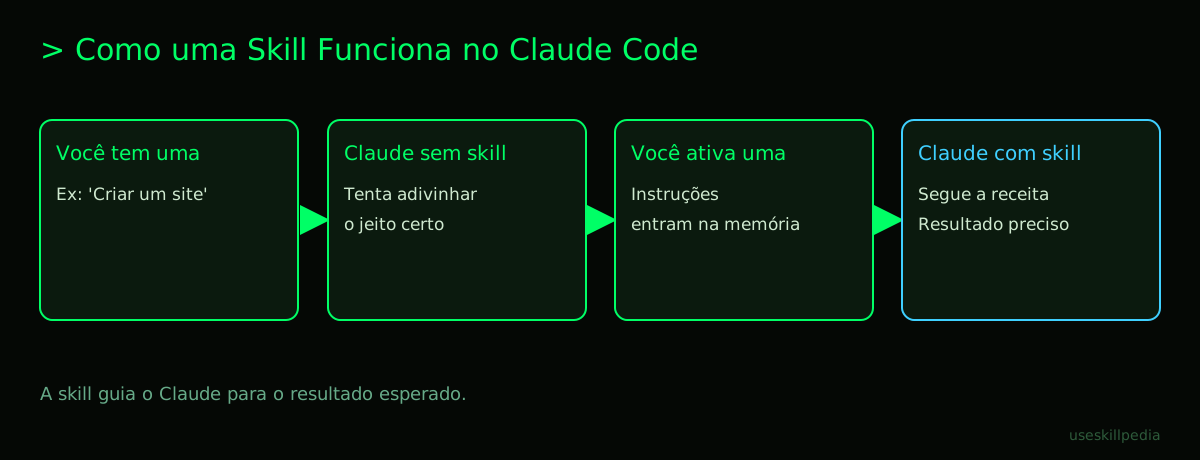
Think of a skill (pronounced "skil", like ability in English) as a very detailed cake recipe you hand to Claude.
Without the recipe, Claude is a brilliant chef who might try to make a cake based on your vague request. With the recipe (the skill), you tell it exactly which ingredients to use, the order of steps, and even tips so the cake doesn't sink. The result is faster and always comes out how you want.
In the world of code, a skill is a folder with written instructions. It teaches Claude to perform a very specific task, like:
- "How to turn a website sketch into clean code."
- "How to test if all the buttons on a website work."
- "How to extract a table from a PDF and put it in a spreadsheet."
Analogy: A skill is like a special "game mode" in a video game. In normal mode, your character just walks and jumps. With "Rocket Mode," it gets new instructions: "Hold X to fly, avoid the blue clouds, use turbo on turns." The character is the same, but with specific instructions, it does new and more complex things.
Why use skills in 2026?
In 2026, everyone who programs already uses some AI. The difference between someone who just asks and someone who excels is in how you guide the AI. Skills are the most advanced way to give those instructions. Here's why they've become essential:
- They save time and patience: Instead of explaining the same complex task every time, you load the skill and it delivers the right instructions. It's like using a keyboard shortcut instead of clicking 10 times in a menu.
- They guarantee quality and standards: If you want all your website code to follow the same organization rules, a skill ensures Claude will always follow those rules. It's like using a standardized form to fill out a report – information is never missing.
- They turn difficult tasks into simple ones: Working with an API (which is like a "digital waiter": you ask a service on the internet, like the weather forecast, for data, and it brings you the answer) can be complicated. A skill comes with the "menu" and the "right way to order" for that specific API.
Furthermore, Claude Code itself and the ecosystem around it have evolved to work better with skills. They are a fundamental part of how you extract the most power from the tool today. To better understand this power, check out our complete guide: Skill Claude: what it is, how to install, and the best ones to try (2026 guide).
How to install and manage skills?
Installing a skill is a lot like downloading a theme for your phone. You get the files and put them in the right folder.
Here are the basic steps, in the simplest way:
- Find the skill. The official place to find skills created by Anthropic is their repository on GitHub (think of a repository as a "public library of folders" on the internet). You can access it at
github.com/anthropics/skills. - Choose the skill. Browse the folders and read the
SKILL.mdfile for each one. It's the "book cover" that explains what that skill does. - Put it in the right place. On your computer, there is a hidden folder called
.claude. Inside it, create a folder calledskills. That's where you put the folder of the skill you downloaded.- User Folder (
~/.claude/skills/): Skills here work in all your projects. It's like installing a program on your computer. - Project Folder (
.claude/skills/inside your working folder): Skills here work only in that project. It's like having a tool that's stored only in the workshop.
- User Folder (
Important: There is no magic command like claude skills add. You simply copy the folder. For a more detailed guide on installation, especially for skills from GitHub, we have a dedicated post: How to install skills from GitHub in Claude Code, Cursor and Codex.
| Where the Skill Goes | What It's For | Analogy |
|---|---|---|
User Folder (~/.claude/skills/) |
Available for all your projects. | Like kitchen scissors: you use them in any room of the house. |
Project Folder (.claude/skills/) |
Available only in that specific project. | Like a special screwdriver that only fixes the living room fan. |
After placing the folder in the right spot, when you open Claude Code in that project (or in any project, if it was in the user folder), Claude will already "see" the new skill and know how to use it when you ask.
Skills vs. Plugins: what's the difference?
This can be confusing at first. Think of it this way:
- A Skill is a single recipe. It teaches Claude to do one specific task (e.g., "test website").
- A Plugin is a complete package that can contain multiple skills, plus other things.
A plugin for Claude Code is like a toolkit you buy in a box. Inside the box there might be:
- Several skills (several recipes).
- Subagents (like specialized "helpers" for Claude).
- Hooks (automatic commands that run by themselves at certain times, like "every time I save a file, do X").
- MCP Servers (connections to other programs).
You manage plugins inside Claude Code by typing /plugin. This opens a screen with catalogs (the marketplaces, which are like app stores). The official Anthropic marketplace is added automatically. To better understand the relationship between these concepts, read our post: Skills vs MCP: difference and when to use.
In short: Every skill is a set of instructions. A plugin is a packaged way to distribute one or more skills, along with extra features. A standalone skill (that you just pasted into the folder) works perfectly without being part of a plugin.
3 examples of powerful skills to see now
Let's look at types of skills that show the tool's power. Remember: you can search for skills to find others.
Frontend Skills (the part the user sees): These skills help Claude transform a design – an image or a description – into beautiful, functional website or app code. They know the rules for organizing buttons, text, and colors in the browser. It's like giving Claude a quick web design course. To dive deeper, see: Frontend design skill: sites that don't look like templates.
Automated Testing Skills: Imagine launching a website and having to click on every link and button, one by one, to see if anything broke. It's boring and time-consuming. A testing skill teaches Claude to simulate a user, clicking on its own and checking if everything responds as it should. It's like hiring a meticulous robot to do that tedious work for you.
Document Work Skills (PDF, Excel): Have you ever tried copying a table from a PDF to a spreadsheet? It's a nightmare. PDF skills teach Claude to "read" the document, identify headings, paragraphs, and especially tables, and then organize that data in a useful way. It's like having a super attentive intern just for that task.
How to choose the right skill for you?
You don't need to install all the skills. The secret is to start with your current problem.
Ask yourself these questions:
- "What makes me waste the most time when I'm trying to create something with Claude Code?" Is it explaining how the design should look? Is it testing what was done? Is it working with data from a specific place? The skill that solves that pain will be the most valuable.
- "Is the skill well explained?" Read its
SKILL.mdfile. If the description is clear and you understand what it does, it's a good sign. If it's full of confusing terms, it might not be for beginners. - "Does it come from a trusted source?" Start with skills from Anthropic's official repository or recommended marketplaces. Remember: a skill or plugin runs with your permissions on the computer. So, it's like installing software: prefer official sources.
Don't rush. The beauty of skills is that you can add a new one at any time, when a new need arises. To create your own skills in the future, check out How to create a skill for Claude (step by step).
We recommend trying these 3 skills first
To feel in practice how a skill transforms the experience, start with these that solve common problems:
- frontend-design-anthropics: Teaches Claude to create more beautiful and organized website interfaces. Ideal if you want your prototypes to not look "machine-made."
- webapp-testing-anthropics: Teaches Claude to do basic automated tests on your website or web app. Perfect for anyone who wants more confidence that their creations work.
- pdf-anthropics: Teaches Claude to extract and organize information from PDF files. Very useful if you deal with reports, manuals, or any data stuck inside a PDF.
Frequently asked questions
Do I need to pay to use skills? No. The skills and the ability to use them are available on all Claude plans, including the free plan (Free). What may be paid is access to Claude Code, which is necessary to use many programming skills. Claude Code is included in the Pro, Max, Team, and Enterprise plans, but not in the Free plan.
Does using many skills make Claude slower or use more credits? Each active skill takes up a small amount of space in the conversation's memory (the tokens – think of tokens as "units of words and characters" that the AI can process at once). The skill's name and description are always there. So, yes, having dozens of active skills can consume a tiny bit of your context limit, but the overall impact for simple skills is very small.
Can I use skills on the web version of Claude (claude.ai)? On the claude.ai website, the similar concept is called "Connectors". They are like skills, but made to connect Claude to other online services, like Google Drive or Notion. The programming skills we talk about here are made primarily for the Claude Code environment, on your computer.
Is a skill the same thing as MCP? No, but they are close relatives. A skill is a set of text instructions for Claude. MCP (Model Context Protocol) is a "connection standard" (like a universal USB cable) that allows Claude to access data and tools from other programs. A skill can use an MCP server to access something external, but many skills work with just instructions, without MCP. Understand better in: What is MCP (Model Context Protocol): explained the easy way.
Where can I find more skills besides the official repository?
There are marketplaces (catalogs) for plugins, which are usually repositories on GitHub maintained by other people or companies. Inside Claude Code, you can add these catalogs through the plugins screen (/plugin). But be careful: always check the source before installing anything, because plugins/skills run in your environment.
Read also
- Claude Code: what it is, how to download, install, and how much it costs (2026 guide)
- AI Agent: what it is, how it works, and how to create yours (without programming)
- How to create a skill for Claude (step by step)
- Skills vs MCP: difference and when to use
- Skill Claude: what it is, how to install, and the best ones to try (2026 guide)
Sources
- Official Anthropic skills repository (accessed on 10/16/2026)
- Open standard Agent Skills (accessed on 10/16/2026)
- Claude Code: skills (accessed on 10/16/2026)
- Claude plans and pricing (accessed on 10/16/2026)
Full guide on this topic: Claude Skills: What They Are, How to Install, and Best Ones to Try