Claude Frontend Design Skill: Build Unique, Non-Template Websites
Skillpedia team · updated 2026-10-16 · 11 min read
Short answer: The claude frontend design skill is an assistant inside Claude that helps you create websites with a unique look, so they don't seem generic. It explains how to structure content, choose colors and fonts, and organize elements in a beautiful and original way. It's like having a designer friend who translates your idea to the screen, without needing a ready-made template.
Have you ever visited a website and thought, "Wow, this looks different"? It feels custom-made, with its own personality. That's the result of good frontend design – the art of taking care of the part the user sees and interacts with.
Now, if you've never programmed, you might think creating something like that is out of this world. It's not. With the right tools and good guidance, you can start to understand the principles and even create your first screens. And that's where a specialized helper, like a specific skill for this, comes in.
Table of Contents
- ## What does this skill do, in plain English? {#what-it-does}
- ## Do I need to be a programmer to use it? {#need-programmer}
- ## How do I install it and start using it? {#how-to-install}
- ## Does it teach me to make a site from scratch? {#make-site-scratch}
- ## Is this different from using a connector (MCP)? {#different-mcp}
- ## How much does it cost and what do I need? {#how-much-costs}
What does this skill do, in plain English?
Let's simplify. Frontend design is everything you see and click on a website or app: the text, colors, buttons, how things move on the screen. It's the site's "face." A Template is a ready-made model that many people use. A site that "looks like a template" is one you recognize from other places; it seems generic.
The claude frontend design skill is like a specialized instruction manual you give to Claude. With it activated, Claude understands that you want to talk about creating the beautiful, unique "face" of a website. It will use more focused knowledge to help you.
What can you ask it to do?
- "Explain how to choose matching colors for a yoga website." It will give you a color palette and explain the feeling each color conveys.
- "Help me organize my business's homepage. Where do I put the photo, text, and button?" It will suggest layouts (arrangements of elements on the screen) that are pleasing to the eye.
- "How do I make the site look good on both phone and computer?" It explains the concepts of responsive design, which is the site adapting to different screen sizes.
In short, the skill doesn't create the site by itself. It guides you, explains concepts with everyday analogies, and suggests paths. It's accessible design consulting.
Do I need to be a programmer to use it?
No, absolutely not. This skill is precisely for people who are not programmers.
Think of it this way: to build a house, you need an architect (who draws how it will look) and an engineer/builder (who follows the plan and builds the walls). Frontend design is the architect's job. It takes care of aesthetics, flow, experience. The programmer (frontend specialist) is the one who takes that plan and, by writing code, "builds" that screen in the browser.
The skill puts you in the architect's role. It helps you think about the visual, the concept, the organization. You can use this "plan" in several ways:
- To understand what you want and communicate better with a programmer you might hire.
- To use visual tools (like "drag and drop" website builders) with much more clarity about what to do.
- To learn the first steps of code, if that's your interest, but starting with a design vision.
The skill speaks the language of design, not the language of code. It's like learning the names of car parts before trying to fix the engine.
How do I install it and start using it?
There are two main Claudes: web Claude (which you use in the browser at claude.ai) and Claude Code (a program you install on your computer to help with projects and code). Skills work in both, but the installation is a little different.
In web Claude (claude.ai):
- Go to the site claude.ai and log in.
- In the top left corner, click on your name or the menu icon.
- Look for a section called "Skills" or "Connectors".
- There should be a button for "Add Skill" or "Browse Skills".
- Search for something like "frontend design" or "web design." If it's an official or popular skill, it will appear.
- Click to add/activate. Done! Now, when you start a new chat, you can select this skill so Claude begins the conversation with that specialized knowledge.
In Claude Code (the computer program):
- First, you need to have Claude Code installed. If you don't, check the guide Claude Code: What It Is, How to Download, Install, and Cost (2026 Guide) to find out how.
- Open the terminal. (The terminal is a black screen where you type text commands for the computer to obey. It's like giving direct orders to your PC instead of clicking icons).
- Navigate to your project folder or the user's skills folder. The simplest way is to install via the official plugin catalog: inside Claude Code, type
/pluginand search for the skill in the discovery tab. You can also copy the skill folder to~/.claude/skills/(works for all your projects). - You can also download the skill folder manually from the official repository and place it in the correct folder. For more details, we have a guide: How to Install Claude Skills from GitHub for Beginners.
After installation, in Claude Code, you just need to mention in the chat that you want to use that knowledge. Something like: "Let's use the frontend design skill to help me plan the homepage."
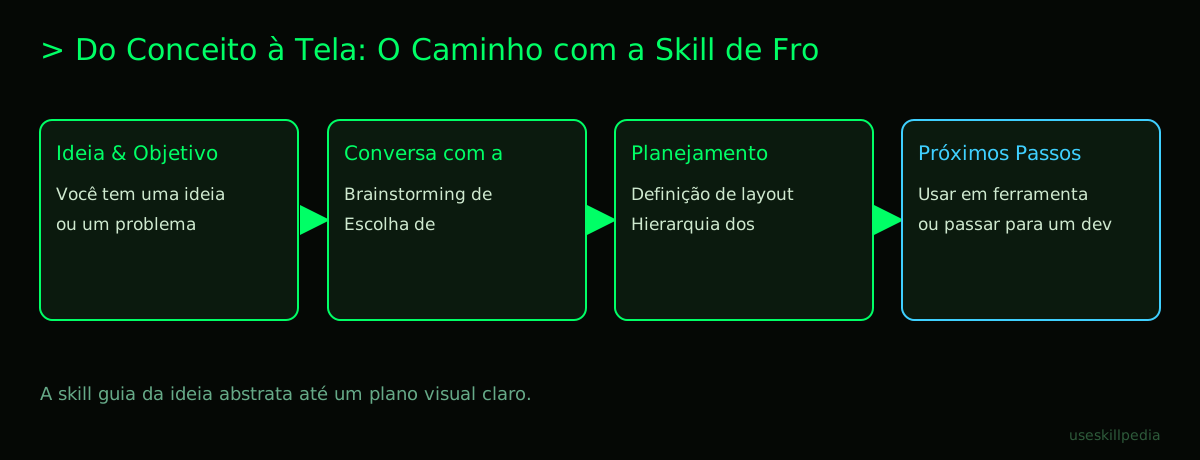
Does it teach me to make a site from scratch?
It teaches you to design a site from scratch. There's an important difference.
Making a site "from scratch" typically involves two major steps:
- Design (Planning): "Where does the logo go? What color will the button be? Which font to use for titles? How does the user navigate from page A to page B?"
- Implementation (Building): Taking all those design decisions and turning them into real code (HTML, CSS, JavaScript) that the browser understands and turns into a page.
The claude frontend design skill focuses almost entirely on Step 1. It's excellent for:
- Brainstorming: Generating layout and style ideas.
- Education: Explaining principles of typography (study of fonts), color theory, visual hierarchy (what catches the eye first).
- Judgment: Helping you analyze a site you like and understand why it works.
- Specification: Creating a detailed description of the design, which can be used by you in a visual tool or by a programmer.
For Step 2 (building with code), you would need other skills or tools. For example, you could use the design knowledge generated here and then ask for help from another skill or from Claude Code itself to write the HTML and CSS code based on that description. Check out other options at Best Claude Code Skills for Beginners in 2026.
Is this different from using a Connector (MCP)?
Yes, it's quite different, although both are ways to expand what Claude can do.
- Skill (like the frontend design one): It is mainly a set of specialized instructions and knowledge. When you activate the skill, you're basically giving Claude a reference manual to read. It uses that knowledge to answer you better about that subject. It's an upgrade to Claude's brain for that topic.
- Connector (MCP - Model Context Protocol): It is a communication channel with another program or service. MCP is like a USB-C port for Claude. It allows Claude to interact with things outside of itself. For example, a connector can let Claude access your files on Google Drive, search for information in a database, or control a design tool like Figma.
A table for clarity:
| Characteristic | Skill (ex: Frontend Design) | Connector / MCP (ex: Figma Access) |
|---|---|---|
| Main function | Add specialized knowledge. | Connect to external tools and data. |
| Analogy | Giving Claude an architecture book to study. | Giving Claude a phone to call Figma. |
| What it does | Claude explains concepts, suggests ideas. | Claude can open, edit, or read Figma files. |
| Needs external code? | Not necessarily (can be just a text file). | Yes, needs a "server" (a small program) running. |
For a deeper dive into this difference, read: Skills vs MCP: diferença e quando usar. And if you want to understand MCP, we have a guide: What is MCP? The Simple Guide to the Model Context Protocol.
How much does it cost and what do I need?
The good news is that skills, including the frontend design one, are available on all Claude plans, even the free one (Free). So, if you find a public skill, you can activate and use it without paying anything extra.
However, to use Claude itself, you need an account. The plans are:
- Free (US$0): Has usage limits. Includes skills, but does NOT include Claude Code (the computer program). You only use it via the browser.
- Pro (US$20/month): Offers much more usage. Includes Claude Code. Skills also work here.
- Max and other plans: For very heavy use or teams. All include Claude Code and skills.
What you NEED to have to use a frontend design skill:
- A Claude account (free or paid).
- Access to the skill (it might be in the public library or you need to install it manually).
- (Optional, but recommended for practice) If you want to go beyond theory and start "building," having Claude Code installed is a big advantage, as it's made for projects. But you can perfectly learn design concepts just by chatting with Claude in the browser.
Remember: using Claude consumes tokens. A token is the unit of measurement for text that the AI model processes. Think of it as "processed words." 1 million tokens is roughly equivalent to about 555 thousand words. Everything in the conversation (your questions, the skill's response, files you upload) consumes tokens. Paid plans offer a larger token quota to use.
We recommend trying these 3 skills first
To start your frontend learning, we suggest these skills that work well together or in sequence:
- Skill: frontend-design-anthropics: The one discussed in this article. It's the foundation, teaching you the principles of how to plan a site's appearance and experience, avoiding a generic template look.
- Skill: skill-creator-anthropics: After learning design, you might have specific ideas. How about creating your own personalized skill? This skill teaches you the step-by-step. It's like learning to make your own super-organized study notes.
- Skill: pdf-anthropics: Often, design inspirations and materials come in PDFs. With this skill, Claude can read and extract information from PDF files you upload. It's like giving Claude the ability to read a color catalog or a brand identity manual you found.
Frequently Asked Questions
Do I need to pay to access design skills? No. Skills are features included in all Claude plans, even the free one. You don't pay extra to activate them.
Can I use the skill to redesign my current website? Yes! You can describe how your site is today (or even upload a screenshot) and ask for improvement suggestions, like "how to make this page more modern?" or "is this button color appropriate?"
Will the skill create a ready-made image file of the design? Not directly. The skill focuses on verbal and conceptual guidance. To generate mockup images (visual prototypes), you would need to use Claude's image generation feature (if available) or an external tool. The skill tells you what to do, but doesn't draw by itself.
Can I use what I learned with the skill in website builders like Wix or WordPress? Absolutely! This is a great use. The knowledge about visual hierarchy, color palette, and spacing you gain will be super useful for setting up your sites on those "drag and drop" platforms in a more professional way.
What's more important to learn first: design or code? For a total beginner, starting with design (with a skill like this) is less intimidating and more rewarding. You see visual results faster, understand the "why" of things, and build the project vision. Later, if you want, you can move on to code with a solid foundation of what you want to achieve.
Read Also
- To understand the world of skills: Claude Skills: What They Are, How to Install, and Best Ones to Try
- If you're excited to create your own: How to Create a Claude Skill: A Simple Step-by-Step Guide
- Explore other available skills: buscar skills
- Understand a broader concept: What Are AI Agents? A Beginner's Guide to Creating Your Own
Sources
- Official Anthropic skills repository (accessed on 16/10/2026)
- Open Agent Skills standard (accessed on 16/10/2026)
- Claude Code: skills (accessed on 16/10/2026)
- Claude plans and pricing (accessed on 16/10/2026)
Full guide on this topic: Claude Skills: What They Are, How to Install, and Best Ones to Try