What is MCP? The Simple Guide to the Model Context Protocol
Skillpedia team · updated 2026-10-16 · 13 min read
Short answer: MCP (Model Context Protocol) is like a USB-C port for AI applications. It lets Claude, ChatGPT, and others "talk" to other programs, like your Google Calendar or your Drive, in a standard, easy way. Instead of every app needing a different integration, MCP solves this by creating a common language.
Have you ever wondered how an AI assistant could see your calendar appointments or edit a file on your computer? It seems like magic, but the answer lies in an open protocol called MCP. This article will explain, simply and without jargon, what is MCP, how it works, and why it might change how you use AI every day.
Table of Contents
- The Perfect Analogy: The USB-C Port for AI
- The Problem MCP Solves: The Integration Mess
- How MCP Works: Client, Server, and What It Offers
- Real Examples: From Google Calendar to Blender
- MCP vs API vs Skill vs Plugin: What's the Difference?
- How to Use MCP on Claude.ai and Claude Code
- Where to Find MCP Servers to Use
- Security: What You Need to Know
- Try These 3 Skills First
- Frequently Asked Questions
The Perfect Analogy: The USB-C Port for AI
Think of your USB-C port. It's for charging your phone, connecting a monitor, transferring files from a flash drive, and connecting headphones. One type of cable for many functions.
MCP does exactly that for artificial intelligence. It's the "USB-C port" that lets Claude connect to different "peripherals":
- Your Google Calendar is a peripheral (to see appointments).
- Your Notion is another (to read and write notes).
- Your Google Drive is one more (to fetch files).
Before, each AI app had to build a special "little cable" for each service. Now, with MCP, you just need the universal port. Any "peripheral" that follows the MCP standard can be plugged in and used immediately.
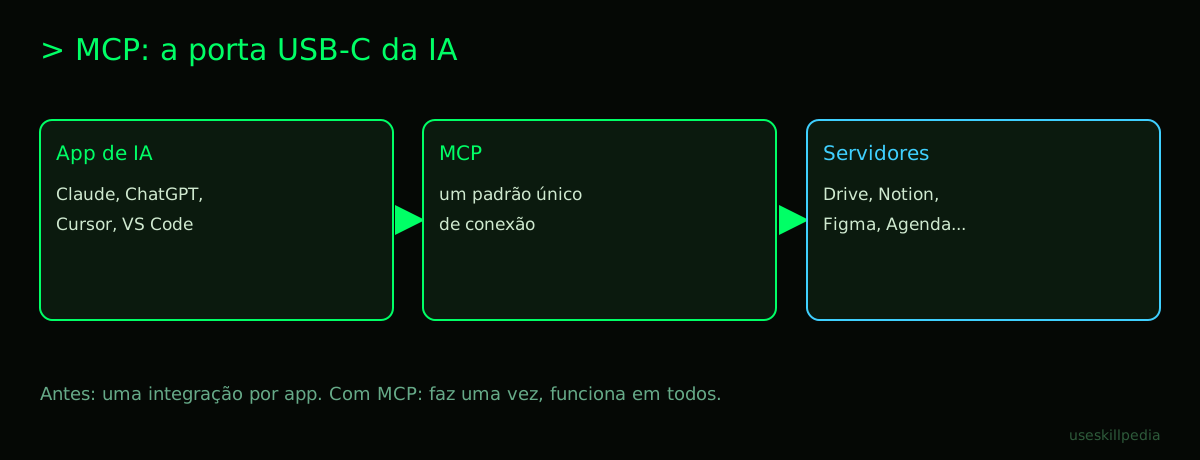
The Problem MCP Solves: Every App with Its Own Integration
Imagine you want an AI to access your GitHub account. Claude would need one integration. ChatGPT, another. Cursor (another AI-powered editor), yet another. Each one made differently, with different security levels and features.
This was inefficient for developers and confusing for users. MCP came to organize this mess. It proposes: "Let's create a common language for this conversation between AI and other software." So, the developer of the GitHub MCP server writes this "bridge" just once. And it then works in any application that speaks the MCP language.
How MCP Works: Client, Server, and What It Offers
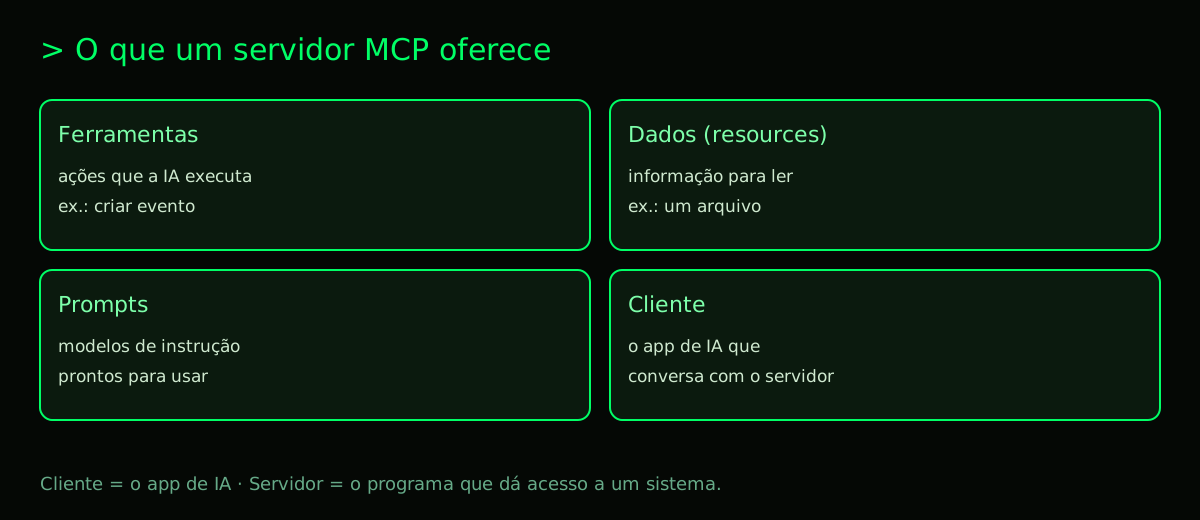
The architecture is simple and based on two main characters:
- The Client: This is the AI application you use. Claude.ai (in the browser), Claude Code (in the terminal), or ChatGPT, for example. The client knows how to "speak" the MCP protocol.
- The Server: This is a separate program that sits between the client (the AI) and the external resource (like Google Drive). The server is the translator. It talks to Drive and also speaks the MCP language with Claude.
But what exactly does the server "offer" to the client? It can offer three types of resources:
- Tools: These are actions the AI can perform. For example: "fetch email", "create calendar event", "perform a web search", "run a calculator". The AI sees these tools as functions it can call.
- Resources: These are sources of information for the AI to read. It could be a specific file on your computer, a database, a news feed, or a web page. The AI can access and read the content of these resources.
- Prompts: These are pre-defined instruction templates that the server can suggest. They help guide the AI to perform complex tasks more efficiently with that specific resource.
The flow goes like this: You ask Claude "What are my appointments for tomorrow?". Claude (the client) sees that it has a Google Calendar MCP server connected. It asks the server: "Do you have a tool to 'list events'?". The server responds: "Yes, here it is". Claude then uses that tool, the server talks to the Google Calendar API, gets the data, and delivers it back to Claude. Finally, Claude organizes that information and gives you the answer.
To better understand the server part, read our support post: What is an MCP Server.
Real Examples: From Google Calendar to Blender
Theory is good, but concrete examples help visualize. The official MCP site already shows some powerful ideas:
- Google Calendar + Notion: An AI agent that follows your meetings (via Calendar) and automatically creates summaries and action items in your Notion workspace.
- Figma + Claude Code: You ask Claude Code to create the code for a web app. Instead of describing the design, you simply connect an MCP server for Figma. Claude can access the design directly from your Figma screen and generate much more accurate code.
- Blender: An MCP server can allow an AI to interact with Blender, a complex 3D modeling software. You could ask the AI to "create a round table with 4 legs" and it would use MCP tools to command Blender and generate the model.
- Google Drive / Local Files: The filesystem server is one of the most basic and useful. It allows Claude to read and (depending on configuration) write files in specific folders on your computer or in the cloud.
See more use cases in our article: MCP Servers: Real Examples.
MCP vs API vs Skill vs Plugin: What's the Difference?
These terms can be confusing. They are all ways to extend a software's capabilities, but with different purposes and scopes. The table below helps compare:
| Concept | What is it? | Example | Standardized? |
|---|---|---|---|
| API | An interface for programs to talk to each other. Technical and generic. | The Google Calendar API to create events. | No. Each service creates its own. |
| Plugin | A module that adds functionality to a specific program. | A Photoshop plugin to batch resize images. | No. Works only in the program it was made for. |
| Skill | A set of instructions and capabilities for an AI Agent. Focuses on "knowing how" to do something. | A skill that teaches Claude to analyze sentiment in texts. | There is an emerging standard (Agent Skills). |
| MCP | A protocol for connecting AI apps to external data/tools. It's the standard "bridge". | An MCP server that gives Claude access to your code editor's tools. | Yes. It's an open standard that multiple apps can adopt. |
In summary: MCP is the standard connection infrastructure. A Skill is the agent's "know-how". A Plugin is an extension for one app. An API is the raw communication tool. They can work together: a Skill can use tools provided by an MCP server to do its job.
Learn more about Skills in our guide: Claude Skill: What It Is, How to Install, and the Best Ones to Try (2026 Guide). And about plugins in Claude Code here: What is a Plugin in Claude Code.
How to Use MCP on Claude.ai and Claude Code
How you use MCP changes a bit depending on where you're using Claude.
On Claude.ai (the website)
On the claude.ai site, the MCP functionality is called "Connectors". It's the easiest way for those who don't want to code.
- Open Settings.
- Go to Connectors. Menu names may change with updates.
- You'll see a list of available connectors (like Google Drive, GitHub, etc.). Just activate the ones you want.
- Done! Now, in your conversations, Claude will be able to access resources from these services when you give permission during the chat.
We have a full tutorial here: How to Connect MCP in Claude.
On Claude Code (the terminal/IDE)
Claude Code is where MCP shines with its full potential, offering total control. The connection is made via command line and project configuration.
Install Claude Code. If you don't have it yet, follow one of the official commands (use what suits your system):
- macOS/Linux:
curl -fsSL https://claude.ai/install.sh | bash - Windows PowerShell:
irm https://claude.ai/install.ps1 | iex - Via Homebrew:
brew install --cask claude-code
- macOS/Linux:
Add an MCP server. In the project folder, use the command
claude mcp add, giving a name to the server and the command that starts it. Example with the official filesystem server, allowing only one folder:claude mcp add files -- npx -y @modelcontextprotocol/server-filesystem ~/Documents/projectInside Claude Code, the
/mcpcommand shows the connected servers and the status of each.Choose where to save. By default, the server is available only to you in that project. If you add it with
--scope project, the configuration goes to a.mcp.jsonfile in the project root, which can be shared with the team via Git.Start Claude Code. In the project folder, type
claude. It will read the.mcp.jsonand load the servers. Now you can ask things like: "Read the filespreadsheet.csvin thedatafolder and summarize it for me".
For a deep dive into Claude Code, see our pillar article: Claude Code: What It Is, How to Download, Install, and Pricing (2026 Guide).
Where to Find MCP Servers to Use
There are a few good places to start your search for MCP servers:
- Official MCP Registry: the MCP project itself maintains a public registry of servers at registry.modelcontextprotocol.io, and the documentation is at modelcontextprotocol.io.
- GitHub: Many developers publish their MCP servers as open-source repositories on GitHub. Searching for "mcp-server" or "model-context-protocol" can bring great results.
- Community: Forums and channels dedicated to Claude and MCP often share recommendations. Our article Best MCPs for Claude is also a great source of curated suggestions.
- Browse Skills: Remember that Skills can use MCPs. Take a look at our page to search for skills for inspiration.
Security: What You Need to Know
Giving an AI access to your data is serious. That's why security is a pillar of MCP. Here are the key points:
- Only From Trusted Sources: Only install MCP servers from sources you trust, like Anthropic or known developers in the community. Always check the code if possible.
- Permission Control: A good MCP server asks for minimal permissions. The filesystem server, for example, can be configured to access only a specific folder in your project, and not your entire hard drive.
- Everything the server returns goes into the conversation: The data that an MCP tool returns enters Claude's context. Do not connect servers to accounts or folders with information you don't want the AI to read.
- Isolation: MCP servers usually run as separate processes, which helps isolate potential problems.
Think of it this way: connecting an MCP server is like installing an app on your phone. You check who the developer is and what permissions it's asking for. The same logic applies here.
Try These 3 Skills First
Skills and MCPs go hand in hand. To start seeing the power of integration, we recommend these three skills available on our site:
- mcp-builder-anthropics: This skill helps you create your own MCP server, even with little programming knowledge. It guides you through the process.
- mcp-server-patterns-affaan-m: It teaches the most common patterns used to build MCP servers, showing code examples so you understand how tools and resources are structured.
- prepare-mcp-integration-paperclipai: A practical skill that helps prepare and configure the integration of a specific MCP in your environment, handling aspects like authentication and initial setup.
Frequently Asked Questions
Do I need to pay to use MCP in Claude? The Connectors in Claude.ai exist in all plans, including the Free plan. Claude Code, where you add MCP servers via the terminal, requires a paid plan (Pro or higher). Some connected services may have their own charges.
Does MCP work with ChatGPT and other AIs? Yes! MCP is an open standard. Although it was driven by Anthropic, the protocol is public. According to the official site, ChatGPT, VS Code, Cursor, and many other tools already support MCP.
What's the difference between MCP and a Skill? MCP is the connection, the channel that allows the AI to access external tools and data. The Skill is the knowledge you give the AI to use those connections (and other things) to perform a specific task. A Skill can depend on an MCP server to function.
Do I need to be a programmer to use MCP? To use ready-made Connectors in Claude.ai, no. Just activate them in the settings. To use it in Claude Code and explore more advanced servers, basic terminal knowledge is helpful, but many tutorials guide you step by step. To create an MCP server, yes, programming is required.
Does MCP use up my Claude tokens? Yes, everything counts. When Claude calls an MCP tool, the result (the data coming back from the server) is inserted into the conversation context. This data consumes tokens from your context window, just like your questions and the AI's answers. Understand more at: What are Tokens in AI (and Why They Run Out So Fast).
Can I create my own MCP server? Absolutely! That's one of the beauties of the standard being open. If you have access to a system, database, or internal tool, you can create an MCP server to connect the AI to it. Check out our guide: How to Create Your Own MCP Server.
Where do I get help if something goes wrong?
For problems in Claude Code, use the claude doctor command in the terminal for diagnosis. The official Anthropic community and developer forums are good places to look for solutions. For configuration issues, the post How to Connect MCP in Claude can help.
Read Also
- Claude Code: What It Is, How to Download, Install, and Pricing (2026 Guide) - The complete guide to the tool where MCP shines the most.
- AI Agent: What It Is, How It Works, and How to Create Yours (Without Coding) - Understand the concept behind autonomous assistants that use Skills and MCP.
- Claude in Chrome and Excel - See other ways to integrate Claude into your work.
- Best AI Models in 2026: Which to Use for Each Task - Put the power of MCP into the most capable models for each need.
- How to Create Your Own MCP Server - Dive deeper into creating your own connections.
- Prepare MCP Integration (Skill) - A practical skill to help configure MCP integrations.
Sources
- What is the Model Context Protocol (accessed on 10/16/2026)
- Claude Code: Connect Tools via MCP (accessed on 10/16/2026)
- Official MCP Server Registry (accessed on 10/16/2026)
- Claude Plans and Pricing (accessed on 10/16/2026)
- Anthropic API Pricing (accessed on 10/16/2026)