What is MCP in Claude? A Beginner's Guide to Connecting Tools
Skillpedia team · updated 2026-10-16 · 9 min read
Short answer: MCP is like a "USB-C port" that connects Claude to other programs. In Claude Code, you configure this in a file. In Claude Desktop (the app), you use ready-made "Connectors" in the interface. This connection gives the AI superpowers.
Have you ever imagined asking Claude to analyze data from your work spreadsheet or schedule a meeting directly in your calendar? It seems like magic, but it's possible with a technology called MCP. And the best part: you don't need to be a programmer to use it.
If you're a total beginner, you've come to the right place. I'll explain everything from scratch, as if I'm talking to a friend. No confusing technical jargon. Every new term will be explained right away with a simple analogy.
Table of Contents
- Before you start: what is MCP?
- How to connect MCP in Claude Code (advanced mode)
- How to connect MCP in Claude Desktop (easy mode)
- What's the difference between Skills, Connectors, and MCP servers?
- Is it safe to use MCP? Is my data protected?
- Common problems (and how to fix them)
- We recommend trying these 3 skills first
- Frequently asked questions
- Read more
Before you start: what is MCP?
MCP stands for Model Context Protocol. Think of it as a universal translator or, as the creators call it, a USB-C port for AI applications.
Imagine Claude is a super-smart phone, but by itself it can't access your email account or your spreadsheet. MCP is the cable (and the language) that allows this phone to "talk" to those other services in a secure and organized way.
With this "connection" made, Claude can:
- Read data: Access files on your computer, notes from an app, or information from a database.
- Use tools: Perform an internet search, use a calculator, or generate a chart.
- Perform actions: Create an event in your calendar, send an email, or update a task.
This makes Claude much more useful for everyday tasks! To understand everything about this foundational technology, read our pillar article: What is MCP (Model Context Protocol): explained in an easy way.
How to connect MCP in Claude Code (advanced mode)
Claude Code is a version of Claude that you run in the terminal. The terminal is that computer program with a black screen and green letters where programmers type text commands. Think of it as your computer's "command mode."
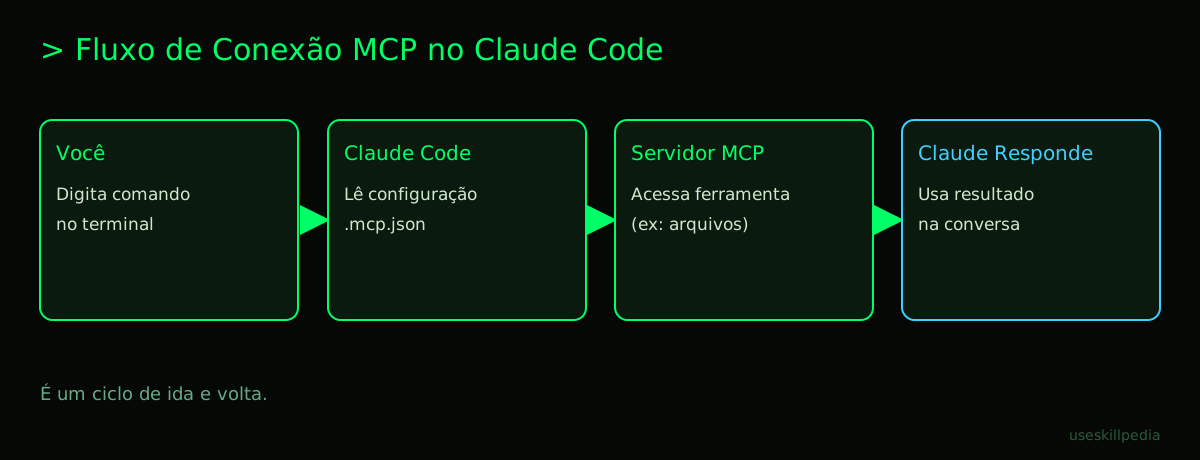
To use MCP here, you need to configure a small file in your project. It's like creating a contact list on your phone, telling Claude who it can talk to.
Simplified step-by-step:
- Have Claude Code installed. If you don't, check out our installation guide for instructions. It's free if you already have a paid Claude plan (Pro, Max, Team, or Enterprise).
- Open the terminal in your project folder (where your files are).
- Add an MCP server. An MCP server is the program on the other end of the "USB-C connection." It's the one that actually accesses your data or tools. For example, there is a server for accessing computer files and another for searching the web. Use a command like:
claude mcp add --transport http server-name https://server-address(For a remote server on the internet. For a program that runs on your computer, the format isclaude mcp add name -- command. Each server's page usually shows the exact command.) - Configure the
.mcp.jsonfile. This file is the contact list I mentioned. It lives in your project folder and stores all the MCP connections you've activated for that work.
How to connect MCP in Claude Desktop (easy mode)
Claude Desktop is the regular app you download and install on your computer, with windows, buttons, and menus. It's much simpler!
Here, the MCP feature is called "Connectors." They are like ready-made "plugins" or "extensions" that you turn on or off with a click.
How to do it:
- Open the Claude Desktop app on your computer.
- Go to Settings (usually a gear icon).
- Look for the "Connectors" or "MCP" section.
- You will see a list of available connectors. It could be "Local Files," "Web Search," "Google Calendar," etc.
- Turn on the switch (toggle) for the connector you want to use.
- In your next conversation with Claude, it will already have access to the tools or data from that connector.
Done! No terminal or configuration files needed. It's the most accessible way to start. If you want to explore what plugins are in the Claude universe, we have a guide: What is a plugin in Claude Code (and how to install it).
What's the difference between Skills, Connectors, and MCP servers?
This can be confusing at first because they are similar concepts. Let's break it down:
| Term | Where does it live? | Analogy | Who is it for? |
|---|---|---|---|
| MCP Server | On your computer or in the cloud. | It's the black box/translator. The program that actually connects to the service (e.g., Google Drive). | Technical users. It's the foundation of everything. |
| Connector | In the Claude Desktop app. | It's the light switch on the wall. An easy interface to turn an MCP server on/off. | For everyone. The easiest way. |
| Skill | In Claude Code. | It's a package of instructions + recipes. Tells Claude how to use the tools that MCP provides. | Claude Code users. Increases efficiency. |
Think of it this way: The MCP server (learn more in this sister post) gives access to your calendar. The Connector in Desktop is the button that activates that access. The Skill in Code is a manual that teaches Claude how to use that access better, like: "whenever the user says 'meeting,' suggest free time slots."
Is it safe to use MCP? Is my data protected?
This is the most important question. The MCP architecture was designed with security in mind:
- Local connection: In most cases, the MCP server runs directly on your computer. Your data (e.g., your spreadsheet file) does not go to the internet without your explicit permission. It stays between Claude and your PC.
- Full control: You decide which server to add and which tools it will have access to. You are the one "opening the door."
- Access token: To connect online services (like Google Drive), you use a token. A token is like a temporary physical key with limited powers. You authorize the MCP server to access only what is necessary (e.g., only read files, not delete them), and this key can expire.
- Be careful with unknown servers: Only add servers from trusted sources. It's like installing software on your PC: check the origin.
In short: the technology itself is secure, but the final security depends on you using trusted connections and servers.
Common problems (and how to fix them)
"Claude doesn't recognize the MCP tool I added."
- Solution: In Claude Code, restart the session (
ctrl+cand runclaudeagain). In Desktop, restart the app. Sometimes the connection needs to be reloaded.
- Solution: In Claude Code, restart the session (
"An 'invalid token' or 'access denied' error appears."
- Solution: Your token (that access key) may have expired. You will need to generate a new one in the service (e.g., Google Cloud site) and update the MCP configuration. To better understand what tokens are, read: What are tokens in AI (and why they run out so fast).
"The
claude mcp addcommand doesn't work."- Solution: Check if Claude Code is installed correctly (
claude --version). Make sure the MCP server "address" is correct. Useclaude doctorto check the health of the installation.
- Solution: Check if Claude Code is installed correctly (
"I don't know where to find MCP servers to use."
- Solution: There is a growing ecosystem. Start by seeing a list with real examples of MCP servers for inspiration.
"I activated the Connector, but Claude doesn't do what I expect."
- Solution: Connectors give access, but not necessarily intelligence on how to use it. Be clear in your instructions. E.g., Instead of "look at my calendar," try "use the Google Calendar connector to check if I have appointments on Wednesday afternoon."
We recommend trying these 3 skills first
Skills are instruction packages that make using MCP more powerful in Claude Code. They are like pre-configured apps. Here are three suggestions to start with:
- Skill: mcp-builder-anthropics
- What it does: It's a "builder assistant" that helps you create your own MCP server. If you have a specific tool or data, this skill guides you through the process.
- Skill: mcp-server-patterns-affaan-m
- What it does: Shows common "patterns" or "recipes" for MCP servers. Helps you understand how others were made, which is great for learning.
- Skill: prepare-mcp-integration-paperclipai
- What it does: Helps "prepare the ground" for integrating a new service with Claude via MCP. Organizes the initial step-by-step, which can be the most confusing part.
Want to explore more? You can search for skills to find others that match your needs.
Frequently asked questions
Do I need to pay to use MCP? No. MCP is an open and free standard. What may have a cost is the Claude plan (to use Claude Code) or a specific online service you want to connect (like a paid API).
Does MCP work on the free Claude plan? On the claude.ai website (chat in the browser), Connectors (MCP) work on all plans, including Free. However, Claude Code (where you use Skills) is only included in paid plans (Pro, Max, Team, Enterprise).
Can I connect Claude to my WhatsApp or Excel? Yes, but not directly through a magic button. You would need an MCP server that acts as a bridge. Some already exist for popular services, others can be created. For tools like Excel, a server that accesses local files already allows Claude to read and edit spreadsheets.
Difference between MCP and AI Agent? An AI Agent is an autonomous "robot" that receives a goal and acts on its own (e.g., research a product and buy it). MCP is the "tool" that gives that agent the ability to act. The agent uses MCP to access data and systems. Learn more about this in: AI Agent: what it is, how it works, and how to create yours (without programming).
Can I use the same MCP servers in ChatGPT? In theory, yes! MCP is an open standard. If ChatGPT starts officially supporting it in the future, compatibility could exist. Today, native support is strong in Claude and some code editors.
Read more
- Claude Code: what it is, how to download, install, and how much it costs (2026 guide)
- Best MCPs for Claude: Figma, Drive, WhatsApp, Power BI
- What is MCP (Model Context Protocol): explained in an easy way
- What is an MCP server and how it works
- MCP servers: list with real examples
Sources
- What is the Model Context Protocol (accessed on 10/16/2026)
- Claude Code: MCP (accessed on 10/16/2026)
- Claude Code: plugins (accessed on 10/16/2026)
- Claude plans and pricing (accessed on 10/16/2026)
Full guide on this topic: What is MCP? The Simple Guide to the Model Context Protocol