Best MCP Servers for Claude: Figma, Drive, WhatsApp, Power BI
Skillpedia team · updated 2026-10-16 · 11 min read
Short answer: MCPs are like "USB adapters" that connect Claude to other programs, like Figma and Google Drive. Using the mcp claude figma lets the AI see your designs and suggest changes directly. It's much easier than it sounds.
Have you ever wished Claude could look at a document in your Drive, or analyze a chart you made in Power BI? It sounds like science fiction, but it's real. All thanks to a technology called MCP.
Imagine Claude is a super smart assistant, but it can only talk to you through the browser window. MCP is like giving it a new phone with all your work contacts installed. Suddenly, it can call Google Drive, message your work WhatsApp, and comment on that project you have in Figma.
In this article, we'll talk about the best "contacts" (or MCPs) for your Claude to have. We'll focus on four tools many people already use: Figma, Google Drive, WhatsApp, and Power BI. Everything explained from scratch, like we're having a coffee.
Table of Contents
- What is an MCP (and why you should care)
- How MCP works in practice (the anatomy of a connection)
- Figma + Claude: Your design partner
- Google Drive + Claude: Your expanded memory
- WhatsApp Business + Claude: Stress-free customer service
- Power BI + Claude: Ask your data questions
- We recommend trying these 3 skills first
- Frequently Asked Questions
What is an MCP (and why you should care)
MCP stands for Model Context Protocol. Forget the complicated name. Think of it this way:
MCP is a universal connector, like a USB-C port, that allows Claude to access other apps and tools.
Before MCP, Claude only knew what you told it or what was written in the files you uploaded. Now, with MCP, you can connect Claude directly to your work tools.
An MCP server is the program that does the "translation." It sits in the middle, teaching Claude to speak the "language" of Google Drive, Figma, etc. It's like an interpreter.
A token is the basic unit of information the AI understands. It can be a word, part of a word, or even a symbol. When you chat with Claude, every letter and space consumes tokens. It's like "chips" you spend to use the AI's brain.
Why is this important for you? Simple: productivity. Instead of you describing a problem, downloading a file, sending it to Claude, getting the answer, and applying it in the original program… Claude itself goes there, looks at the situation, and suggests the solution in the right place. It's a leap in quality.
To understand all the details, read our complete guide: What is MCP (Model Context Protocol): explained in an easy way.
How MCP works in practice (the anatomy of a connection)
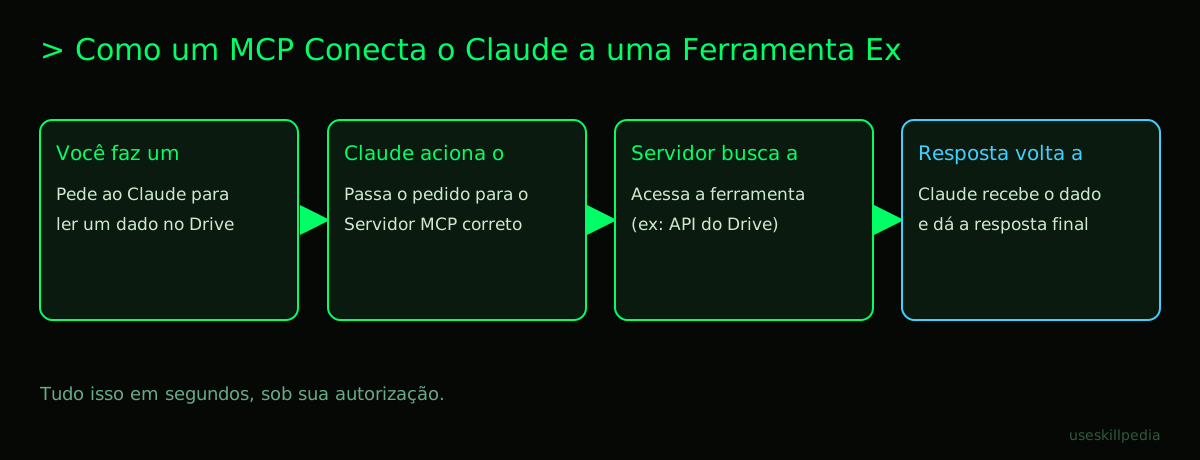
Let's simplify with a daily example. Imagine you want Claude to read a spreadsheet from Google Drive.
- You ask the question: "Claude, what is the total sales in the 'Sales 2026' spreadsheet in my Drive?"
- Claude identifies the need: It understands it needs data that is in Google Drive.
- MCP springs into action: Since you've already configured the Google Drive "connector," Claude "knows" how to ask for this information. It doesn't go to Drive itself; it asks the Google Drive MCP server to do it.
- The server fetches the information: This server is a secure program that only you have authorized. It accesses the Google Drive API.
- An API is a set of rules that allows two programs to talk. It's like the waiter who takes your order (Claude's request) to the kitchen (Google's servers) and brings back the food (the data).
- The result returns to Claude: The MCP server takes the spreadsheet, extracts the total sales, and returns that information in a format Claude understands.
- Claude answers you: "The total sales in the spreadsheet is $150,000."
This entire process happens in seconds, securely, because the MCP server only accesses what you allow.
To use this, you need Claude Code, which is the version of Claude you install on your computer, like a regular program. It's included in all paid Anthropic plans (Pro, Max, Team, Enterprise), but not in the free plan (Free). It's in Claude Code that you configure these MCP connectors.
Want to know how to connect? We have a step-by-step here: How to connect MCP in Claude (Desktop and Code).
Figma + Claude: Your design partner
Let's get to the first and one of the most powerful: mcp claude figma. Figma is a popular tool for creating website and app designs.
Without MCP, you'd have to export an image of your design, send it to Claude, and say: "What do you think of this button?" With MCP, the conversation is direct.
How does it work? You connect Claude to your project in Figma. From there, you can ask things like:
- "Claude, take a look at the login screen and suggest improvements for accessibility."
- "Translate the text on this screen to English and Spanish."
- "Generate basic HTML code from this card design."
Claude can "see" the layers, text, colors, and components in your Figma file. It can analyze and give contextual suggestions because it's looking at the real thing, not a static image.
Who is it for? Perfect for designers, product managers, and front-end developers who want to prototype faster, ensure consistency, or just get a quick second opinion on a layout.
Google Drive + Claude: Your expanded memory
Your Google Drive (or OneDrive, Dropbox) is like the basement of your digital house: it has everything, but finding something specific can be a chore. Connecting Drive to Claude turns the AI into your super-fast personal archivist.
What's the advantage? Almost unlimited context. Claude has a large context window (1 million tokens, which is roughly 555,000 words), but it's limited. Instead of putting a huge document directly into the conversation, you can leave the document in Drive and just ask Claude to read the part that matters.
You can ask:
- "Summarize the document 'Annual Report 2026' that's in the 'Work' folder."
- "Compare the main points of proposal 'A' with proposal 'B'."
- "Extract all the tasks and deadlines listed in this PowerPoint presentation."
This is powerful because Claude doesn't need to "load" the entire file into the conversation's memory all the time. It fetches the information on demand, saving your tokens (the AI's usage "chips") for what really matters: the analysis and the answer.
For a list of other MCP servers you can explore, check out: MCP Servers: list with real examples.
WhatsApp Business + Claude: Stress-free customer service
Many businesses use WhatsApp Business for sales and support. The problem is that attending to everyone consumes hours. An MCP for WhatsApp allows Claude to assist with that service.
Important: This is not for Claude to operate the account alone 24/7. It's for it to be an assistant to the human agent.
How would you use it? Imagine you connected your store's WhatsApp Business to Claude. When a customer message arrives, you can, in the same conversation with Claude, ask:
- "Claude, a customer is complaining about the delay of order #12345. Generate a polite response apologizing and saying we'll check with the carrier."
- "Translate this response I wrote into English, to send to the foreign customer."
- "Based on this customer's chat history (which Claude can analyze via MCP), they've asked many questions about shipping. Suggest including the link to the delivery policy page in the response."
The MCP allows Claude to read and, in some more advanced workflows, even send messages, always under your control. This speeds up work a lot, reduces errors, and maintains a quality standard in customer service.
Power BI + Claude: Ask your data questions
Power BI, Tableau, Google Looker... are Business Intelligence (BI) tools, meaning they create those dashboards full of pretty charts with company data. For a layperson, understanding what a scatter plot or a treemap means can be difficult.
An MCP for Power BI puts Claude as your data translator.
What changes? Instead of clicking filters and trying to guess, you ask a question in simple English:
- "Claude, looking at the Sales dashboard, which region grew the most last quarter?"
- "Explain, in simple terms, why the 'Costs' line spiked in May."
- "Based on the monthly trend, what do you think the estimated revenue for December will be?"
Claude, connected to your Power BI report, can "read" the data and visuals. It won't alter your dashboard, but it will interpret it for you, highlighting insights, explaining causes, and even projecting scenarios clearly and without jargon.
This democratizes access to information. Anyone on the team, without technical BI training, can ask complex questions and get useful answers.
Here is a simple comparison table to help choose which MCP to try first:
| Tool | Best For... | You Need... |
|---|---|---|
| Figma | People who create website/app layouts, UI/UX. | An active project in Figma. |
| Google Drive | People who work with many documents, spreadsheets, presentations. | A Google account (personal or Workspace). |
| Small businesses, salespeople, customer support teams. | A configured WhatsApp Business account. | |
| Power BI | People who need to analyze data and dashboard reports. | Access to a Power BI report/publication. |
We recommend trying these 3 skills first
Besides MCPs (which connect to external tools), Claude Code uses Skills. These are like "mini-programs" or saved instruction reminders you can activate to teach Claude to do specific tasks within the code. They are simpler to start with.
- mcp-builder-anthropics: This skill helps you create your own MCP server. If no connector exists for the tool you use, this skill guides you through the first steps to build your own.
- mcp-server-patterns-affaan-m: It teaches common patterns for how to structure an MCP server. It's like a cookbook showing the right ways to make Claude talk to databases, files, or web APIs.
- prepare-mcp-integration-paperclipai: Focuses on helping you prepare your project (your code) to receive an MCP integration in an organized way, avoiding mess.
Frequently Asked Questions
Do I need to be a programmer to use MCPs? Not necessarily. Connecting a ready-made MCP, like the one for Figma or Drive, often just involves copying a command or setting up an access key. Creating an MCP from scratch requires programming knowledge.
Is it safe? Will Claude access my data without me knowing? Yes, it's safe. You need to explicitly authorize each connection. The MCP acts as an intermediary with limited permissions (e.g., read-only). Your data is not used to train the model. Security depends heavily on you using MCP servers from trusted sources.
Does this use more tokens? Yes, but in a smart way. The content the MCP fetches from Figma, Drive, etc., will be injected into the conversation and will consume tokens. The advantage is that you bring in only what's necessary, at the right time, instead of putting a huge file in all at once.
MCP, Plugin, Skill... are they the same thing? No, but they are similar concepts. MCP is the universal standard for connecting to any external app. Plugin in Claude Code is an older term, often used for specific code editor extensions. Skill (in Claude Code) is a set of saved instructions to help Claude with programming tasks.
Does it work on the free plan (Free) of Claude? MCP Connectors on the claude.ai website work on all plans, including Free. However, to use MCPs in Claude Code (where there are more options and control), you need a paid plan (Pro, Max, etc.), because Claude Code itself is not available on the Free plan.
Read More
- Understand the basics: What is MCP (Model Context Protocol): explained in an easy way
- The heart of the technology: What is an MCP server and how it works
- Practical installation guide: Claude Code: what it is, how to download, install and how much it costs (2026 guide)
- Explore more Skills: search skills
- Related concept: AI Agent: what it is, how it works and how to create yours (without programming)
Sources
- What is the Model Context Protocol (accessed on 10/16/2026)
- Claude Code: MCP (accessed on 10/16/2026)
- Claude Code: plugins (accessed on 10/16/2026)
- Claude plans and pricing (accessed on 10/16/2026)
Full guide on this topic: What is MCP? The Simple Guide to the Model Context Protocol