What is an MCP Server? A Simple Guide for Beginners
Skillpedia team · updated 2026-10-16 · 11 min read
Short answer: An MCP server is a program that connects your AI to real-world data and tools, like your email or spreadsheet. It's like a translator that teaches the AI how to use other apps. With it, you can ask the AI to check your schedule or read a document for you.
Imagine you have a super-smart AI assistant, like Claude. It knows how to chat, write text, and answer questions. But it lives "inside the computer." It can't, on its own, look at your emails, check your bank balance, or change an event on your calendar.
That's where the MCP server comes in. It's your AI's "connected friend." While the AI is the brain, the MCP server is the eyes, ears, and hands that access other places. Let's understand this together, from the ground up, without any complication.
Table of Contents
- What is an MCP Server For?
- The Restaurant Analogy: Client and Server
- What's Inside an MCP Server?
- How Do I Get an MCP Server Working?
- Is It Safe to Use an MCP Server?](#is-it-safe)
- What's the Difference Between Skills, Connectors, and Servers?
What is an MCP Server For?
Think of everything you do on your computer or phone:
- Reading and replying to emails.
- Saving files to Google Drive or your computer.
- Scheduling meetings on your calendar.
- Making spreadsheets in Excel or Google Sheets.
- Chatting on WhatsApp or Slack.
Now, imagine being able to ask your AI to do that for you. Instead of you opening Gmail, the AI could summarize your last 10 emails. Instead of you searching for a file, the AI could find it and read the contents.
The MCP server makes this possible. It's the program that sits in the middle, acting as a bridge. Without it, the AI is just a very good conversationalist. With it, the AI becomes a true assistant that acts in the digital world.
It's important to understand that MCP (Model Context Protocol) is the standard, the "language" they speak. It's like the USB-C protocol, which allows you to connect different devices. The MCP server is one of the devices that uses this connection.
The Restaurant Analogy: Client and Server
Let's use a simple analogy: a restaurant.
- You are the customer. You sit at the table and place an order: "I want a margherita pizza."
- The waiter is the AI application (like Claude Code). They receive your order, take it to the kitchen, and then bring you the finished pizza.
- The kitchen is the MCP server. That's where the ingredients (your data) are accessed and transformed into what you ordered. The kitchen has access to the pantry (your files), the stove (tools), and follows recipes (workflows).
In this case:
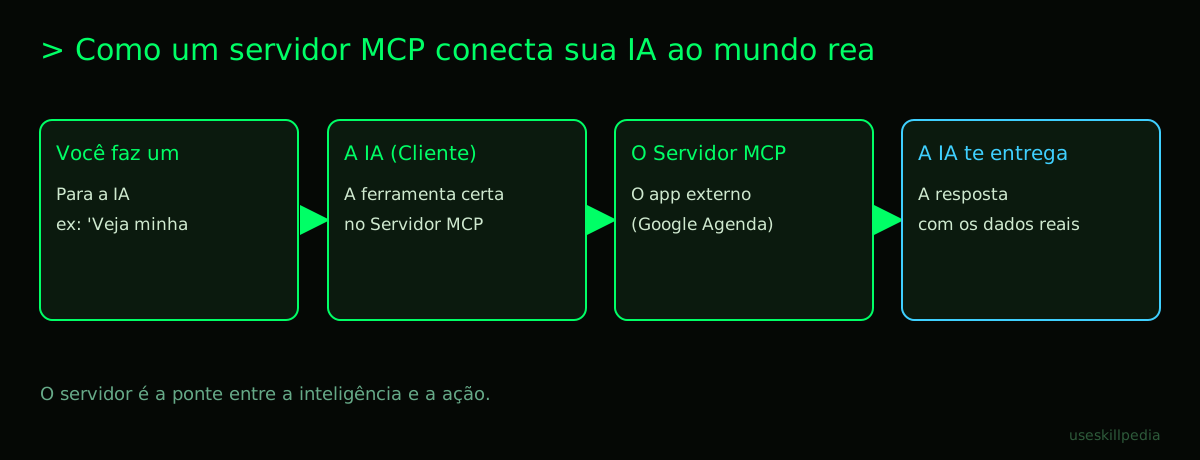
- You ask the AI: "See what's in my March expenses spreadsheet."
- The Claude application (the waiter) takes that request to the correct MCP server (the kitchen specialized in spreadsheets).
- The MCP server (the kitchen) accesses your Google Sheets spreadsheet (the pantry), reads the data, and prepares the information.
- The server returns the data to the Claude application, which delivers the answer to you: "In March, your main expenses were..."
The server is the one that serves the data and executes actions. The client (the AI app) is the one that consumes those services. This architecture is common in technology, and MCP is just a specific, standardized way of making this connection for artificial intelligences.
What's Inside an MCP Server?
An MCP server is usually a simple computer program. Inside it, there are basically three things it can offer to the AI:
Resources (Data): These are sources of information the AI can read. Think of them as "places the AI can pull data from."
- Practical Example: An MCP server for Google Drive. It tells the AI: "I have access to these resources: the list of files in the 'Projects' folder, the content of the 'Final Report' document, etc."
- Analogy: It's as if the server said, "Here are the library shelves you can consult."
Tools (Actions): These are things the AI can do, not just read. They are verbs: search, calculate, send, create.
- Practical Example: An MCP server for a calendar. The tools could be:
create_event,find_todays_events,update_event. - Analogy: They are the kitchen appliances: the blender (to mix), the oven (to bake), the knife (to cut). Each performs a specific action.
- Practical Example: An MCP server for a calendar. The tools could be:
Prompts (Workflows/Recipes): Sometimes the action is more complex. A prompt here is like a mini-recipe or a pre-defined workflow that the server knows.
- Practical Example: An MCP server for a news website might have a prompt called "summarize_topic." You ask "summarize today's news about AI," and the server already knows the step-by-step: fetch the latest news, filter by relevance, and generate a summary.
- Analogy: It's like ordering a "combo" at a fast-food restaurant. You say "I want combo 3," and the employee already knows they need to get a burger, fries, and a drink, in a sequence.
To work, the MCP server needs an access key (token) for many services. A token is like a temporary password or a special key you give to the program so it can access only your account on Google, Notion, etc. You normally create this once on the service's official page (like Google Cloud) and configure it in the server.
How Do I Get an MCP Server Working?
You don't need to be a programmer! The process is getting easier. Let's think about Claude Code, which is an application from Anthropic that you install on your computer and works in a terminal window (a black screen where you type text commands to control the computer).
Here is a general flow:
- Choose an MCP server. There are many ready-made ones. Some are official, others were created by the community. We have a list with real examples to inspire you.
- Install the server. This usually involves running a command in your computer's terminal. It's like installing a new app, but using text commands.
- Configure the credentials. You will need that access key (token) for the service (e.g., Google, Notion). The MCP server generally explains how to get it.
- Add the server to Claude Code. You use the command
claude mcp addin the terminal to tell Claude Code: "Hey, talk to this server here." - Done! Now, when you use Claude Code, it will already know it has access to the tools and data that server offers.
In Claude.ai (the version you use in the browser), the idea is the same, but they call MCP servers "Connectors." The interface is more visual: you go to settings, search for the connector you want (e.g., Google Drive), and click to connect, logging in and granting the necessary permissions.
If you want a step-by-step guide on how to make this connection, we have a detailed post on how to connect MCP in Claude.
Is It Safe to Use an MCP Server?
This is an important concern! After all, you are giving access to your data. Here are some key points:
- Limited Permissions: When you generate a token (the access key) on Google, GitHub, etc., you can control exactly what that token is allowed to do. For example: "Only read files" or "Only access the calendar, but not delete events." Always give the minimum permissions necessary.
- Open Source: Many popular MCP servers have their source code open. This means any experienced programmer can look at the code and verify if it only does what it promises, without collecting secret data. It's an extra layer of trust.
- Local Connection: Often, the communication between Claude Code (on your computer) and the MCP server (also on your computer) happens locally. Your data doesn't pass through an unknown server on the internet.
- Official Connectors: On Claude.ai, the "Connectors" offered by Anthropic itself are curated. It's like installing an app from the official store on your phone, which has more guarantees.
The golden rule is: use servers from trusted sources and always pay attention to the permissions you are granting.
What's the Difference Between Skills, Connectors, and Servers?
This can be confusing at first. Let's clarify:
| Term | Where is it used? | Analogy | Example |
|---|---|---|---|
| MCP Server | The general concept, the program. Works with Claude Code, ChatGPT, etc. | The entire kitchen, with its resources and equipment. | A program that gives access to Google Calendar. |
| Connector | Name used in Claude.ai (website/browser) for an MCP server. | A specific adapter plug for the Claude.ai wall. | The "Connect Google Drive" button inside Claude.ai's settings. |
| Skill | Used in Claude Code. It's a package that can contain instructions for using MCP servers (and other things). | An instruction manual you give to the waiter (Claude Code) on how to interact with a specific kitchen. | A folder with a guide saying "To use the spreadsheet server, ask like this...". |
A Skill in Claude Code is interesting because it can teach the AI to better use the tools an MCP server offers. They use a standard called Agent Skills. You can learn to create skills with MCP Builder or explore common MCP server patterns.
The important thing to know is: in the end, everything revolves around the MCP server (the program that provides access). "Connector" and "Skill" are different ways of integrating that server with the AI application you are using.
Try These 3 Skills First
To start seeing the power of this in practice, here are three skills you can explore in Claude Code:
- Prepare MCP Integration: This skill is like a setup assistant. It helps you prepare the ground by creating the correct configuration files to add a new MCP server to your project. Ideal for a first-time user.
- MCP Builder: This skill guides you through the process of building your own MCP server. It explains the concepts and helps structure a simple server. Perfect for those who want to understand how it's made from the inside.
- MCP Server Patterns: This skill shows common "patterns" used in creating servers. It's like learning basic cooking recipes (white sauce, sauté) that you use in various dishes. Helps you understand the logic behind different types of servers.
Remember: skills are instructions. To use them, you normally need to already have the corresponding MCP server installed and configured, or be following a more complete tutorial.
Frequently Asked Questions
Do I need to pay to use MCP servers? No, the MCP protocol is open and free. Many servers are open source and free to use. What may have a cost is the plan for the AI application (like Claude Pro) or the API of some external service you access (e.g., heavy use of the Google Cloud API may generate costs).
Can I use an MCP server with the free Claude plan? Yes! On Claude.ai, the "Connectors" feature (which are MCP servers) is available on all plans, including the free one. However, Claude Code (the terminal application) is only included in paid plans (Pro, Max, etc.).
What is a "repository" in the context of MCP? A repository (or "repo") is, most of the time, a page on GitHub where a project's code is stored and shared. When they say "the official MCP servers repository," it means a place on the internet where you find a list of programs (servers) ready to download and use.
Does an MCP server replace a "plugin" or "extension"? In many cases, yes, the function is similar: connecting the AI to something external. MCP is a new standard that tries to be more universal. In Claude Code, plugins are a specific form of extension, while MCP servers are more general. The trend is for MCP to become the main standard.
Do I need to know programming to create my own MCP server? Yes, creating an MCP server from scratch requires programming knowledge. However, using a ready-made MCP server may only require following configuration instructions, something many non-technical people can do with a good tutorial. To create without programming, you would need tools for creating AI Agents that might integrate MCP in a more visual way.
Read More
- Understand the basics: What is MCP (Model Context Protocol): Explained in an Easy Way
- Practical guide: How to Connect MCP in Claude (Desktop and Code)
- Inspiration: Best MCPs for Claude: Figma, Drive, WhatsApp, Power BI
- Explore everything: search for skills
- Learn about the tool: Claude Code: What It Is, How to Download, Install, and How Much It Costs (2026 Guide)
Sources
- What is the Model Context Protocol (accessed on 10/16/2026)
- Claude Code: MCP (accessed on 10/16/2026)
- Claude Code: plugins (accessed on 10/16/2026)
- Claude pricing plans (accessed on 10/16/2026)
Full guide on this topic: What is MCP? The Simple Guide to the Model Context Protocol