MCP Server Examples: A Simple Guide to Extending Claude's Powers
Skillpedia team · updated 2026-10-16 · 11 min read
Short answer: An "mcp server list" is a list of programs you can connect to Claude so it can access other tools. They're like extra apps you install to let the AI work with your files, calendar, or the internet. It's a simple way to give your AI assistant more powers.
Have you ever chatted with Claude and thought: "Wow, it would be amazing if it could look at my computer files" or "I wish it could update my spreadsheet automatically"? That's what MCP servers are for. They are the bridge that allows this conversation between the AI and the outside world.
In this article, we'll look at real-world mcp server examples of what these servers can do. You'll see that even without knowing how to program, you can understand how these tools work and how they can help in your daily life.
Table of Contents
- What is an MCP Server? A Simple Analogy {#oque}
- Where to Find MCP Servers (The "List") {#lista}
- Real Examples of MCP Servers {#exemplos}
- How Do I "Install" One of These Servers? {#instala}
- Do I Need to Pay for This? {#pagar}
- Try These 3 Skills First {#skills}
- Frequently Asked Questions {#faq}
- Read More
What is an MCP Server? A Simple Analogy
Think of Claude as a very intelligent assistant, but one who is locked in a room with no windows. It knows everything, can calculate, write, and reason. The problem is that it doesn't have access to your desk, your email, or the internet.
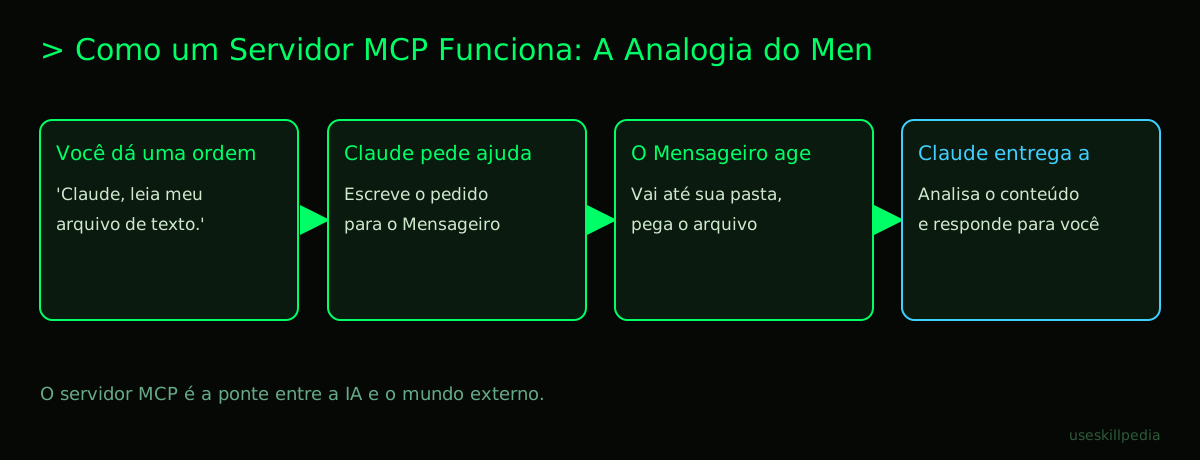
An MCP server is like installing a window in that room. Or better yet, it's like hiring a specialized messenger. This messenger (the server) stays outside Claude's room. You give an order to Claude, like "get the April expenses spreadsheet." Claude can't leave the room, so it writes a request and passes it through the window to the messenger. The messenger goes to your documents folder, gets the correct file, and hands it back through the window to Claude. Now, with the file in hand, Claude can analyze it and give you the answer you need.
In technical terms (which we'll explain!):
- Server: It's the messenger program. A piece of software that runs on your computer or on the internet and knows how to access a specific system (like your files, Google Drive, etc.).
- MCP (Model Context Protocol): It's the "communication manual" between Claude and the messenger. It's how Claude and the messenger agree to speak the same language and use the same size paper for their notes. It's an open standard, which means anyone can create a messenger that follows these rules. You can learn more about this protocol in our article What is MCP (Model Context Protocol): Explained the Easy Way.
- Client: It's Claude itself (or another AI app) making the requests. It's the messenger's "client."
Where to Find MCP Servers (The "List")
There isn't a single, official app store with a big catalog for you to choose from, like the Play Store or App Store. The community is still building this. But there are some good places to start your search:
- Anthropic's Official Skills Repository: Anthropic (the company that created Claude) maintains a collection of "skills." A repository is like a public library on the internet where programmers leave their code for others to use. Some of these "skills" use MCP servers behind the scenes. You can search for skills to see what's available.
- GitHub: This is the world's largest platform where programmers share code. Many developers create their MCP servers and make them available there for free. You can search for "MCP server" on the GitHub website.
- Communities and Forums: Places where Claude users and developers gather to discuss. In these spaces, people often recommend useful MCP servers they've created or found.
Here is a simple table to summarize where to look:
| Place to Search | What You'll Find | Who It's Best For |
|---|---|---|
| GitHub | The server's source code, straight from the developer. | Those with more technical curiosity or who want to see how it was made. |
| Claude Code Documentation | Instructions and examples provided by Anthropic itself. | Beginners who want to start with something guided. |
| Community Forums | Recommendations, tutorials, and discussions from real users. | Those who want to know "what really works" in practice. |
Real Examples of MCP Servers
Now let's get to the interesting part: what can these servers actually do? Let's imagine everyday situations.
- Server for Local Files: This is the messenger that accesses your computer's folder. You can ask Claude: "Read the report in the 'Work' folder and make a one-page summary." The server will fetch the file and deliver the content for Claude to work on.
- Server for Web Browser: Imagine a messenger that controls your internet browser (like Chrome). You could say: "Go to news site X and bring me today's headlines." The server would command the browser, collect the information, and bring it back. This is very useful for research.
- Server for Design Tools (e.g., Figma): Here, the messenger knows how to talk to a design program. A designer could ask: "Claude, look at the login screen design in my Figma project and generate the HTML and CSS code for it." The Figma MCP server would get the design and pass it to Claude, which would then generate the code. See more examples like this in Best MCPs for Claude: Figma, Drive, WhatsApp, Power BI.
- Server for Databases: Think of a messenger that knows the language of your database (where you store structured information, like a customer list). "Claude, connect to our database and tell me how many new customers signed up last week." The server would translate Claude's request, run the query, and bring back the numbers.
- Server for Service APIs: An API is a "digital waiter." It's like the menu and counter of a restaurant on the internet. Other programs can make requests (like "bring me the weather forecast for San Francisco") and the API delivers. An MCP server can be the messenger that takes Claude's requests to the weather API, Google Calendar API, or Gmail API.
Each of these examples drastically expands what Claude can do for you, going far beyond just chatting in a text box. If you want to know more about how these pieces fit together, check out What is an MCP Server and How Does It Work.
How Do I "Install" One of These Servers?
The most common way to use MCP servers is through Claude Code. Claude Code is a tool you run in your computer's terminal. The terminal is that black screen with green letters that looks like something from a hacker movie; it's actually a way to give commands to the computer by typing text, instead of clicking icons.
If you have Claude Code installed, the general process has a few steps. Remember: to use Claude Code, you need a paid Claude plan (Pro, Max, Team, or Enterprise). It is not included in the free plan (Free).
- Find the Server: You need to find the "address" of the MCP server you want to use. It's usually a link on the internet (URL) or a special command.
- Use the
claude mcp addCommand: In the terminal, inside your project folder, you would use a command similar to this:claude mcp add --transport http server-name https://server-address. This command basically says: "Claude Code, please add a new messenger (MCP) in this project folder, and its address is this one here." - Configuration: Some servers may need an API key (token). A token is like a password or badge you get from a service's website (like Google or OpenAI) to prove you have permission to use their "table" (the API). You would need to set up this password in a configuration file.
- Use: After it's added and configured, when you run the
claudecommand in that folder, Claude Code will already know that messenger is available. Then just make your requests!
The full process has more details. For a step-by-step guide, we recommend the article How to Connect MCP to Claude (Desktop and Code).
Do I Need to Pay for This?
This question has two parts:
For using Claude Code and MCP servers? The MCP protocol itself is free and open. Many MCP servers created by the community are also free. However, to use Claude Code (the main tool for connecting these servers in an advanced way), you need to have a paid Claude subscription (Pro, Max, Team, or Enterprise). The Free plan does not include Claude Code.
For the service the server accesses? This is important. The MCP server is just the messenger. If the messenger goes to fetch information from a service that is already paid, you continue to pay for that service. For example:
- If you use an MCP server to access a paid API (like ChatGPT's or a financial data service), the costs for that API are still yours.
- If you connect to Google Drive, you won't pay for the MCP messenger, but you continue using your free or paid Google account.
- The tokens used in the conversation with Claude are also consumed normally. Remember: tokens are the "units of text processing" that the AI uses. Everything it reads (including the files the messenger brought) and everything it writes consumes tokens from your plan. To better understand this concept, read What are Tokens in AI (and Why Do They Run Out So Fast).
Try These 3 Skills First
If you're just starting, it might be easier to first try the "Skills" in Claude Code. They are packages that may contain or use MCP servers in a more packaged way. Start with these:
- Skill: prepare-mcp-integration-paperclipai: This skill helps you prepare to connect MCP servers. It's like an assistant that checks if everything in your project is in the right place before you "install" a new messenger.
- Skill: mcp-server-patterns-affaan-m: This skill teaches and demonstrates common "patterns" used in creating MCP servers. It's great for those who want to understand, in practice, how these messengers are built and how they think.
- Skill: mcp-builder-anthropics: This is a more advanced skill, straight from Claude's creators. It provides tools and examples for those who want to build their own MCP servers. It's the next step if you get the hang of it and want to create a custom messenger.
Frequently Asked Questions
Do I need to be a programmer to use MCP servers? Not necessarily to use them. Some servers are easier to set up, especially by following community tutorials. But to create a new server from scratch, yes, programming knowledge is required.
Is this safe? Are my data protected? It depends on the server. If you install a server that accesses your local files, it runs only on your computer. The risk lies in using servers from unknown sources that might access sensitive data. Always check the reputation of the server's creator.
Is an MCP server the same thing as a plugin in Claude Code? They are very close and related concepts. In a very simplified way, a plugin in Claude Code often uses an MCP server to do its job. The plugin is the "face" or the functionality, and the MCP server is the "mechanism" of communication underneath. Understand better in What is a Plugin in Claude Code (and How to Install).
Can I use MCP in the normal Claude app (claude.ai)? Yes, but with another name and in a slightly different way. On the claude.ai website, they call the similar idea "Connectors". The logic is the same (connecting Claude to other services), but the way to add and manage them is more integrated into the web interface, with no need for a terminal.
What's the difference between MCP and an AI Agent? An AI Agent is a broader concept. It's an AI program that makes decisions and acts automatically to achieve a goal. This agent can use several MCP servers as its "arms" and "eyes" to interact with the world. MCP is one of the tools an agent can use. Learn more about this in AI Agent: What It Is, How It Works, and How to Create Yours (Without Programming).
Read More
- Claude Code: What It Is, How to Download, Install, and How Much It Costs (2026 Guide)
- What is MCP (Model Context Protocol): Explained the Easy Way
- What is an MCP Server and How Does It Work
- How to Connect MCP to Claude (Desktop and Code)
- search for skills
Sources
- What is the Model Context Protocol (accessed on 10/16/2026)
- Claude Code: MCP (accessed on 10/16/2026)
- Claude Code: plugins (accessed on 10/16/2026)
- Claude Plans and Pricing (accessed on 10/16/2026)
Full guide on this topic: What is MCP? The Simple Guide to the Model Context Protocol