What Are Tokens in AI and Why Do They Run Out So Fast?
Skillpedia team · updated 2026-10-16 · 14 min read
Short answer: Tokens are the pieces of text that an AI reads and writes. They act as the unit of measurement for memory and cost. When a limit runs out fast, it's usually not just because of your question's size, but because of everything involved: chat history, files, tools, and the AI's responses.
If you've ever seen the warning that your Claude limit is reached and didn't understand why, this post is for you. We'll explain what are tokens in AI in simple language. I'll use everyday examples. No jargon thrown around. When a technical term appears, I'll explain it. The goal is to help you understand why long conversations, heavy files, and AI agents use up tokens quietly.
Table of Contents
- What is a token, in practice?
- How does a sentence become tokens?
- How much is a token worth?
- Why does Portuguese use more tokens?
- The context window is a work desk
- What counts as a token?
- Input tokens, output tokens, and price
- Why does the Claude limit run out so fast?
- 10 tips to save tokens
- We recommend trying these 3 skills first
- Frequently asked questions
What is a token, in practice?
A token is a piece of text. It can be a word. It can be part of a word. It can be a punctuation mark. It can be a space. It can be a letter. It depends on how the system splits the text.
In AI, a token is the basic unit of reading and writing. The AI doesn't understand "sentences" exactly like we do. It transforms your text into tokens, does the calculation, and returns new tokens as a response.
Think of it this way: each paragraph becomes a sequence of small pieces. These pieces are the tokens. The more pieces you use, the more "space" and "cost" the task occupies.
For the average user, this matters for two reasons:
- Cost: many plans and APIs charge per token used.
- Memory: conversations and files need to fit in the context window.
Understanding what tokens are in AI helps you avoid limit warnings, overly short answers, or conversations that "forget" important things.
How does a sentence become tokens?
Let's see a visual example. Suppose this sentence:
"The coffee is hot and I want to read the book."
A possible illustrative split would be:
The | coffee | is | hot | and | I | want | to | read | the | book | .
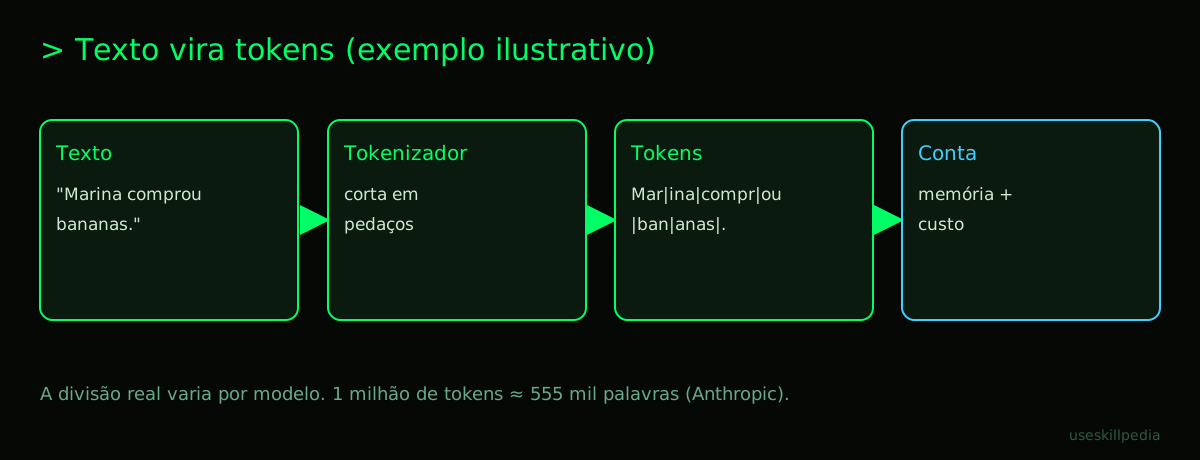
In this sentence, each piece appears as one token. But note: the actual split changes. Each system uses its own tokenizer. The same text can become a different number of tokens depending on the AI, the version, and even the content format.
Now look at a sentence with a name and punctuation:
"Marina went to the market and bought: bananas, coffee, and bread."
An illustrative split could be:
Mar | ina | went | to | the | market | and | bought | : | ban | anas | , | coffee | , | and | bread | .
Some names can be broken up. Words with accents can become more pieces. Spaces and punctuation also count.
How much is a token worth?
A useful number for perspective: 1 million tokens equals about 555 thousand words in Anthropic's current tokenizer. You could also say it's roughly 2.5 million characters.
That seems like a lot. And it is. But 555 thousand words don't always fit in a simple conversation. The reason is that the system may need to carry many other pieces of information along with your question.
Here's an important detail: Anthropic's current tokenizer was introduced in Claude Opus 4.7. It generates about 30% more tokens for the same text than previous models. So, a text that used to cost X tokens may now cost more. Not because the text changed. The system that splits it into tokens became different.
This also explains why a task can cost more than it seems. You see "one paragraph." The model sees "a pile of pieces."
Why does Portuguese use more tokens?
In general, Portuguese tends to use more tokens than English. I won't state an exact number here, because it depends on the text and the system. But the pattern exists.
Common reasons:
- words with accents, like "café," "pão," and "não";
- Brazilian or foreign proper names;
- verb endings and plurals;
- punctuation in the middle of sentences;
If you write in Portuguese, the same text might occupy more space than an equivalent text in English. This isn't an exact rule, but it's common behavior. For those who use AI every day, remember: saving words helps, but saving context helps more.
The context window is a work desk
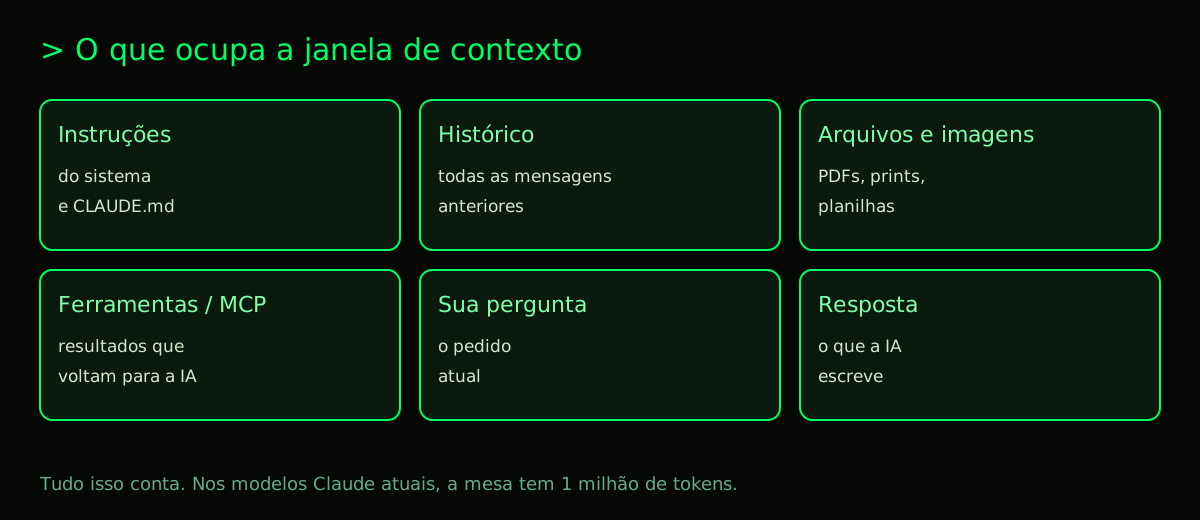
The context window is the space the AI uses to remember the conversation. It's like a work desk. On it fit open documents, notebooks, tools, notes, and the response being written.
If the desk is small, it fills up fast. If the desk is large, it can still fill up if you spread out many files, screenshots, PDFs, logs, spreadsheets, and long responses.
In the mentioned Claude models, the context window is 1 million tokens. The maximum output is 128 thousand tokens. In practice, that's quite large. But the desk isn't infinite. It needs to divide space with everything you send, everything the system remembers, and everything the model needs to write.
To better understand the role of the context window, see AI Agent: what it is, how it works, and how to create yours (without coding). Agents usually use more context because they need goals, tools, and decisions across multiple steps.
What counts as a token?
Here's the part many people forget. The token isn't just what you type in the chat. Everything counts.
The following count as tokens:
- System instructions: internal rules the app uses to respond.
- Conversation history: previous messages.
- Uploaded files: documents, spreadsheets, copied text.
- Images: photos, screenshots, and diagrams.
- Tool results: search results, spreadsheets, database, API.
- Generated response: the text the AI writes.
- Settings and memory: when the system carries additional information.
If you use MCP, this can increase a lot. MCP, or Model Context Protocol, is an open standard for connecting AI to external data, tools, and workflows. The official analogy calls it "a USB-C port for AI applications." You can learn more at What is MCP (Model Context Protocol): explained the easy way.
For the layperson, think of it this way: each connected tool opens an extra drawer on the desk. If the drawer is full, it consumes space.
Input tokens, output tokens, and price
There are two sides to the count: input and output.
Input tokens are everything you and the system send for the AI to analyze. Example: your question, the history, the pasted file.
Output tokens are what the AI responds with. A long response uses more output tokens. In many plans and APIs, output usually costs more than input.
The table below compares some current models based on the provided numbers. Prices are per 1 million tokens.
| Model | Input per 1M tokens | Output per 1M tokens | Simple Use |
|---|---|---|---|
| Claude Haiku 5.5 | starting at $0.10 | starting at $0.50 | Fast and cheap. Above 100k tokens in the prompt, it can get more expensive. |
| Claude Sonnet 5.5 | $2 | $10 | Good balance. Leads the Vibe Code Bench code test (Vals.ai, Oct/2026). |
| Claude Opus 5.5 | $4 | $20 | High level. Leads the Artificial Analysis Intelligence Index with 57.6 in Oct/2026. |
| Claude Fable 5.1 | $10 | $50 | More advanced, for long agents. |
| GPT-6 Luna | $0.10 | $0.50 | Cheap and fast. Available for Free and Go users on the desktop app. |
| GPT-6.1 Sol | $2 | $10 | Almost Astra level for 1/5 the price. Leads in math on the cited ranking. |
| GPT-6 Astra | $10 | $50 | Top-tier model. |
There are also other models, like Meta Muse Wonder, xAI Grok 4.7, Mistral Large 4 in preview, and DeepSeek V4.1 Flash. And Google has Gemini 4 Argon, available globally since 10/13/2026 in the API and the Gemini app for Google AI Pro and Ultra subscribers, plus AI Mode in Search. According to Google, it ranks 1st on the Vals Index. To choose which one to use, see Best AI models in 2026: which to use for each task.
Why does the Claude limit run out so fast?
Here's the common frustration: you chat a little, but your plan runs out fast. This happens because the usage limit isn't measured just by your question. It's measured by the entire conversation context.
The main reasons:
1. Long conversations resend the history
Each new message can carry the previous history again. If you asked ten big questions, the tenth might carry all ten previous ones in the token count. The longer the conversation, the "heavier" it gets.
2. Large files and copy/paste add weight
A PDF, a log, a spreadsheet, or pasted text occupy space. Even if the AI summarizes it later, everything goes on the desk first.
3. MCPs and tools use tokens
External tools can query databases, files, calendars, CRM, or APIs. Each result comes back as text. If the result is large, the count goes up. If you use several tools, they add up.
4. New Anthropic models count more tokens
Anthropic's current tokenizer generates about 30% more tokens for the same text than previous models. This isn't a "mistake." It's how the text is now measured.
5. The renewal window is 5 hours
In Claude plans, usage limits renew in a 5-hour window. The Free plan costs $0. The Pro plan costs $20/month on the monthly plan or $17/month on the annual plan, with $200 charged at once. Max starts at $100/month, with Max 5x options for $100 and Max 20x for $200. Max gives 5x or 20x the Pro usage per 5-hour session. Paid plans also have a weekly limit.
And there's an important detail: Claude Code and chat share the same limit. So programming with Claude Code can consume the same budget as chatting with Claude. If that's your case, read Claude Code: what it is, how to download, install, and how much it costs (2026 guide) and Claude limits by plan.
Also worth noting: Skills and Connectors exist in all plans, including Free. Claude Code is included in all paid plans, but not in Free.
To better understand how to save within the same plan, see How to save tokens in Claude.
10 tips to save tokens
Here's a simple guide. You don't need to do everything. Choose three tips and start with them.
1. Start a new conversation per task
A long conversation accumulates history. If the task changed, start a new one. This way, the model doesn't carry everything said before unnecessarily.
2. Ask for a summary before continuing
Instead of keeping 50 large messages, ask something like:
"Summarize what we've decided so far in up to 100 words. Then, continue only with that."
This helps clear the desk. Later, pasting the summary into a new conversation is usually cheaper.
3. Use a smaller model for simple tasks
You don't need the strongest model for everything. For reviewing short text, listing ideas, or explaining a simple term, a cheaper model may be enough. For long and complex tasks, then a more advanced model is worth it.
4. Use skills instead of pasting instructions every time
A skill is a folder with instructions, scripts, and references. It can load only the name and description first. Only when the task needs it does it open more details. This saves context.
If you use Claude Code, this is very useful. To understand better, read Claude Skill: what it is, how to install, and the best ones to test (2026 guide).
5. Turn off MCPs you aren't using
Each connected tool can bring instructions, options, and results. If you're not using it, turn it off. Fewer open drawers means less stuff occupying the desk.
6. Ask for short answers
You can be direct:
"Answer in 3 bullet points."
Or:
"Explain as if for a beginner, with a maximum of 80 words."
This reduces output tokens. Since output is usually more expensive, it helps a lot.
7. Keep CLAUDE.md lean
If you use Claude Code, CLAUDE.md can contain project instructions. This is great for not repeating orders. But don't put everything there. Keep only the essentials: stack, main commands, style rules, and points of attention.
If the file becomes a book, it will occupy context in almost every task.
8. Use /compact and /clear in Claude Code
In Claude Code, /compact helps summarize the current conversation. /clear clears the context. Use /compact when the conversation gets long. Use /clear when starting a new task.
9. Don't paste entire files if you only need a part
If the problem is in a snippet, paste only the snippet. If it's a PDF, send the necessary page. If it's a log, filter it first. Less text goes in, fewer tokens are used.
10. Compare models before switching tools
The AI that gives the prettiest answer isn't always the one that fits your usage. For programming, one AI might be better. For writing, another might cost less. For long agents, you might need a more expensive model, but with fewer turns. Also see Save tokens in Claude Code: 12 tricks and Save tokens in Codex and Copilot.
We recommend trying these 3 skills first
Skills can help you handle tokens in a more organized way. Here are three to try first.
- token-budget-advisor-affaan-m: helps you understand how many tokens a task might use and how to adjust the request to save without ruining the response.
- context-budget-affaan-m: organizes what needs to go into the conversation and what can be summarized, preventing files and instructions from taking up too much space.
- strategic-compact-affaan-m: indicates the best time to compact or summarize the conversation, keeping what matters and discarding what no longer helps.
If you want to explore more options, you can search for skills.
Frequently asked questions
1. Is a token the same as a word?
No. A word usually becomes one or more tokens. Signs, spaces, and parts of words also count.
2. Why does my AI conversation "forget" old things?
It might be that the context is full. The work desk fills up. The system starts paying more attention to the most recent or useful parts.
3. Does a large file always use more?
Yes. A large file can occupy many tokens. If you only need a snippet, use a snippet.
4. Is a long answer more expensive than a long question?
In general, output is more expensive than input. So asking for short answers helps a lot.
5. Do MCPs use tokens even if I don't use them?
They can. Connected tools can bring instructions and options to the desk. Turn off what you don't need.
6. Does the 5-hour limit apply to both chat and Claude Code?
In Claude, chat and Claude Code share the same limit. The renewal window is 5 hours.
7. Do skills help save tokens?
They can help. Instead of pasting large instructions every time, you use a skill with progressive loading.
Read also
- How to save tokens in Claude
- Save tokens in Claude Code: 12 tricks
- Claude limits by plan
- What is MCP (Model Context Protocol): explained the easy way
- Claude Code: what it is, how to download, install, and how much it costs (2026 guide)
- Claude Skill: what it is, how to install, and the best ones to test (2026 guide)
Sources
- Anthropic: model overview (context and tokens) (accessed 10/16/2026)
- Anthropic: token counting (accessed 10/16/2026)
- Anthropic: context windows (accessed 10/16/2026)
- OpenAI models (accessed 10/16/2026)
- Claude plans and pricing (accessed 10/16/2026)
- Anthropic API pricing (accessed 10/16/2026)