Understanding the Claude Token Limit: Free, Pro & Max Plans Explained
Skillpedia team · updated 2026-10-16 · 8 min read
Short answer: The limits for Claude Pro (and other plans) define how much AI you can use per period. The Free plan has slower responses and simpler models. By paying (Pro or Max), you get more "battery" to use Claude for longer and with smarter models.
If you're starting with Claude, you might wonder: "Why does it sometimes stop responding?" The answer lies in usage limits. Each plan (Free, Pro, Max) comes with a different "quota," like a cell phone plan. This article will explain, in detail, what each plan offers and how these limits affect your daily use, using simple words and everyday examples.
Table of Contents
- What are these limits and how do they work?
- Side-by-side comparison: Free vs. Pro vs. Max
- How do I know if I'm near my limit?
- What happens when I hit the limit?
- Claude Code: how does it fit into this?
- Practical tips to use your quota well
- We recommend trying these 3 skills first
- Frequently asked questions
What are these limits and how do they work?
Think of Claude as a very powerful engine. To work, it needs fuel and can't overheat. The limits are rules to ensure everyone gets a fair share of this "fuel" and that the "engine" doesn't stop for everyone.
There are two main types of limits:
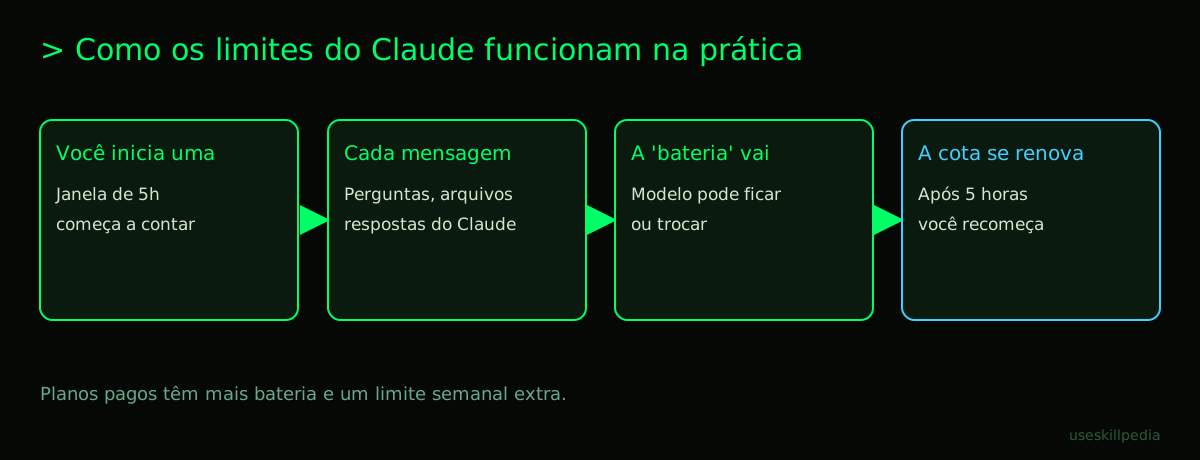
- Per-"Session" Limit (5-Hour Window): It's like a battery that recharges every 5 hours. Everything you chat about with Claude (questions, answers, files you send) consumes a bit of this battery. When it runs out, you need to wait for it to recharge (i.e., wait for the 5 hours to pass).
- Weekly Limit (for paid plans only): It's like a monthly internet budget. Besides the battery that recharges every 5 hours, those who pay (Pro, Max) also have a larger limit for the whole week. If you use a lot in one day, you still have a balance for the rest of the week.
The "fuel" we measure is tokens. A token is a tiny piece of a word or symbol that the AI can understand. It's like syllables or letters that the AI reads at once. A more detailed explanation about tokens can be found here.
Important fact: Everything you send and that Claude replies to counts toward the limit: your questions, the conversation history, files, images, and Claude's own responses.
Side-by-side comparison: Free vs. Pro vs. Max
The table below summarizes the main differences. Remember: the values are in US dollars (US$) and the limits renew every 5 hours, not at midnight.
| Plan | Cost (per month) | Available Models | Usage in 5 Hours (Window) | Weekly Limit | Claude Code? |
|---|---|---|---|---|---|
| Free | Free | Varies (check at claude.com/pricing) | Low (not publicly specified) | Check the official page | Not included |
| Pro | US$ 20 (monthly) or US$ 17 (annual) | More models than Free (check the current list) | More than the Free plan | Has one (value not specified) | Yes, included |
| Max | Starting at US$ 100 | Same as Pro, with more usage (check the current list) | 5x (Max 5) or 20x (Max 20) the usage of Pro | Has one (larger than Pro) | Yes, included |
What does this mean in practice?
- Free: Ideal for trying it out, asking short, occasional questions. It's like having a free sample.
- Pro: For daily use, for work or studies. You get access to the "smarter" models (like Opus) and can chat much more without worrying about the battery running out quickly.
- Max: For maximum possible use. It's for teams, intensive research, or long projects that require many hours of conversation with the AI at once. Claude Max literally means having 5 or 20 times more "fuel" per session than the Pro plan.
How do I know if I'm near my limit?
Unfortunately, there isn't a visible "battery meter" all the time on the Claude site. The most common way to notice is through performance:
- Slower responses: Claude may start responding more slowly.
- Model is switched: The site may automatically switch to a simpler, cheaper model (like Haiku) to save your tokens.
- Warning message: At times, Claude itself may warn you that your usage is high in that 5-hour window.
To manage this proactively, you can use skills. A skill (pronounced "skíl") is a small package of instructions you "teach" Claude so it can do a specific task better. For example, there are skills that help monitor your usage. Two we recommend are:
- Context Budget Affaan M: Warns you how much of the "context window" (the conversation's memory space) you've already used.
- Token Budget Advisor Affaan M: Helps you plan and not spend too many tokens at once.
What happens when I hit the limit?
It's not a "punishment," it's just the quota running out. Two things can happen:
- In the 5-hour window: If you use up all your quota in this period, Claude will stop responding with the models from your plan. On Free, you practically can't use it anymore. On Pro or Max, the system may put you in a wait queue or severely limit responses until the 5 hours from the start of your window pass and the quota is renewed.
- On the weekly limit (paid plans): If you exhaust your weekly limit, you will revert to the same usage level as the Free plan until the week resets.
The best strategy is not to reach the end. Learning to save tokens is the key to getting the most from your plan.
Claude Code: how does it fit into this?
Claude Code is a separate tool, made for programmers. It works in the terminal, which is a black screen where you type text commands for the computer, instead of using menus with a mouse. The important thing to know is: using Claude Code consumes the same quota from your plan on the website (claude.ai).
If you have a Free plan, you don't have access to Claude Code. Only paid plans (Pro, Max, Team, Enterprise) can use it. So, when you ask Claude Code to analyze a file or write code, it's using the tokens from your 5-hour window and your weekly limit from the Pro or Max plan.
If you're going to code a lot, it's worth checking out specific tips for saving tokens in Claude Code.
Practical tips to use your quota well
- Be clear and direct: The longer and more confusing your question, the more tokens you spend. Try to get straight to the point.
- Clear the history: Very long conversations take up memory. If the conversation has already turned into something else, start a new chat. This "resets" the weight of the history.
- Use the right model for the task: Don't use the most powerful model (which uses more tokens) for everything. For simple tasks, Claude Sonnet or Haiku can work perfectly.
- Watch out for large files: Sending huge documents consumes many tokens at once. If possible, extract only the relevant part or ask Claude to summarize specific sections.
- Use saving skills: Skills like Strategic Compact Affaan M are designed to help Claude give efficient responses, using fewer tokens without losing quality.
We recommend trying these 3 skills first
For you to start getting more out of Claude, especially if you have a paid plan, these three skills are great starting points:
- Token Budget Advisor Affaan M: It's like a financial advisor for your AI use. It helps you plan your questions so you don't spend your "tokens" (the usage currency) too quickly.
- Context Budget Affaan M: Works like a fuel gauge for your conversation. It warns you when the "memory" of your conversation with Claude is getting full, so you don't lose important information.
- Strategic Compact Affaan M: Teaches Claude to be more direct and concise in its responses, ideal for when you need a quick solution without beating around the bush.
Frequently asked questions
Can I buy more tokens if I run out? Not directly. The quota renews with time (every 5 hours and weekly). If you need more, the solution is to upgrade to a higher plan, like Pro or Max.
Is the Claude Pro limit per day or per month? It's mainly per a 5-hour "window" that keeps renewing. Paid plans also have an extra weekly limit. It's not a fixed monthly limit.
If I send an image, does it use more? Yes. Images, PDF files, spreadsheets... All of this is converted into text (tokens) for Claude to understand, and it consumes from your quota.
On the Free plan, can I use Skills and Connectors? Yes! One of the cool advantages is that Skills and Connectors (which are like "plugins" or extensions for Claude) are available on all plans, even Free.
What is a Connector (MCP)? A Connector (or MCP) is a standard that allows connecting Claude to other programs, like a calendar or a database. The official analogy is that it's a "USB-C cable for AI apps." Understand better what MCP is here.
Read also
- What are tokens in AI (and why do they run out so fast)
- How to save tokens in Claude (complete guide)
- Claude Code: what it is, how to download, install and how much it costs (2026 guide)
- AI Agent: what it is, how it works and how to create yours (without coding)
- Search for skills
Sources
- Anthropic: context windows (accessed on 10/16/2026)
- Anthropic: token counting (accessed on 10/16/2026)
- Claude plans and pricing (accessed on 10/16/2026)
Full guide on this topic: What Are Tokens in AI and Why Do They Run Out So Fast?