How to Save Tokens in Claude (Complete Guide for Beginners)
Skillpedia team · updated 2026-10-16 · 9 min read
Short answer: Tokens are like coins you spend every time you chat with Claude. To save tokens, be clear and direct in your questions, avoid very long texts, and use the right tools. This makes your credits go further.
Hello! If you're new to using Claude and wonder why your "credits" run out so fast, you're not alone. It's a very common question. This "credit" has a name: token.
Think of tokens like tickets at an amusement park. Every time you chat with Claude—whether sending a question or reading the answer—you spend some of those tickets. Your monthly plan gives you a bunch of them, but if you're not careful, they run out quickly!
The good news is you can be smart and make your tickets (your tokens) last much longer. It's like learning to use your money better. This guide will show you, step by step with simple examples, how to do that.
Table of Contents
- What are tokens and why do I need to save them?
- The 5 habits that waste the most tokens (and how to avoid them)
- How to use Claude Code to save tokens
- Skills and Connectors: your best friends for saving
- Planning your use: which plan and model to choose?
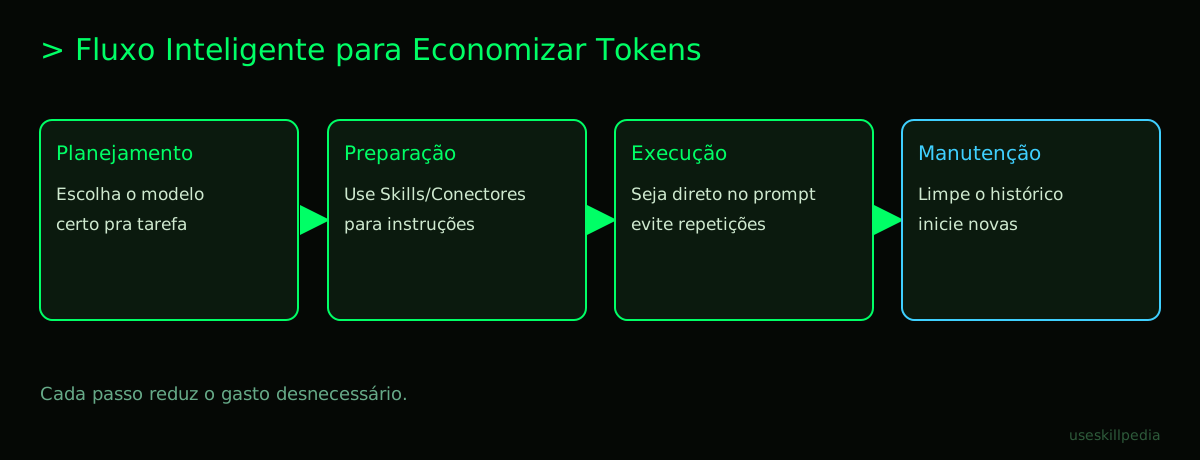
- We recommend trying these 3 skills first
- Frequently asked questions
- Read more
What are tokens and why do I need to save them?
Let's start from the beginning, without complication. A token is the basic unit Claude uses to process text.
Think of it this way: Imagine you are cutting a sentence with scissors. Each little piece you cut (a small word, part of a big word, or even a space) is a token. Claude "reads" the text cut into these parts.
Everything you send and receive counts as tokens: your question, the old conversation history, files you upload, images, and, of course, Claude's response.
Why does this matter? Because Claude's plans (especially Free and Pro) have a limit on how many tokens you can use in a certain period. It's like having a cell phone plan with a data limit. If you spend it too fast, you run out until next month or until your period renews (which, in Claude, happens every 5 hours for some limits).
If you want a more detailed and visual explanation, check out our pillar article: What are AI tokens (and why do they run out so fast).
The 5 habits that waste the most tokens (and how to avoid them)
Many people waste tokens accidentally, out of habit. Here are the main culprits:
Very Long Conversation History: Claude remembers everything said in the same conversation. A conversation that turned into a 50-page novel will consume a lot of tickets just to be "remembered."
- How to avoid: Close old conversations and start new ones for different topics. Use the "New Conversation" button frequently.
Huge and Repetitive Questions: Writing a huge text, with lots of repeated or off-topic information, forces Claude to process everything.
- How to avoid: Be direct. Before writing, think: "What is my main question?" Get straight to the point.
Uploading Unnecessary Files: Uploading a text file, PDF, or image consumes tokens for Claude to read the content.
- How to avoid: Only upload files when it's really necessary. Sometimes, copying and pasting the important part is more economical.
Not Using Saving Tools: Claude has features made to help you save, but many people don't use them.
- How to avoid: Read the next sections! We'll talk about Claude Code, Skills, and Connectors.
Choosing the Wrong Model for the Task: Claude has several "brains" (models). Using the most powerful (and expensive) one for a simple task is like using a truck to go to the corner store.
- How to avoid: Know the models. For quick and cheap tasks, Haiku is excellent. For serious work, Sonnet offers great value. Save Opus or Fable for complex missions.
To know the exact limits of each plan, take a look at the sister post: Claude limits by plan (Free, Pro, Max).
How to use Claude Code to save tokens
Claude Code is a powerful tool you install on your computer. It is a terminal (a command window where you type instructions for the computer) specialized for working with Claude, mainly on programming tasks.
Why does it save tokens? On the normal website (claude.ai), the entire graphical interface, history, and images consume tokens just by existing in the conversation. Claude Code is leaner and gives you fine control over what you send.
Furthermore, with it you can use MCP. MCP (Model Context Protocol) is like a universal adapter (a USB-C port) that connects Claude to other programs on your computer, like spreadsheets, databases, or design tools. Instead of Claude having to read a huge file, it can "ask" the specific program just what it needs, saving many tokens.
Practical example: Instead of pasting 1000 lines from a spreadsheet into the chat, you connect Claude Code to Excel via MCP. Then you ask: "What is the average sales for March?". Claude asks for this information directly from Excel and receives just the average number, using very few tokens.
If you're interested, we have a complete guide on this: Claude Code: what it is, how to download, install, and how much it costs (2026 guide). And for specific code tricks, see: Saving tokens in Claude Code: 12 tricks.
Skills and Connectors: your best friends for saving
These are the smartest tools for you to manage your tokens.
- Skills: They are like cell phone apps or cake recipes for Claude. A Skill teaches Claude to perform a specific task in the best possible way, using fewer resources (that is, fewer tokens!). They are loaded intelligently: only the name and description are always in memory; the detailed "instruction manual" is only loaded when you use it.
- Connectors: They are the same idea as MCP, but they work directly on the Claude website (claude.ai). They are plugins or extensions that connect Claude to other online services, like Google Drive or Notion.
How do they save tokens? Imagine you want Claude to analyze your expenses. Without a Skill, you would have to explain everything: "Look, Claude, take this spreadsheet, sum column B, filter for 'groceries'...". This creates a huge prompt.
With a financial analysis Skill, you simply say: "Use the Budget Skill to analyze this file." The Skill already contains all the optimized instructions. Claude follows the ready-made recipe, does the work efficiently, and spends far fewer tokens than if you had to explain everything from scratch.
You can find ready-made Skills in the official repository (a repository is like an online library or an app store for code) or search for skills in specialized directories.
To understand the technology behind this, read: What is MCP (Model Context Protocol): explained in an easy way.
Planning your use: which plan and model to choose?
Choosing the right combination of plan and model is half the battle for healthy token savings. Let's use a table to simplify:
| Your Usage Profile | Recommended Plan | Recommended Model for daily use | Why? |
|---|---|---|---|
| Curious/Beginner | Free | The plan's default model | The Free plan has limits. Use Haiku, which is fast and cheap in tokens, to explore. |
| Professional/Student | Pro (annual, if possible) | Sonnet | Pro gives more tokens. Sonnet is the "sweet spot": smart for work and with good token value. Use Opus for critical tasks. |
| Team/Complex Projects | Max or Team | Opus or Fable | For long and complex sessions (like creating an AI agent – an autonomous assistant), you need the power and high token limit of these plans and models. |
Golden tip: On paid plans (Pro, Max), you have access to Claude Code, which, as we saw, is a powerful saving tool. The Haiku model is the champion in cost/benefit for simple tasks: it costs from $0.10 to "understand" and $0.50 to "respond" per million tokens.
Remember: usage limits renew every 5 hours (rolling window), so you can plan intensive use sessions with breaks.
We recommend trying these 3 skills first
To start saving tokens today, try these Skills. They were made to help you with just that!
- Skill: skill-creator-anthropics: This Skill helps you create other Skills. It's like having a teacher by your side. Instead of trying and spending tokens to make a Skill from scratch, you use this one to guide the process efficiently.
- Skill: token-budget-advisor-affaan-m: It's your token financial advisor. It analyzes your conversation and warns you if you're about to spend too many tokens, suggesting ways to shorten your text or split the task.
- Skill: context-budget-affaan-m: Focuses on managing the context (the conversation's memory). It helps summarize long parts of the history or clean up unnecessary information, freeing up space (tokens) to continue working.
Frequently asked questions
My Free plan tokens ran out. What do I do? Wait for the renewal, which happens in a 5-hour window from your first use. To have more tokens, consider subscribing to the Pro plan.
What happens if I run out of tokens in the middle of a response? Claude's response will be interrupted. You can start a new conversation (if you have renewed credits) or continue the same one in a new time window.
Do images use more tokens than text? Yes, generally they do. Images are converted into a detailed textual description by Claude, and that description can be long. Only send images when they are essential to the question.
Can I reuse tokens I've already spent? No. Tokens are like minutes used on a phone call: once consumed, they're gone. Saving comes from using fewer tokens in your next interactions.
Do free Skills really save tokens? Yes! The great benefit of Skills is that they bring optimized instructions. Even though they are free, the fact that they guide Claude efficiently already reduces token waste in task execution.
Read more
Want to dive even deeper? These articles will help you:
- What are AI tokens (and why do they run out so fast) - Understand the concept of tokens in depth.
- Saving tokens in Codex and Copilot - Tips for other AI tools for programming.
- AI Agent: what it is, how it works, and how to create yours (without coding) - Learn to create autonomous assistants, which require good token planning.
- search for skills - Explore the directory to find more Skills that make your work easier.
Sources
- Anthropic: context windows (accessed on 10/16/2026)
- Anthropic: token counting (accessed on 10/16/2026)
- Claude plans and pricing (accessed on 10/16/2026)
Full guide on this topic: What Are Tokens in AI and Why Do They Run Out So Fast?