Save on Codex Token Usage with Clear AI Prompts
Skillpedia team · updated 2026-10-16 · 9 min read
Short answer: Tokens are like coins you spend every time you use an AI for programming. To save on codex token usage, think about being direct and clear with the AI, like giving instructions to a newbie friend. This makes your token "money" go further.
Have you ever asked someone for help and gotten back a huge, confusing text? Sometimes when using AI programming tools like Codex or Copilot, something similar happens. The AI can generate long, complex answers that use a lot of "tokens." If you're new to this and want to understand how to save this resource, you've come to the right place. We'll explain everything simply, like a conversation between friends.
Table of Contents
- What are tokens and why do I need to save them?
- Codex and Copilot: Your Code Helpers
- How to Be a Clear "Boss" for the AI
- Practical Tips to Save Tokens Day-to-Day
- Common Mistakes That Waste Your Tokens
- We Recommend Trying These 3 Skills First
- Frequently Asked Questions
What are tokens and why do I need to save them?
Think of tokens as the "words" or "blocks of letters" that the AI can see. Everything you type and everything the AI responds with is counted in tokens. It's as if each conversation costs a little of your "chip" or "credit." If you understand What are tokens in AI (and why they run out so fast), you'll see they are the fuel of the conversation.
A server is a super-powerful computer, far from you, that processes the AI's requests. It's like the kitchen in a restaurant: you place your order (your question) in the dining room (your computer), and the kitchen (the server) prepares the food (the response).
Why save? Because the usage plans for these tools have limits based on tokens. Using a lot of tokens at once can make your limit run out quickly or make responses slower and more expensive. Saving means getting more value, asking better questions, and getting more useful code.
Codex and Copilot: Your Code Helpers
Let's meet the main "characters":
- Codex: This is an AI specialized in understanding and writing code. Think of it as an experienced assistant that looks at what you're trying to do and suggests complete pieces of code.
- Copilot: This is a tool that uses Codex (or similar models) directly in your programming editor, like VS Code. It's like having the experienced assistant sitting next to you, giving suggestions in real time as you type.
A repository is a special folder on your computer or on the internet where you keep all the files for a project. It's like an organized box with labels so you can find everything easily.
An API is the way two programs talk to each other. Imagine you need weather data: your app asks the weather service through a standard "phone line" (the API), and it responds. In our case, your code editor (like VS Code) talks to the Copilot AI through an API.
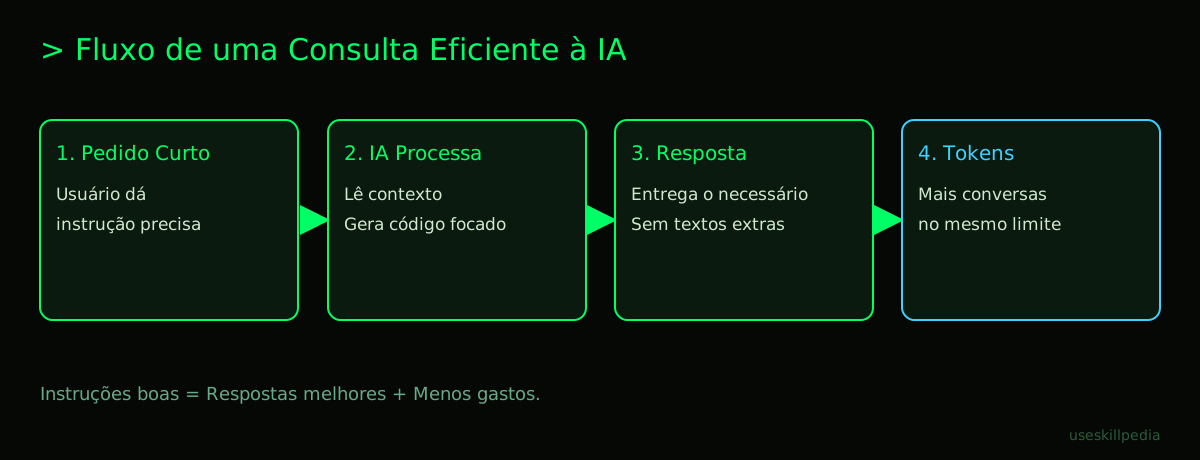
How to Be a Clear "Boss" for the AI
For the AI to understand well and use few tokens, you need to give clear instructions. Imagine you are the boss and the AI is a very smart intern who needs precise guidance.
- Be specific: Instead of "create a button," say "create a red button with the text 'Save' that, when clicked, shows an alert saying 'Data saved'." The more relevant context you give at once, the less the AI has to guess.
- Give examples: Show the AI the format you want. It's like teaching someone to bake a cake by showing them a picture of the finished cake. "I want a list of fruits in Python. Example:
frutas = ['maçã', 'banana']". - Ask for short answers: If you only need one line of code, say so! "Give me just the function, no additional explanations." This prevents the AI from generating unnecessary paragraphs of text.
- Use history to your advantage: The AI remembers the recent conversation. You can say "using the same logic from the previous example, now do it for products." This is like continuing a topic without having to repeat everything from the beginning.
Remember: Everything in the conversation window – your questions, the history, files you've uploaded – consumes tokens. The more stuff there is, the more tokens are used just for the AI to "read" the context.
Practical Tips to Save Tokens Day-to-Day
Here are simple tricks you can use right now:
- Clear the history: If the conversation is very long and has already changed topics, consider starting a new one. This "resets" the context and frees up tokens.
- Comment your code: Write clear comments in your own code (using
//or#). When Copilot reads your file, it will understand your intention better with fewer context tokens. - Break down large tasks: Instead of asking "create a complete e-commerce website," ask in parts: "1. Create the header with logo and menu. 2. Now, make the product listing." It's easier for the AI and for you to control.
- Reuse prompts: If you discover a way to ask for something that works very well (a prompt), save that phrase! Use it again in the future. A prompt is simply the instruction or question you ask the AI.
Here is a comparison of approaches:
| How to Ask (Prompt) | Likely Result | Token Usage |
|---|---|---|
| "Help me with some code" | Generic, long, maybe not useful answer | HIGH - The AI tries to guess everything. |
| "Write a function in Python that adds two numbers" | Direct, probably correct code. | LOW - The AI understands the exact task. |
| "Explain how a REST API works, with simple analogies" | Long textual explanation. | MEDIUM/HIGH - Generation of a lot of text. |
| "Give the example JSON code for a REST API" | Compact block of code. | LOW - Focused code generation. |
Common Mistakes That Waste Your Tokens
Watch out for these habits that make your tokens disappear fast:
- Chatting instead of programming: Chatting with the AI about the problem, instead of asking for the code directly, fills the history with text.
- Sending huge files unnecessarily: If you send a 1000-line file for the AI to analyze, that uses a lot of tokens at once. Send only the relevant parts.
- Not reviewing the generated code: Sometimes the AI suggests a very complicated method. You accept it and then ask to simplify it, generating a new exchange of tokens. Review first if the code makes sense.
- Ignoring clear error messages: Before asking the AI, read the error message in your program. Often the solution is right there, and you save a query.
- Always asking for long explanations: For a beginner, explanations are great! But as you learn, try asking only for the code. You can look for the explanation separately if you need it, like in this guide on How to save tokens in Claude (complete guide).
We Recommend Trying These 3 Skills First
In the Claude ecosystem, there are Skills, which are like "apps" or "extra functions" you can add to the AI so it can do specific tasks better. For a non-technical person, think of it like installing a new filter in your photo app: it gives the tool a new ability. Here are three useful skills for managing tokens:
- token-budget-advisor-affaan-m: This skill acts as a spending advisor. It helps you monitor how many tokens you are using in a conversation, giving tips so you don't go over your "budget."
- context-budget-affaan-m: The focus here is "context," which is the entire conversation history. This skill helps manage what stays in the AI's memory, suggesting what can be summarized or removed to save tokens.
- strategic-compact-affaan-m: This skill is about being strategic and compact. It rewrites your commands for the AI, making them clearer and shorter, which can result in more direct answers and less token usage.
You can find more useful skills in the official repository or by searching for skills for your needs.
Frequently Asked Questions
Are tokens the same thing as characters? Not exactly. A token can be a short word, a syllable, a special character, or even part of a word. In English, 1 million tokens is roughly equivalent to 555 thousand words.
Does saving tokens make the AI's response worse? On the contrary! Clear, direct instructions usually lead to more accurate and useful answers. The AI spends less energy trying to guess what you want and more energy doing the right thing.
Can I reuse tokens I've already spent? No. Tokens are the fuel consumed in that specific conversation. They are not refilled or reused. Your plan has a limit (daily, weekly) that renews over time.
Are Codex and Copilot free? It depends. Some tools, like GitHub Copilot, have paid plans. Claude Code, for example, is included in paid Claude plans. For exact price and limit details, like the Claude limits by plan (Free, Pro, Max), always check the official page.
What is MCP and does it help save tokens? MCP (Model Context Protocol) is a standard for connecting the AI to other tools (like your calendar or spreadsheet). Think of it as a universal USB-C port. It can help indirectly, as it allows the AI to access data in a structured way, without you having to paste loads of text manually. Understand better in What is MCP (Model Context Protocol): explained in an easy way.
Read Also
- For specific code tips, see Save tokens in Claude Code: 12 tricks.
- Want to know more about Claude Code? Claude Code: what it is, how to download, install, and how much it costs (2026 guide).
- Understand the concept behind automatic assistants: AI Agent: what it is, how it works, and how to create yours (without programming).
Sources
- Anthropic: context windows (accessed on 10/16/2026)
- Anthropic: token counting (accessed on 10/16/2026)
- Claude plans and pricing (accessed on 10/16/2026)
Full guide on this topic: What Are Tokens in AI and Why Do They Run Out So Fast?