How to Build Your Own MCP Server: A Beginner's Guide
Skillpedia team · updated 2026-10-16 · 12 min read
Short answer: Building your MCP server is like building a bridge that lets Claude access your personal stuff. You write a small program that tells Claude how to fetch information or perform tasks on your computer or online services. You don't need to be an expert programmer!
Have you ever imagined asking Claude to organize your phone photos, check a financial spreadsheet, or even control your smart home lights? All of this is possible when you connect Claude to the real world. This special "connector" is called an MCP server. In this article, you'll learn, step-by-step in simple language, how to build your own.
Table of Contents
- What is an MCP Server, Anyway?
- Why Build a Server from Scratch?
- The Puzzle Pieces: What You Need to Know
- Step-by-Step: Let's Get to Work
- What to Put Inside Your Server? Practical Ideas
- We Recommend Trying These 3 Skills First
- Frequently Asked Questions
- Read More
What is an MCP Server, Anyway?
Let's start from the beginning. MCP stands for Model Context Protocol. It's a "protocol," which is basically a set of rules for talking, made to give "context" (real-world information) to AI "models," like Claude.
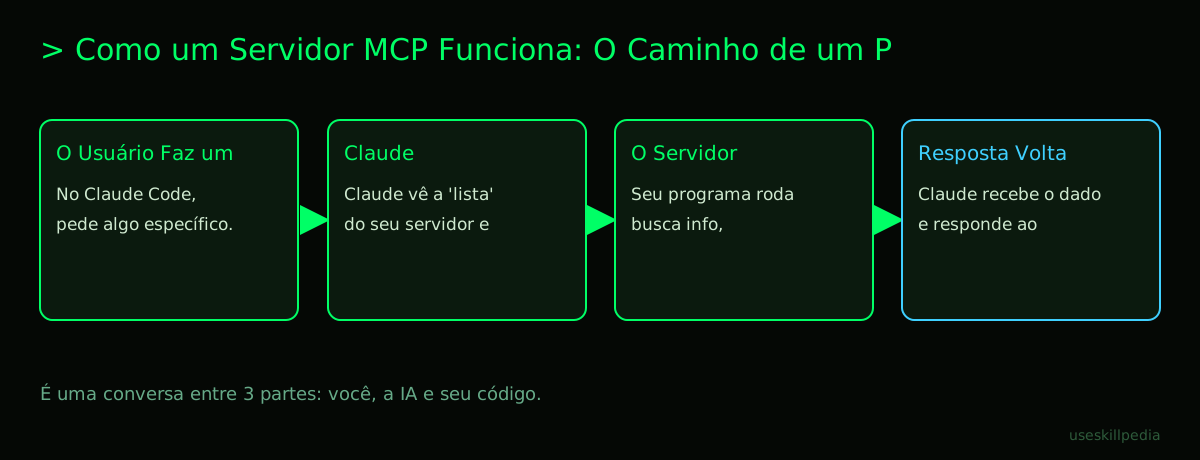
Think of MCP as a universal USB-C port for AI apps. Just like you plug a charger, headphones, or a flash drive into the same type of port on your phone, MCP is a standard way to connect Claude to anything: your Google Calendar, a spreadsheet on your computer, or a database. The MCP server is the specific adapter you plug into that port. It's a small program that sits between Claude and the "thing" you want to access, translating Claude's requests into actions in the real world.
Without it, Claude is like a very smart person, but locked in a windowless room. They know all about theory but can't interact with anything outside. The MCP server opens the window and passes things to them.
Clients are the apps that use MCP, like Claude Code (the version of Claude that runs in your terminal) or Claude Desktop. The server is the program you create, which exposes tools or data.
Why Build a Server from Scratch?
There are many ready-made MCP servers out there (called Connectors on the Claude website). So, why build your own?
- For things that are just yours: Imagine having a file on your computer with all your grandma's recipes, written in a unique way. No ready-made server will know how to read that file. By creating your own, you teach Claude how to find and understand your recipes.
- Personalized automation: You can create a server that, when asked, automatically: 1) fetches the weather forecast, 2) checks traffic on your commute, and 3) suggests if you should leave earlier. All in a single command.
- Integrate different systems: Let's say you use tool A for tasks and tool B for notes. You can create a server that, when you ask "Claude, what are my tasks for today and their related notes?", it fetches from both tools and combines the information.
- Learn in a fun way: It's a programming project with a very tangible and useful result. You see the "magic" of AI interacting with something you built.
It's like preferring to build your own burger with the ingredients you like, instead of always ordering from the menu.
The Puzzle Pieces: What You Need to Know
Before we start, let's explain some names that will appear. Don't be scared!
- Terminal (or Command Prompt): It's a black (or white) screen where you type text commands for the computer, instead of clicking icons. It's like sending a direct text message to the operating system, asking it to do something.
- API (Application Programming Interface): It's a "waiter" between two programs. If one program (like your MCP server) wants information from another (like Twitter), it doesn't go straight to the kitchen. It asks the API (the waiter), who brings the response in a standardized way.
- Token: The smallest unit of text that an AI understands. It's not exactly a word. It can be a short word, part of a long word, a space, or a symbol. When thinking about how to build an Mcp, it's important to know that the instructions you write for the server also consume tokens from Claude's context window.
- Server: In our context, it's simply a program that "listens" for requests and responds to them. Think of a waiter in an empty restaurant, waiting for a customer (Claude) to place an order.
- Repository: It's a special folder on the internet (usually on GitHub) that stores all the files of a project, its change history, and allows collaboration. It's like a smart Google Drive for code.
- JSON (JavaScript Object Notation): A very common format for organizing and exchanging data between programs. It's basically structured text with braces
{}, brackets[], names, and values. Easy for humans to read and machines to interpret.
| Puzzle Piece | Analogy | Role in Your MCP Server |
|---|---|---|
| Claude (MCP Client) | The smart customer in the restaurant. | Makes the orders (calls the tools) that your server will fulfill. |
| Your MCP Server | The personalized waiter. | Receives the order from Claude, goes to the "kitchen" (your file, the internet, etc.), gets what was requested, and brings it back. |
| Tools | The menu the waiter offers. | They are the specific actions your server knows how to perform, like "fetch recipe" or "calculate expenses." |
| Resources | The raw ingredients available in the kitchen. | They are the data your server can read and provide, like a text file or a news feed. |
Step-by-Step: Let's Get to Work
Let's build a super simple MCP server that gives a random motivational message. You'll see that the structure is more important than the complexity.
Prerequisite: You need to have Claude Code installed and configured on your computer. If you don't have it yet, check the official page for installation commands for your system (macOS, Windows, or Linux).
Create a new folder for your project. Open the terminal, navigate to where you keep your projects (e.g.,
cd Documents) and type:mkdir my-first-mcp. Enter the folder:cd my-first-mcp.Initialize a Node.js project. We'll use JavaScript/Node.js, a very common language for this. In the terminal, inside your folder, type:
npm init -y. This creates apackage.jsonfile, which is like the "list of ingredients and instructions" for your project. Then runnpm pkg set type=module(this tells Node that the code uses the modernimportformat; without this, the example below gives an error).Install the official MCP library. Anthropic (Claude's creator) offers a library that makes life much easier. In the terminal, type:
npm install @modelcontextprotocol/sdkThis downloads the "toolkit" for building MCP servers.Create the main server file. Create a file called
server.jsusing a text editor (like Notepad, VS Code, or any other). Paste the code below:// server.js import { Server } from '@modelcontextprotocol/sdk/server/index.js'; import { StdioServerTransport } from '@modelcontextprotocol/sdk/server/stdio.js'; import { CallToolRequestSchema, ListToolsRequestSchema, } from '@modelcontextprotocol/sdk/types.js'; // 1. Creates the MCP server, giving it a name and version const server = new Server( { name: 'my-motivational-mcp', version: '1.0.0', }, { capabilities: { tools: {}, // Says our server will offer tools }, } ); // 2. Creates our list of motivational phrases const motivationalPhrases = [ "You are capable of amazing things!", "One step at a time. You've already come this far.", "The secret is to start. You've already started!", "Making mistakes is part of learning. Keep going.", "Today is a great day to learn something new." ]; // 3. Defines the "give_motivation" tool that Claude can use server.setRequestHandler(ListToolsRequestSchema, async () => ({ tools: [ { name: 'give_motivation', // Name that Claude will know description: 'Provides a random motivational phrase to cheer up the user.', inputSchema: { type: 'object', properties: {}, // This tool doesn't need any extra info from the user }, }, ], })); // 4. Tells the server WHAT TO DO when Claude calls the "give_motivation" tool server.setRequestHandler(CallToolRequestSchema, async (request) => { if (request.params.name === 'give_motivation') { // Chooses a random phrase from the list const randomPhrase = motivationalPhrases[Math.floor(Math.random() * motivationalPhrases.length)]; return { content: [ { type: 'text', text: randomPhrase, // This is the response that goes back to Claude }, ], }; } // If they ask for a tool that doesn't exist, returns an error throw new Error(`Tool not found: ${request.params.name}`); }); // 5. Starts the server engine and makes it start listening in the terminal async function main() { const transport = new StdioServerTransport(); await server.connect(transport); console.error('Motivational MCP Server running... (this message appears in the terminal)'); } main().catch((error) => { console.error('Something went wrong:', error); process.exit(1); });Configure Claude Code to use your server. In the same folder (
my-first-mcp), create a file called.mcp.json. This file tells Claude Code where to find your server.{ "mcpServers": { "my-motivational-mcp": { "command": "node", "args": ["/FULL/PATH/TO/YOUR/FOLDER/my-first-mcp/server.js"] } } }Important: Replace
/FULL/PATH/TO/YOUR/FOLDER/with the actual path to the folder on your computer. In the terminal, you can typepwd(macOS/Linux) orcd(Windows) to see the full path.Test your server! Now, open Claude Code in your project folder. In the terminal, in the
my-first-mcpfolder, typeclaude. When the interface opens, try asking: "I need some motivation, can you use the tool we created?" Claude should recognize thegive_motivationtool and use it, returning one of the random phrases you programmed!
Congratulations! You've created and connected your first MCP server.
What to Put Inside Your Server? Practical Ideas
Now that you know the structure, you can swap the "content" of the server. Instead of motivational phrases, your server can:
- Read local files: Teach Claude to read a CSV spreadsheet with your monthly expenses and summarize where you spent the most.
- Query a public API: Fetch the dollar exchange rate, the weather forecast, or the latest releases from a news site.
- Control things on your network: (Advanced) Send commands to smart devices in your home, like a light bulb.
- Process text: Receive a long text from Claude and format it in a specific way to post on a social network.
The limit is basically what you can program it to do. Start with something small and useful for your daily life.
We Recommend Trying These 3 Skills First
These skills teach Claude to help you build MCP servers. Install one and ask: "help me create a simple MCP server."
- Skill: mcp-builder-anthropics: This skill teaches Claude to build MCP servers for you. It guides you through the creation process, suggesting structures and code. It's a great next step after this tutorial.
- Skill: mcp-server-patterns-affaan-m: Shows common code "patterns" for MCP servers. It's like a catalog of recipes (how to fetch data from an API, how to read files) that you can copy and adapt for your project.
- Skill: prepare-mcp-integration-paperclipai: Focuses on preparing the MCP integration, helping to structure and document your server in the best way possible. Teaches good practices from the start.
Frequently Asked Questions
Do I need to be an experienced programmer to create an MCP? No, but you need to have basic programming logic and be willing to learn. Knowing the basics of JavaScript (or Python) is enough to start with simple projects, like the one in the example above.
Will my MCP server consume a lot of tokens? The main consumption comes from the conversation with Claude itself. The server only provides or receives small blocks of information (text, numbers). What spends tokens are the instructions you give Claude and the long responses he generates. The descriptions of your tools in the code also stay in the context memory.
Can I sell or share the server I created? Yes! You can publish the code in a public repository (like GitHub) for others to use. If it's something very specific to your life, it might not make sense. But if it solves a common problem (e.g., integrating with a popular app in a unique way), others might find it useful.
Is it safe to connect my server to personal data? You are responsible for security. Never put passwords or API keys directly in the code. Use environment variables (a safe way to store secrets on your computer) for sensitive information. Only create tools that access data you have permission to access.
What's the difference between Skill, Connector, and MCP Server? They are names for very similar concepts. MCP Server is the general technical term of the protocol. Skill is what Claude Code calls an MCP server (it's a folder with scripts and documentation). Connector is what the Claude.ai website (the web interface) calls the same thing. At their core, they all refer to programs that follow the MCP rules to connect the AI to something external.
Read More
- To understand the foundation of it all: What is MCP (Model Context Protocol): Explained in an Easy Way
- To dive deeper into the technical concept: What is an MCP Server and How Does It Work
- To learn how to use what you created: How to Connect MCP in Claude (Desktop and Code)
- To get inspired by useful servers: Best MCPs for Claude: Figma, Drive, WhatsApp, Power BI
- To understand the workspace: Claude Code: What It Is, How to Download, Install and How Much It Costs (2026 Guide)
Sources
- What is the Model Context Protocol (accessed on 10/16/2026)
- Claude Code: MCP (accessed on 10/16/2026)
- Claude Code: plugins (accessed on 10/16/2026)
- Claude Plans and Pricing (accessed on 10/16/2026)
Full guide on this topic: What is MCP? The Simple Guide to the Model Context Protocol