Agent Skills: The Open Standard for Claude, Cursor, and Codex
Skillpedia team · updated 2026-10-16 · 10 min read
Short answer: Agent Skills is an open standard, like a recipe that anyone can use. It lets you add extra abilities to your AI, like teaching a dog a new trick. It works in Claude, Cursor, and Claude Code.
Have you ever thought about asking an AI to search the web for you, edit a spreadsheet, or chat with your files? It sounds like magic, but there's a simple way to do it. The idea is that instead of creating one giant super-AI that knows how to do everything (which is very hard), you can give it accessories for specific tasks. It's like giving a screwdriver to an assistant: they don't need to know how to fix everything, they just need to know how to use the right tool at the right time.
These "accessories" need a standard way to work, otherwise each AI would understand them differently. That's where the Agent Skills standard comes in. Let's understand how this works and how you can use it today.
Table of Contents
- What is an Agent Skill, in practice?
- How do I add a skill to my AI?
- Skills vs. Connectors vs. MCP: What's the difference?
- Where do skills work? Claude, Cursor, Codex, and others
- Why is an open standard important?
- Try these 3 skills first
- Frequently asked questions
What is an Agent Skill, in practice?
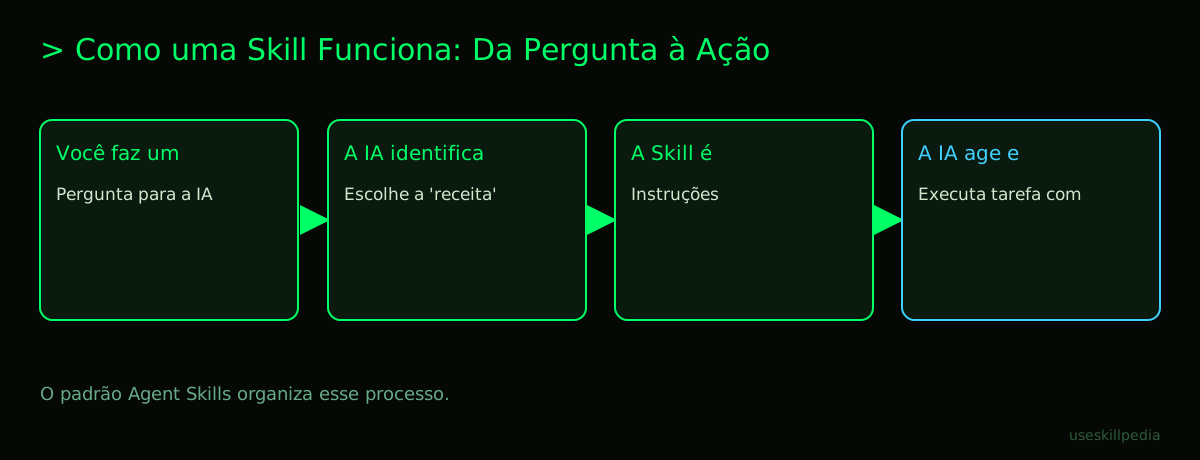
Think of a skill as an instruction booklet you give to your AI. This booklet tells the AI: "Look, to do this task, you need to follow these steps, use these tools, and remember these tips."
It's not a complex program. It's basically a text file (called SKILL.md) inside a folder. This file contains:
- The skill's name (e.g., "Web Researcher").
- A simple description of what it does.
- Step-by-step instructions for the AI to execute the task.
- (Optional) Scripts or references the AI can consult.
Everyday analogy: Imagine you want a friend to bake a cake. You could just say "bake a cake." Or you could give them a detailed recipe (the skill): "Use the mixer on speed 2, preheat the oven to 350°F, measure 2 cups of flour..." The skill is the recipe. Your friend (the AI) is smart, but needs the recipe to get it right.
A big advantage is progressive loading. Only the skill's name and description stay in the AI's memory all the time. The detailed instructions are only read when the skill is actually used. This saves the AI's "mental space" (tokens) for the conversation.
What is a token? It's the basic unit of text the AI understands. It can be a whole word, a syllable, or even part of a word. 1 million tokens equals about 555 thousand words. Everything in the conversation (your messages, files, tool results) consumes tokens.
How do I add a skill to my AI?
The process varies a bit depending on where you're using the AI. Let's focus on Claude Code, which is the most powerful tool for working with skills.
What is Claude Code? It's a command-line application (CLI) from Anthropic, the company that created Claude. It lets you use Claude directly in your terminal, integrated with your code projects and files.
What is a terminal? It's a text window on your computer where you type commands, instead of clicking icons. It's like talking directly to your PC's operating system.
To install Claude Code, you need to open the terminal and run a specific command for your operating system (like macOS, Windows, or Linux). After it's installed, you can add skills in two main ways:
- For a specific project: You put the skill's folder inside a folder called
.claude/skills/in your project. It's like having tools stored in a workbench drawer. - For all your projects (global): You put the skill's folder in a special folder in your user directory (
~/.claude/skills/). These are like the tools you keep in the garage and can grab for any job.
What is a repository? It's a storage location, usually online (like on GitHub), where project files and history are kept. It's like an organized box in the storage room, with a label and versions of what was done.
Many ready-to-use skills are in Anthropic's official repository. To use them, you often just need to copy the folder from the repository to Claude Code's skills folder.
| Where to Add the Skill? | Folder Location | When to Use? |
|---|---|---|
| Only in one project | my_project/.claude/skills/ |
When the skill is only useful for that specific job (e.g., a skill for a website framework). |
| In all projects | ~/.claude/skills/ |
When the skill is for general use (e.g., a skill to search the web or summarize texts). |
After placing the skill in the right folder, just start chatting with Claude Code in your project. The AI will automatically "see" the available skills and know how to use them when you ask for something related.
Skills vs. Connectors vs. MCP: What's the difference?
This can be confusing at first because they are related concepts, but with different purposes.
- Agent Skills: This is the instruction standard in text (the
SKILL.mdfile). It focuses on how the AI should think and act to perform a task. It's like the cake recipe. - MCP (Model Context Protocol): This is a more technical connection standard. It defines how an AI application (like Claude) can connect and talk to other programs, databases, or external tools in a safe, standardized way.
- Official analogy: "A USB-C port for AI apps." MCP is the USB port standard. The MCP server is the specific cable or adapter (e.g., a server that connects to Google Calendar). The MCP client is the USB port on your laptop (Claude Code, for example).
- Connectors (in Claude.ai): This is the name the Claude web interface (
claude.ai) gives to integrations that use the MCP standard behind the scenes. When you enable the "Google Drive Connector" on the website, you are essentially using an MCP server with a simpler interface.
In summary: A Skill teaches the AI how to perform a task. MCP is the infrastructure that allows the AI to access external tools. A Connector is a ready-made implementation of MCP, focused on ease of use for the end user.
Many skills can use tools provided by an MCP server to function. For example, a search skill might ask the AI to use a search tool available via MCP. For a deeper dive into this topic, check out the companion post Skills vs MCP: difference and when to use.
Where do skills work? Claude, Cursor, Codex, and others
The beauty of an open standard is that it doesn't belong to a single company. Agent Skills was created to be used by different AI assistants and code editors.
- Claude Code: This is where skills have the most power and integration. Since Claude Code runs on your computer and has access to the terminal and your files, skills can generate commands, read code, and manipulate projects in a very practical way. It's the main environment for developers.
- Claude.ai (web interface): Here, the concept is more focused on Connectors (based on MCP). The idea of skills as instruction files is less explicit for the average user, but the principle of extending abilities is the same.
- Cursor and other editors: Smart code editors like Cursor can also adopt the Agent Skills standard to allow their AI assistants to have specific abilities within the development environment. Check the official documentation for each tool to know the level of support.
So, learning about skills in Claude Code means learning a concept that is likely to spread to other tools you use.
Why is an open standard important?
An open standard is like a common language that everyone agrees to speak.
If each company created its own secret way of adding abilities, we'd have a problem: a skill made for Claude wouldn't work in Cursor, and vice versa. It would be like buying headphones with a proprietary connector that only works with one brand of phone.
With the Agent Skills standard being open (publicly available at agentskills.io), anyone or any company can:
- Create skills that work in different environments.
- Share skills with the community.
- Use skills created by others, without being locked into a single "ecosystem."
This accelerates innovation. Instead of Anthropic, OpenAI, and Google having to develop all possible abilities alone, millions of users and developers around the world can create and share solutions for specific problems. It's the power of community.
If you're interested in creating your own skill, we have a complete guide: How to create a skill for Claude (step by step).
Try these 3 skills first
To start seeing the magic happen, here are three popular and useful skills:
Skill: skill-creator-anthropics This skill helps create other skills. It's meta! You describe what you want a new skill to do, and it guides you in creating the
SKILL.mdfile. Perfect for starting to understand the structure.Skill: pdf-anthropics Teaches Claude Code to read, extract, and summarize information from PDF files. Instead of you having to copy and paste text, the AI can analyze the document directly.
Skill: frontend-design-anthropics Focuses on helping create the visual design (frontend) of websites. It can suggest colors, layouts, and even generate HTML/CSS code snippets based on your description. To see examples of the results, see Frontend design skill: websites that don't look like templates.
You can find many others in the official repository or search for skills in community directories.
Frequently asked questions
Do I need to pay to use skills? No. The use of skills and connectors is available on all Claude plans, including the Free plan. However, to use Claude Code (the most robust tool for skills), you need a paid plan (Pro, Max, Team, or Enterprise), as it is not included in the Free plan.
Are skills safe? Can they access my files without permission? Skills in Claude Code operate within the context of the project or user folder where you placed them. The AI will only execute actions (like reading a file) if you, in the conversation, ask for something that requires it. It's always good to get skills from trusted sources, like the official repository.
Can I use a skill created for Claude in ChatGPT or Gemini? Not directly. The Agent Skills standard is natively supported by Claude (especially Claude Code). For it to work in other AIs, like ChatGPT, they would need to adopt the same standard. However, the idea of an open standard is precisely to facilitate this adoption in the future.
What's better: a skill or an MCP connector? It depends on your goal. If you want to teach a specific step-by-step process or mindset to the AI (e.g., "how to review code"), a skill is ideal. If you want to give the AI access to an external tool or data (e.g., your Google Calendar, a database), an MCP server (or a Connector on the website) is the way to go. They can be complementary.
Does using many skills slow down the AI? Progressive loading prevents this from happening. Only the names and brief descriptions stay in memory. A skill's detailed instructions are only loaded when it is invoked. Therefore, having many skills installed should not impact overall performance.
Read also
- Claude Skill: what it is, how to install, and the best ones to try (2026 guide) - A complete guide to the skills ecosystem.
- Claude Code: what it is, how to download, install, and pricing (2026 guide) - Everything about the main tool for using skills.
- What is MCP (Model Context Protocol): explained in an easy way - Understand the connection technology behind Connectors.
- Best skills for Claude Code in 2026 - A curation of the most useful skills for productivity.
- AI Agent: what it is, how it works, and how to create yours (without coding) - A broader concept that involves using skills.
Sources
- Anthropic's official skills repository (accessed on 10/16/2026)
- Open Agent Skills standard (accessed on 10/16/2026)
- Claude Code: skills (accessed on 10/16/2026)
- Claude plans and pricing (accessed on 10/16/2026)
Full guide on this topic: Claude Skills: What They Are, How to Install, and Best Ones to Try