Build Your Own AI Agent with n8n: A Beginner's Guide
Skillpedia team · updated 2026-10-16 · 10 min read
Short answer: A n8n AI agent is a robot helper that uses n8n (an automation tool) to make decisions and act for you. It connects different apps and data automatically, following a pre-programmed recipe. Think of it like a household robot that does specific tasks when you give a command.
Imagine you need someone to always check your emails, organize information in a spreadsheet, and send WhatsApp messages. Doing all that manually every day is a lot of work. That's where the idea of creating a digital helper, or an AI Agent: what it is, how it works, and how to create yours (without coding), comes in.
In this article, we'll talk about how to use n8n to build these helpers. Don't worry, we won't use complicated language. We'll explain everything step-by-step, like we're having a chat in the kitchen.
Table of Contents
- What is n8n?
- How Does an AI Agent Work Inside n8n?
- What Kind of Tasks Can I Automate?
- What Do I Need to Get Started?
- Try These 3 Skills First
- Frequently Asked Questions
What is n8n?
n8n (pronounced "n-eight-n") is a tool that helps connect different online apps and services. The name comes from "nodemation," which means automation with "nodes."
It's like a big automation puzzle. Each puzzle piece (called a "node") does one specific thing. For example:
- A node can fetch new emails from Gmail.
- Another node can take the text from that email and send it to an artificial intelligence to understand.
- A third node can take the AI's response and post it to a Google Sheet.
You fit these pieces together in a logical sequence (this is called a "workflow") and say: "When an email arrives, do this, then that." From then on, n8n does everything by itself.
The big advantage is that n8n is "low-code" or "no-code." This means you don't need to be a programmer to use it. You build the workflows by dragging and dropping these "pieces" on the screen, like you're drawing a diagram.
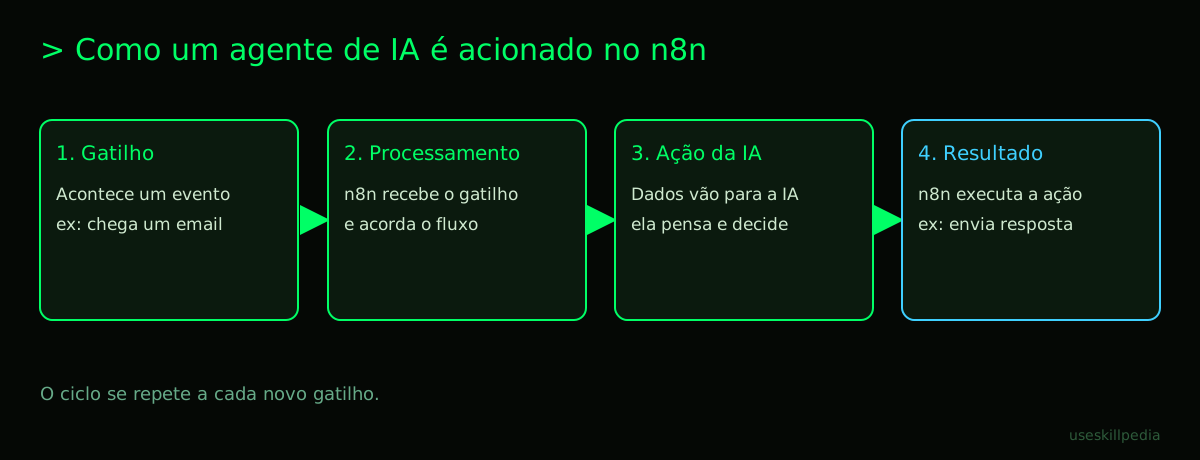
How Does an AI Agent Work Inside n8n?
First, let's remember what an AI agent is. It's a program that receives a task, makes decisions, and executes actions to complete it. In n8n, you can build the "logic" of this agent using workflows.
Let's think of an analogy: building an agent in n8n is like cooking with a single-serve coffee machine.
- The pod is the workflow you created, with all the steps.
- The button you press is the event that starts the agent (e.g., an email arrives, it's a specific time).
- The hot water passing through the pod is the execution of your workflow, step by step.
- The coffee in the cup is the final result of your agent's action.
n8n works as a server. A server is a computer that stays on 24/7, waiting to execute tasks when triggered. It's like an electronic doorman who is always on duty. When something happens (the "trigger"), it wakes up and runs your flow.
To communicate with other services (like Gmail or WhatsApp), n8n uses APIs. An API is a standardized way for two programs to talk to each other. Think of it like the power outlet on your wall: it's a standard that lets you plug any appliance (blender, charger, TV) into the electrical grid. The API is the "outlet" for online services.
Often, to use an API, you need a token. A token is a special password, an identification code that tells the service: "Look, it's me, n8n, authorized to access this data." It's like your building's key: a physical (or digital) object that proves you have permission to enter.
See in the table below how the parts connect:
| Puzzle Piece | What It Is | Everyday Analogy |
|---|---|---|
| Workflow | The agent's complete recipe, with all the steps. | A movie script, with each scene in order. |
| Node | An individual piece that performs a specific action. | An appliance in your kitchen (blender, oven, refrigerator). |
| Trigger | The node that starts the workflow, waiting for an event. | The motion sensor for a stairway light. |
| n8n Server | The computer that keeps running your workflow. | The building's doorman, always at their post. |
| API | How n8n "talks" to other apps. | The standardized power outlet in your house. |
| Token | The password/key to securely access an API. | Your car key or your phone's fingerprint sensor. |
What Kind of Tasks Can I Automate?
An n8n AI agent can do many things. The main limitation is your creativity and which apps n8n can connect to (there are hundreds!).
Here are some ideas to help you understand the potential:
Personal Communication Assistant:
- Trigger: A message arrives in a specific WhatsApp group.
- Agent's Action: Reads the message with AI, understands the topic, searches for information in a file or website, and automatically replies to the group with the answer.
- To learn more about agents for WhatsApp, see AI Agent for WhatsApp: A Practical Guide.
Information Organizer:
- Trigger: You save an interesting post on Instagram or Pocket.
- Agent's Action: Gets the link, uses AI to summarize the content, and automatically saves the summary in Notion or Google Docs, already categorized.
Price or News Monitor:
- Trigger: Every hour (like an alarm clock).
- Agent's Action: Accesses a shopping site, checks the price of a product. If the price drops to a value you set, it sends you an alert via Telegram or email.
Document Processor:
- Trigger: You place a new PDF file in a Google Drive folder.
- Agent's Action: Reads the PDF with AI, extracts important information (like date, amount, name), and automatically fills a row in an Excel spreadsheet.
The combination of n8n with AI's language understanding ability is very powerful. n8n handles the mechanical part of connecting apps and moving data. The AI handles the "intellectual" part of reading, interpreting, summarizing, and deciding.
What Do I Need to Get Started?
You don't need to be an expert. Follow these steps:
Access n8n: You can use the online version (n8n.cloud) which is simpler to start with, or install n8n on your own computer/server (it's free and open-source). Check the options on the official n8n page.
Create an account or install it: For the online version, just sign up. To install it, follow the official guide. It's a technical process, but the tutorials on their site are very detailed.
Explore the interface: When you log into n8n, you'll see the main screen with a blank area. That's where you'll drag the "nodes" from the left panel. Don't be afraid to click and explore. Create a test workflow just to see how things work.
Choose your first "trigger": In the node panel, look for the "Trigger" category. Drag a simple node like "Schedule" onto the screen. Configure it to run every 5 minutes. This will be your agent's "alarm clock."
Add an AI action: Look for nodes related to AI, like "ChatGPT," "Claude AI," or "Google AI." Connect it to the trigger. You'll need an API key (the token) from the AI service you choose. To get a key, create an account on the AI provider's website (like OpenAI or Anthropic).
Add a final action: After the AI node, add an action node, like "Email" (to send an email) or "Google Sheets" (to add a row to a spreadsheet). Connect the AI's output to this action.
Activate and test: Turn on the workflow (there's usually an "Active" or "Toggle" button) and wait for the trigger to happen. See if everything works in the "Executions" tab.
Remember: start with something VERY simple. The goal of your first workflow is just to understand the mechanism. For example: "Every hour, ask the AI to create a joke about cats and email it to me." When that works, your confidence will grow and you can try more complex things.
If you liked the idea of creating agents, you can dive deeper by reading about How to Create an AI Agent from Scratch (Without Coding).
Try These 3 Skills First
Skills are ready-made packages of functionality you can add to your AI environment (like Claude Code) to expand what it can do. In the context of n8n, thinking about skills helps you understand which "superpowers" you might want to give your agent. Here are three useful skills for those starting with automation:
Skill: mcp-builder-anthropics: This skill helps you create and manage MCP servers. Remember we said an API is like an outlet? MCP is a specific "outlet" standard for artificial intelligences. With this skill, it's easier to connect your AI to external data and tools, which is exactly what you do in n8n. To understand better, read about What is MCP (Model Context Protocol): Explained the Easy Way.
Skill: agent-harness-construction-affaan-m: The name sounds complex, but the idea is simple: it helps "assemble the harness" for your agent. That is, it provides an organized structure for you to build and test your agent's logic before taking it to a tool like n8n. It's a good place to plan.
Skill: agent-eval-affaan-m: After building your agent, how do you know if it's working well? This skill focuses on evaluating the agent's performance. It helps run tests and check if your agent's responses and actions are correct and useful.
You can find many other skills to explore in our skills repository.
Frequently Asked Questions
Do I need to leave my computer on for n8n to work? Yes, if you installed n8n on your personal computer. For workflows to run automatically 24/7, the program needs to be running. That's why many people use the cloud version (n8n.cloud) or install n8n on an online server (a computer that's always on and connected to the internet).
Is n8n free? The version you install on your own computer or server (n8n self-hosted) is free and open-source. The managed cloud version (n8n.cloud) has a free plan with limits, and paid plans for more advanced use. Check the official website for details on pricing and limits.
What's easier for a beginner: n8n or tools like Make/Zapier? It varies. Tools like Zapier and Make focus on simplicity and have fewer advanced options, which can be easier at the start. n8n is more powerful and flexible, but the interface might seem a bit more complex initially. n8n's advantage is that as you learn, you have access to a much wider range of possibilities.
Can I use free AI (like ChatGPT free) in my n8n workflows? Generally, no. To connect an AI service to n8n via API, you almost always need an API key (token) from a paid account (like the OpenAI API or Anthropic's API). The free chat versions (chat.openai.com, claude.ai) normally don't provide this key for external use in automations.
How do I learn to use specific "nodes"? The best way is practice and documentation. Within the n8n editor itself, when you click on a node, there's an "Info" or "Documentation" tab that explains what it's for and how to configure it. The n8n website also has excellent tutorials for various common scenarios.
Read More
To continue your journey into the world of AI agents and automation, check out these other articles:
- How to Create an AI Agent in Claude
- Claude Code: What It Is, How to Download, Install, and How Much It Costs (2026 Guide)
- Subagents in Claude Code: What They Are and How to Use Them
- What Are Tokens in AI (And Why They Run Out So Fast)
Sources
- What is the Model Context Protocol (accessed 10/16/2026)
- Claude Code: Overview (accessed 10/16/2026)
- Claude Plans and Pricing (accessed 10/16/2026)
Full guide on this topic: What Are AI Agents? A Beginner's Guide to Creating Your Own