WhatsApp AI Agent: A Practical Guide for Beginners
Skillpedia team · updated 2026-10-16 · 10 min read
Short answer: A WhatsApp AI agent is a digital assistant that talks to your customers on WhatsApp automatically. It uses artificial intelligence to understand questions and give helpful answers, like a virtual employee that never sleeps. You can create one without knowing how to program, using visual tools that connect the parts.
Imagine being able to answer all your business's WhatsApp messages, at any time, without being glued to your phone. Sounds like a dream? With artificial intelligence, this is already a reality. This guide is for you if you've never programmed in your life but want to understand how to have an automatic assistant on WhatsApp. We'll explain everything with simple words and everyday examples.
Table of Contents
- What exactly is an "AI agent" and how does it work on WhatsApp?
- Why use an AI agent on WhatsApp?
- What parts do you need to build your agent?
- How much does it cost to create and maintain an agent?
- Can I create one by myself, without knowing how to program?
- What else can an AI agent do besides answering messages?
What exactly is an "AI agent" and how does it work on WhatsApp?
Think of an AI agent as a very smart robot. It's a computer program that can understand human language, think about what you asked, and generate a coherent answer. It's like having a friend who knows everything about your business and is always available to help your customers.
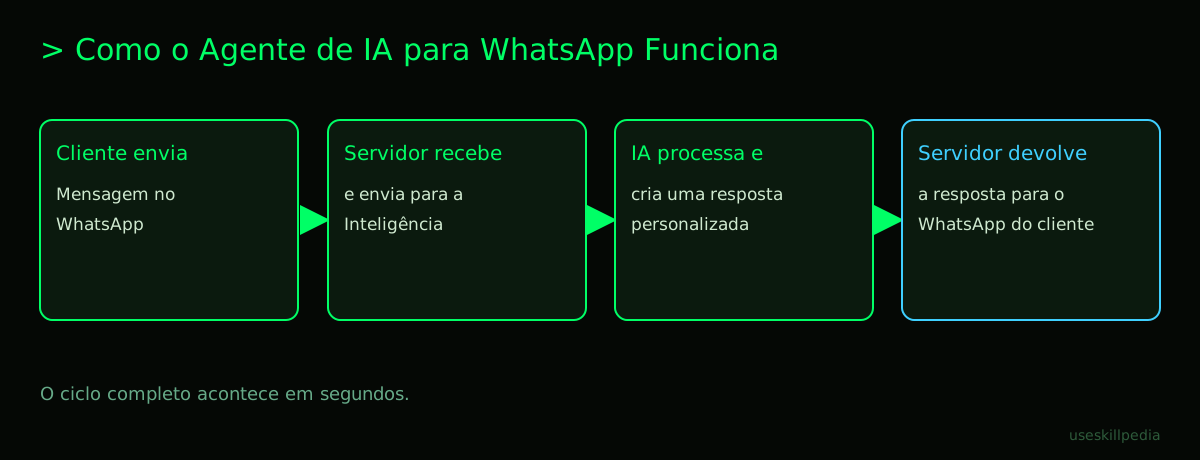
When this agent is connected to WhatsApp, it gains a superpower: it can send and receive messages on the platform. The magic happens like this:
- A customer sends a message to your business's WhatsApp number.
- That message goes to a server. A server is a computer that stays on 24 hours a day, waiting for tasks. Imagine it as a customer service center that never closes.
- The server takes the message and sends it to the agent's brain, which is a language model (an AI like Claude or ChatGPT).
- The AI processes the question, thinks of the best answer based on the information you taught it, and generates text.
- This answer goes back to the server.
- The server sends the answer back to WhatsApp, straight to the customer.
The secret to connecting the AI to WhatsApp is an API. An API is a standardized communication channel between two programs. It's like a waiter in a restaurant: you (WhatsApp) place an order, the waiter (the API) takes it to the kitchen (the AI) and brings your food (the answer) back to your table.
Why use an AI agent on WhatsApp?
WhatsApp is a major communication tool for businesses. Having an agent here offers clear advantages:
- 24/7 Support: Your business responds even in the middle of the night or on holidays. Customers don't have to wait.
- Scale: A single agent can talk to hundreds of people at the same time, without getting stressed.
- Consistency: The answer always follows your brand's tone and the information you defined. There's no risk of a human agent giving wrong information on a bad day.
- Smart Triage: The agent can collect basic data (name, email, problem) and only pass the more complex cases to a human. This frees up your team for what really matters.
It's important to remember: the agent doesn't need to replace all human support. It's excellent for handling the most frequent and simple questions, allowing your team to focus on cases that require empathy and creative solutions.
What parts do you need to build your agent?
Building an agent is like putting together a puzzle with a few main pieces. You don't need to build any from scratch, just connect them.
| Part | What is it? | Analogy | Where do I get it? |
|---|---|---|---|
| Brain (AI Model) | The program that understands and generates text. It's the intelligence itself. | The engine of a car. | Claude, ChatGPT, Gemini. You choose one and pay for its usage. |
| Connection (WhatsApp API) | The official channel to send/receive messages automatically. | Your company's telephone line. | Meta (owner of WhatsApp) sells this. It's the "WhatsApp Cloud API". |
| Server | The computer that stays on, managing the conversation between the AI and WhatsApp. | The operations center that coordinates everything. | Cloud services like Google Cloud, AWS, or tools like n8n. |
| Logic/Instructions | The rules and information you give to the agent. E.g., "Be polite", "Our hours are...". | The training manual for your new employee. | You write it yourself, using prompts (instructions in natural language). |
| Tools (Optional) | Extra functionalities the agent can use, like querying a database. | Access to an inventory spreadsheet or booking calendar. | Connectors or MCP (Model Context Protocol), which work like "USB ports" for the AI to access other apps. |
To better understand the first part, the brain, it's essential to know what an AI Agent is and how it works.
How much does it cost to create and maintain an agent?
The cost isn't a single number. It's the sum of several parts, like an electricity bill that adds up the fridge, TV, and shower.
Brain (AI): You pay for usage. The unit of measurement is tokens. A token is a tiny piece of a word. Think of it as "processed words". If the agent reads a long question and generates a long answer, it uses more tokens. Prices vary by model. Using today's official numbers (Oct/2026):
- Claude models (from Anthropic): From the cheapest (Haiku 5.5, starting at $0.10 to process 1 million tokens) to the most expensive and advanced (Fable 5.1, $50 to generate 1 million tokens).
- OpenAI models (GPT-6): From Luna ($0.50 to generate 1 million) to Astra ($50).
- For an idea: 1 million tokens is roughly equivalent to about 555 thousand words in English. That's a lot of text.
WhatsApp: Meta charges a fee per conversation. A "conversation" is a 24-hour window of exchanging messages with a customer. The values vary by country/region. You need to check Meta's official page.
Server/Hosting: If you use a visual tool like n8n, it offers a free plan with limits. For more usage, there are paid plans. If hosting on a cloud service (Google, AWS), you pay for the time the server is on and the resources used.
Summary: For a small business with dozens of conversations per day, costs can start very low. As the volume increases, costs rise proportionally. The ideal is to start small and measure.
Can I create one by myself, without knowing how to program?
Yes, absolutely! This is the best part. Today there are tools that allow you to "build" the agent's flow visually, by dragging and dropping blocks.
The most famous tool for this is n8n. In it, you can:
- Place a block that "listens" for new messages from WhatsApp.
- Connect that block to another that sends the text to the AI (Claude or ChatGPT).
- Receive the AI's answer and connect it to a block that sends it back to WhatsApp.
It's like building a circuit with Legos. Each block has a function. You don't write code, you just define the sequence. For a step-by-step guide using this approach, we have a dedicated post: How to create an AI agent from scratch (without programming).
Another option is to use Claude Code, which is an application from Anthropic (the company behind Claude) to create and manage agents. It's included in all paid Claude plans (Pro, Max, Team). In it, you can write instructions in simple English to configure your agent. Learn more at Claude Code: what it is, how to download, install, and how much it costs.
What else can an AI agent do besides answering messages?
A well-configured agent goes far beyond "hello, how are you?". With the right tools, it becomes a multi-functional assistant:
- Scheduling: Connected to your Google Calendar or Calendly, the agent can show available times and book appointments directly in the chat.
- Check Inventory: Integrated with an online spreadsheet or system, it can check if a product is available and inform the price.
- Process Orders: It can guide the customer through a small catalog, note the order, and even generate a payment link.
- Basic Tech Support: Access to a manual or knowledge base allows it to suggest solutions for common problems.
- Collect Data: It can conduct satisfaction surveys or collect information (like email) for customer registration.
To give these powers to the agent, you use MCP or Connectors. MCP is an open standard that works like a universal adapter. It allows the AI (Claude, ChatGPT) to access data from other programs in a safe and controlled way. Understand better at What is MCP (Model Context Protocol): explained in an easy way.
We recommend trying these 3 skills first
For those of you starting with Claude Code, Skills are like "apps" or "ready-made functionalities" you can install in your agent for it to do specific things. It's a quick way to add power. Check out all available skills, but we suggest starting with these:
- Skill: mcp-builder-anthropics: This skill helps you create MCP servers. Remember we said MCP is like a USB port? This skill is an interactive manual for building those ports, allowing your agent to access new programs.
- Skill: agent-harness-construction-affaan-m: Think of it as a construction kit for agents. It helps structure and organize your AI agent better, as if you were building a more robust skeleton for it.
- Skill: agent-eval-affaan-m: After creating the agent, how do you know if it's good? This skill gives your agent a "test", checking its answers and giving it a grade, so you know where to improve.
Frequently Asked Questions
Do I need a new phone number for the agent? No. You will use your business phone number, but through the official WhatsApp Business API. It's the same number, just with automation superpowers.
Can the agent be mistaken for a robot? It can, if poorly configured. The key is to write instructions asking for a natural, human tone. Tell it to introduce itself as a virtual assistant, be polite, and if it doesn't know something, transfer to a human. Transparency is the best policy.
Is it against WhatsApp's terms? No, as long as you use the official WhatsApp Business API. Using unofficial methods (like automating the regular phone app) is prohibited and can result in your number being blocked. Always use the official paid channel.
Can I see the conversation history? Yes, one of the big advantages. All the agent's interactions are recorded in the dashboard of the tool you use (like n8n or the WhatsApp API dashboard). You can read, analyze, and improve the agent.
What if the customer wants to talk to a human? Your agent should be programmed to identify phrases like "I want to talk to someone" or "human agent". At that moment, it can ask the customer to wait and send an alert by email or message for your team to take over the chat.
Read More
Want to go deeper? These articles will help with your next step:
- How to create an AI agent in Claude
- AI Agents with n8n: automating workflows
- Subagents in Claude Code: what they are and how to use them
- What are tokens in AI (and why they run out so fast)
Sources
- What is the Model Context Protocol (accessed on 10/16/2026)
- Claude Code: overview (accessed on 10/16/2026)
- Claude plans and pricing (accessed on 10/16/2026)
Full guide on this topic: What Are AI Agents? A Beginner's Guide to Creating Your Own