How to Build AI Agents from Scratch (No Coding Required)
Skillpedia team · updated 2026-10-16 · 13 min read
Short answer: You can build an AI agent, which is a specialized assistant, without writing any code. Using visual tools, you teach it what it needs to know and define the tasks it will perform automatically. It's like building a robot with snap-together pieces.
Have you ever imagined having a personal assistant that works for you 24/7? Someone who answers emails, organizes spreadsheets, responds to customer questions, or even searches the internet for information? That's the idea behind an AI agent.
But wait! If the word "programming" already scares you, don't worry. Nowadays, creating this kind of intelligent assistant has become much easier. You don't need to be a computer expert. It's more like putting together a puzzle or teaching a task to a very attentive friend.
In this guide, we'll walk through this world together. I'll explain everything in everyday language. Whenever a more technical term comes up, we'll stop and understand what it means with a simple analogy.
Table of Contents
- What is an AI Agent, Really?
- Why Build Your Own Agent?
- The Basic Ingredients to Get Started
- Visual Step-by-Step: Building Your First Agent
- How Your Agent "Thinks" and Acts
- The Tools Your Agent Can Use
- Try These 3 Skills First
- Frequently Asked Questions
- Read More
What is an AI Agent, Really?
Let's start from the beginning. An AI agent is simply a computer program that can perform tasks on its own, following your instructions.
Think of it as a super-fast digital intern that never gets tired. You hire this intern (create it), give it training (write the instructions), and provide the tools it will use (like internet access or a file). From then on, it can work independently to achieve the goal you defined.
The most important part here are the instructions. You tell it:
- "You are a customer service expert."
- "Always be polite."
- "Your task is to read emails and answer the most common questions."
- "Never invent prices that are not in the product file."
The agent follows these rules strictly. It doesn't have its own opinions or get distracted. It only executes what you asked, using the AI's "brain" (which is a large language model, like Claude or GPT) to understand and generate text.
Server is a term you might encounter. It's just a more powerful computer, always connected to the internet, that "serves" information or processes tasks. For our agent, it's often where it is hosted and runs from.
Why Build Your Own Agent?
You might be thinking: "There are already so many AI chats out there, why build a specific one?" The answer lies in customization and automation.
It's 100% yours: You shape its personality, knowledge, and limits. An agent for customers of a plant store will have a totally different tone and information than an agent that helps developers with code.
It automates the tedious: Repetitive tasks, like sorting hundreds of emails, extracting data from PDFs, or posting on social media at the same time, are ideal for an agent. You gain time for what really matters.
It scales your knowledge: Imagine you are an expert on a subject. You can create an agent that contains all that knowledge and is available to answer questions 24/7, serving multiple people at once.
It integrates tools: Your agent isn't stuck just in a chat. It can learn to use other digital tools, like spreadsheets, calendars, or management systems.
In short, creating an agent is like hiring a digital employee specialized exactly in what you need, without the traditional interview and training process.
The Basic Ingredients to Get Started
To build our first agent, we don't need a high-tech workshop. The "ingredients" are more accessible than you think.
An account on an AI platform: This will be your agent's "mind." You can use Claude (from Anthropic), ChatGPT (from OpenAI), or Gemini (from Google), for example. Many have free plans to start. According to verified facts, Claude's Free plan is $0, and plans like Pro start at $20/month. The important thing is to choose one that allows creating custom instructions and, preferably, connecting tools.
Clear instructions (the "training"): This is the heart of the agent. You will write, in clear English, who it is, what it does, and how it should behave. The more detailed and with more examples, the better it will perform.
Visual automation tools (the "toolbox"): Here is the magic of "no coding." There are platforms that work like a visual control panel, where you drag and drop blocks to create your agent's logic.
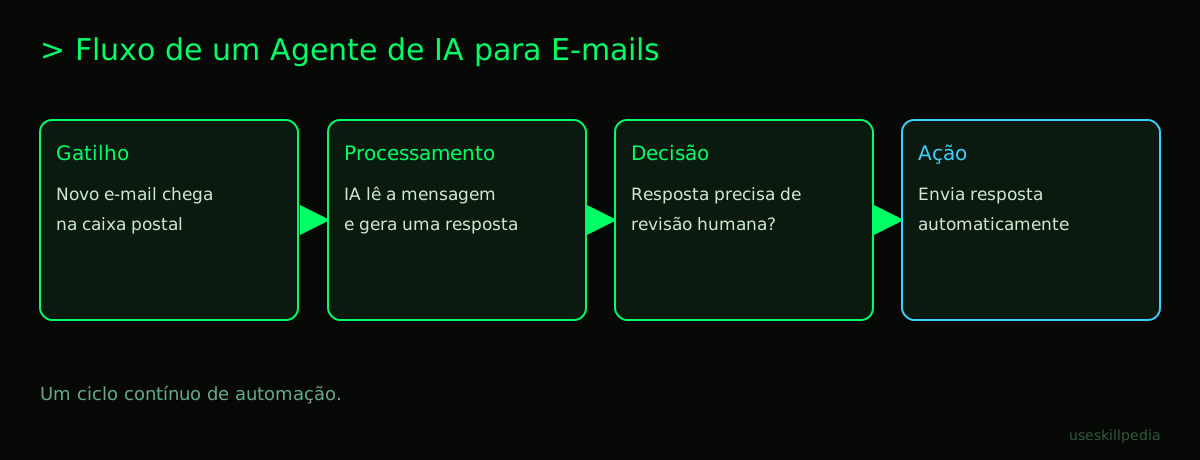
- Example: A "Trigger" block (that starts the task when a new email arrives) connected to an "AI" block (that analyzes the email) connected to a "Response" block (that sends the ready reply).
- A popular tool in this style is n8n. It allows you to create workflows linking different services and actions.
A place for it to live (the "hosting"): Your agent needs to run somewhere. Some automation platforms, like n8n itself, offer a version you can install on your computer or on a cloud server (a rented computer, always online). Other tools, especially those from the AI companies themselves, already host the agent for you.
Visual Step-by-Step: Building Your First Agent
Let's create a practical agent: an Automatic FAQ Email Responder. Its goal is to read emails arriving in an inbox, identify the subject, and reply with a ready, personalized response, saving your time.
We'll use a visual tool (like n8n) as a general example, without going into specific menu commands.
Step 1: Choose the "mind" and write the instructions
- In your automation tool, look for a block/node called "AI" or "LLM".
- Inside it, you will paste your agent's instructions. For example:
"You are the customer service assistant for 'Green Life Plant Shop'. Your function is to respond to customer emails in a friendly and helpful way. Use the attached product catalog to answer questions about price and care. If the customer asks about delivery times, say it's 3 to 5 business days. If the question is very complex or specific, politely ask the customer to contact us by phone at (555) 123-4567. Always sign with 'Sincerely, Green Life Team'."
Step 2: Connect the action trigger
- Drag a block/node to the start of the flow that is a Trigger. Choose the "Email" or "Gmail" option.
- Configure it so that every time a new email arrives in the inbox "contact@exampleshop.com", the flow is triggered. The tool will ask you to connect your email account, following a secure step-by-step.
Step 3: Process the information
- Connect the output from the Email block to the AI block you prepared in Step 1.
- Configure it so that the content of the received email is sent to the AI as the "user's question".
- You can also attach, here, a file with the product catalog for the AI to use as a reference.
Step 4: Make a decision (optional, but powerful)
- You can add a "Condition" or "Switch" block after the AI.
- For example: "If the AI's response contains the phrase '[FORWARD TO HUMAN]', then forward the original email to my personal address. Otherwise, proceed to send the automatic reply." This creates a quality control.
Step 5: Execute the final action
- Finally, connect to a "Send Email" block.
- Configure it to use the response generated by the AI as the body of the new email, send it back to the original sender, and have a subject like "Re: [Original Subject]".
Done! By saving and activating this flow, you've created your first agent. It will be "listening" to your email inbox and acting automatically. Remember to test a lot at the beginning, sending emails from another address to see if the responses come out as you expect.
How Your Agent "Thinks" and Acts?
It's useful to understand a bit of what happens behind the scenes, even without coding. Your agent's "brain" is a language model. Think of it as a giant, advanced automatic text corrector, that not only corrects but also generates new, coherent text.
When the agent receives a question (a prompt), it processes this into little pieces called tokens. A token can be a whole word, part of a word, or even a symbol. It's the currency for processing. The facts show that, in the current system, 1 million tokens are equivalent to about 555 thousand words. Everything you send and receive consumes tokens.
The AI uses all the context you provided — the initial instructions, the conversation history, the attached files — to generate the next most probable sequence of tokens, which forms the response. That's why clear instructions are so important: they guide this probability.
And how does the agent use external tools, like searching the web? It relies on APIs. An API (Application Programming Interface) is like a waiter in a restaurant. You (the agent) don't go to the kitchen (Google's server, for example) to get the information. You make a standardized request to the waiter (the API), and they bring the result to your table. Visual automation tools already come with many of these "waiters" pre-configured for popular services.
The Tools Your Agent Can Use
An agent becomes much more powerful when it has access to the outside world. See some tools you can give it through blocks on a visual platform:
| Tool | Analogy | What the Agent Can Do With It |
|---|---|---|
| Email Access | The company's mailbox | Read new emails, send replies, organize messages into folders. |
| Spreadsheets (Google Sheets, Excel) | The company's record book | Read data (customer list, inventory), add new rows (record a sale), update values. |
| Calendars | The shared agenda | Check free times, schedule meetings, send reminders. |
| Databases | A huge file cabinet | Search for specific information quickly, like a customer's history. |
| Web Search Tools | A super-fast librarian | Search for current information, competitor prices, news on a topic. |
| Social Media Platforms | The company's megaphone | Post content automatically, respond to comments, analyze mentions. |
| Messaging Systems (WhatsApp, Slack) | The team's communication radio | Send and receive messages, alert teams about important events. |
To connect these tools in a standardized way, there is a protocol called MCP (Model Context Protocol). It works like a universal USB-C port for AI applications. Just as a USB-C cable connects your laptop to any monitor or charger, MCP connects your agent to different data sources and tools (like Google Calendar, Notion, or even software like Blender for 3D models), without needing a different adapter for each one. In Claude, these connections can be called Connectors.
Try These 3 Skills First
If you want to try something more direct before building complex flows, many platforms offer Skills. A Skill is like a plugin or a ready-made app that you install on your agent to give it a new specific capability, without having to build it from scratch.
Think of it like downloading an app for your phone. Someone already programmed the functionality, and you just need to install it and configure a few details.
Here are three interesting skills for a beginner to experiment with the feeling of "teaching" a new skill to your assistant:
- agent-harness-construction-affaan-m: This skill helps your agent evaluate and improve itself. It's like giving it a mirror and a manual on how to be more effective. It can analyze its own responses and suggest adjustments to the instructions to perform better in the future.
- skill-creator-anthropics: This is a meta skill. It allows you to use the agent itself to help you create other skills. You describe in English what you want a new skill to do, and it generates the basic structure for you. It's a great way to understand how these abilities are built internally.
- agent-eval-affaan-m: Focused on evaluation, this skill helps test if your agent is really following your rules. You can ask test questions and see how it does, ensuring it's ready to be used in the real world.
Skills are an excellent starting point because you see quick results and learn, in practice, how an agent works. You can search for other skills to find the one that fits your goal.
Frequently Asked Questions
Do I need to pay to create an agent? Not necessarily. Many platforms, like Claude's Free plan, allow you to experiment with creating complex instructions and using some basic tools at no cost. For more sophisticated agents that run 24/7 or use many resources, a paid plan may be necessary.
Can my agent make mistakes or say inappropriate things? Yes, it can. It's only as good as the instructions and tools you provide. If the instructions are vague or if the data it accesses is incorrect, the response may be inappropriate. That's why you should start with low-risk tasks and always include an instruction like "If you're not sure, say you'll consult a human and ask for the person's email."
Can I create an agent that works on WhatsApp? Yes, it's perfectly possible! You would need a tool that connects to the WhatsApp Business API. The process is similar to email: a trigger for new messages, an AI block to process, and a block to respond. We have a more detailed guide on this here: AI Agent for WhatsApp: Practical Guide.
What happens if the AI "runs out" of tokens? Tokens are like the fuel for the conversation. Each platform has a limit on how many tokens you can use in a period (for example, in a 5-hour window). If you reach the limit, the agent may stop responding until the limit is renewed. Paid plans generally offer higher limits.
Can I make my agent learn from the interactions it has? Automatically and without supervision, generally not. The conversation history stays in the temporary memory of that session, but it doesn't change its original instructions by itself. To "teach it" new information, you need to manually update its instructions or the knowledge files you attached to it.
Read More
To delve even deeper into the world of AI agents, check out these other articles:
- AI Agent: What It Is, How It Works, and How to Build Yours (No Coding) – The main pillar on the topic.
- How to Create an AI Agent in Claude – Focused on the specific tools of the Claude platform.
- AI Agents with n8n – A more detailed dive into using this powerful visual automation tool.
- What is MCP (Model Context Protocol): Explained in an Easy Way – Better understand the standard that connects your agent to the world.
- Claude Code: What It Is, How to Download, Install, and How Much It Costs (2026 Guide) – Learn about Anthropic's development tool, which includes support for agents and skills.
Sources
- What is the Model Context Protocol (accessed 10/16/2026)
- Claude Code: Overview (accessed 10/16/2026)
- Claude Plans and Pricing (accessed 10/16/2026)
Full guide on this topic: What Are AI Agents? A Beginner's Guide to Creating Your Own