Free AI Agents: The Best Options to Get Started
Skillpedia team · updated 2026-10-16 · 9 min read
Short answer: Yes, there are great options for a free AI agent. Claude's Free plan and OpenAI's Luna model are two strong examples. They let you start experimenting without spending any money.
The idea of having a digital assistant that works for you sounds like something from a movie, right? But today, that technology is accessible. And the best part: you can try it without opening your wallet. If you're completely new to this, don't worry. We'll simplify everything, explaining each technical term with everyday analogies.
Table of Contents
- What is an AI Agent, Anyway?
- Where to Find Free AI Agents?
- How Do These Free Agents Work?
- What Can You Actually Do for Free?
- Is There a Catch? Limits and Tokens](#limits-tokens)
- Where to Start Testing?
What is an AI Agent, Anyway?
Think of an AI agent as a digital employee. You give it a task ("monitor the prices of this product online"), and it will try to complete it on its own, making small decisions along the way. Unlike a simple chat that only answers your question, an agent acts.
It works using an AI model (the agent's "brain," which is a program trained to understand and generate language) and can access tools (these are like the agent's "arms" and "hands," allowing it to, for example, search the web or read a file you uploaded).
An important concept here is MCP (Model Context Protocol). The official analogy is perfect: it's like a USB-C port for AI apps. It's a standard that allows you to connect your agent to other programs, like your Google Calendar or a spreadsheet, so it can interact with your real data. In Claude, these connections are called Connectors.
To understand all this in detail, read our complete guide: AI Agent: What It Is, How It Works, and How to Create Yours (Without Coding).
Where to Find Free AI Agents?
The good news is that several major companies offer free versions of their "brains" (AI models). You can use them as a base to create your agent. The main options are:
1. Claude (Free Plan)
Anthropic, the creator of Claude, has a robust free plan. You access it via the website claude.ai. It's one of the best starting points because the Free plan already includes access to Skills and Connectors.
- Skills are like "superpowers" or "apps" you can install in your agent to make it do specific tasks, following an open standard.
- Connectors are the MCP integrations we mentioned, for connecting your agent to other services.
2. OpenAI (GPT-6 Luna) OpenAI, from the ChatGPT family, offers the GPT-6 Luna model for users on the Free and Go plans in the desktop app. It's described as fast and cheap, perfect for experimenting.
3. Other Options Companies like Google (with Gemini), Meta, xAI, and others also have models publicly available, but the details of their free plans may vary. The rule is always: check the official page.
How Do These Free Agents Work?
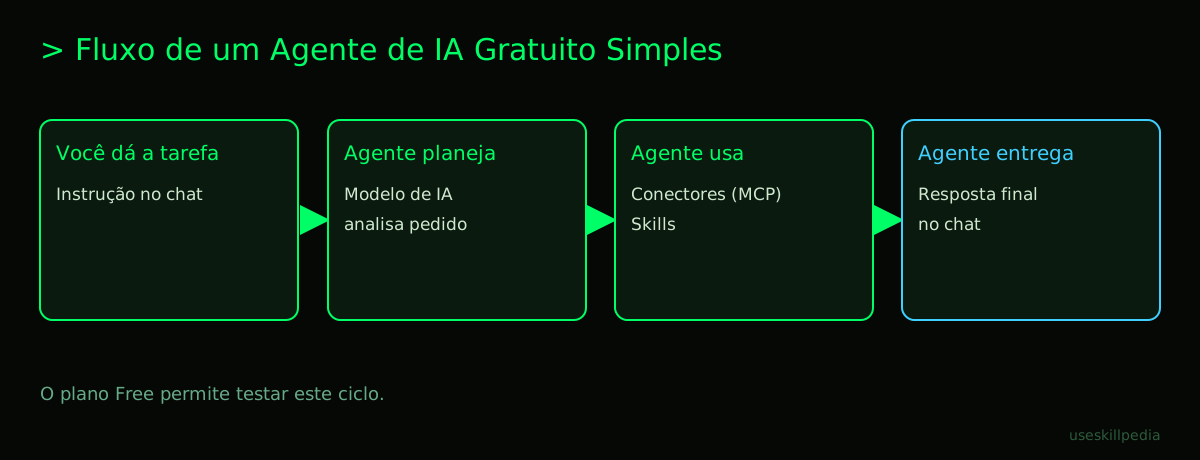
Let's imagine you want an agent that summarizes the day's news for you. In Claude's Free plan, the process would look something like this:
- You give the instruction: In the chat, you write: "Every day at 9 AM, fetch the top 5 tech headlines from [example] website and email me a summary."
- The Agent Plans: The AI model (the brain) inside Claude understands your request.
- The Agent Acts: To complete the task, it needs tools. It can use an MCP Connector to access the internet and fetch the news. Then, it uses its own brain to summarize them.
- The Agent Delivers: It then tries to use another tool (an email connector) to send you the summary.
The heart of this is Claude Code. It's a program you install on your computer that allows you to run Claude's "brain" in a more powerful and integrated way, especially for creating agents. Important: Claude Code is not included in Claude's Free plan. It comes with all paid plans (Pro, Max, etc.). But you can use the claude.ai website on the Free plan to start understanding the concepts.
If the technical part seems scary, know that it's possible to How to Create an AI Agent from Scratch (Without Coding). We also have a guide focused on How to Create an AI Agent in Claude.
What Can You Actually Do for Free?
With free tools, your possibilities are broad for learning and creating prototypes. See some examples:
- Research Agents: Create an assistant that finds and compares information on a topic for you.
- Idea Organizer: An agent that takes your messy brainstorm and organizes it into topics or a mind map.
- Text Reviewer: One that analyzes your emails or short texts and suggests improvements in tone and clarity.
- Agent for WhatsApp: Yes, it's possible to create basic integrations. Explore more in AI Agent for WhatsApp: A Practical Guide.
- Simple Automation: Using visual platforms like n8n (which also has a free version), you can create workflows involving AI. Learn more in AI Agents with n8n.
The key is to start with small, well-defined tasks.
Is There a Catch? Limits and Tokens
Yes, free plans always come with limits. The main concept to understand here is the token.
What is a token? It's the basic unit of text processing for an AI. It's not exactly a word. Think of it as intelligent syllables. The word "car" might be 1 token, but "intelligently" might be split into 3-4 tokens ("in-tel-li-gent-ly").
In Claude's Free plan, your usage is limited by a time "window." You have a quota that renews every 5 hours. In paid plans, there is also a weekly limit. Everything you do consumes tokens: your question, the AI's response, the files you upload, everything.
A useful number: 1 million tokens is roughly equivalent to 555 thousand words. It seems like a lot, but an entire book can consume that quota. To understand why this quota "runs out so fast," read What Are Tokens in AI (and Why They Run Out So Fast).
The table below compares the two main free models we mentioned, focusing on aspects a beginner should note:
| Feature | Claude (Free Plan) | OpenAI GPT-6 Luna (for Free/Go) |
|---|---|---|
| Access to Tools (Connectors/Skills) | Yes, included. | Depends on implementation in the app. |
| Context Window | 1 million tokens. | 1.05 million tokens. |
| Good for... | Experimenting with agents using Skills. | Fast conversations and model testing. |
| How to access | Website claude.ai. |
OpenAI desktop app. |
| Claude Code included? | No. | Not applicable. |
Where to Start Testing?
The golden rule is: start with the simplest thing. Don't try to build a complex agent on day one.
- Create a free account on
claude.ai. - Chat naturally. Ask questions, ask for help writing an email, to summarize a text you paste.
- Explore the pre-installed Skills. In Claude's own chat, see if there are any Skills available to activate.
- Think of a micro-task. Example: "Every time I paste a recipe here, rewrite it into shopping list items and instructions." Test it manually a few times.
To go further, you'll need Claude Code (which requires a paid plan). If that's your case, we have a detailed guide: Claude Code: What It Is, How to Download, Install, and How Much It Costs (2026 Guide). And to master the concept of connecting with other apps, study What is MCP (Model Context Protocol): Explained the Easy Way.
We Recommend Trying These 3 Skills First
Skills are the most practical way to add power to your agent. In the official repository, you'll find many. To start, look for these:
- agent-harness-construction-affaan-m: This skill helps you build other agents. Think of it as an intelligent instruction manual that guides you through the creation process.
- agent-eval-affaan-m: After creating an agent, how do you know if it's good? This skill helps evaluate your agent's performance, like a teacher grading a test.
- skill-creator-anthropics: Want to create your own skill? This is Anthropic's official tool for that. It guides you step-by-step.
Find more skills in our directory: search skills.
Frequently Asked Questions
Do I need to know how to code to use a free AI agent? Not to get started. You can use Claude's chat or ChatGPT for free without coding. To create more complex and autonomous agents, some knowledge helps, but there are visual tools (like n8n) and Skills that reduce this need.
What's better: Claude's Free plan or free ChatGPT? It depends on your goal. Claude's Free plan has the advantage of including access to Skills and Connectors for free, which is great for experimenting with agents. Free ChatGPT is excellent for conversations and general tasks. Try both!
Does "free" mean my data is sold? Generally, no. The privacy policies of major companies state they do not sell your conversation data. However, your inputs may be used to improve the models. Always read the privacy policy of the service you use.
Can I create an agent that runs 24/7 for free? Probably not. Free plans have usage limits (tokens/messages). An agent running constantly would consume that quota very quickly. For persistent agents, you will likely need a paid plan or to set up your own infrastructure (which is more complex).
Where can I find ideas for what to do with an agent? Explore official Skill repositories (like Anthropic's), online communities, and our other articles (see "Read Also" below). Start by copying simple ideas and then adapt them to your needs.
Read Also
- AI Agent: What It Is, How It Works, and How to Create Yours (Without Coding)
- How to Create an AI Agent from Scratch (Without Coding)
- Claude Code: What It Is, How to Download, Install, and How Much It Costs (2026 Guide)
- What is MCP (Model Context Protocol): Explained the Easy Way
- search skills
Sources
- What is the Model Context Protocol (accessed on 10/16/2026)
- Claude Code: Overview (accessed on 10/16/2026)
- Claude Plans and Pricing (accessed on 10/16/2026)
Full guide on this topic: What Are AI Agents? A Beginner's Guide to Creating Your Own