AI Agent Types Explained with Simple Examples for Beginners
Skillpedia team · updated 2026-10-16 · 14 min read
Short answer: AI agents are smart assistants that don't just chat, they act. They can search the internet, analyze your documents, or control other programs for you. Think of them as a digital employee you can train for specific tasks.
Imagine you have a complex question. A regular AI chat tries to answer with what it already knows. An AI agent, on the other hand, can leave the conversation, search the web, read a PDF you uploaded, do calculations, and then come back with a complete answer. It's the difference between asking a friend and giving that friend the power to use your computer and the internet to really help you.
Today, we're going to demystify these assistants. I'll explain the different ai agent types that exist and what each one is for, as if we were having coffee.
Table of Contents
- What is an AI Agent and How Does it Work?
- The "Researcher" or Search Agent
- The "Analyst" or Data Processor Agent
- The "Executor" or Integrator Agent
- The "Specialist" or Niche Agent
- How Do These Agents Talk to the World?
- How to Choose or Create Yours?
- We Recommend Trying These 3 Skills First
- Frequently Asked Questions
What is an AI Agent and How Does it Work?
To understand the types, we first need to know what an agent is. Let's use a simple analogy.
Think of a regular chatbot as a very well-informed salesperson inside a store. They know everything about the products (their training data), but they can't leave the store. If you ask about the weather outside, they'll guess based on what they've heard.
Now, think of an AI agent as a personal assistant. You give them a task: "I need to buy the top-rated birthday gift for a kid on Amazon, but I want to spend at most $20." The assistant (the agent) has your permission to:
- Open the browser (this is a tool or API — a "communication channel" with another program).
- Access the Amazon website (a server — the "computer" where the website is stored).
- Do the search, filter by the criteria, compare reviews.
- Come back and show you the options, with links.
The agent's "brain" is a large language model (like Claude or ChatGPT). It's the smart part that understands what you want and decides which steps to take. The big trick is that this brain gets access to arms and legs — the tools — to interact with the digital world.
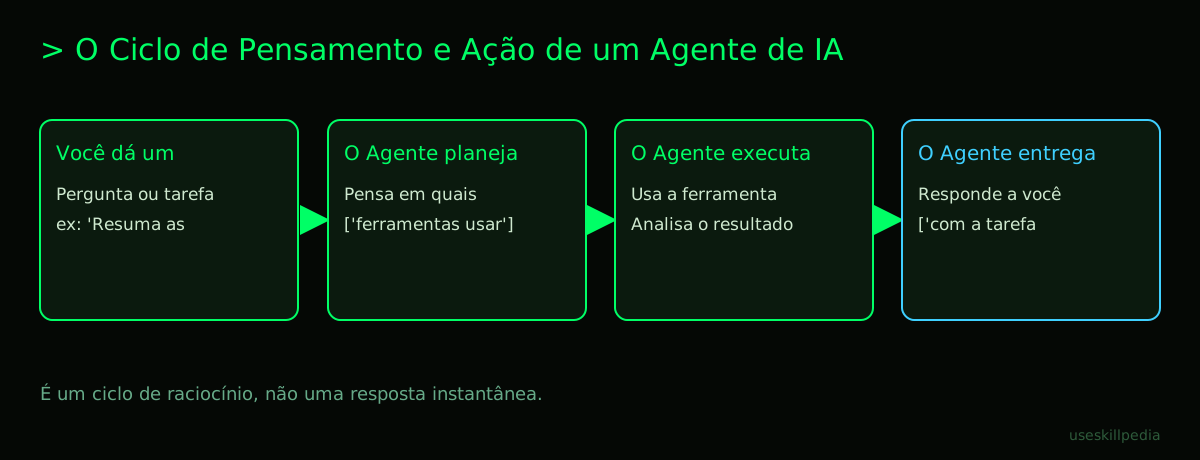
How does it work, step by step?
- You give a goal: "Summarize the top tech news from this week."
- The agent plans: The brain thinks: "For this, I need to: a) find news sources, b) get the latest news, c) read the content, d) summarize."
- The agent acts: It uses the "search the internet" tool for step (b). It might use a "read website" tool for step (c).
- The agent observes the result: It sees what the tool returned (the news article texts).
- The agent thinks again: "Now I have the news, I can proceed to summarize."
- The agent completes the task: It generates and delivers the final summary to you.
This ability to think, act, observe, and repeat is what defines an agent. It doesn't give a one-time answer. It "reasons" in multiple steps, using tools along the way.
The "Researcher" or Search Agent
This is the most common and useful type for everyday use. Its main function is to search for information outside the AI's memory, which might already be outdated.
What is it like?
- Personality: Curious and methodical.
- Tools it uses: Real-time internet access, queries to specific databases, website searches.
- Analogy: It's that friend who, in a discussion about a movie, doesn't just say "I think." They grab their phone right away and search Google to confirm the actor's name, the release year, and the review.
Practical examples:
- News Agent: You ask: "What important things happened in the financial market today?" It accesses news portals, gets the headlines, reads the main articles, and gives you a bulletin.
- Price Comparison Agent: "Find the best price for a 24-inch Full HD monitor on the main online stores." It visits sites, scrapes the prices (ethically), and brings you a comparison table.
- Academic Agent: "What are the latest scientific articles published about solar energy?" It searches academic repositories (like Google Scholar) and brings you the titles, authors, and a brief summary.
Why is it important? Because AI, no matter how good, has a knowledge "cut-off" date. A researcher agent breaks this barrier, bringing the real, updated world into the conversation.
The "Analyst" or Data Processor Agent
This agent is focused on looking at data you already have. It doesn't go out to find new information, but dives deep into the files, spreadsheets, and texts you provide.
What is it like?
- Personality: Detail-oriented and organized.
- Tools it uses: File reader (PDF, Word, Excel, PowerPoint), image interpreter, code analyzer.
- Analogy: It's the accountant or analyst you give a stack of receipts and invoices from the month. They organize, categorize, add everything up, and prepare a clear report of your spending.
Practical examples:
- Report Analyst: You send 10 annual reports in PDF from a company. You ask: "Extract the net revenue and profit for each year and show it in a chart." It reads each PDF, finds the numbers in the tables, structures the data, and generates the chart.
- Meeting Organizer: You record the meeting (audio) and give it to the agent. You ask: "Transcribe it, identify the participants, list the decisions made and the next steps with owners." It does all that and gives you back an organized meeting minute.
- Code Reviewer: You, even without being a programmer, can ask: "Look at these files from a simple website I'm trying to make. Find errors and suggest improvements." It analyzes the code and gives tips in simple language.
Why is it important? It turns chaos into useful information. It takes away the heavy work of manually reading, compiling, and analyzing mountains of data, freeing your time for what really matters: decision-making.
The "Executor" or Integrator Agent
This is the most powerful agent. It doesn't just search or analyze, it does things in other applications. It acts in the digital world as if it were you.
What is it like?
- Personality: Practical and efficient.
- Tools it uses: APIs of other services. An API is like a "digital waiter." You (the agent) don't go into the restaurant kitchen (Google Calendar's server). You give the order to the waiter (the API), who gets what you need from inside the system.
- Analogy: It's an extremely competent virtual assistant. You say: "Schedule a meeting with Julia next week about the budget." It checks your calendar, Julia's calendar (if it has access), suggests times, creates the event in Google Calendar, writes the description, and sends the invite by email. All by itself.
Practical examples:
- Task Automator: "Every Friday at 5 PM, get the sales data from spreadsheet X, generate a chart, and email it to the team." The agent is programmed (or you instruct it) to do this automatically.
- Social Media Manager: "Analyze the last 20 comments on our Instagram, identify frequent questions, and answer the ones about business hours." It interacts directly with the platform.
- System Integrator: "Whenever a new lead is added to spreadsheet Y, create a card for them in Trello and add a reminder in Slack." The agent "listens" to one system and acts in the other.
Why is it important? It eliminates the "copy and paste" between programs, automating boring and repetitive workflows. It's the type of agent that can truly give you hours of your week back.
The "Specialist" or Niche Agent
This one isn't defined by its action (search, analyze, execute), but by its specific knowledge. It's an agent that receives very detailed training or a set of instructions to work in a narrow area.
What is it like?
- Personality: Focused and deep.
- Tools it uses: It can combine any of the previous ones, but its big differentiator is the specialized "instruction manual."
- Analogy: It's like hiring a consultant for a very specific problem. Instead of a general practitioner doctor, you go to a cardiologist. Instead of a general lawyer, you look for a tax law specialist.
Practical examples:
- Customer Support Agent: It is trained with all your company's FAQ, product manual, and ticket history. When a customer asks something, it answers precisely, in the brand's tone, and can even open a ticket if needed.
- Math Tutor: Its "system" is instructed to explain concepts step by step, never give the direct answer, and adapt to the student's level. It is patient and pedagogical by design.
- Script Critic: You feed the agent with hundreds of movie analyses and storytelling structures. When reading a script, it can give feedback in the style of an experienced editor.
Why is it important? Because it offers superior quality and consistency in specialized tasks, scaling knowledge that was previously held by few.
How Do These Agents Talk to the World? (Tools, APIs, and MCP)
We've already talked about "tools" and "APIs." But how does this work in practice? There's a standard that is becoming common, which is the key to creating agents.
Think of your computer. You have a mouse, a keyboard, a webcam, an external hard drive. They all connect through ports (USB, HDMI). Imagine if each mouse brand needed a different port? It would be chaos.
In the world of AI agents, MCP (Model Context Protocol) is exactly that: a "USB-C standard for AI applications." It's a single, open way to connect any agent (Claude, ChatGPT, etc.) to any data source or tool (Google Calendar, Notion, your database).
- Without MCP: Each AI would have to create its own way to talk to Google Calendar. Difficult and limited.
- With MCP: There is a standard "translator" (the Google Calendar MCP server). Any agent that speaks "MCP" can connect and use it.
In Claude, these connections are called Connectors. In Claude Code (the tool for programmers), you use commands in the terminal (a text window where you give direct orders to the computer) to add these MCP servers.
| Component | Analogy | Function in the Agent World |
|---|---|---|
| Agent (Claude, ChatGPT) | You, giving orders. | The brain that plans and decides what to do. |
| Tool/API | The waiter (API) or the physical tool (screwdriver). | The means by which the agent executes a specific action (search, calculate, write). |
| Server | The restaurant kitchen or the workshop. | The computer/software that stores the data or performs the operation (e.g., Gmail server). |
| MCP (Protocol) | The USB-C standard. | The standard language that allows the agent (client) to connect to any tool server. |
| Connector/Claude Skills | The specific USB-C cable for a device. | The practical implementation that connects Claude to a specific tool via MCP (e.g., Google Calendar Connector). |
How to Choose or Create Your Agent?
Now that you know the types, how do you get hands-on?
1. Use Ready-Made Connectors (Easiest): The simplest way is to use an agent that already comes with tools. On Claude.ai, in the paid version, you find Connectors for the internet, Google Calendar, etc. You basically "flip the switch" and can already ask: "Search the web about...". It's like buying a smartphone with apps already installed.
2. Use Skills (Intermediate): Skills are "knowledge packages" for agents. They are like small manuals or superpowers you can add to Claude to specialize it in something. There are skills for better writing, for analyzing code, for thinking more strategically. In Claude Code, you can add them to a repository (an organized "project folder") for your agent to use. It's like downloading a new app to expand your phone's functions.
3. Create with Visual Platforms (No Code): Tools like n8n or Zapier allow you to create executor agents (automations) by connecting visual blocks. You configure: "When an email X arrives (Gmail block) -> Save attachment to Google Drive (Drive block) -> And notify me on WhatsApp (WhatsApp block)." It's like building an assembly line with Lego pieces.
4. Create with Claude Code (Most Powerful): For more complex and personalized agents, you use Claude Code. It's a program you install on your computer that combines the power of Claude with a terminal and the ability to manage Skills and MCP Connectors. It's the tool for those who want an assistant deeply integrated into their workflow. You can start by reading our practical guide on How to create an AI agent from scratch (without programming).
Crucial tip: Remember the tokens. Everything the agent reads (instructions, history, files, web results) consumes tokens. It's like the "fuel" of the conversation. A Free plan has a limit. We explain this in detail in the post What are tokens in AI (and why do they run out so fast).
We Recommend Trying These 3 Skills First
Before trying to create something complex, try adding Skills to Claude to see the concept in practice. They are like mini-specialized agents you can activate.
- agent-eval-affaan-m: This skill teaches Claude to evaluate other agents. Seems meta, right? With it, you can describe an agent you created or imagined, and Claude will analyze if the idea is good, point out weaknesses, and suggest improvements. It's like having an agent consultant by your side.
- agent-harness-construction-affaan-m: This skill helps build the "test environment" for an agent. "Harness" is a "harness" or "safety belt." It guides you to think about the limits, the necessary tools, and the tests to ensure your agent works safely and in a controlled way before going out and acting in the world.
- skill-creator-anthropics: This one is straight from the manufacturer (Anthropic, creator of Claude). It helps you create your own Skill. It's a step-by-step guide inside Claude itself to package a complex knowledge or instruction into a reusable skill. Perfect for documenting a company process or a personal work method.
Frequently Asked Questions
Do I need to be a programmer to use an AI agent? No! You can use ready-made agents in chats like Claude (with connectors turned on) or create visual automations on platforms like n8n without writing a single line of code. For more advanced agents, programming helps, but it's no longer an absolute requirement.
Can an AI agent act on its own, without me asking? Generally, no. Most agents need a trigger: a command from you, a scheduled time, or a specific event (e.g., an email arriving). They are tools under your supervision. Fully autonomous agents are a more complex field and, for now, less common in daily life.
Is it expensive to have an AI agent? It depends on the use. Free plans, like Claude Free, allow you to try researcher agents (with limited use). Pro plans (like Claude Pro for $20/month) give more tokens and access to more tools. The main cost is the tokens used in the interactions. For personal and moderate use, it can be very affordable.
Are my data safe with an agent? You need to pay attention to the privacy policy of each tool. When an agent uses a tool (like reading your emails), it acts with the permissions you granted. Serious companies don't use your data to train other models without consent. Always check the settings and grant only the necessary accesses.
What's the difference between an AI agent and a common automation (Zapier)? A common automation follows rigid rules "if X, then Y." If something unexpected happens, it gets stuck. An AI agent has flexible reasoning. Faced with the same unexpected event, it can analyze the context, make a different decision, and move forward. The agent is more adaptable and handles unforeseen situations better.
Read Also
- To understand the basis of it all: AI Agent: what it is, how it works, and how to create yours (without programming).
- To get hands-on: How to create an AI agent in Claude and AI Agent for WhatsApp: practical guide.
- To explore visual automation: AI Agents with n8n.
- To dive into the developer tool: Claude Code: what it is, how to download, install, and how much it costs (2026 guide).
- To understand the "universal language" of agents: What is MCP (Model Context Protocol): explained in an easy way.
- To find more skills: search skills.
Sources
- What is the Model Context Protocol (accessed on 10/16/2026)
- Claude Code: overview (accessed on 10/16/2026)
- Claude plans and pricing (accessed on 10/16/2026)
Full guide on this topic: What Are AI Agents? A Beginner's Guide to Creating Your Own