Best AI for Coding in 2026: A Beginner's Friendly Guide
Skillpedia team · updated 2026-10-16 · 12 min read
Short answer: The best ai for coding 2026 really depends on what you need to do. For most people, Claude Code (which comes with paid Claude plans) is an excellent choice. For more specific tasks, other models might be better. I'll help you choose.
Hello! If you're thinking about starting to code, or have tried before and found it too hard, I have great news: 2026 is the perfect year to begin. The tools have evolved in a way that feels like magic. They won't code by themselves, but they are like a super smart friend by your side, who understands what you want and guides you step-by-step.
Think of it this way: before, learning to program was like learning to fix a car by reading the manual, without any tools. Today, it's like having a professional mechanic teaching you and handing you the right tools at the right time. You still need to learn, but the path becomes much easier and more fun.
This article is for you if you've never written a line of code. I'll explain everything using everyday analogies, no jargon. I promise!
Table of Contents
- What is an "AI for coding," in practice?
- How to choose the best one for you? (simple guide)
- Claude Code: the assistant that lives inside your computer
- What are Skills and MCP? Your secret superpowers
- How much does it cost? Plans and prices in 2026
- How to get started? First steps without fear
- We recommend trying these 3 skills first
- Frequently asked questions
- Read also
What is an "AI for coding," in practice?
Imagine you want to build a bookshelf. You have the idea in your head, but you don't know how to use a saw, hammer, or screwdriver.
An AI for coding does two main things:
- It understands what you want. You can say, in normal English: "I want a web page that has a form for the user to put their name and email, and a red button to submit." The AI will understand that description.
- It gives you the tools and instructions. It won't magically create the page out of thin air. Instead, it will tell you: "First, open the notepad on your computer. Now, copy this text I'm going to show you and save it as 'index.html'. Then, double-click that file to open it in your browser." And it will give you the exact text (the code) you need to copy.
The AI is like a specialized guide. It writes the tricky parts, explains what each thing does, and fixes your mistakes. You learn by doing, with help.
Some AIs are chat assistants (like ChatGPT or Claude in the browser). You chat with them and they suggest code. Others, like Claude Code, are installed on your own computer. This is powerful because it can see the files in your working folder, as if it were looking over your shoulder.
How to choose the best one for you? (simple guide)
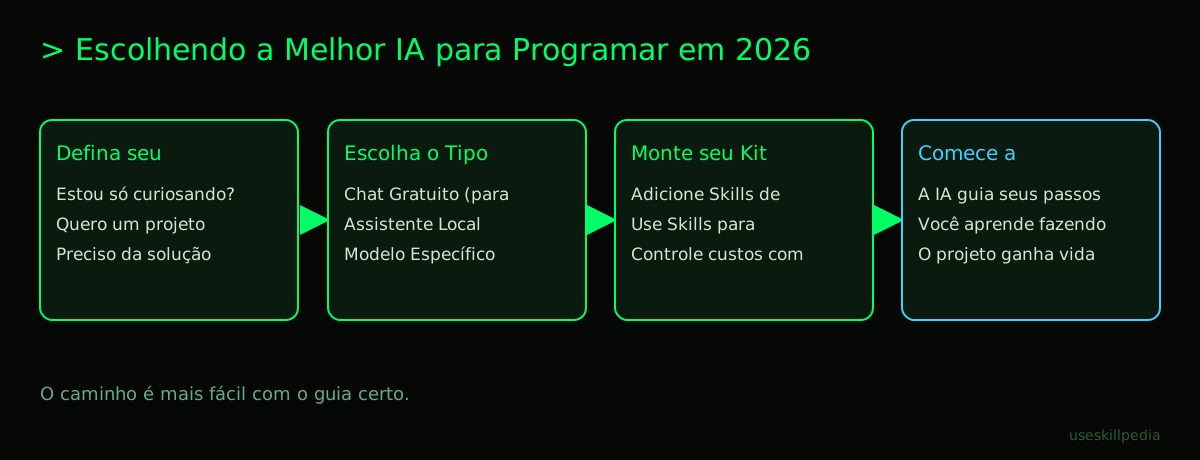
There isn't a single answer. It depends on your goal. Use this table to guide you:
| Who is it for? | Best Option | Why? |
|---|---|---|
| Just curious, don't want to spend anything. | Free chat models (Claude Free, ChatGPT Free, Gemini) | They are great for asking questions, understanding concepts, and requesting simple code examples. It's the ideal starting point. |
| Want to learn/start a real project. | Claude Code (comes with Claude Pro or Max plans) | Because it works directly on your files, understands the context of your project, and is very good at explaining things to beginners. It's a personal tutor inside your PC. |
| Already tinker and want speed/low cost. | Fast and cheap models (Claude Haiku, GPT-6 Luna) | For repetitive tasks, fixing simple errors, or generating small functions quickly, without spending much. |
| Need the most advanced intelligence. | Top-tier models (Claude Opus, GPT-6 Astra, Gemini 4 Argon) | For very complex logic problems, architecting large systems, or when you're stuck on an impossible bug. It's like calling in an expert. |
For most people starting out, the Claude Code + Claude Pro plan combo is the most powerful and practical. You pay for a complete service (the browser assistant + the tool on your computer) at an accessible price.
To dive deeper into the differences between models, we have a complete guide: Best AI models in 2026: which to use for each task.
Claude Code: the assistant that lives inside your computer
Claude Code is not a program with buttons and menus. You interact with it via text, in a window called a terminal.
- Terminal (explanation): It's a computer window where you type text commands, instead of clicking icons. Think of it like sending text messages directly to your computer's "brain." It's faster and more powerful when you know what to ask.
Its big advantage is that it has context. It doesn't just see the message you typed now, but also knows all the files in your project, the errors that appeared before, etc. It's the difference between asking a stranger on the street for directions and asking a friend who is right next to you, looking at the same map.
It's included in all paid Claude plans (Pro, Max, Team). If you want to know all the details about how it works, we have a dedicated guide: Claude Code: what it is, how to download, install, and how much it costs (2026 guide).
What are Skills and MCP? Your secret superpowers
These are the features that turn a good AI into an amazing AI for coding.
Skills are like "apps" or "plugins" for your AI. Each Skill teaches the AI to do a specific task.
- Skill (explanation): It's a package with instructions and, sometimes, small tools, that you "install" in your AI. It's like downloading an app on your phone to edit photos. Without the app, you can't. With the app, you gain new functions.
For example, there is a Skill that teaches Claude to create visually attractive and modern designs for the front end of websites and apps. Another teaches it to manage costs when using multiple AIs together. You can find them in the official repository.
- Repository (explanation): It's an online location, like a folder in the cloud, where files and projects are stored and organized. Think of it as a public library of programs, where anyone can grab a copy.
MCP (Model Context Protocol) is the "universal connector" that allows your AI to access things outside of itself.
- MCP (explanation): It's a standard that works like a USB-C port for AI applications. Through it, the AI can connect to other programs on your computer (like Figma for designs or Blender for 3D models) or to online services (like your Google Calendar).
- Server (explanation, in the context of MCP): In MCP, the "server" is the program that sits in the middle, managing the connection. It's like a translator who stands between you and a person who speaks another language, allowing you to understand each other.
With MCP, you can, for example, show a design made in Figma to the AI and ask: "Create the code for a page just like this one." The AI, through MCP, can "see" the design and work from it. To better understand this fascinating technology, read: What is MCP (Model Context Protocol): explained the easy way.
When you combine Skills and MCP, you can create an AI Agent.
- AI Agent (explanation): It's an AI configured with Skills and Connectors (MCP) to perform a complete workflow by itself. Imagine a virtual robot that you program to: 1) check your emails, 2) pick up orders, 3) create a file in the system, and 4) notify you on WhatsApp. It automates processes. Learn more at: AI Agent: what it is, how it works, and how to create yours (without coding).
How much does it cost? Plans and prices in 2026
Let's talk mainly about Claude, since that's where Claude Code is. The prices are in US dollars (US$).
- Free Plan: US$0. Includes the chat on the website, but does NOT include Claude Code. Has usage limits.
- Pro Plan: US$20 per month (or US$17/month if paying yearly, US$200 upfront). Includes Claude Code. Has generous limits that refresh every 5 hours and also a weekly limit.
- Max Plan: Starting at US$100/month. Offers 5x or 20x greater capacity than Pro, also in 5-hour windows. Includes Claude Code. Ideal for heavy professional use.
An important detail: In Claude, the use of Claude Code and the regular chat share the same token limit.
- Token (explanation): It's the basic unit of text that the AI understands. It can be a whole word, part of a word, or a symbol. Think of it like syllables for the AI. Everything you send and receive consumes tokens.
- 1 million tokens is roughly equivalent to about 555 thousand words. That's a lot of text! Everything counts: your question, the files you send, the AI's response.
Skills and Connectors (MCP) are available on all plans, even Free (for use in the chat). This is great for experimenting.
For other popular tools, like those from OpenAI (ChatGPT) or Google (Gemini), prices and plans vary. Always check the official page for the most up-to-date information.
How to get started? First steps without fear
Let's assume you've chosen to try Claude Code. The process is simple:
- Have a Claude account. Create a free one on the claude.com website.
- Subscribe to the Pro plan (or higher). This is required to use Claude Code.
- Install Claude Code on your computer. Open the terminal and type the correct command for your system. Don't be scared by the commands below. Just copy and paste.
- Mac or Linux: Open the Terminal and paste:
curl -fsSL https://claude.ai/install.sh | bash - Windows (PowerShell): Open PowerShell as Administrator and paste:
irm https://claude.ai/install.ps1 | iex
- Mac or Linux: Open the Terminal and paste:
- Open Claude Code. After installation, open the terminal, navigate to any folder on your computer (like the "Desktop") and type the command
claude. - Log in. The first time, it will open a page in your browser for you to confirm your account. Done!
Now you are in Claude Code. To test it, type something like: "Explain to me what an HTML page is and create an example file in this folder." It will guide you.
If you have problems, the claude doctor command helps diagnose them.
Remember: you can also use the Desktop app for Claude (with a regular visual interface) and extensions for editors like VS Code, if you prefer not to use the terminal. Check the options on the official page.
We recommend trying these 3 skills first
Installing Skills in Claude Code is easy. They live in special folders on your computer. Start with these three, which are very useful:
- frontend-design-anthropics: This Skill teaches Claude to create visually attractive and modern designs for the front end of websites and apps (what the user sees). Perfect for those who want beautiful results from the start.
- council-multi-model-affaan-m: This Skill makes Claude act as a "council" of experts. Instead of just one AI thinking about the problem, it simulates several different AIs discussing the best solution for your code. Great for technical decisions.
- cost-aware-llm-pipeline-affaan-m: This Skill makes Claude "cost-aware." It helps plan programming tasks in a way that uses different AI models (some expensive, some cheap) intelligently, to spend less. Ideal for larger projects.
To find more Skills, you can search skills in our directory.
Frequently asked questions
Do I need to be a computer genius to use this? No! That's exactly the revolution. The AIs of 2026 are made to understand requests in natural language. If you can explain what you want to a friend, you can explain it to the AI. You'll learn the technical details over time, guided by it.
Will I lose my job to an AI that codes? AI is a tool, not a replacement. It automates repetitive and difficult tasks (like finding a specific error), but the project vision, the creativity to solve problems, and the decision about what to build are still human. The professional who knows how to use AI will be much more valued.
What's the difference between Claude in the browser and Claude Code? Claude in the browser (claude.ai) is a chat. You converse, send files, but it doesn't have direct access to your computer's folders. Claude Code is installed on your PC and operates in the terminal, having full access to your project. It's like the difference between talking to an expert via video call (browser) and having them in your office, looking at your screen (Claude Code).
Can I use it for free for serious things? For learning concepts, clearing up doubts, and very small projects, yes, the free plans of various AIs are sufficient. For a real, ongoing programming project, where you'll save many files and ask for many explanations, a paid plan (like Claude Pro) is almost essential, as it removes usage limits and gives access to tools like Claude Code.
Is it safe? Will the AI access my personal data? Serious companies have clear privacy policies. In general, in consumer versions, your conversations may be reviewed to improve the system. If you're working with sensitive data (personal, company), it's essential to read the terms of service and consider enterprise plans, which usually have more privacy guarantees. Always check the official page for the data policy of the service you plan to use.
Read also
- Best open source and local AI model - For those who prefer to have everything on their own computer, without the cloud.
- Best AI for writing texts - Focus on writing, emails, articles, and textual creativity.
- Which Claude model to use: Haiku, Sonnet, or Opus - A detailed guide to choosing between the Claude "siblings."
- Best free AIs - An overview of the best free options available.
- To dive deeper into choosing the right model for each task, revisit our pillar article: Best AI models in 2026: which to use for each task.
Sources
- Anthropic: model overview (accessed 16/10/2026)
- OpenAI models (accessed 16/10/2026)
- Gemini API pricing (accessed 16/10/2026)
- Claude plans and pricing (accessed 16/10/2026)
Full guide on this topic: Best AI Models in 2026: Which to Use for Every Task