Which Claude Model to Use: Haiku, Sonnet, or Opus
Skillpedia team · updated 2026-10-16 · 9 min read
Short answer: Use Claude Haiku for simple, quick tasks. Claude Sonnet for everyday work like writing and coding. Claude Opus when you need the deepest, smartest analysis possible. This way, you always pick the best claude model for the job.
Choosing an AI model can seem complicated. It's like walking into a juice bar and seeing different kinds: quick, balanced, and super premium. Which one do you order? It depends on your thirst!
Anthropic, the company that created Claude, offers three main models: Haiku, Sonnet, and Opus. Each one has a purpose. This article will explain, in simple terms, how to choose between them. We'll use everyday analogies so it all makes sense, even if you've never programmed in your life.
Table of Contents
- What are these models? Three very different siblings
- When to use each one? The easy rule of thumb
- What about price? How much does each "juice" cost
- Claude Code: the right model for programming
- How do they compare with the competition?
- We recommend trying these 3 skills first
- Frequently asked questions
What are these models? Three very different siblings
Think of the claude models as three siblings with distinct personalities and skills. The company (Anthropic) trained them to be good at different things.
Claude Haiku: This is the fast and practical sibling. It solves simple things in the blink of an eye. Need to summarize an email? Ask for a date? Haiku is your friend. It's the cheapest of the three. It's like a speedy messenger who delivers short messages efficiently.
Claude Sonnet: This is the balanced and reliable sibling. It's good at almost everything: writing text, helping brainstorm ideas, explaining concepts, and especially programming. For most of your daily tasks, Sonnet is the perfect choice. It's like a competent personal assistant who helps you with serious work.
Claude Opus: This is the genius and analytical sibling. It's the smartest, capable of understanding very complex contexts, making deep connections, and giving sophisticated advice. Use it when the task is critical and you need the best possible thinking. It's like a consultant specialist who dives deep into your problem.
When to use each one? The easy rule of thumb
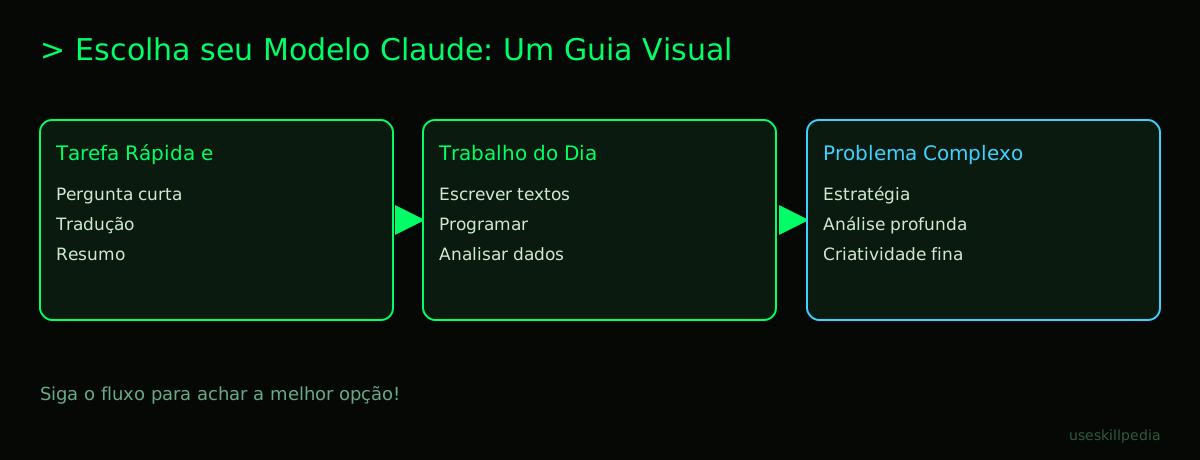
Now, in practice, how do you decide? Follow this simple table. It compares the models by speed, intelligence, and cost, as if they were cars.
| Model | It's like a... | Use for... | Speed | Cost |
|---|---|---|---|---|
| Haiku | Motorcycle | Instant answers, simple tasks, content moderation. | ⚡⚡⚡ Very Fast | $ |
| Sonnet | Family Car | Daily work, writing, programming, data analysis, brainstorming. | ⚡⚡ Fast | $$ |
| Opus | Executive Jet | Complex analysis, strategy, deep research, high-level creativity. | ⚡ Powerful | $$$ |
Let's look at some concrete examples:
Use Claude Haiku when:
- You need to translate a phrase quickly.
- You want a summary of a long paragraph.
- You're moderating comments on a blog (checking if they are offensive).
- You need a super fast factual answer.
Use Claude Sonnet when (for most things!):
- You're writing a blog post or a professional email.
- You need help understanding programming code or writing a snippet.
- You want to brainstorm ideas for a project.
- You need to analyze an Excel spreadsheet and extract insights.
Use Claude Opus when:
- You have a complex business problem and need a strategic analysis.
- You're reviewing a very important legal or technical document.
- You need the AI to make creative connections between several different topics.
- The task is so critical that only the best result will do.
Remember: on the Claude website (claude.ai), you can switch between models at any time during a conversation. Just click the model name at the top of the screen. Don't be afraid to test!
What about price? How much does each "juice" cost
Here, we need to understand a technical word: token. A token is a little piece of words. Think of it as a unit of measurement for text, like "grams" for food. In the current Claude, 1 million tokens is roughly equivalent to about 555 thousand words. Everything you send to the AI (your question) and everything it replies with is counted in tokens.
The models have different prices per million tokens. The values below are the official ones from Anthropic (in US dollars):
- Claude Opus: The most expensive. It costs $4 for you to "enter" (send your text) and $20 for the AI to "exit" (generate the answer) per million tokens.
- Claude Sonnet: The balanced one. It costs $2 (input) / $10 (output) per million tokens.
- Claude Haiku: The cheapest. Starts from $0.10 (input) / $0.50 (output) per million tokens. It gets a bit more expensive if your question is very, very long (above 100k tokens).
What does this mean in practice? If you are on the Claude Free plan, you have a limited quota to use the models. On the paid plans (Pro, for $20/month), you have a larger quota. The quota is like a bucket that refills with tokens every 5 hours. Everything you spend (questions and answers) takes water out of this bucket. When the bucket refills after 5 hours, you can use more.
For almost everyone starting out, Claude Sonnet on the Pro plan offers the best value for money. It's powerful for work and the cost is reasonable. Haiku is amazing for quick tasks that pop up all the time.
Claude Code: the right model for programming
Claude Code is a special tool you install on your computer to help with programming. It is not a model, but a program that uses the Claude models. Think of it as a specialized programming assistant that lives inside your terminal.
A terminal is a black screen where programmers type text commands to talk to the computer, instead of clicking icons. It's like the computer's "text mode."
The big advantage of Claude Code is that it automatically chooses the best model for programming tasks. It's very smart about this! Normally, it prefers Claude Sonnet, which is the best claude model for code, as it leads performance rankings (like the Vibe Code Bench, with 92.4% accuracy). But, if the task is simple, it might use Haiku to be fast. If it's super complex, it might call Opus.
Important: Claude Code is included in all paid Claude plans (Pro, Max, Team). It is not available on the Free plan. And it shares the same token quota as your chat on the website.
If you want to program, the combination Claude Code + Sonnet is extremely powerful. To understand everything about how to install and use it, we have a complete guide: Claude Code: What It Is, How to Download, Install, and Cost (2026 Guide).
How do they compare with the competition?
Claude isn't alone in the market. OpenAI has ChatGPT (with models like GPT-6), Google has Gemini, and there are others like Grok and Mistral. In independent rankings from October 2026:
- Claude Opus often leads in general intelligence evaluations.
- Claude Sonnet leads in specific programming benchmarks.
- OpenAI's GPT-6.1 Sol is a strong, well-balanced direct competitor.
- Google's Gemini 4 Argon stands out in "value for work."
Each model family has its strengths. The choice between Claude, ChatGPT, or Gemini often comes down to personal preference, the type of task, or which interface you find easier to use. For a broader overview, check out our pillar article: Best AI Models in 2026: Which to Use for Every Task.
We recommend trying these 3 skills first
In Claude, there are Skills. Think of a Skill as a miniature app or a ready-made recipe that you install inside Claude to make it better at a specific task. It's like giving a specialized tool to your assistant.
Here are three excellent skills to start with:
- council-multi-model-affaan-m: This skill makes Claude talk to itself! It uses different models (Haiku, Sonnet, Opus) to debate your question and arrive at the best possible answer. It's great for tough decisions.
- cost-aware-llm-pipeline-affaan-m: It automatically manages your costs. The skill decides which model (cheap or expensive) to use for each part of the task, always trying to save your tokens without losing quality.
- prompt-optimizer-affaan-m: This skill helps you write better questions for the AI. It takes your initial idea and rephrases it in a clearer, more efficient way, so you get more useful answers.
Frequently asked questions
Can I switch models in the middle of a conversation?
Yes! On the claude.ai website, just click the model name (at the top of the screen, next to the Claude logo) and choose another one. The conversation will continue.
Do I need to pay to use Claude Sonnet or Opus? On the Free plan, usage is limited and not all models appear. For regular use, the Pro plan ($20/month) offers much more usage. The exact list of models per plan changes, so check claude.com/pricing.
Is Claude Haiku "dumb"? Not at all! It's very smart for what it's meant to do: be incredibly fast at simple, straightforward tasks. For complex things, it's not the right tool, just like a motorcycle isn't ideal for traveling with the whole family.
Which model is better for writing long texts? Claude Sonnet is the best choice for most texts. It has a great balance of quality, creativity, and cost. Opus can be used for critical texts that require a special sparkle.
Can the Claude models "think" for a long time? Yes! All the main models (Haiku, Sonnet, Opus) have a context window of 1 million tokens. This means they can remember and consider a huge amount of text during the conversation — equivalent to more than 500 thousand words. It's like giving them a giant book to consult while they talk to you.
Read also
- To learn more about other models on the market: Best AI Models in 2026: Which to Use for Every Task
- If the focus is programming: Best AI for Coding in 2026: A Beginner's Friendly Guide
- For writing texts: Find the Best AI for Writing: A Simple Guide for Beginners
- About AIs you can run on your computer: Find the Best Open Source AI Models for Your Own Computer
- To spend nothing: Best Free AI Tools for Beginners: Easy Guide & Top Picks
- To connect Claude to other applications: What is MCP? The Simple Guide to the Model Context Protocol
- To create autonomous assistants: What Are AI Agents? A Beginner's Guide to Creating Your Own
- To discover more skills: buscar skills
Sources
- Anthropic: model overview (accessed on 10/16/2026)
- OpenAI models (accessed on 10/16/2026)
- Gemini API pricing (accessed on 10/16/2026)
- Claude plans and pricing (accessed on 10/16/2026)
Full guide on this topic: Best AI Models in 2026: Which to Use for Every Task