Best Free AI Tools for Beginners: Easy Guide & Top Picks
Skillpedia team · updated 2026-10-16 · 10 min read
Short answer: There are great free AI tools, like Claude's Free plan and access to GPT-6 Luna, that you can use right in your browser. The best free ai depends on what you want to do: chat, code, or analyze images.
If you're just starting out, the world of Artificial Intelligence can seem like a confusing mix of strange names and promises. Don't worry! This article is for you if you want to understand, in a simple way, what the best free options are today, without needing to be an expert. I'll explain everything as if I were telling a friend.
Table of Contents
- What is a "Free AI" and how does it work?
- What are the best free AI tools to start with?
- How do you use these AIs? A simple step-by-step guide
- What are "tokens" and "usage limits"?
- Claude Code: The free AI for programming on your computer
- Skills and Connectors: How to teach new tasks to your AI
What is a "Free AI" and how does it work?
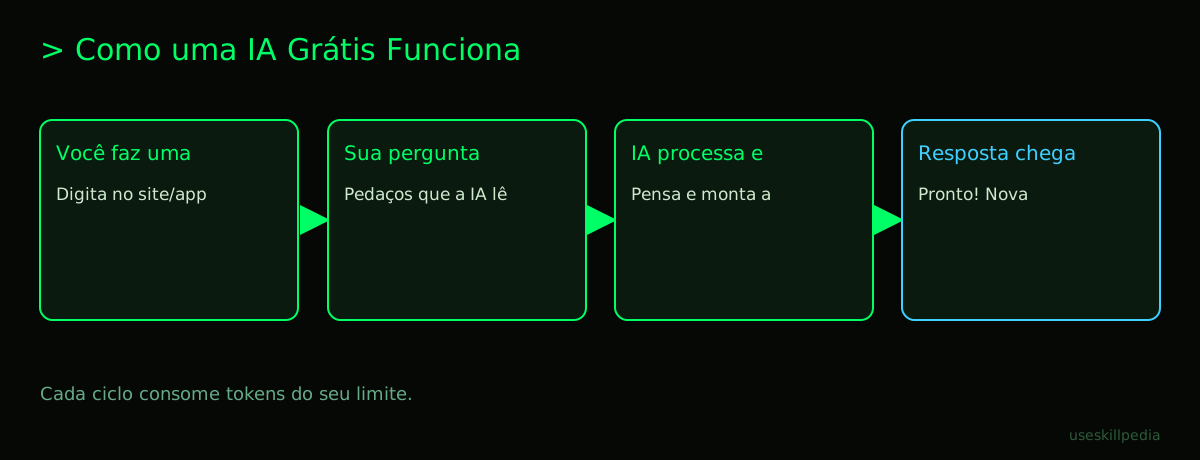
Think of a free AI as a super-smart assistant you can call to chat with over the internet, without paying anything for it. This assistant was trained by reading a gigantic amount of books, websites, and articles.
When you ask a question, it doesn't "search" on Google. Instead, it uses all that knowledge it absorbed to build an answer from scratch, word by word, trying to be as helpful as possible. It's like a very studious friend trying to explain something to you in their own words.
Some of these AIs are completely free, offered by the companies themselves (like Google or Meta) for you to try. Others are simpler, limited versions of a paid service – but they are still very powerful for casual use. It's important to know that "free" usually comes with some limits, like a maximum number of questions per day, so the company's costs don't get too high.
What are the best free AI tools to start with?
Let's talk about concrete options you can access right now. The table below summarizes the main ones. Remember: the best free ai is the one that solves your problem in the easiest way.
| Name | Where to Access | It's Good For... | One Caveat |
|---|---|---|---|
| Claude (Free Plan) | Website claude.ai | Long, detailed conversations, analyzing documents and images you upload. | Has usage limits that refresh every 5 hours. |
| ChatGPT (GPT-6 Luna) | OpenAI app or website | Quick answers for everyday questions, creative ideas. | It's the simplest model in the GPT-6 line, so it may not be the best for complex tasks. |
| Gemini (Google) | Website gemini.google.com | Integration with Google services (like Gmail and Drive, if you allow it) and searches. | The most advanced features may require a paid subscription (Google AI Pro). |
| Meta Muse Wonder | Meta website or app | Creating images from text descriptions and editing photos in a fun way. | Main focus is on image generation and editing, not so much on text. |
| Grok (xAI) | Available on X (formerly Twitter) | Conversations with a more relaxed and opinionated tone, pulling real-time information from X. | The "politically incorrect" style may not appeal to everyone. |
Besides these, there are other open-source models that communities make available, like those from DeepSeek and Mistral (check each one's license). For a more complete overview of available models, you can check out our guide on the Best AI models in 2026: which one to use for each task.
How do you use these AIs? A simple step-by-step guide
Using most free AIs is easier than installing a phone app. Follow these steps:
- Choose an AI: Decide which option from the table above seems most interesting to you. Let's use Claude Free as an example, as it's very complete.
- Go to the website: Open your browser (Chrome, Safari, etc.) and go to claude.ai.
- Create an account: Click on "Sign up". You can usually use an email or continue with a Google or Apple account. Follow the on-screen instructions.
- Start chatting: You'll see a large text box, similar to WhatsApp. That's where you type! Write something like "Hi! Can you help me plan a beach trip for the end of the year?" and press Enter.
- Try uploading a file: Look for the attach button (usually a paperclip or a "+" symbol) next to the text box. You can drag and drop a photo, a PDF, or a Word document. Ask something about that file, like "summarize this PDF for me."
That's it! You're already using an AI. Now just explore. Ask questions, ask for help writing an email, translating text, or explaining a difficult concept.
What are "tokens" and "usage limits"?
These are the two most important technical concepts to understand free plans. Let's simplify:
- Token: Imagine that the AI doesn't read whole words, but "little pieces" of them. A token is like one of those syllables or chunks that the AI can process at once. About 1 million tokens is roughly equivalent to 555 thousand words (a little more than the entire Harry Potter series). Everything you send and everything the AI replies with consumes tokens.
- Usage Limits: Because running these AIs costs money for the companies (electricity, powerful computers), free plans put a "cap" on how much you can use. In Claude Free, for example, you have a token quota that refreshes every 5 hours. Paid plans, like Claude Pro, have larger quotas and also weekly limits.
It's like a cell phone carrier that gives you 5GB of free internet per month. You can use it freely until it runs out, then you need to wait for it to renew. The difference is that with the AI, the renewal is much faster (hours, not a month).
Claude Code: The free AI for programming on your computer
If you're interested in programming, there's an amazing and free tool called Claude Code. It's not a website, but a program you install on your computer that talks directly to the files in your project.
- Terminal: It's a text window on your computer where you type commands for it to execute, instead of clicking icons. It's the text-based "control panel".
- Repository: A folder (usually online, like on GitHub) where all the files for a software project are stored, with a history of all changes. Think of it as a very well-organized filing box for a project.
Claude Code runs in the terminal and can help you write code, explain errors, create files, and even run commands with your permission. The big advantage is that, because it sees the files in your folder, the context of the conversation is much richer. It's included in all of Claude's paid plans, but its basic functionality can be accessed in other ways.
For those who want to dive deeper into programming with AI, we have a dedicated guide: Best AI for programming in 2026. And if you prefer solutions that run entirely on your PC, without depending on the internet, explore the post about the Best open source and local AI model.
Skills and Connectors: How to teach new tasks to your AI
Now let's get to the most powerful part. Modern AIs can learn to use external tools. In Claude, this has two names:
- Skills (in Claude Code): They are like "apps" or "recipes" that you install to teach the AI to do something specific within a programming project.
- Connectors (on Claude.ai): The same idea, but for the web version of Claude. They are ready-made integrations with other services.
The analogy is: the AI is a brand new smartphone in the box. Skills and Connectors are the apps (like WhatsApp, Uber, your Bank app) that you install so the phone can do specific tasks in the real world.
For example, you could add a Google Calendar Connector. Then, instead of just talking about your schedule, you could ask: "Claude, check what I have scheduled for tomorrow in my Google Calendar and summarize it for me." The AI, with your permission, would go there, check your appointments, and give you the summary.
This is possible thanks to a technical standard called MCP (Model Context Protocol), which works like a universal USB-C port for AI apps to connect to external data and tools. If you want to understand this "glue" that holds everything together better, read our explanation on What is MCP (Model Context Protocol): explained in an easy way.
We recommend trying these 3 skills first
In Claude Code, you can start with Skills that make the AI even more useful for common tasks. The three below are excellent for beginners:
- council-multi-model-affaan-m: Teaches the AI to be a "counselor." Instead of giving just one answer, it thinks from several different perspectives before giving you the best solution. Perfect for tough decisions.
- cost-aware-llm-pipeline-affaan-m: This skill makes the AI pay attention to the "cost" (in tokens) of its operations. It tries to optimize responses to be efficient, helping you stay within your free plan limits for longer.
- prompt-optimizer-affaan-m: It helps you write better questions for the AI. Sometimes the answer isn't good because the question was confusing. This skill reviews and improves what you want to ask, so you get better results.
To discover more Skills, you can search for skills in our directory.
Frequently Asked Questions
Do I need to be a programmer to use free AIs? No! The vast majority of free AIs, like Claude.ai, ChatGPT, and Gemini, are made to be used by anyone, directly in the browser, just by typing and chatting.
Are my conversations with the AI private? Generally yes, but it's always worth reading the service's privacy policy. Serious companies like Anthropic (Claude) and OpenAI do not use your conversations to further train the models without your explicit permission. In paid plans, privacy is even more reinforced.
What's the difference between Claude Free and Claude Pro? Besides much larger usage limits, Pro unlocks more models and features (the exact list changes, check at claude.com/pricing) and includes Claude Code. You can check the exact pricing details on the official pricing page.
Are "AI", "Chatbot", and "Language Model" the same thing? Almost, but with nuances. Chatbot is any program that converses (even the simpler ones). Language Model (LLM) is the technical "engine" that generates text. AI is the broader term that encompasses all of this. In everyday use, you can just call it "AI".
Can I trust everything the AI writes? No. AIs can "hallucinate" – that is, invent information that seems convincing but is false. Always verify important facts, dates, quotes, or medical/legal advice from reliable sources. Use the AI as a creative assistant, not as an infallible encyclopedia.
Read Also
- Which Claude model to use: Haiku, Sonnet, or Opus
- Claude Code: what it is, how to download, install, and how much it costs (2026 guide)
- Best AI for writing texts
- AI Agent: what it is, how it works, and how to create yours (without coding)
- search for skills
Sources
- Anthropic: model overview (accessed on 10/16/2026)
- OpenAI models (accessed on 10/16/2026)
- Gemini API pricing (accessed on 10/16/2026)
- Claude plans and pricing (accessed on 10/16/2026)
Full guide on this topic: Best AI Models in 2026: Which to Use for Every Task