What is CLAUDE.md? A Simple Guide for Beginners
Skillpedia team · updated 2026-10-16 · 9 min read
Short answer: A CLAUDE.md file is like a personal instruction manual for your project. You write in it how you want Claude Code to work in your folders. This makes help faster and more accurate because Claude starts out already knowing your rules.
Have you ever asked someone to help you with a project, but they do everything their own way and you have to keep correcting them? It's annoying, right? With Claude Code, an AI tool for programming, this can happen too. You ask it to create a button, but it uses colors that don't match your site or writes the code in a way you don't like.
The solution is a small text file called CLAUDE.md. It's like you sit down with Claude before starting work and say: "Look, in my stuff, we do it like this...". With this file in the right place, Claude Code becomes much "smarter" for what you need. Let's understand how?
Table of Contents
- What is CLAUDE.md, in practice?
- Why do I need this if Claude is already smart?
- Where to put it and how to make your first CLAUDE.md
- What to put inside the file? Ideas to get started
- CLAUDE.md vs Skills: what's the difference?
- Final tips for you to start using it today
- We recommend trying these 3 skills first
- Frequently asked questions
- Read also
What is CLAUDE.md, in practice?
Imagine you have a toolbox (your project folder on the computer). The CLAUDE.md is a well-organized sticky note stuck to the lid of that box.
On this sticky note, you write important things for anyone using the tools:
- "The screwdrivers are on the left side."
- "Always clean the tool before putting it away."
- "For small screws, use wrench number 2."
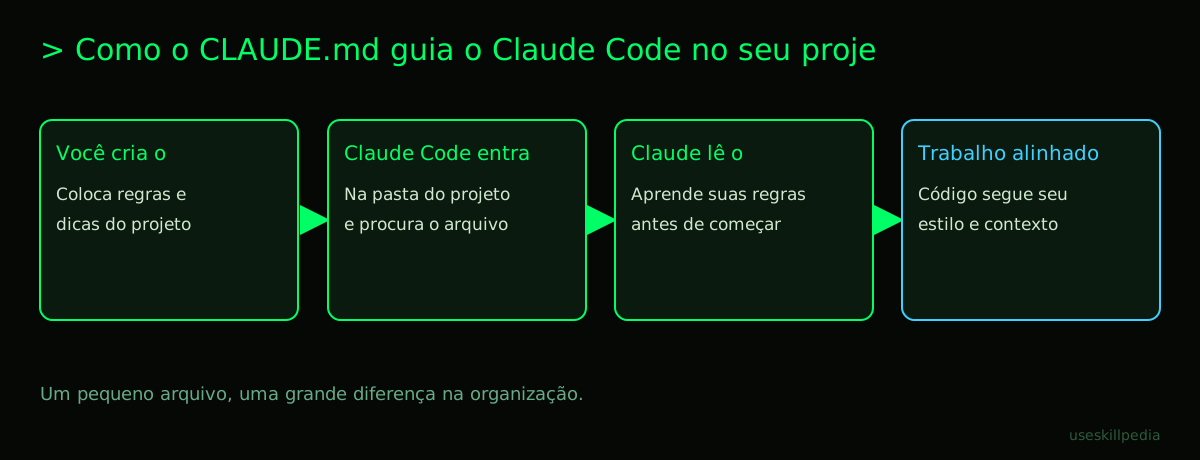
In the digital world, this "sticky note" is a text file named CLAUDE.md. When you open Claude Code inside your project folder, it looks for this file. If it finds it, it reads all your instructions before starting to work. It's like giving it a map of your preferences.
Analogy: If Claude Code were a new intern, the CLAUDE.md would be your company's welcome manual, made by you.
Why do I need this if Claude is already smart?
Claude is very smart, yes, but it's not a mind reader. Without instructions, it acts in a "generic" way, using the best practices it knows from the whole world.
Let's think of a daily example. You order a coffee. Without more information, the barista gives you a standard coffee. But if you say "a coffee with two spoons of sugar and a bit of hot milk, please," you get exactly what you want. The CLAUDE.md is where you put your "two spoons of sugar" for the project.
Here are the clear benefits:
- Consistency: Every new piece of code Claude creates will follow the same formatting rules, file names, and structure.
- Efficiency: You don't need to repeat the same explanation every time you ask for something. "Remember to use single quotes" becomes a written rule.
- Context: You can explain things specific to your project that aren't obvious in the code. For example: "This project is for client X, who prefers blue buttons."
Where to put it and how to make your first CLAUDE.md
Doing this is easier than it seems. You don't need special programs.
- Open your project folder. It's the main folder where all your website, app, or script files are.
- Create a new text file. You can use Notepad (Windows), TextEdit (macOS, in plain text format), or any simple code editor.
- Name the file exactly as
CLAUDE.md. The name needs to be in uppercase letters, with the dot and the.mdextension. The.mdextension means "Markdown," which is a simple way to format text. - Save the file directly in the root folder of your project. Not inside a subfolder. It's at the front door.
- Write your instructions inside the file. You can start with something simple, like "Please use the English language in responses.".
- Done! Next time you open Claude Code in that folder, it will read your file.
What is a "root folder"? It's the main folder, the outermost one of your project. If your project were a house, the root folder would be its address. Inside it are the living room (the src folder), the kitchen (the assets folder), etc.
What to put inside the file? Ideas to get started
Don't know what to write? Start with what bothers you or what you repeat the most. Here are some ideas organized by topic.
General Project Rules:
- Always write code comments in English.
- The name of this project is "Bakery Sweet Bread Site". Use this name in messages.
- For doubts, prioritize simple solutions over complex and new ones.
Code Preferences:
- Use single quotes (') for strings in JavaScript, not double quotes (").
- Indentation (the spaces at the beginning of the line) should be 2 spaces, not 4.
- File names should be in lowercase, separated by hyphens (ex: my-file.css).
Folder Structure (Optional):
A brief explanation of what each folder does:
- /src: Here is the main site code.
- /assets: Here are the images and icons.
- /docs: Here are the manuals and documentation.
Remember: you can edit and improve this file over time. It's alive!
| What you might want | Example line in CLAUDE.md |
|---|---|
| Define the language | - Always respond in English. |
| Specify code type | - This project uses React. Write function components, not class components. |
| Define visual standards | - The site's primary color is #2A5C8B (blue). Use it for important buttons. |
| Explain something confusing | - The 'legacy' folder has old code. Avoid modifying, only use as reference. |
CLAUDE.md vs Skills: what's the difference?
This is a common doubt. Both teach things to Claude, but in different ways.
Think of CLAUDE.md as the rules of your house. They are general instructions for anyone who will work inside: "Take off your shoes at the entrance," "The kitchen light is the switch on the right." It's static, a text file.
A Skill, on the other hand, is like hiring a specialist for a specific task. It's a small package that teaches Claude how to do something very concrete, like connecting to an online spreadsheet or translating texts in a special way. Skills are slightly more complex programs.
In summary:
- CLAUDE.md: For rules and context of your specific project. (Ex: "In my project, do it like this.").
- Skill: To add new abilities to Claude. (Ex: "Learn how to fetch data from Google Sheets.").
You can (and should) use both together! One defines the project environment, the other brings powerful tools to work in it. To learn more about expanding Claude, check out our post on AI Agent: what it is, how it works, and how to create yours (without coding).
Final tips for you to start using it today
- Start simple. Just having a
CLAUDE.mdfile with one or two lines is already a big step. - It's yours. There is no perfect template. Write what is useful for your work.
- Use it in all main projects. Make a habit of creating a
CLAUDE.mdfor each new project. - Update it over time. Found a new pattern you liked? Add it to the file.
- It's not magic. Claude will try to follow, but it can make mistakes. It serves as a guide, not an absolute law.
The most important thing is not to overcomplicate it. This file exists to help you, not to be another difficult task.
We recommend trying these 3 skills first
How about giving superpowers to Claude? Skills are little packages that teach it to do specific tasks. For a beginner, it's like installing a new app on your phone: it gains a new function.
- skill-creator-anthropics: This skill is amazing to start with. It teaches Claude Code itself to create other skills. It's like giving it the tools to build its own tools, following what you need.
- frontend-design-anthropics: Focuses on creating the visual part of websites and apps (colors, buttons, layout). If you want prototypes or improvements to a page's visual, this skill helps Claude think like a designer.
- webapp-testing-anthropics: Teaches Claude to test small web applications. It can simulate clicks and interactions to see if everything works as it should, helping to catch errors before you do.
To find more skills, you can search for skills in the official repository.
Frequently asked questions
Do I need to be a programmer to use CLAUDE.md? No! Anyone who uses Claude Code to organize projects (even if it's to write texts, plan things, or analyze data) can benefit. You just need to know how to write clear instructions.
Can I have more than one CLAUDE.md file? Yes, you can have one in the main project folder (which applies to everything) and others in specific subfolders. Claude will read the one in the main folder first and then the one in the subfolder where you are working, combining the rules.
What if I change my mind about a rule?
It's very simple: just open the CLAUDE.md file in the text editor, delete or modify the line, and save. Next time you use Claude Code in that folder, it will already follow the new rule.
Does Claude obey 100% of what's in the file? It does its best to follow all instructions. But like any assistant, it can occasionally slip up, especially if there are conflicting instructions. The file serves as a strong guide of preferences.
Does it work on the web version of Claude (claude.ai) too?
No. The CLAUDE.md file is a specific feature of Claude Code, the application you install on your computer for programming. On the claude.ai website, the similar functionality is the "Connectors" of MCP. To understand this standard, read What is MCP (Model Context Protocol): explained in an easy way.
Read also
- Claude Code: what it is, how to download, install, and how much it costs (2026 guide) – The complete guide to start from zero.
- Is Claude Code free? Prices and plans – Understand how usage limits work.
- What are tokens in AI (and why they run out so fast) – The "conversation currency" of AIs explained.
- How to edit video with Claude and AI agents
- Claude vs ChatGPT vs Gemini: which one to use
Sources
- Claude Code: installation and requirements (accessed on 10/16/2026)
- Claude Code: overview (accessed on 10/16/2026)
- Claude plans and pricing (accessed on 10/16/2026)
Full guide on this topic: Claude Code: What It Is, How to Download, Install, and Cost (2026 Guide)