Claude vs ChatGPT vs Gemini: Which AI Assistant to Use
Skillpedia team · updated 2026-10-16 · 11 min read
Short answer: If you're just starting out, try the free plan for each one. Claude is great for creativity and safety. ChatGPT is the most popular and versatile. Gemini integrates very well with Google products. The best one is the one you get the hang of the fastest.
Choosing an AI assistant these days can feel like choosing a new phone: so many options, so many technical names, and each one promises to be the best. If you've never programmed before, it gets even more confusing.
But it doesn't have to be this way! Let's simplify everything. Think of these assistants (Claude, ChatGPT, Gemini) as very studious friends you can consult. Each has its own personality, its strong point, and its price.
This guide is for you if you want to understand, once and for all, which one could be your new partner for writing texts, answering questions, helping brainstorm projects, or even creating small programs, all in clear English.
Table of Contents
- What are Claude, ChatGPT, and Gemini, Really?
- How Do I Choose? A Simple Guide for First Use
- How Much Do They Cost? Free and Paid Plans Side-by-Side
- Do They Understand English? And How Do They "Think"?
- Claude Code: When You Want to Create Things from Scratch
- Skills and Connectors: Giving Superpowers to Your Assistant
What are Claude, ChatGPT, and Gemini, Really?
Let's imagine you have three expert friends.
- Claude (from Anthropic) is the careful and creative friend. It was trained to be very helpful, harmless, and honest. Think of it as the friend who reviews your text with care, helps brainstorm ideas without judgment, and avoids giving dangerous advice. It's strong in writing, analysis, and reasoning.
- ChatGPT (from OpenAI) is the most famous and generalist friend. It's the one that popularized AI chatbots. It's like that colleague who knows a little about everything: writes, programs, explains concepts, creates images (in some versions). Because it's the most well-known, it has a huge community creating plugins and tutorials.
- Gemini (from Google) is the integrated friend. Since it's made by Google, it talks naturally with other Google tools, like Gmail, Google Drive, and Calendar. It's like having an assistant that, with your permission, can check your calendar to schedule a meeting or find a file in your Drive.
They all work basically the same way: you type a question or request (this is called a prompt, which is like giving an instruction), and they generate a text response. Their "intelligence" comes from having "read" an astronomical amount of text, books, and websites during training.
Why are there several? Just like there are Android and iPhone, or Netflix and Spotify, different companies have created their versions of this technology. Competition is good for us, users, because it makes products evolve and prices drop.
How Do I Choose? A Simple Guide for First Use
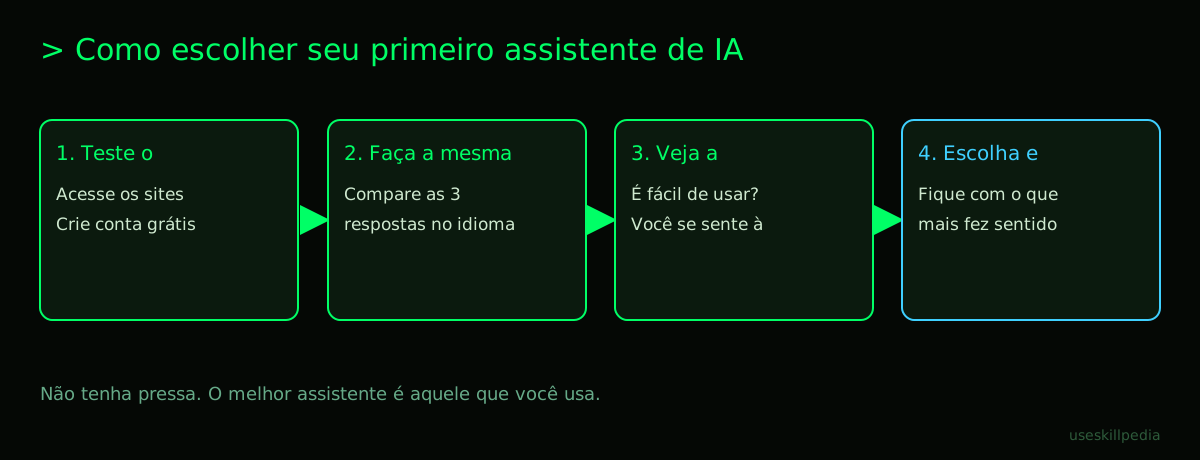
You don't have to marry just one. The best strategy is to test! Here is a step-by-step guide without fear:
- Create a free account for each one. Go to
claude.ai,chatgpt.com, andgemini.google.com. Use your email to sign up. The free plans are limited, but perfect for a first contact. - Ask the SAME questions to all three. Ask something from your daily life, like: "Help me write an email to postpone a meeting" or "Explain how photosynthesis works as if I were 10 years old." Compare the answers.
- Pay attention to what matters most to you:
- Is the interface easy? Do you feel lost or can you navigate?
- Did the response sound natural in English? Were there serious errors or did it sound too robotic?
- Was the response straight to the point or did it ramble?
- Did the assistant understand the context? If you asked a follow-up question, did it remember the previous subject?
The table below summarizes the strengths of each one, according to recent tests:
| Assistant | Strengths (Ranking Oct/2026) | It's a good choice if you... |
|---|---|---|
| Claude | Leads in general reasoning (57.6 on Artificial Analysis) and in code tasks (92.4% on Vibe Code Bench). | Value safety, want creative writing help, or are starting to explore programming. |
| ChatGPT | Leads in math and logical reasoning tasks. It's the most versatile. | Want the most popular assistant, with the most tutorials online, and one that does a bit of everything. |
| Gemini | Leads in "work value" (effectiveness in practical tasks). Native integration with Google. | Already use the Google ecosystem (Gmail, Drive, Calendar) a lot and want an assistant that works within it. |
Remember: these rankings change over time, as companies are always updating their models.
How Much Do They Cost? Free and Paid Plans Side-by-Side
All have a free version, but with limits. To use more and have access to the most powerful models, you pay a monthly subscription, like Netflix or Spotify.
Let's get to the facts (prices in US dollars, as of October 2026):
- Claude: The Pro plan costs $20 per month. If you pay for the year upfront, it's $17/month (total of $200). It gives access to smarter models, like Claude Opus, and a special tool called Claude Code: What It Is, How to Download, Install, and Cost (2026 Guide). There is also the Max plan, which starts at $100/month, for those who need much more usage.
- ChatGPT: It has paid plans (check the prices on the official OpenAI page) that give access to the strongest models, like GPT-6 Astra, and extra features. There is also a free plan that uses slightly older models, but still very capable ones.
- Gemini: The paid plans Google AI Pro and Ultra give access to Gemini 4 Argon in the Gemini app (check the prices on the official Google page).
Crucial tip: Start with the free version. Only consider paying when you feel the limits of the free version are hindering your workflow. The difference between the free and paid model is often about speed and capacity for very complex tasks. For daily use, the free version may be more than enough.
Do They Understand English? And How Do They "Think"?
Yes, they all understand English very well! They were trained on a universal library that included many texts in our language.
Now, how do they "think"? The key to understanding this is the concept of a token. A token is, roughly, a little piece of a word. For the AI, "house" might be 1 token, but "intelligence" might be split into "intel" + "ligence" (2 tokens). They process and generate the response token by token.
Think of tokens as casino chips. Every time you send a message and every time the assistant responds, you spend chips. The free plan gives you a handful of chips per day. The paid plan gives you a larger package. When the chips run out, you need to wait for them to renew (in Claude, renewal happens every 5 hours for some limits).
One million tokens is equivalent to roughly 555 thousand words. That's a ton of text! Everything in the conversation counts toward this limit: your question, the history, files you upload, and the generated response. To learn more about this vital resource, read What Are Tokens in AI and Why Do They Run Out So Fast?.
The context window (which today is about 1 million tokens in these top models) is the short-term memory of the conversation. It's how many "chips" of information (tokens) the model can remember at once while responding. That's why, in very long conversations, it might forget what was said at the beginning.
Claude Code: When You Want to Create Things from Scratch
Here's a big differentiator for Claude if you're curious about creating. Claude Code is not a common chat. It's a tool you install on your computer that works directly in your project folder (the folder where you keep the files for a website, a script, or a document).
Imagine your computer is a workshop. The normal chat (claude.ai) is like calling an expert on the phone and describing your problem. Claude Code is like having that expert inside your workshop, looking at all your tools (files), being able to handle them with your permission, and guiding you step by step.
It's great for:
- Learning programming basics with a patient tutor.
- Creating a simple website or a script to automate a spreadsheet.
- Analyzing data you have in CSV or Excel files.
- Converting documents from one format to another.
It's included in all of Claude's paid plans (Pro, Max, etc.), but not in the free one. If this idea of a "digital workshop" interests you, check out the complete guide at Claude Code: What It Is, How to Download, Install, and Cost (2026 Guide).
Skills and Connectors: Giving Superpowers to Your Assistant
What if you could teach your assistant to do specific tasks for your job? That's what Skills (in Claude Code) and Connectors (on the claude.ai site) do.
- A Skill is like an "instruction booklet" you give to Claude Code. In it, you explain a step-by-step for a task, like "format a report in Word" or "analyze sales from last week." Claude Code reads this booklet and follows the instructions to the letter when you ask. It's a way to customize it for your needs.
- A Connector on the Claude site is similar, but it serves to connect the chat to other applications, like Google Drive or Notion (with your permission), to fetch information from there.
The technology behind this, which is also used by other AIs, is called MCP (Model Context Protocol). Think of MCP as a universal USB-C port for AI applications. Just like you connect a charger, headphones, or an external hard drive to the same port on your laptop, MCP allows you to connect data sources (files, databases) and tools (calculator, web search) to your AI assistant. For an easy explanation, see What is MCP? The Simple Guide to the Model Context Protocol.
This is the basis for creating AI Agents, which are autonomous assistants programmed to do a series of tasks by themselves. Got curious? Read What Are AI Agents? A Beginner's Guide to Creating Your Own.
We Recommend Trying These 3 Skills First
If you are going to use Claude Code (paid plan), starting with ready-made Skills is great. Here are three from the official repository, good for beginners:
- frontend-design-anthropics: Teaches Claude to create the look of a simple website. You describe ("I want a recipe site with a light background"), and it generates the code for colors, buttons, and layout.
- webapp-testing-anthropics: Teaches Claude to test a small web application. It's like asking a friend to click all the buttons on the website you created to see if nothing breaks.
- skill-creator-anthropics: This one is meta: it's a Skill that helps you create your own Skills! It guides you through the process of writing the "instruction booklet" for a new task.
Frequently Asked Questions
Do I need to know how to program to use Claude, ChatGPT, or Gemini? No, absolutely not. They are made to converse in natural language. Programming is just one of the many things they can do.
Are my data and conversations private? Generally yes, but check the privacy policy of each company. In general, conversations may be used to improve the models, but you can often disable this in the settings. For sensitive data, avoid sharing it.
Can I blindly trust the answers they give? No. They can make mistakes or "hallucinate" (invent information that seems convincing but is false). Always use critical thinking and, for important matters, check the information from reliable sources.
Which is best for writing long texts, like articles or reports? Claude has a reputation for being excellent in creative and coherent writing. ChatGPT is also very good. The ideal is to test both with a paragraph on your topic and see which style you identify with more.
Will they replace my job? It's more useful to think of them as tools that will change the way we work, just like the calculator, the computer, and the internet did. Those who know how to use them to increase their productivity and creativity will have an advantage.
Read Also
- How to Edit Video with AI Using Claude Code: A Beginner's Guide
- CLAUDE.md: o arquivo que deixa o Claude Code mais esperto
- Claude Code é grátis? Preços e planos
- Criar slides e apresentações com Claude
- See more tutorials at: buscar skills
Sources
- Claude Code: installation and requirements (accessed on 10/16/2026)
- Claude Code: overview (accessed on 10/16/2026)
- Claude plans and pricing (accessed on 10/16/2026)
Full guide on this topic: Claude Code: What It Is, How to Download, Install, and Cost (2026 Guide)