How to Edit Video with AI Using Claude Code: A Beginner's Guide
Skillpedia team · updated 2026-10-16 · 10 min read
Short answer: You can edit video with ai using Claude Code, a program that runs on your computer. It understands commands in English and uses special skills to cut, join, and improve your videos automatically.
Ever imagined telling your computer "cut out the parts where I pause to think" and it just does it? Or "create an animated intro with my channel's title"? This isn't just movie stuff anymore. With the right AI tools, this is within reach for anyone who's never opened a video editing program.
If the idea of dealing with timelines, transitions, and codecs (video file formats) scares you, take a deep breath. This guide is for you. We'll simplify everything, step by step.
Table of Contents
- What You Need to Get Started
- Claude Code: Your Smart Editing Assistant
- How Skills Work on Your Videos
- From Command to Finished Video: Step by Step
- What Else Can You Do?
- Is It Free? How Much Does It Cost?
- We Recommend Trying These 3 Skills First
- Frequently Asked Questions
What You Need to Get Started
Think of this like cooking a new recipe. You need the right ingredients and tools. Here, the "ingredients" are your videos and ideas. The "tools" are computer programs.
You will need:
- Your Computer: It can be Windows, Mac, or Linux.
- Claude Code: This is the main program that will receive your orders. It's like the head chef who coordinates everything. To install it, you can download a simple installer; you don't need to be an expert. You can find all the details in the guide Claude Code: what it is, how to download, install, and how much it costs (2026 guide).
- A Paid Claude Plan: Claude Code only works with paid plans (Pro, Max, Team, or Enterprise). The free plan (Free) does not have access to it. This is because it uses more processing power.
- Some Skills: These are like specific kitchen gadgets: a peeler, a mixer. Each skill does a different task with video. You add them to Claude Code so it gains new powers.
Claude Code: Your Smart Editing Assistant
Claude Code is a program you install on your computer that talks to the Claude AI. The big difference from just using the website is that here, the AI has "permission" to work with files on your machine and run other programs.
Think of it this way:
- Claude on the website (claude.ai): It's like getting advice from an expert over the phone. They give you instructions, but you have to execute them.
- Claude Code: It's like having that expert sitting next to you, with their hands on your computer's keyboard. You say what you want, and they do it.
This is possible thanks to a protocol called MCP. MCP works like a universal USB-C port. It allows Claude Code to connect to other tools on your PC, like video editing programs or databases, to perform complex tasks. To better understand this "connection," you can read What is MCP (Model Context Protocol): Explained the Easy Way.
How do you "talk" to it? Mainly through the terminal. Don't run away! A terminal is just a black or white window where you type text commands, instead of clicking icons. It's like sending a direct text message to the computer's system. It might seem strange at first, but for the AI, it's the easiest and most precise way to give instructions.
How Skills Work on Your Videos
Skills are little packages of instructions that teach Claude Code how to do something very specific. To edit video with ai, there are specialized skills.
Let's take an example: the skill remotion-video-creation-affaan-m. It teaches Claude to use a tool called Remotion, which creates videos by programming. Instead of you dragging and dropping elements, you describe ("I want a black background, white text sliding in from the left") and the skill translates that into code that Remotion understands.
It's like giving a robot chef a cake recipe. The skill is the recipe (in robot language), and Claude Code is the chef who follows it.
Another powerful skill is manim-video-affaan-m. It's focused on creating high-quality mathematical and explanatory animations, the kind you see on science YouTube channels.
The coolest part is that these skills use AI agents. An agent isn't just a chatbot that replies. It's an autonomous assistant that receives a big goal ("make a 1-minute video") and, on its own, breaks it down into small steps, makes decisions, and uses the tools (the skills) until it completes the task. If you want to dive deeper into the concept, check out AI Agent: what it is, how it works, and how to create yours (without coding).
From Command to Finished Video: Step by Step
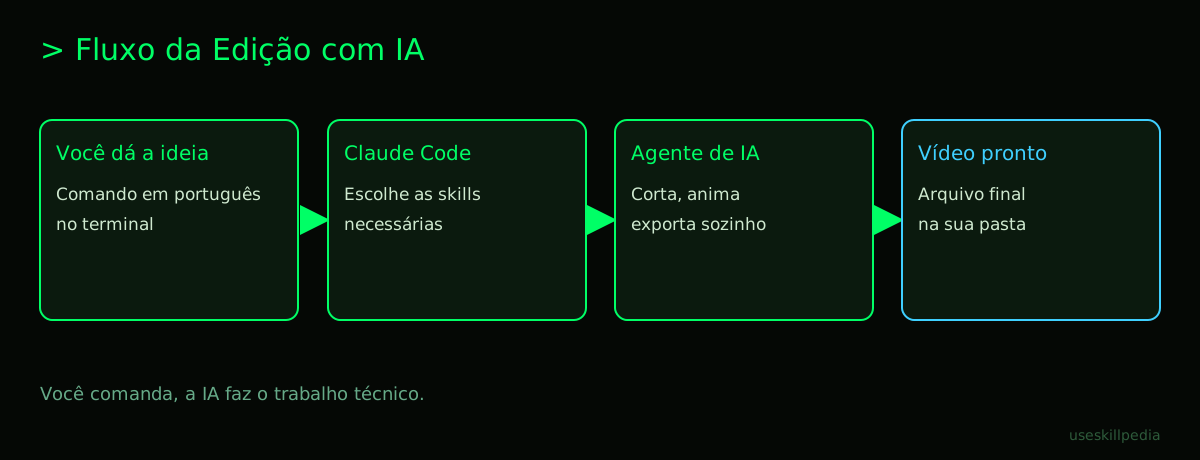
Let's see in practice how a simple edit happens. Imagine you have a long lecture video and you want to keep only the best moments.
- Prepare the environment: Open your computer's terminal and navigate to the folder where your video is. It's like opening the kitchen cabinet where the ingredients are.
- Activate Claude Code: Type the command
claudeand press Enter. Your browser will open for you to log in. After that, the conversation with the AI starts in the terminal itself. - Give the instruction: Write in clear English: "I have a file called
lecture.mp4in this folder. It's 1 hour long. Please identify the segments where the audience laughs or applauds and create a new, 5-minute video with just those moments, with soft background music." - The AI acts: Claude Code, now acting as an agent, will:
- Analyze your request.
- Check if it needs any specific skill to manipulate video (it may suggest installing one).
- Use the skill to "see" the video's audio and find volume peaks (laughter and applause).
- Cut and join those segments automatically.
- Search for or generate a compatible music file.
- Mix audio and video and export the final file.
- Result: After a few minutes, it will inform you: "Done! I created the file
lecture-highlights.mp4in your folder."
You didn't need to know which button was for scene detection, or how to equalize the audio. You just needed to describe the desired result.
What Else Can You Do?
Beyond smart cuts, this combination opens up a world:
- Create videos from scratch: Describe "a square video for Instagram with text overlay, vibrant colors" and use a skill like remotion-video-creation-affaan-m to generate it.
- Generate automatic subtitles: Ask to transcribe the audio and overlay the subtitles with a font and color you choose.
- Create thumbnails: Although more focused on front-end, concepts from skills like frontend-design-anthropics help with understanding layout, which is useful for thinking about thumbnail designs.
- Convert formats: "Transform all the .mov videos in this folder to .mp4, to make them lighter."
- Add watermarks and logos automatically to a series of videos.
The main limitation is not technical, but of tokens. A token is the unit of measurement the AI uses to process text. Everything it "reads" (your command, the skill manuals) and "writes" (the code it generates) consumes tokens. Each plan has a token limit per period. It's like having a limit on the words you can use to give instructions to your magical assistant. To understand this vital resource, read What are tokens in AI (and why they run out so fast).
Is It Free? How Much Does It Cost?
The answer has two parts: the software and the service.
- Claude Code (software): It is free to download and install.
- Use of the AI (service): To use Claude Code, you need a paid Claude subscription. The server is the powerful computer at Anthropic (the company that created Claude) that processes your requests. It's like the engine of a Ferrari: the car (Claude Code) is in your garage, but to work it needs premium fuel (the paid plan).
The table below summarizes the relevant plans (prices as of Oct/2026):
| Plan | Monthly Price | Includes Claude Code? | Good for video editing? |
|---|---|---|---|
| Free | $0 | NO | Not possible. |
| Pro | $20 | YES | Yes, for personal projects and testing. |
| Max | Starting at $100 | YES | Best value for video, as it allows for longer tasks. |
For all the details on pricing and what each plan offers, see the specific post: Is Claude Code Free? Prices and Plans.
It's worth remembering that there are other AIs on the market, like OpenAI's ChatGPT and Google's Gemini, each with their own strengths. If you're curious about how they compare, take a look at Claude vs ChatGPT vs Gemini: which one to use.
We Recommend Trying These 3 Skills First
To avoid getting lost, start with these skills which are very straightforward. You can find more in the official skills repository or by searching for skills on our page.
- remotion-video-creation-affaan-m: The most popular skill for creating animated videos from descriptions. Perfect for intros, outros, and social media content.
- manim-video-affaan-m: If you want to create visual explanations with graphs, formulas, or moving arrows, this is the ideal skill. It generates professional-quality animations.
- frontend-design-anthropics: Although focused on website design, it's excellent training for learning to give clear instructions about layout, colors, and visual composition – skills that transfer completely to creating thumbnails and video elements.
Frequently Asked Questions
Do I need to know how to code? No, not at all. You need to know how to describe what you want in English. The AI is the one that will generate the necessary code. It's like knowing how to order a dish at a restaurant without needing to know how to cook it.
Are my videos sent to the internet? Yes, in part. To process your request, the relevant content (the command you typed, video segments for analysis) is sent to Anthropic's servers. Servers are super-powerful computers located in datacenters. The company has strict privacy policies. For very sensitive tasks, always check the official terms.
Can I edit many videos at once? It depends on your token limit. Complex and long tasks consume many tokens. The Pro plan has a limit that renews every 5 hours and weekly. The Max plan offers much more capacity, ideal for those who want to process several videos in a row.
What is a skills repository? It's an online location, like a library or an app store, where skills are stored and made available. The official repository is Anthropic's GitHub. In Claude Code, you can add skills from there with a simple command.
How do I make Claude Code remember my preferences? This is done through a special file called CLAUDE.md. You can create this file in your project folder to give permanent instructions to Claude, like "always use maximum quality to export videos" or "my videos are for YouTube." Learn more at CLAUDE.md: the file that makes Claude Code smarter.
Read Also
- Create slides and presentations with Claude - Use the same principle to create visual content.
- Claude Code: what it is, how to download, install, and how much it costs (2026 guide) - The complete installation guide.
- AI Agent: what it is, how it works, and how to create yours (without coding) - Understand the power behind automation.
Sources
- Claude Code: installation and requirements (accessed on 16/10/2026)
- Claude Code: overview (accessed on 16/10/2026)
- Claude plans and pricing (accessed on 16/10/2026)
Full guide on this topic: Claude Code: What It Is, How to Download, Install, and Cost (2026 Guide)