Claude Skills Marketplace: Where to Find the Best (and Are They Safe?)
Skillpedia team · updated 2026-10-16 · 9 min read
Short answer: The best skills for Claude are in Anthropic's official repository and online developer directories. They are safe because Claude Code only runs code you approve. It's like downloading an app from your phone's official store.
Have you ever felt your AI assistant could do more? Imagine asking it to organize your spreadsheets automatically or create a beautiful website layout in seconds. This is possible with skills. Skills are extra abilities you add to Claude, like installing new apps on your phone.
But where do you find these tools? And how can you be sure they're safe? If you've never programmed, these terms might sound strange. Don't worry. I'll explain everything in simple words with everyday examples.
Table of Contents
- What are skills and why you need them
- Where to find reliable skills
- How to know if a skill is safe
- Step-by-step: How to install your first skill
- Skills vs Connectors (MCP): What's the difference?
- Skills in practice: What you can actually do
What are skills and why you need them
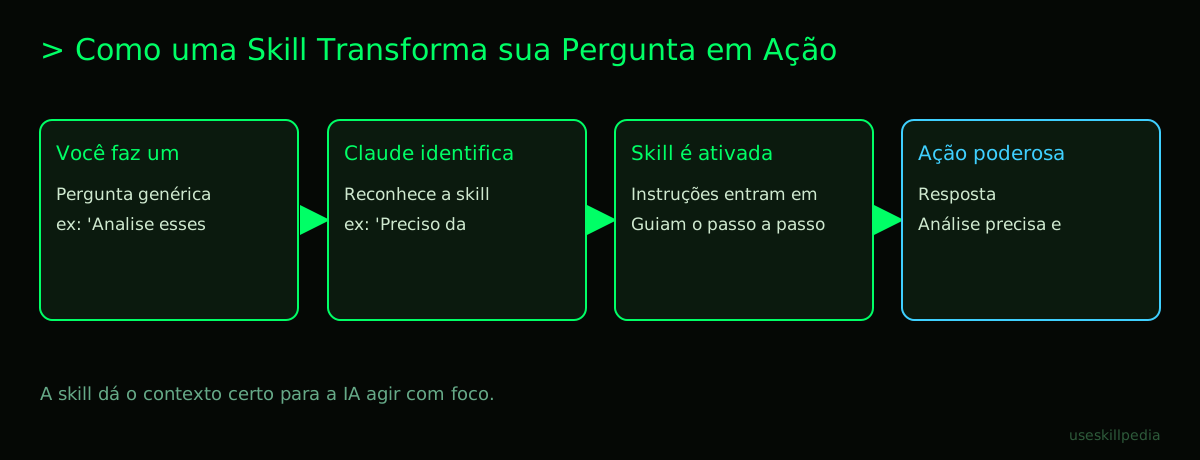
Think of Claude as a very smart personal assistant. It already knows how to chat, write text, and reason. A skill is extra training you give it. It's like hiring a specific course for your assistant.
- Example: Claude knows how to cook (generate text). With an "Italian cooking" skill, it learns specific recipes, ingredient names, and techniques. It doesn't become a chef, but it gets much better at helping you make good pasta.
In practice, a skill is a folder with written instructions and, sometimes, small scripts. A script is a list of commands the computer understands, like a very detailed cake recipe. Claude reads these instructions and learns to do something new.
You need skills when you want Claude to:
- Do repetitive tasks automatically.
- Work with specific programs or file formats.
- Follow a very well-defined step-by-step method.
Without skills, you'd have to explain everything every time. With skills, you just say "use skill X to do Y". It's a powerful shortcut.
Where to find the best claude skills marketplace
A marketplace is an online "market" or store. For skills, the main places are:
- Anthropic's Official Repository: A repository is a centralized place where files are stored and organized, like a public library of projects. Anthropic's (github.com/anthropics/skills) is the safest place to start. All skills there have been reviewed by the team that created Claude.
- Community Online Directories: Programmers worldwide create and share their skills on platforms like GitHub. It's like a giant forum where people share tools they've built. You can find more specialized skills here.
- Inside Claude Code Itself: The Claude Code tool, which you install on your computer, already comes with suggestions and can guide you to useful skills. It's the most integrated way to discover new things.
For a beginner, the recommendation is clear: start with the official repository. The quality is guaranteed and the risk is minimal. As you get comfortable, you can explore other directories.
How to know if a skill is safe
Security is the biggest concern. Installing a skill is like letting a stranger give instructions to your assistant. How do you protect yourself?
The great advantage of Claude Code is that it never runs code by itself. It always asks for your permission. It's like a security guard who stops you at the door and asks: "Can I do this?". You need to say "Yes".
Here's a quick checklist you can do:
| What to Check | What it Means | Why it's Important |
|---|---|---|
| Trusted Source | Where did the skill come from? | Skills from the official repository are safer than those from an unknown website. |
| Clear Documentation | Are the instructions well explained? | A well-intentioned skill wants to be understood. Confusing instructions are a red flag. |
| Recognized Author | Who created it? Is it someone from the community? | Active and known creators tend to make more careful skills. |
| Open Source | Can I see the skill's "script"? | If the code is open source, other programmers have already been able to look at it and identify problems. |
Golden rule: If you don't understand what a skill does or don't trust the source, don't install it. The principle is the same as not clicking on strange links in email.
Step-by-step: How to install your first skill
Let's get practical. To install skills, you use Claude Code. It's a version of Claude you install on your computer to work with projects and code. It's included in all paid Anthropic plans (Pro, Max, Team, Enterprise), but not in the free plan.
Installing Claude Code:
- Open your computer's terminal. The terminal is a black screen where you type text commands to control the computer directly. It's like the system's "admin mode".
- Paste the correct command for your system (macOS, Linux, or Windows). You can find the exact command on the official Claude Code website.
- Follow the instructions on the screen. The program will download and install itself.
Finding and installing a skill:
- Open Claude Code in your project folder.
- Ask it for help! Type something like: "I want a skill to help clean data in spreadsheets. What's available?".
- It will suggest skills. When you choose one, it will explain what it does and ask for your permission to add it to the project.
- You give the OK, and the skill will be ready to use.
Remember: installation is always per project. The skill stays in a folder called .claude/skills/ inside your current project. You can also install skills for all your projects by placing them in your user folder.
Skills vs Connectors (MCP): What's the difference?
This can be confusing at first. Both skills and Connectors (MCP) give extra powers to Claude. But the philosophy is different.
- Skills: They are like knowledge or abilities you teach Claude. They stay in its memory (with limits) and dictate how it thinks and responds for a certain type of task.
- Connectors (MCP): They are like tools or data access you give Claude. A Connector doesn't teach Claude how to think, but gives it a key to use an external program. The MCP (Model Context Protocol) is the standard that allows this connection, working like a universal USB-C adapter for AIs.
Analogy: Let's say you want a new bookshelf.
- With a woodworking skill, you teach Claude the step-by-step to design the bookshelf.
- With a Connector to the hardware store, you give Claude access to buy the wood and screws.
Often, you'll use both together! For a deeper guide on this difference, check out our companion post: Skills vs MCP: Difference and When to Use.
Skills in practice: What you can actually do
Theory is good, but concrete examples help more. With skills, Claude can become an expert in very specific things. The magic happens when you combine Claude's advanced reasoning with a focused skill.
For now, think of things like:
- Analyze sentiment in hundreds of customer reviews at once.
- Automatically format dozens of documents following your company's standard.
- Translate and adapt the tone of a text for a different audience.
- Extract data from PDFs and put it into an organized spreadsheet.
The possibilities grow every day as the community creates new skills. For inspiration, you can always search for available skills.
We recommend trying these 3 skills first
To start without fear, try skills that are useful and come from trusted sources:
- skill-creator-anthropics: This skill teaches Claude itself how to create new skills. It's meta! You describe what you want, and it helps set up the instructions. Perfect for understanding how everything works inside.
- frontend-design-anthropics: Want to create a web page that doesn't look like a generic template? This skill guides Claude to generate beautiful and unique designs for the visual part of websites (the frontend).
- pdf-anthropics: Dealing with that complicated PDF full of tables? This skill helps Claude extract text, numbers, and information from PDF files in a much smarter way.
These three give a good idea of the power of skills: creating, designing, and working with documents. They are an excellent starting point.
Frequently Asked Questions
Do I need to be a programmer to use skills? No. You just need to know how to ask. Claude Code manages the installation. Your part is just to approve and use.
Do skills work on the free Claude (claude.ai)? Skills in the format we explained (for Claude Code) do not. On the claude.ai website, there are Connectors, which are a similar idea, but work differently. For full skills, you need Claude Code on a paid plan.
Does installing many skills make Claude slow? Not exactly slow, but it can consume tokens. Tokens are the "units of information" that Claude processes. Everything in the conversation (including skill instructions) consumes tokens from your context window. Very long skills take up space that could be used for your chat history.
Can I create my own skill? Absolutely! Anyone can. You just need to write clear instructions in a text file. For a complete guide, see How to Create a Skill for Claude (Step-by-Step).
Do skills have access to my files and the internet? By default, no. A skill is just a set of instructions. However, if you use a Connector (MCP) that has access to files or the web, and combine it with a skill, then yes. But you need to configure and approve each access. You are always in control.
Read Also
Want to learn more? These articles will help you:
- Understand the basics: Claude Skill: What It Is, How to Install, and the Best to Test (2026 Guide)
- Get to know the tool: Claude Code: What It Is, How to Download, Install, and How Much It Costs (2026 Guide)
- Learn about the technology behind it: What is MCP (Model Context Protocol): Explained in an Easy Way
- See specific tips: Best Skills for Claude Code in 2026
- Explore a broader concept: AI Agent: What It Is, How It Works, and How to Create Yours (Without Programming)
Sources
- Anthropic's official skills repository (accessed 10/16/2026)
- Open Agent Skills standard (accessed 10/16/2026)
- Claude Code: skills (accessed 10/16/2026)
- Claude plans and pricing (accessed 10/16/2026)
Full guide on this topic: Claude Skills: What They Are, How to Install, and Best Ones to Try