Find the Best AI Models Right Now: A Simple Guide for Beginners
Skillpedia team · updated 2026-10-16 · 11 min read
Short answer: There isn't a single "best ai models right now" for everything. The choice depends on what you need: writing, coding, fast reasoning, or saving money. It's like choosing a car: a hatchback is great for the city, but a pickup truck is better for hauling loads.
Have you ever felt lost with so many AI names? ChatGPT, Claude, Gemini, Grok... It sounds like a science fiction alphabet! If you're a total beginner, relax. This article is for you. We'll explain each of these "models" in a super simple way, as if we were having a coffee.
Think of an "AI model" as the brain of a virtual assistant. Each company (like OpenAI, the creator of ChatGPT) trains a different brain, with specific talents. Some are great for conversation, others for creating programming code, and others are fast and cheap. Our goal is to help you understand which "brain" can be your best friend for each task.
Let's go?
Table of Contents
- What is an "AI Model"? A No-Jargon Explanation
- How to Choose the Best AI Model for You?
- The Big Names: Who's Who in the AI World
- Understanding "Tokens" and Costs (Without the Headache)
- Claude Code: AI That Works Directly on Your Computer
- We Recommend Trying These 3 Skills First
- Frequently Asked Questions
- Read More
What is an "AI Model"? A No-Jargon Explanation
Imagine you're teaching a very, very smart child to read all the books on the internet. You show it billions of pages, texts, codes, and images. After a lot of training, this child learns patterns: how words connect, how to solve a math problem, how to write a cake recipe.
That trained "brain" is the AI model. It doesn't copy the books, but learns how language works, so it can later create new things on its own.
Now, some technical words you'll hear, with everyday analogies:
- Terminal: It's a text window on your computer where you type commands for it to obey. Instead of clicking icons, you "talk" directly to the machine by typing. It's like the control panel of a spaceship in old movies.
- API: It's a digital waiter. When an application (like your food delivery app) needs information from somewhere else (like the map to locate you), it "asks" the API, which fetches and brings back the answer. It's the middleman that makes different services talk to each other.
- Token: It's a tiny piece of a word. For the AI, words are broken into smaller parts (tokens) to make processing easier. It can be a whole word ("house") or syllables/symbols ("hou", "se", "."). It's like counting text by "Lego blocks" instead of by letters.
- Server: It's a very powerful computer that stays on 24/7, storing information and handling requests. When you use an app on your phone, you're talking to a server somewhere in the world. It's the "kitchen" of the restaurant that prepares your order.
- Repository: It's a special folder on the internet (usually on the GitHub website) where programmers keep the source code of a program. It's like a public library of cake recipes, where anyone can view, copy, and suggest improvements.
How to Choose the Best AI Model for You?
Choosing a model isn't about which is the "strongest," but which is the "most suitable." Ask yourself:
What is my main task?
- Writing texts, emails, summaries? Prioritize models good at language and creativity.
- Programming or understanding code? Look for the champions in programming benchmarks.
- Complex reasoning, data analysis? You'll need the most "intelligent" models (and usually more expensive ones).
- Quick conversations, answering simple questions? A fast and cheap model is the best choice.
What is my budget?
- Many have free plans with limits. Paid plans unlock more powerful models and greater usage.
Do I need speed?
- For a response in seconds, "lightweight" models are ideal. For complex tasks that might take a minute, the "heavyweight" models are worth it.
For a more detailed analysis of which model to use in each specific scenario, check out our guide Best AI Models in 2026: Which One to Use for Each Task.
The Big Names: Who's Who in the AI World
Let's meet the most popular "families" of models. The table below summarizes the main ones. Remember: rankings change, but this gives you a good map.
| Family (Company) | Main Models (Examples) | Strong in... | Price (Example) |
|---|---|---|---|
| Claude (Anthropic) | Opus, Sonnet, Haiku, Fable | Safety, reasoning, programming | Varies (from cheap to premium) |
| GPT (OpenAI) | Astra, Sol, Luna | Versatility, large ecosystem | Varies (from cheap to premium) |
| Gemini (Google) | Gemini Argon | Integration with Search, "work value" | Check the official page |
| Other Notables | Grok (xAI), Mistral, DeepSeek | Specific niches, code, cost | Usually affordable |
The Claude Family: Anthropic is famous for models focused on safety and reasoning. It's like the car brand that prioritizes airbags and driver assistance.
- Claude Opus: The top model, the "heavyweight." It's the most intelligent for complex reasoning tasks. Ideal for deep analysis.
- Claude Sonnet: The perfect balance. Very intelligent, but faster and cheaper than Opus. It's currently the champion in programming tasks.
- Claude Haiku: The fast and economical one. Perfect for quick chats, summaries, and everyday tasks where speed matters.
- Claude Fable: Expert in "long agents." Made for very long and complex work sessions, where the AI needs to stay focused for hours.
Want to know more about how to choose between Haiku, Sonnet, and Opus? We have an article just about that: Which Claude Model to Use: Haiku, Sonnet, or Opus.
The GPT Family (OpenAI): OpenAI popularized chatbots with ChatGPT. Its models are extremely versatile and have a huge number of tools and integrations.
- GPT-6 Astra: The most capable model in the line, for cutting-edge tasks.
- GPT-6.1 Sol: Offers performance close to Astra for a fraction of the price, being an excellent cost-benefit ratio.
- GPT-6 Luna: The accessible and fast model, available even in free plans.
Gemini (Google): Google's model stands out for its deep integration with Search and other company services. A recent independent report highlighted it as a leader in "work value" delivered.
Other Competitors:
- Meta Muse Wonder: Meta's (Facebook) AI model.
- Grok (xAI): Created by Elon Musk's company, known for a more informal tone and access to data from the X platform.
- Mistral and DeepSeek: These are very respected "open source" models, especially in the programming community. We'll talk more about open source in another article.
For those who want to focus on programming, we have a specific recommendation: Best AI for Programming in 2026.
Understanding "Tokens" and Costs (Without the Headache)
This is the part that confuses people the most. Let's simplify.
Tokens = Unit of Measurement. The AI doesn't count words, it counts tokens. Think of them as "text blocks."
- 1 million tokens is approximately 555 thousand words. That's a very large book!
- Everything you send to the AI (your question + the conversation history + attached files) consumes tokens from the context window. It's the AI's short-term memory.
- The response the AI generates also consumes tokens.
How Do They Charge? Usually, they charge for:
- Input Tokens: Everything you sent to the model.
- Output Tokens: Everything the model generated as a response.
Practical Example (fictional prices for illustration):
- Cheap Model: $0.10 to INPUT 1 million tokens + $0.50 to OUTPUT 1 million tokens.
- Premium Model: $10 to INPUT 1 million tokens + $50 to OUTPUT 1 million tokens.
The more expensive models are better at complex tasks. For a normal conversation, the cheap model is more than enough. Always check the updated prices on the service's official page.
Claude Code: AI That Works Directly on Your Computer
Now for something really cool: what if the AI could access the files on YOUR computer to help you? That's what Claude Code does.
It's a program you install on your PC or Mac. After installation, you open the Terminal (that command window we talked about) inside your project folder (your documents, photos, code) and call Claude. It "sees" your files and can act on them: analyze, summarize, modify, and even create new files.
How to install? It's simple. You copy a specific command for your operating system (Windows, Mac, or Linux) and paste it into the Terminal. The command downloads and installs automatically. For example, for many systems, the command is similar to: curl -fsSL https://claude.ai/install.sh | bash.
Why is it powerful? Because it combines Claude's intelligence with the full context of your local project. You can ask: "Claude, read all the PDF documents in this folder and make me a summary." It will do that.
For a complete installation and usage guide, visit Claude Code: What It Is, How to Download, Install, and How Much It Costs (2026 Guide).
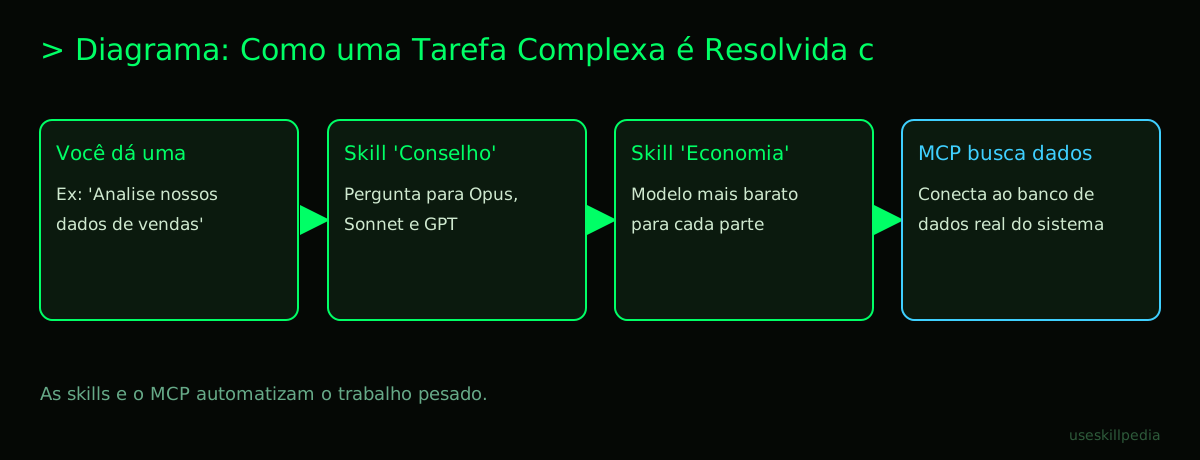
The Role of MCP (Model Context Protocol): MCP is what allows Claude Code to access things outside your files, like your Google Calendar or a database. The official analogy is perfect: it's a USB-C port for AI applications.
With MCP, you can "connect" Claude to other tools. Want to understand this better? Read What is MCP (Model Context Protocol): Explained the Easy Way.
We Recommend Trying These 3 Skills First
In the Claude ecosystem, there are Skills. Think of them as cell phone apps or plugins for your AI model. They give Claude specific superpowers. They are easy to use and don't require programming.
council-multi-model-affaan-m: This skill is an expert committee. Instead of asking a single model, it takes your question, sends it to several different models (Claude, GPT, etc.), compares the answers, and gives you the best result. It's like getting a second, third, and fourth opinion automatically.
cost-aware-llm-pipeline-affaan-m: This skill is your AI financial advisor. It automatically manages which model to use for each part of your task, always trying to use the cheapest model that can do a good job. It saves your credit without you having to think about it.
prompt-optimizer-affaan-m: This skill is your question trainer. You give an instruction to the AI (e.g., "write an ad for my product"), and it rewrites that instruction in much clearer and more effective ways, so the AI understands exactly what you want and generates a better result.
Want to explore more skills? Access our directory to search for skills.
Frequently Asked Questions
Do I need to know how to program to use these AIs? No! Interfaces like ChatGPT, Claude.ai, and the Gemini app are made for beginners. You just need to type your questions in normal English. Tools like Claude Code and Skills are a step forward, but they also have accessible guides.
What's the difference between ChatGPT and Claude? They are "brains" trained by different companies, with distinct philosophies. ChatGPT (OpenAI) was the pioneer and is very versatile. Claude (Anthropic) is famous for being more cautious, having very strong reasoning, and great performance in programming. The best way is to test both and see which one you adapt to better.
Are the free plans worth it? Yes, absolutely! They are a great entry point for you to test the basics, understand how it works, and see if AI helps you in your daily life. When you feel limitations (like the number of questions or access to more powerful models), then you can evaluate a paid plan.
What is an "AI Agent"? It's a step beyond a chatbot. While a chatbot answers one question at a time, an AI Agent receives a larger objective (e.g., "plan my vacation") and, on its own, breaks it down into steps: researching destinations, comparing prices, creating an itinerary. It "thinks" on its own to execute complex tasks. Learn more at AI Agent: What It Is, How It Works, and How to Create Yours (Without Programming).
Can I use a powerful AI without paying, by installing it on my PC? Yes, this category is called open source and local models. These are models you can download and run on your own computer, without relying on the internet or paying per use. They can be very capable, but usually require a more powerful computer and a bit more technical knowledge to set up. Explore this option in the article Best Open Source and Local AI Model.
Read More
- Best AI Models in 2026: Which One to Use for Each Task
- Best AI for Writing Texts
- Best AI for Programming in 2026
- Best Open Source and Local AI Model
- Which Claude Model to Use: Haiku, Sonnet, or Opus
Sources
- Anthropic: Model Overview (accessed 10/16/2026)
- OpenAI Models (accessed 10/16/2026)
- Gemini API Pricing (accessed 10/16/2026)
- Claude Plans and Pricing (accessed 10/16/2026)
Full guide on this topic: Best AI Models in 2026: Which to Use for Every Task