Build a Website with Claude Code: A Beginner's Guide
Skillpedia team · updated 2026-10-16 · 10 min read
Short answer: You can build a website from scratch using Claude Code, an AI tool that understands what you want and writes the code for you. It's a practical way to build a website with claude code without needing to know how to program. Just chat with the AI, like you're explaining it to a friend.
Have you ever imagined having an idea for a website and being able to turn it into reality in just a few hours, even if you've never written a line of code? This is now possible thanks to tools like Claude Code. In this guide, we'll walk you through this journey step-by-step, explaining each concept in a simple way, with everyday analogies. Think of it as a relaxed conversation where there are no silly questions.
Table of Contents
- What You Need Before You Start
- The Step-by-Step: From Idea to Live Site
- Understanding the "Tools" of Construction
- Diagram: How the AI "Thinks" Your Site
- Claude Code vs. Other Tools: Which to Choose?
- We Recommend Trying These 3 Skills First
- Frequently Asked Questions
- Read More
What You Need Before You Start
Before you "sit down to chat" with Claude Code, it's good to have a few things organized. Don't worry, none of this is complicated.
- A paid Claude.ai account: Claude Code is included in the paid plans (Pro, Max, Team, Enterprise), but not in the free one. You can check the plan details in the official guide about Claude Code.
- The Claude Code program installed on your computer: It's a program you download and install, like WhatsApp or a game. It will be your main interface for working. The installation instructions are also in the guide about Claude Code.
- A clear idea for your site: Think about: what is the goal? (e.g., sell products, show your portfolio, write a blog). Who will visit it? What pages will it have? (e.g., Home, About, Contact). It can be useful to sketch a draft on paper.
- Content ready: Texts you want to use, your own photos or stock photos (without copyright), a logo if you have one. Having this on hand speeds up the process a lot.
Technical term explained: Terminal – It's a text window on your computer where you give commands by typing, instead of clicking icons. Think of it like the "command line" of an old adventure game, where you typed "open door." We use the terminal to start and control Claude Code.
The Step-by-Step: From Idea to Live Site
Let's break the creation down into simple, numbered steps. Follow along as you feel comfortable.
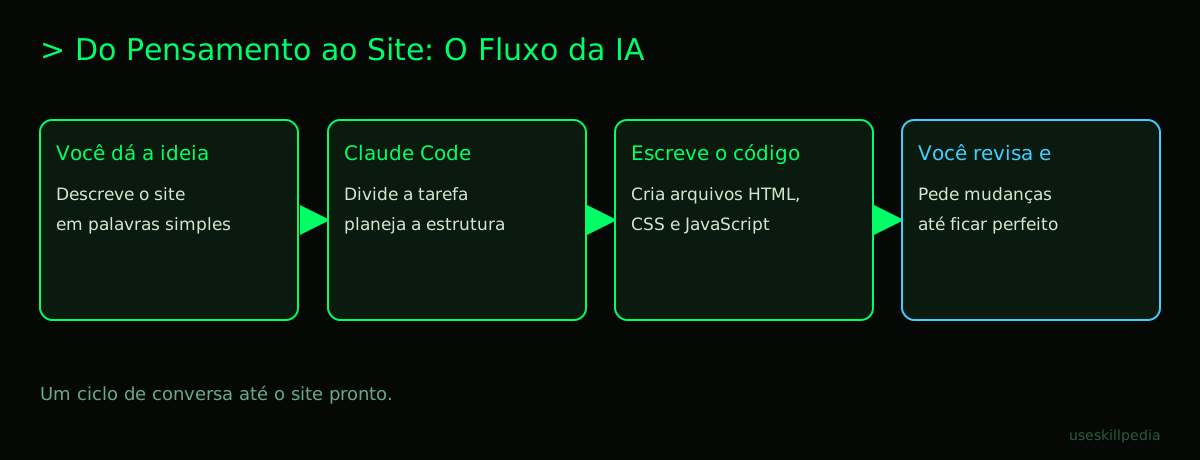
Install and open Claude Code. Follow the instructions on the official site for your system (Windows, Mac, or Linux). After installing, open the Terminal (see explanation above), go to the folder where you want to save the website project (for example, "MySite"), and type the command
claude. This will open an interface in your browser for you to log in.Start a new conversation and explain your idea. In the Claude Code interface, start a new conversation. Be descriptive! Say something like: "I want to create a personal website to showcase my work as a photographer. I need a homepage with a large background photo, a 'Portfolio' page with a gallery, and a 'Contact' page with a form."
The AI will generate the files and code. Claude Code will understand your request and start creating the website files. A website is made of several text files (code) and folders, like HTML (the structure), CSS (the beauty and colors), and JavaScript (the interactivity). It will write all of this for you.
Review and ask for adjustments. You can ask to see how the site is looking. Claude Code has a way to show a "preview" of the site. If something didn't turn out the way you imagined, just explain: "Can you change the title color to blue?" or "The photo gallery is too close together, can you add more space?". The AI will rewrite the code.
Put the site on the internet. When you're satisfied, it's time to put the site live for everyone to see. For this, you need a server. A server is a powerful computer, connected to the internet 24/7, that "serves" (delivers) your site's pages when someone visits. Companies called "web hosts" rent space on these servers.
- Claude Code can help you prepare the files to upload.
- You sign up for a hosting service (there are many, with affordable prices).
- Follow the host's instructions to send your files (usually using an FTP program or through their control panel).
Technical term explained: Server – It's like the warehouse and delivery team of an online store. When a customer (visitor) orders a product (opens your page), the warehouse (server) locates the product (the site files) and the team (the server software) sends it to the customer's house (their browser).
Understanding the "Tools" of Construction
To build a website with AI effectively, it's useful to know what tools are in the box. Let's talk about two powerful concepts: MCP and Skills.
What is MCP (Model Context Protocol)? Think of MCP as a universal adapter (like USB-C) for the AI. It allows Claude Code to connect to other tools you already use. For example, it can pull data directly from a Google Sheets spreadsheet to create a product list on the site, or fetch the latest photos you saved in Dropbox. This makes the process much more integrated. You can learn more about this in the post What is MCP (Model Context Protocol): Explained in an Easy Way.
What are Skills? Skills are like apps or special "modes" that you install in Claude Code for it to do specific tasks better. There's a Skill for creating beautiful web designs, another for testing if the site works correctly, etc. They give the AI superpowers for specific areas. You can explore some of them in the skill search.
Technical term explained: API – It's a waiter that bridges two kitchens. Imagine your site (kitchen A) needs to show the weather forecast. Instead of you making the forecast, you "call" the waiter (API) of a weather service (kitchen B). The waiter gets the information there and brings it ready for you to use on your site.
Claude Code vs. Other Tools: Which to Choose?
There are other AIs that also help with coding. The table below compares them in a simple way, thinking about the goal of creating a site without experience.
| Tool | Best for someone who... | Main Advantage | How to Access |
|---|---|---|---|
| Claude Code | Wants an integrated experience, focused on complete projects and using Skills. | Deep understanding of context, great for following long and complex instructions. | Dedicated app (Claude Code) or on the Claude.ai site (Connectors). |
| ChatGPT (with GPT-6) | Prefers a more conversational tool and is already familiar with the interface. | Widely popular, with a vast community and examples available. | OpenAI website or apps that integrate the API. |
| Gemini 4 Argon | Is within the Google ecosystem and values integration with tools like Google Workspace. | Native integration with Google services, like Search and Drive. | Google AI Studio, Gemini app, or AI mode in Search. |
| Editor Extensions (e.g., Cursor) | Already tinkers with code a bit and wants help directly in the program where they edit files. | Works inside known code editors, like VS Code, suggesting lines in real-time. | Code editor's extension store (e.g., VS Code Marketplace). |
For a more detailed comparison, you can read the post Claude vs ChatGPT vs Gemini: Which to Use. The choice often depends on what already works best for your workflow.
We Recommend Trying These 3 Skills First
Skills might seem like expert stuff, but some are perfect for getting started. Install these to boost your creation:
- frontend-design-anthropics: It's like having a website designer by your side. This Skill helps Claude Code create more beautiful, harmonious, and professional-looking layouts from the start. It suggests color combinations, fonts, and spacing.
- webapp-testing-anthropics: This is your personal tester. After your site is almost ready, this Skill helps simulate how it behaves in different situations: if the buttons work, if the page loads fast on a phone, etc. It finds problems before your visitors do.
- skill-creator-anthropics: This one is for when you get the hang of it! It teaches you how to create your own Skills. If you always repeat a certain type of adjustment in Claude Code, you can create a custom Skill to do it automatically. Understand more about agents in the post AI Agent: What It Is, How It Works, and How to Create Yours (Without Programming).
Frequently Asked Questions
Do I need to know English to use Claude Code? It's useful, but not mandatory. Claude Code understands and responds very well in Portuguese. However, the technical documentation and many community resources (like Skills) may initially be in English.
Can I create an online store (e-commerce) with Claude Code? Yes, you can create the visual structure and basic functionalities. However, for complex parts like secure payment processing and inventory management, you will likely need to integrate your site with a dedicated e-commerce platform (like a payment gateway's API), which may require a more advanced step-by-step or help from someone who understands.
How long does it take to create a simple website? It depends on the complexity. A single-page site (landing page) with text and a few images can be ready in less than an hour of chatting with the AI. A site with 4 or 5 pages and more interactivity might take an afternoon or a day.
Can I change the site after it's already live? Absolutely! This is a big advantage. Just open the project in Claude Code again, ask for the changes (e.g., "update the contact phone number," "add a new photo to the portfolio"), generate the new files, and upload them again to the hosting server, replacing the old ones.
What are "tokens" and why do they run out? Tokens are the units of "text blocks" that the AI processes. Think of them as syllables or short words. Everything you write, everything the AI reads (your files), and everything it replies with consumes tokens. They "run out" because the plans have a usage limit per period (a 5-hour window), to ensure the service works well for everyone. For a complete explanation, see What Are Tokens in AI (And Why They Run Out So Fast).
Read More
- Claude Code: What It Is, How to Download, Install, and How Much It Costs (2026 Guide) - Everything you need to know to get started.
- CLAUDE.md: The File That Makes Claude Code Smarter - Learn how to create a custom instruction manual for your projects.
- How to Edit Video with Claude and AI Agents - See other creative tasks you can do with AI.
- Is Claude Code Free? Prices and Plans - Details about the costs involved.
Sources
- Claude Code: Installation and Requirements (accessed on 10/16/2026)
- Claude Code: Overview (accessed on 10/16/2026)
- Claude Plans and Pricing (accessed on 10/16/2026)
Full guide on this topic: Claude Code: What It Is, How to Download, Install, and Cost (2026 Guide)