Your Friendly Guide to Brand Design with Claude
Skillpedia team · updated 2026-10-16 · 11 min read
Short answer: This guide teaches you how to use the claude design skill to create and maintain your project's visual identity. Claude becomes your design partner, helping you choose colors and create logos. It's like having a trusted designer working alongside you.
Creating a project's visual identity can feel like a huge task. Think about it: choosing colors, fonts, making a logo, defining how everything fits together... If you've never done it before, it's easy to get lost.
But what if you could have expert help? Someone who understands design and can guide you step-by-step, explaining each concept in a simple way? That's exactly what Claude is for, especially when it uses specific skills.
In this article, we'll show you how to use Claude to master your brand design, without needing to be an expert. We'll talk in a friendly way, as if we were having coffee and I was explaining it to you.
Table of Contents
- What Can Claude Do for Your Brand Design?
- How to Start: Your First Design Brief with AI
- Claude Design Skill: Your Specialized Assistant
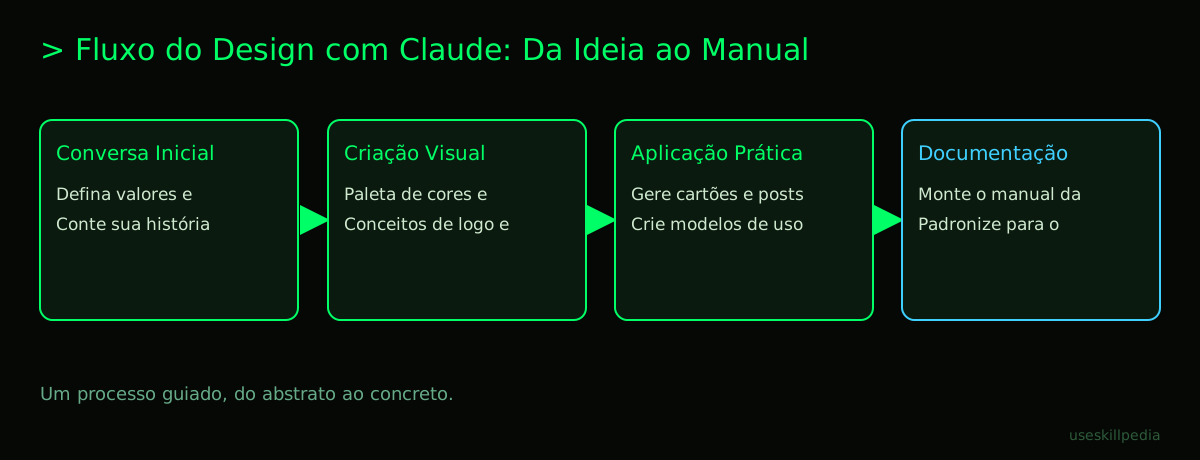
- From Concept to Final File: The Workflow
- Common Beginner Mistakes (and How Claude Avoids Them)
- Try These 3 Skills First
- Frequently Asked Questions
- Read More
What Can Claude Do for Your Brand Design?
Think of Claude as a very talented and patient friend. A friend who can draw, has great taste in colors, and loves organizing things. When it comes to brand design, it can help you in several ways.
First, it's excellent for brainstorming. Need a name for your project? Describe the idea and ask for suggestions. It will bring several options, explaining the "why" behind each one.
Then comes the visual part. Claude can:
- Create color palettes: It suggests combinations that work well together and explains the feeling each color conveys (calm, energy, trust...).
- Suggest fonts: It indicates font types that match your idea and teaches you to use a maximum of two different fonts to avoid clutter.
- Develop logo concepts: You describe with words ("I want something modern, with a leaf symbol") and it generates detailed descriptions and even text sketches that you can give to a designer or try to create in simple tools.
- Write visual identity guides: It organizes all the rules (HEX colors, logo sizes, how to use elements) into a clear document that anyone on your team can follow.
How to Start: Your First Design Brief with AI
A "brief" is just a fancy way of saying "a document with all the important information." It's what you give a designer to start the work. With Claude, the process is similar, but more conversational.
Follow these steps:
- Open Claude. You can use the claude.ai website in your browser or Claude Code: What It Is, How to Download, Install, and Cost (2026 Guide), which is a program you install on your computer for more serious projects.
- Tell your story. Instead of technical commands, just have a conversation. Say something like: "Hi Claude! I'm creating a small home bakery business. The name is 'Grandma's Sweetness'. I want a visual identity that conveys love, tradition, and quality. Can you help me?"
- Answer its questions. Claude will probably ask you some questions to understand better. Things like: "What colors do you like or dislike?", "Do you have any symbol in mind (like a mixer, a chef's hat)?", or "Where will this brand appear (on social media, on cake packaging)?" Be honest in your answers!
- Review the initial suggestions. It will start giving you ideas. It might be a palette with brown, brick red, and cream ("warm" and "cozy" colors), a suggestion for a "serif" font (those little feet on the letters, which give a classic feel), and concepts for a logo that mixes a mixer shape with a heart.
The key here is dialogue. You keep refining until you get something that truly represents you.
Claude Design Skill: Your Specialized Assistant
A skill is like a specific instruction manual you give to Claude. It's a set of rules and knowledge about a subject that makes Claude smarter on that topic. Think of it as giving Claude a book on brand design before you start talking.
When you use a design skill, like the claude design skill, Claude's behavior changes. It's no longer a general assistant. It becomes a specialized design consultant. It will use more correct terms, follow more structured processes, and avoid suggestions that are visually poor.
For example, without the skill, it might suggest using 5 different fonts on a poster. With the skill active, it knows this is bad practice and will suggest a maximum of two, explaining the importance of visual hierarchy.
To use a skill in Claude Code, you usually place it in a special folder in your project. On the claude.ai website, they are called Connectors and can be activated with one click. It's a powerful way to ensure you're getting quality guidance.
| Situation | Without Skill (General Claude) | With Design Skill |
|---|---|---|
| Request: "Colors for a tech brand" | Might suggest blue and black, but without much context. | Suggests a palette with justification (e.g., blue for trust, green for innovation) and provides HEX codes. |
| Request: "Make a layout for a poster" | Generates a simple text description. | Follows a design structure (title, subtitle, body, call to action) and comments on alignment and spacing. |
| Common Mistake: Using too many colors | Might not comment. | Warns that many colors create visual clutter and suggests limiting the main palette to 3-4 colors. |
From Concept to Final File: The Workflow
Let's get our hands dirty? Here is a general step-by-step of how a conversation with Claude (especially with a design skill) can flow, from the idea to having the files ready to use.
- Define the foundation. Start by talking about your brand's values (e.g., seriousness, fun, innovation), the audience (who you sell to), and the competition (what others do). Claude helps organize these thoughts.
- Name and slogan. With a clear foundation, ask for help brainstorming names and impactful phrases that summarize your proposal.
- Crucial visual elements. Here comes the magic:
- Colors: Ask for a color palette. Claude will give you HEX codes (a 6-letter/number code that identifies an exact color, like a social security number for colors).
- Typography: Ask for font suggestions. It will indicate one font for titles and another for long texts, and tell you where you can download them (usually free fonts from Google Fonts).
- Logo: Describe your concept. Claude can generate a detailed description for a human designer, or create a basic SVG in code (a type of image file that is like a drawing recipe, which can be enlarged without getting pixelated).
- Create the materials. With the identity defined, ask it to generate examples: a business card template, a post for Instagram, an email header. Claude can give you the HTML/CSS code or precise instructions to assemble it in Canva, PowerPoint, or another program you use.
- Document everything. Finally, ask it to write a brand guide. A simple PDF document listing the colors with their HEX codes, how to use the logo, which fonts and sizes to use. This ensures your brand is used the same way everywhere.
Common Beginner Mistakes (and How Claude Avoids Them)
Everyone makes mistakes when starting out. The beauty of working with an AI like Claude is that it can warn you about these slips before you make them. Here are some classics:
- Using too many fonts. This makes everything confusing. Claude, with a skill, will always recommend 1 or 2 fonts maximum.
- Colors that don't match. Sometimes we choose colors that clash with each other or are bad for people with color blindness, for example. Claude can suggest harmonious palettes and test the contrast between colors.
- Logo is too complicated. A logo full of details looks bad when printed small on a business card, for example. Claude will encourage simple, memorable concepts that also work in black and white.
- Forgetting the purpose. Focusing only on what is "pretty" and forgetting what it communicates. Claude always comes back to ask: "Does this match the brand values you told me about?"
- Not having a guide. Creating everything and not documenting it. A month from now, you forget the exact shade of blue you used. Claude encourages you to create the brand guide from the start, avoiding this headache.
Remember: Claude is an amazing tool, but the owner of the vision is you. Use its suggestions as a starting point for your creative decisions.
Try These 3 Skills First
Before you start creating, it's good to know skills that are like "foundations" for others. These three are excellent for starting to understand the power of Claude's skills:
- brand-guidelines-anthropics: This skill teaches Claude to think and create like the professional designers at Anthropic (the creator of Claude). It's great for learning the best practices for building a solid, well-documented visual identity. It's a fantastic way to understand claude brand guidelines.
- brand-voice-affaan-m: Design isn't just visual! Your brand's "voice" is how it talks to people. This skill helps Claude define the tone of communication (formal, casual, friendly) that should be used in all texts, matching the visual part.
- frontend-design-anthropics: If you want to put your brand on the internet (on a website, for example), this skill is essential. It focuses on design for the web, helping Claude create layouts, choose elements, and write code that is beautiful and easy to use in a browser.
To find more skills like these, you can always search for skills in the official repository.
Frequently Asked Questions
Do I need to pay to use Claude for design? Not necessarily. Claude's Free plan (US$ 0) allows you to use basic conversation skills and some Connectors. To use Claude Code (the more powerful version for projects) and have higher usage limits, you need a paid plan (Pro, starting at US$ 20/month).
Does Claude create the logo image by itself? Not directly. Claude is a language model, it "thinks" in text. It is excellent for creating detailed text concepts, simple SVG codes, or precise instructions for you to create the image in other free tools (like Canva, Inkscape) or hire a designer.
What are "tokens" and why should I care? Tokens are little pieces of words and characters that the AI can understand. Everything you send and receive from Claude consumes tokens. It's like the "fuel" of the conversation. A very long text can use many tokens. To understand better, check out What Are Tokens in AI and Why Do They Run Out So Fast?.
Can I use designs created by Claude commercially? Yes, generally yes. According to Anthropic's terms, you own the results generated by Claude. But it's always good to check the official terms of service on the date of your use to be absolutely sure.
What's the difference between Claude, ChatGPT, and Gemini for design? Each has its strength. Claude Opus 5.5 is very good at following complex instructions and is a leader in some general capability rankings. ChatGPT (like GPT-6.1 Sol) can be cheaper in some cases. Gemini 4 Argon is strong in "work value." For a detailed comparison, see Claude vs ChatGPT vs Gemini: qual usar. In the end, the best choice may be the one you adapt to best.
Read More
Want to learn more about the world of Claude and AI? These articles will help you:
- How to Edit Video with AI Using Claude Code: A Beginner's Guide - Take your creativity to videos.
- CLAUDE.md: o arquivo que deixa o Claude Code mais esperto - Learn to customize Claude even more for your projects.
- What is MCP? The Simple Guide to the Model Context Protocol - Understand the "universal connector" that lets Claude access other programs.
- What Are AI Agents? A Beginner's Guide to Creating Your Own - Take the next step and create an autonomous assistant.
- Claude Code é grátis? Preços e planos - Clear up all your questions about costs.
Sources
- Claude Code: instalação e requisitos (consulted on 16/10/2026)
- Claude Code: visão geral (consulted on 16/10/2026)
- Planos e preços do Claude (consulted on 16/10/2026)
Full guide on this topic: Claude Code: What It Is, How to Download, Install, and Cost (2026 Guide)